自定义页面请求响应
Web组件支持在应用拦截到页面请求后自定义响应请求能力。开发者通过onInterceptRequest()接口来实现自定义资源请求响应。自定义请求能力可以用于开发者自定义Web页面响应、自定义文件资源响应等场景。
Web网页上发起资源加载请求,应用层收到资源请求信息。应用层构造本地资源响应信息发送给Web内核。Web内核解析应用层响应信息,根据此响应信息进行页面资源加载。
在下面的示例中,Web组件通过拦截页面请求“https://www.example.com/test.html”,在应用侧代码构建响应资源,实现自定义页面响应场景。
-
前端页面index1.html代码。
<!DOCTYPE html><html><head><meta charset="utf-8"></head><body><!-- 页面资源请求 --><a href="https://www.example.com/test.html">intercept test!</a></body></html> -
应用侧代码。
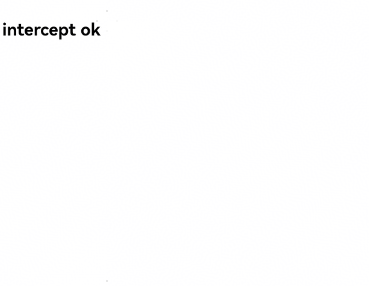
import { webview } from '@kit.ArkWeb';@Entry@Componentstruct WebComponent {controller: webview.WebviewController = new webview.WebviewController();responseResource: WebResourceResponse = new WebResourceResponse();// 开发者自定义响应数据@State webData: string = '<!DOCTYPE html>\n' +'<html>\n' +'<head>\n' +'<title>intercept test</title>\n' +'</head>\n' +'<body>\n' +'<h1>intercept ok</h1>\n' +'</body>\n' +'</html>'build() {Column() {Web({ src: $rawfile('index1.html'), controller: this.controller }).onInterceptRequest((event) => {if (event) {console.info('url:' + event.request.getRequestUrl());// 拦截页面请求if (event.request.getRequestUrl() !== 'https://www.example.com/test.html') {return null;}}// 构造响应数据this.responseResource.setResponseData(this.webData);this.responseResource.setResponseEncoding('utf-8');this.responseResource.setResponseMimeType('text/html');this.responseResource.setResponseCode(200);this.responseResource.setReasonMessage('OK');return this.responseResource;})}}} -
被拦截后的页面
为自定义的JavaScript请求响应生成CodeCache:自定义请求响应的资源类型如果是JavaScript脚本,可以在响应头中添加“ResponseDataID”字段,Web内核读取到该字段后会为该JS资源生成CodeCache,加速JS执行,并且ResponseData如果有更新时必须更新该字段。不添加“ResponseDataID”字段的情况下默认不生成CodeCache。
在下面的示例中,Web组件通过拦截页面请求“https://www.example.com/test.js”,应用侧代码构建响应资源,在响应头中添加“ResponseDataID”字段,开启生成CodeCache的功能。
-
前端页面index2.html代码。
<!DOCTYPE html><html><head><meta charset="utf-8"></head><body><div id="div-1">this is a test div</div><div id="div-2">this is a test div</div><div id="div-3">this is a test div</div><div id="div-4">this is a test div</div><div id="div-5">this is a test div</div><div id="div-6">this is a test div</div><div id="div-7">this is a test div</div><div id="div-8">this is a test div</div><div id="div-9">this is a test div</div><div id="div-10">this is a test div</div><div id="div-11">this is a test div</div><script src="https://www.example.com/test.js"></script></body></html> -
应用侧代码。
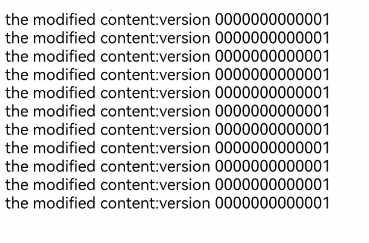
import { webview } from '@kit.ArkWeb';@Entry@Componentstruct WebComponent {controller: webview.WebviewController = new webview.WebviewController();responseResource: WebResourceResponse = new WebResourceResponse();// 开发者自定义响应数据(响应数据长度需大于等于1024才会生成codecache)@State jsData: string = 'let text_msg = "the modified content:version 0000000000001";\n' +'let element1 = window.document.getElementById("div-1");\n' +'let element2 = window.document.getElementById("div-2");\n' +'let element3 = window.document.getElementById("div-3");\n' +'let element4 = window.document.getElementById("div-4");\n' +'let element5 = window.document.getElementById("div-5");\n' +'let element6 = window.document.getElementById("div-6");\n' +'let element7 = window.document.getElementById("div-7");\n' +'let element8 = window.document.getElementById("div-8");\n' +'let element9 = window.document.getElementById("div-9");\n' +'let element10 = window.document.getElementById("div-10");\n' +'let element11 = window.document.getElementById("div-11");\n' +'element1.innerHTML = text_msg;\n' +'element2.innerHTML = text_msg;\n' +'element3.innerHTML = text_msg;\n' +'element4.innerHTML = text_msg;\n' +'element5.innerHTML = text_msg;\n' +'element6.innerHTML = text_msg;\n' +'element7.innerHTML = text_msg;\n' +'element8.innerHTML = text_msg;\n' +'element9.innerHTML = text_msg;\n' +'element10.innerHTML = text_msg;\n' +'element11.innerHTML = text_msg;\n';build() {Column() {Web({ src: $rawfile('index2.html'), controller: this.controller }).onInterceptRequest((event) => {// 拦截页面请求if (event?.request.getRequestUrl() == 'https://www.example.com/test.js') {// 构造响应数据this.responseResource.setResponseHeader([{// 格式:不超过13位纯数字。js识别码,Js有更新时必须更新该字段headerKey: 'ResponseDataID',headerValue: '0000000000001'}]);this.responseResource.setResponseData(this.jsData);this.responseResource.setResponseEncoding('utf-8');this.responseResource.setResponseMimeType('application/javascript');this.responseResource.setResponseCode(200);this.responseResource.setReasonMessage('OK');return this.responseResource;}return null;})}}} -
被拦截后的页面