使用Web组件加载页面
页面加载是Web组件的基本功能。根据页面加载数据来源可以分为三种常用场景,包括加载网络页面、加载本地页面、加载HTML格式的富文本数据。
页面加载过程中,若涉及网络资源获取,请在module.json5中配置网络访问权限,添加方法请参考在配置文件中声明权限。
"requestPermissions":[
    {
      "name" : "ohos.permission.INTERNET"
    }
  ]
加载网络页面
开发者可以在Web组件创建时,指定默认加载的网络页面。在默认页面加载完成后,如果需要变更此Web组件显示的网络页面,可以通过调用loadUrl()接口加载指定的网页。Web组件的第一个参数变量src不能通过状态变量(例如:@State)动态更改地址,如需更改,请通过loadUrl()重新加载。
在下面的示例中,在Web组件加载完“www.example.com”页面后,开发者可通过loadUrl接口将此Web组件显示页面变更为“www.example1.com”。
import { webview } from '@kit.ArkWeb';
import { BusinessError } from '@kit.BasicServicesKit';

@Entry
@Component
struct WebComponent {
  controller: webview.WebviewController = new webview.WebviewController();

  build() {
    Column() {
      Button('loadUrl')
        .onClick(() => {
          try {
            // 点击按钮时,通过loadUrl,跳转到www.example1.com
            this.controller.loadUrl('www.example1.com');
          } catch (error) {
            console.error(`ErrorCode: ${(error as BusinessError).code},  Message: ${(error as BusinessError).message}`);
          }
        })
      // 组件创建时,加载www.example.com
      Web({ src: 'www.example.com', controller: this.controller });
    }
  }
}
加载本地页面
为了在启动、跳转、弱网等场景下减少用户等待感知,同时为动态内容加载争取时间,可以加载本地页面优化用户体验。
在下面的示例中展示加载本地页面文件的方法:
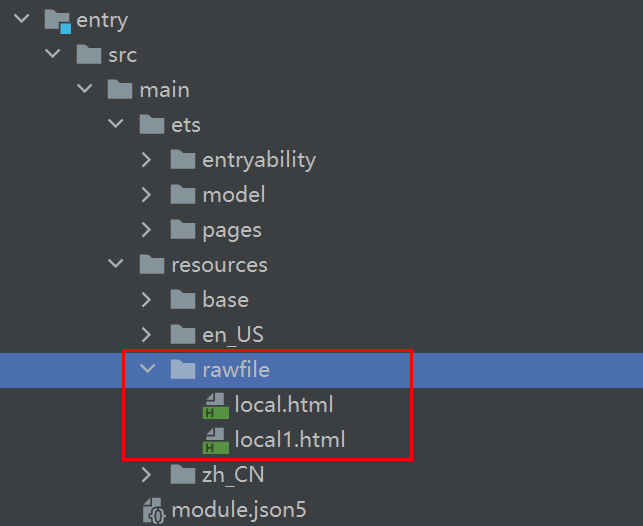
将本地页面文件放在应用的rawfile目录下,开发者可以在Web组件创建的时候指定默认加载的本地页面,并且加载完成后可通过调用loadUrl()接口变更当前Web组件的页面。
加载本地html文件时引用本地css样式文件可以通过以下方法实现。
<link rel="stylesheet" href="resource://rawfile/xxx.css">
<link rel="stylesheet" href="file:///data/storage/el2/base/haps/entry/cache/xxx.css">// 加载沙箱路径下的本地css文件。
-
将资源文件放置在应用的resources/rawfile目录下。
图1 资源文件路径
-
应用侧代码。
import { webview } from '@kit.ArkWeb';import { BusinessError } from '@kit.BasicServicesKit';@Entry@Componentstruct WebComponent {controller: webview.WebviewController = new webview.WebviewController();build() {Column() {Button('loadUrl').onClick(() => {try {// 点击按钮时,通过loadUrl,跳转到local1.htmlthis.controller.loadUrl($rawfile('local1.html'));} catch (error) {console.error(`ErrorCode: ${(error as BusinessError).code}, Message: ${(error as BusinessError).message}`);}})// 组件创建时,通过$rawfile加载本地文件local.htmlWeb({ src: $rawfile('local.html'), controller: this.controller });}}} -
local.html页面代码。
<!-- local.html --><!DOCTYPE html><html><body><p>Hello World</p></body></html> -
local1.html页面代码。
<!-- local1.html --><!DOCTYPE html><html><body><p>This is local1 page</p></body></html>
加载沙箱路径下的本地页面文件。
-
通过构造的单例对象GlobalContext获取沙箱路径。需要开启应用中文件系统的访问fileAccess权限。
export class GlobalContext {private constructor() {}private static instance: GlobalContext;private _objects = new Map<string, Object>();public static getContext(): GlobalContext {if (!GlobalContext.instance) {GlobalContext.instance = new GlobalContext();}return GlobalContext.instance;}getObject(value: string): Object | undefined {return this._objects.get(value);}setObject(key: string, objectClass: Object): void {this._objects.set(key, objectClass);}}import { webview } from '@kit.ArkWeb';import { GlobalContext } from './GlobalContext';let url = 'file://' + GlobalContext.getContext().getObject('filesDir') + '/index.html';@Entry@Componentstruct WebComponent {controller: webview.WebviewController = new webview.WebviewController();build() {Column() {// ···// 加载沙箱路径文件。Web({ src: url, controller: this.controller }).fileAccess(true);}}} -
修改EntryAbility.ets文件。
以filesDir为例,获取沙箱路径。若想获取其他路径,请参考应用文件路径。
// xxx.etsimport { AbilityConstant, UIAbility, Want } from '@kit.AbilityKit';import { webview } from '@kit.ArkWeb';import { GlobalContext } from '../GlobalContext';export default class EntryAbility extends UIAbility {onCreate(want: Want, launchParam: AbilityConstant.LaunchParam) {// 通过在GlobalContext对象上绑定filesDir,可以实现UIAbility组件与UI之间的数据同步。GlobalContext.getContext().setObject("filesDir", this.context.filesDir);console.info("Sandbox path is " + GlobalContext.getContext().getObject("filesDir"));}}加载的html文件。
<!-- index.html --><!DOCTYPE html><html><body><p>Hello World</p></body></html>
加载HTML格式的文本数据
Web组件可以通过loadData()接口实现加载HTML格式的文本数据。当开发者不需要加载整个页面,只需要显示一些页面片段时,可通过此功能来快速加载页面,当加载大量html文件时,需设置第四个参数baseUrl为"data"。
import { webview } from '@kit.ArkWeb';
import { BusinessError } from '@kit.BasicServicesKit';
@Entry
@Component
struct WebComponent {
controller: webview.WebviewController = new webview.WebviewController();
build() {
Column() {
Button('loadData')
.onClick(() => {
try {
// 点击按钮时,通过loadData,加载HTML格式的文本数据
this.controller.loadData(
'<html><body bgcolor=\'white\'>Source:<pre>source</pre></body></html>',
'text/html',
'UTF-8'
);
} catch (error) {
console.error(`ErrorCode: ${(error as BusinessError).code}, Message: ${(error as BusinessError).message}`);
}
})
// 组件创建时,加载www.example.com
Web({ src: 'www.example.com', controller: this.controller })
}
}
}
Web组件可以通过data url方式直接加载HTML字符串。
import { webview } from '@kit.ArkWeb';
import { BusinessError } from '@kit.BasicServicesKit';
@Entry
@Component
struct WebComponent {
controller: webview.WebviewController = new webview.WebviewController();
htmlStr: string = 'data:text/html, <html><body bgcolor=\'white\'>Source:<pre>source</pre></body></html>';
build() {
Column() {
// 组件创建时,加载htmlStr
Web({ src: this.htmlStr, controller: this.controller });
}
}
}
resource协议加载本地资源
resource协议允许访问应用资源目录中的文件。
import { webview } from '@kit.ArkWeb';
@Entry
@Component
struct ResourceWebComponent {
controller: webview.WebviewController = new webview.WebviewController();
build() {
Column() {
Button('LoadResource')
.onClick(() => {
try {
// 通过resource加载resources/rawfile目录下的index1.html文件。
this.controller.loadUrl('resource://rawfile/index1.html');
} catch (error) {
console.error(`ErrorCode: ${error.code}, Message: ${error.message}`);
}
})
// 组件创建时直接使用resource协议加载资源。
Web({ src: 'resource://rawfile/index.html', controller: this.controller });
}
}
}
在“src\main\resources\rawfile”文件夹下创建index.html:
<!-- index.html -->
<!DOCTYPE html>
<html>
    <body>
        <p>Hello World</p>
    </body>
</html>
在“src\main\resources\rawfile”文件夹下创建index1.html:
<!-- index1.html -->
<!DOCTYPE html>
<html>
  <body>
    <p>Hello World Again</p>
  </body>
</html>