自定义组件
使用兼容JS的类Web开发范式的方舟开发框架支持自定义组件,用户可根据业务需求将已有的组件进行扩展,增加自定义的私有属性和事件,封装成新的组件,方便在工程中多次调用,提高页面布局代码的可读性。具体的封装方法示例如下:
-
构建自定义组件
<!-- comp.hml --><div class="item"><text class="title-style">{{title}}</text><text class="text-style" onclick="childClicked" focusable="true">点击这里查看隐藏文本</text><text class="text-style" if="{{showObj}}">hello world</text></div>/* comp.css */.item {width: 700px;flex-direction: column;height: 300px;align-items: center;margin-top: 100px;}.text-style {width: 100%;text-align: center;font-weight: 500;font-family: Courier;font-size: 36px;}.title-style {font-weight: 500;font-family: Courier;font-size: 50px;color: #483d8b;}// comp.jsexport default {props: {title: {default: 'title',},showObject: {},},data() {return {showObj: this.showObject,};},childClicked () {this.$emit('eventType1', {text: '收到子组件参数'});this.showObj = !this.showObj;},} -
引入自定义组件
<!-- xxx.hml --><element name='comp' src='../../common/component/comp.hml'></element><div class="container"><text>父组件:{{text}}</text><comp title="自定义组件" show-object="{{isShow}}" @event-type1="textClicked"></comp></div>/* xxx.css */.container {background-color: #f8f8ff;flex: 1;flex-direction: column;align-content: center;}// xxx.jsexport default {data: {text: '开始',isShow: false,},textClicked (e) {this.text = e.detail.text;},}
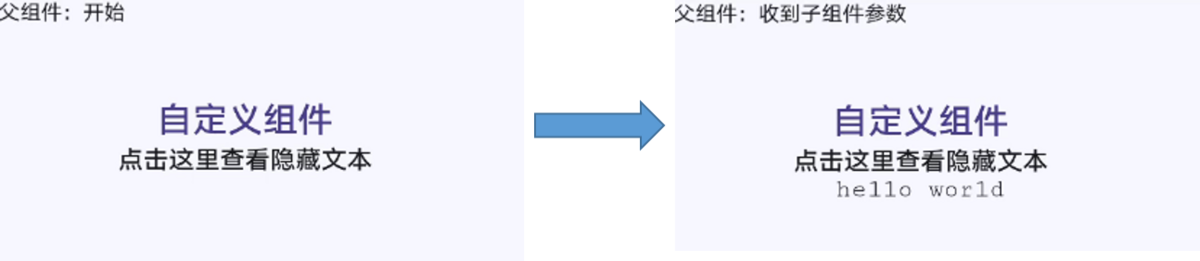
本示例中父组件通过添加自定义属性向子组件传递了名称为title的参数,子组件在props中接收。同时子组件也通过事件绑定向上传递了参数text,接收时通过e.detail获取。要绑定子组件事件,父组件事件命名必须遵循事件绑定规则,详见自定义组件的基本用法。自定义组件效果如下图所示:
图1 自定义组件的效果