生命周期
应用生命周期
在app.js中可以定义如下应用生命周期函数:
| 属性 | 类型 | 描述 | 触发时机 |
|---|---|---|---|
| onCreate | () => void | 应用创建 | 当应用创建时调用。 |
| onShow6+ | () => void | 应用处于前台 | 当应用处于前台时触发。 |
| onHide6+ | () => void | 应用处于后台 | 当应用处于后台时触发。 |
| onDestroy | () => void | 应用销毁 | 当应用退出时触发。 |
页面生命周期
在页面JS文件中可以定义如下页面生命周期函数:
| 属性 | 类型 | 描述 | 触发时机 |
|---|---|---|---|
| onInit | () => void | 页面初始化 | 页面数据初始化完成时触发,只触发一次。 |
| onReady | () => void | 页面创建完成 | 页面创建完成时触发,只触发一次。 |
| onShow | () => void | 页面显示 | 页面显示时触发。 |
| onHide | () => void | 页面消失 | 页面消失时触发。 |
| onDestroy | () => void | 页面销毁 | 页面销毁时触发。 |
| onBackPress | () => boolean | 返回按钮动作 | 当用户点击返回按钮时触发。 - 返回true表示页面自己处理返回逻辑。 - 返回false表示使用默认的返回逻辑。 - 不返回值会作为false处理。 |
| onActive()5+ | () => void | 页面激活 | 页面激活时触发。 |
| onInactive()5+ | () => void | 页面暂停 | 页面暂停时触发。 |
| onNewRequest()5+ | () => void | FA重新请求 | FA已经启动时收到新的请求后触发。 |
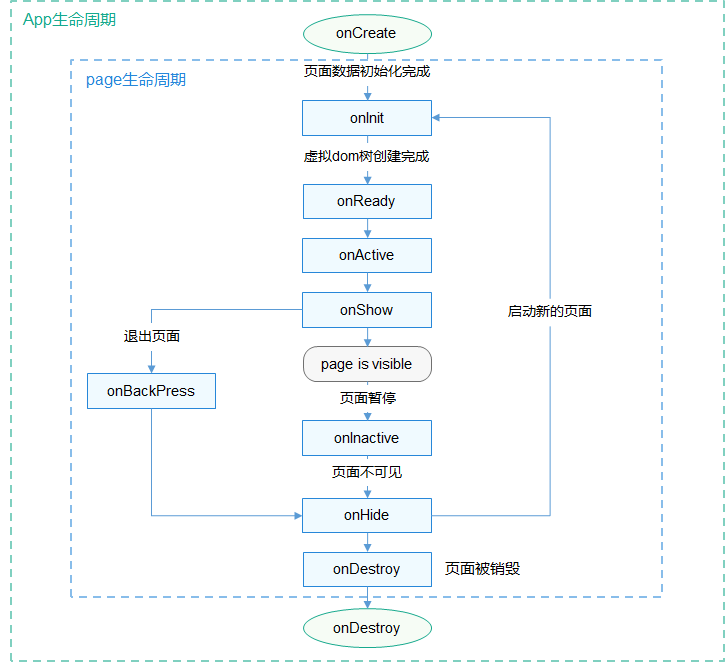
生命周期函数的一般调用顺序如下所示:
图1 生命周期函数调用顺序图示
示例代码
通过以下示例,详细说明生命周期函数的调用顺序。首先创建两个页面,分别为pageA和pageB,并在config.json中配置页面路由信息:
{
    // ...
    "pages": [
        "pages/pageA/pageA",
        "pages/pageB/pageB"
    ],
    // ...
}
pageA实现代码如下:
<!-- pageA.hml -->
<div class="container">
  <text class="title">This is PageA</text>
  <input type="button" value="Go to the PageB" onclick="launch"></input>
</div>
/* pageA.css */
.container {
  flex-direction: column;
  align-items: center;
  width: 100%;
  height: 100%;
}
.title {
  font-size: 38px;
  text-align: center;
  width: 100%;
  height: 40%;
}
// pageA.js
import router from '@ohos.router';
export default {
  launch() {
    router.push ({
      url: 'pages/pageB/pageB'
    });
  },
  onInit() {
    console.info('PageA onInit');
  },
  onReady() {
    console.info('PageA onReady');
  },
  onShow() {
    console.info('PageA onShow');
  },
  onHide() {
    console.info('PageA onHide');
  },
  onDestroy() {
    console.info('PageA onDestroy');
  },
  onBackPress() {
    console.info('PageA onBackPress');
  },
  onActive() {
    console.info('PageA onActive');
  },
  onInactive() {
    console.info('PageA onInactive');
  },
  onNewRequest() {
    console.info('PageA onNewRequest');
  }
}
pageB实现代码如下:
<!-- pageB.hml -->
<div class="container">
  <text class="title">This is PageB</text>
</div>
/* pageB.css */
.container {
  flex-direction: column;
  align-items: center;
  width: 100%;
  height: 100%;
}
.title {
  font-size: 38px;
  text-align: center;
  width: 100%;
  height: 40%;
}
// pageB.js
export default {
  onInit() {
    console.info('PageB onInit');
  },
  onReady() {
    console.info('PageB onReady');
  },
  onShow() {
    console.info('PageB onShow');
  },
  onHide() {
    console.info('PageB onHide');
  },
  onDestroy() {
    console.info('PageB onDestroy');
  },
  onBackPress() {
    console.info('PageB onBackPress');
  },
  onActive() {
    console.info('PageB onActive');
  },
  onInactive() {
    console.info('PageB onInactive');
  },
  onNewRequest() {
    console.info('PageB onNewRequest');
  }
}
运行程序,通过日志观察生命周期函数的调用顺序。其中pageA的生命周期函数的调用顺序为:
- 打开应用进入页面A:onInit() -> onReady() -> onActive() -> onShow()
- 在页面A打开页面B:onHide()
- 从页面B返回页面A:onShow()
- 退出页面A:onBackPress() -> onInactive() -> onHide()
- 页面A隐藏到后台运行:onInactive() -> onHide()
- 页面A从后台运行恢复到前台:onNewRequest() -> onShow() -> onActive()
pageB的生命周期函数的调用顺序为:
- 在页面A打开页面B:onInit() -> onReady() -> onShow()
- 从页面B返回页面A:onBackPress() -> onHide() -> onDestroy()
- 页面B隐藏到后台运行:onInactive() -> onHide()
- 页面B从后台运行恢复到前台:onNewRequest() -> onShow() -> onActive()