构建自定义组件
ArkUI开发框架在NDK接口提供了自定义UI组件的能力,这些能力包括自定义测算,自定义布局和自定义绘制。开发者通过注册相关自定义回调事件接入ArkUI开发框架的布局渲染流程,这些事件需要使用registerNodeCustomEvent来进行声明,并通过addNodeCustomEventReceiver函数添加组件自定义事件的监听器,在该监听器的回调函数中处理相关自定义测算,自定义布局和自定义绘制逻辑。

- 自定义组件事件注册需要addNodeCustomEventReceiver声明监听器注册和registerNodeCustomEvent声明需要的自定义事件类型,监听器只能监听已声明的事件。
- 需要关注事件的反注册逻辑,如在组件销毁前调用removeNodeCustomEventReceiver移除事件监听器,unregisterNodeCustomEvent通知ArkUI框架已监听的自定义组件事件不再需要监听。
- addNodeCustomEventReceiver可以添加多个函数指针,每个函数指针都会在对应事件触发时触发,对应的removeNodeCustomEventReceiver需要传递对应的函数指针用于移除监听。
- registerNodeCustomEventReceiver是全局监听函数,不同于addNodeCustomEventReceiver,registerNodeCustomEventReceiver能够监听所有Native组件的自定义事件触发,但只能传递一个函数指针,多次调用使用最后一次的函数指针进行回调,释放时使用unregisterNodeCustomEventReceiver进行反注册。
- 自定义组件相关接口(measureNode、layoutNode、setMeasuredSize、setLayoutPosition)仅允许在对应的自定义事件(ARKUI_NODE_CUSTOM_EVENT_ON_MEASURE、ARKUI_NODE_CUSTOM_EVENT_ON_LAYOUT)回调中使用。
自定义布局容器
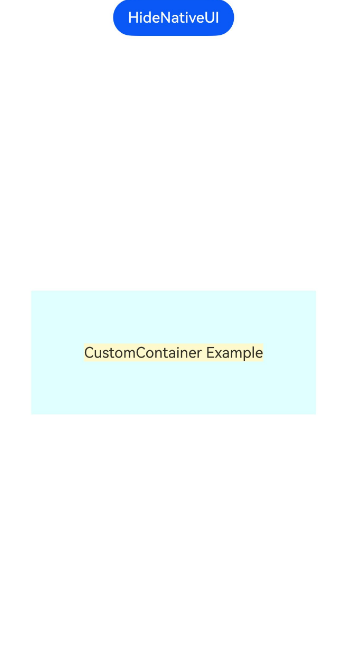
以下示例创建了一个自定义容器,该容器将子组件最大值加上额外边距作为自身大小,同时对子组件进行居中排布。
图1 自定义容器组件
-
按照接入ArkTS页面创建前置工程。
-
创建自定义容器组件封装对象。
// ArkUICustomContainerNode.h// 自定义容器组件示例#ifndef MYAPPLICATION_ARKUICUSTOMCONTAINERNODE_H#define MYAPPLICATION_ARKUICUSTOMCONTAINERNODE_H#include "ArkUINode.h"namespace NativeModule {class ArkUICustomContainerNode : public ArkUINode {public:// 使用自定义组件类型ARKUI_NODE_CUSTOM创建组件。ArkUICustomContainerNode(): ArkUINode((NativeModuleInstance::GetInstance()->GetNativeNodeAPI())->createNode(ARKUI_NODE_CUSTOM)){// 注册自定义事件监听器。nativeModule_->addNodeCustomEventReceiver(handle_, OnStaticCustomEvent);// 声明自定义事件并传递自身作为自定义数据。nativeModule_->registerNodeCustomEvent(handle_, ARKUI_NODE_CUSTOM_EVENT_ON_MEASURE, 0, this);nativeModule_->registerNodeCustomEvent(handle_, ARKUI_NODE_CUSTOM_EVENT_ON_LAYOUT, 0, this);}~ArkUICustomContainerNode() override{// 反注册自定义事件监听器。nativeModule_->removeNodeCustomEventReceiver(handle_, OnStaticCustomEvent);// 取消声明自定义事件。nativeModule_->unregisterNodeCustomEvent(handle_, ARKUI_NODE_CUSTOM_EVENT_ON_MEASURE);nativeModule_->unregisterNodeCustomEvent(handle_, ARKUI_NODE_CUSTOM_EVENT_ON_LAYOUT);}void SetPadding(int32_t padding){padding_ = padding;// 自定义属性事件更新需要主动调用标记脏区接口。nativeModule_->markDirty(handle_, NODE_NEED_MEASURE);}private:static void OnStaticCustomEvent(ArkUI_NodeCustomEvent *event){// 获取组件实例对象,调用相关实例方法。auto customNode = reinterpret_cast<ArkUICustomContainerNode *>(OH_ArkUI_NodeCustomEvent_GetUserData(event));auto type = OH_ArkUI_NodeCustomEvent_GetEventType(event);switch (type) {case ARKUI_NODE_CUSTOM_EVENT_ON_MEASURE:customNode->OnMeasure(event);break;case ARKUI_NODE_CUSTOM_EVENT_ON_LAYOUT:customNode->OnLayout(event);break;default:break;}}// 自定义测算逻辑。void OnMeasure(ArkUI_NodeCustomEvent *event){auto layoutConstrain = OH_ArkUI_NodeCustomEvent_GetLayoutConstraintInMeasure(event);// 创建子节点布局限制,复用父组件布局中的百分比参考值。auto childLayoutConstrain = OH_ArkUI_LayoutConstraint_Copy(layoutConstrain);int32_t maxConstrain = 1000;OH_ArkUI_LayoutConstraint_SetMaxHeight(childLayoutConstrain, maxConstrain);OH_ArkUI_LayoutConstraint_SetMaxWidth(childLayoutConstrain, maxConstrain);OH_ArkUI_LayoutConstraint_SetMinHeight(childLayoutConstrain, 0);OH_ArkUI_LayoutConstraint_SetMinWidth(childLayoutConstrain, 0);// 测算子节点获取子节点最大值。auto totalSize = nativeModule_->getTotalChildCount(handle_);int32_t maxWidth = 0;int32_t maxHeight = 0;for (uint32_t i = 0; i < totalSize; i++) {auto child = nativeModule_->getChildAt(handle_, i);// 调用测算接口测算Native组件。nativeModule_->measureNode(child, childLayoutConstrain);auto size = nativeModule_->getMeasuredSize(child);if (size.width > maxWidth) {maxWidth = size.width;}if (size.height > maxHeight) {maxHeight = size.height;}}// 自定义测算为所有子节点大小加固定边距。该自定义节点最终的尺寸以此处设置的值为准。const int paddingMultiplier = 2;nativeModule_->setMeasuredSize(handle_, maxWidth + paddingMultiplier * padding_,maxHeight + paddingMultiplier * padding_);}void OnLayout(ArkUI_NodeCustomEvent *event){// 获取父组件期望位置并设置。auto position = OH_ArkUI_NodeCustomEvent_GetPositionInLayout(event);nativeModule_->setLayoutPosition(handle_, position.x, position.y);// 设置子组件居中对齐。auto totalSize = nativeModule_->getTotalChildCount(handle_);auto selfSize = nativeModule_->getMeasuredSize(handle_);for (uint32_t i = 0; i < totalSize; i++) {auto child = nativeModule_->getChildAt(handle_, i);// 获取子组件大小。auto childSize = nativeModule_->getMeasuredSize(child);// 布局子组件位置。int32_t horizontalMargin = (selfSize.width - childSize.width) / 2;int32_t verticalMargin = (selfSize.height - childSize.height) / 2;nativeModule_->layoutNode(child, horizontalMargin, verticalMargin);}}int32_t padding_ = 100;};} // namespace NativeModule#endif // MYAPPLICATION_ARKUICUSTOMCONTAINERNODE_H -
使用自定义容器创建带文本的示例界面。
#include "NativeEntry.h"#include "ArkUICustomContainerNode.h"#include "ArkUITextNode.h"#include "UITimer.h"#include <arkui/native_node_napi.h>#include <arkui/native_type.h>#include <js_native_api.h>namespace NativeModule {namespace {napi_env g_env;} // namespacenapi_value CreateNativeRoot(napi_env env, napi_callback_info info){size_t argc = 1;napi_value args[1] = {nullptr};napi_get_cb_info(env, info, &argc, args, nullptr, nullptr);ArkUI_NodeContentHandle contentHandle;OH_ArkUI_GetNodeContentFromNapiValue(env, args[0], &contentHandle);NativeEntry::GetInstance()->SetContentHandle(contentHandle);// 创建自定义容器和文本组件。auto node = std::make_shared<ArkUICustomContainerNode>();node->SetBackgroundColor(0xFFE0FFFF);auto textNode = std::make_shared<ArkUITextNode>();textNode->SetTextContent("CustomContainer Example");const int32_t fontSize = 16;textNode->SetFontSize(fontSize);textNode->SetBackgroundColor(0xFFfffacd);textNode->SetTextAlign(ARKUI_TEXT_ALIGNMENT_CENTER);node->AddChild(textNode);auto onClick = [](ArkUI_NodeEvent *event) {auto textNode = (ArkUITextNode *)OH_ArkUI_NodeEvent_GetUserData(event);textNode->SetFontColor(0xFF00FF7F);};textNode->RegisterOnClick(onClick, textNode.get());// 保持Native侧对象到管理类中,维护生命周期。NativeEntry::GetInstance()->SetRootNode(node);g_env = env;return nullptr;}napi_value DestroyNativeRoot(napi_env env, napi_callback_info info){// 从管理类中释放Native侧对象。NativeEntry::GetInstance()->DisposeRootNode();return nullptr;}} // namespace NativeModule -
修改CMakeLists.txt,添加链接库。
# CMakeLists.txt# the minimum version of CMake.cmake_minimum_required(VERSION 3.4.1)project(testndk)set(NATIVERENDER_ROOT_PATH ${CMAKE_CURRENT_SOURCE_DIR})include_directories(${NATIVERENDER_ROOT_PATH}${NATIVERENDER_ROOT_PATH}/include)add_library(entry SHARED NativeEntry.cpp napi_init.cpp)# target_link_libraries(entry PUBLIC libace_napi.z.so, libace_ndk.z.so, libhilog_ndk.z.so)find_library(# Sets the name of the path variable.hilog-lib# Specifies the name of the NDK library that# you want CMake to locate.hilog_ndk.z)find_library(# Sets the name of the path variable.libace-lib# Specifies the name of the NDK library that# you want CMake to locate.ace_ndk.z)find_library(# Sets the name of the path variable.libnapi-lib# Specifies the name of the NDK library that# you want CMake to locate.ace_napi.z)find_library(# Sets the name of the path variable.libuv-libuv)target_link_libraries(entry PUBLIC${hilog-lib} ${libace-lib} ${libnapi-lib} ${libuv-lib} )
自定义绘制组件
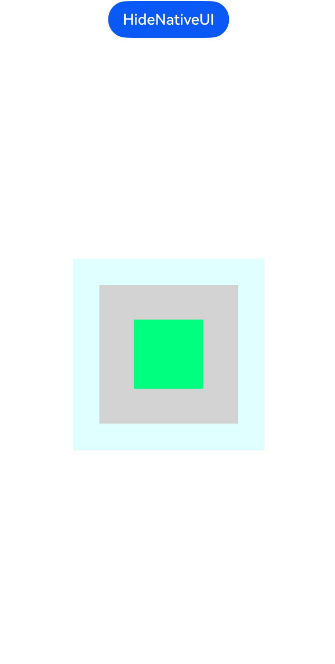
以下示例创建了一个自定义绘制组件,该绘制组件能够绘制自定义矩形,并使用上述自定义容器进行布局排布。
图2 自定义绘制组件
-
按照自定义布局容器章节准备前置工程。
-
创建自定义绘制组件封装对象。
// ArkUICustomNode.h// 自定义绘制组件示例#ifndef MYAPPLICATION_ARKUICUSTOMNODE_H#define MYAPPLICATION_ARKUICUSTOMNODE_H#include <native_drawing/drawing_brush.h>#include <native_drawing/drawing_canvas.h>#include <native_drawing/drawing_path.h>#include "ArkUINode.h"namespace NativeModule {class ArkUICustomNode : public ArkUINode {public:// 使用自定义组件类型ARKUI_NODE_CUSTOM创建组件。ArkUICustomNode(): ArkUINode((NativeModuleInstance::GetInstance()->GetNativeNodeAPI())->createNode(ARKUI_NODE_CUSTOM)){// 注册自定义事件监听器。nativeModule_->addNodeCustomEventReceiver(handle_, OnStaticCustomEvent);// 声明自定义事件并传递自身作为自定义数据。nativeModule_->registerNodeCustomEvent(handle_, ARKUI_NODE_CUSTOM_EVENT_ON_DRAW, 0, this);}~ArkUICustomNode() override{// 反注册自定义事件监听器。nativeModule_->removeNodeCustomEventReceiver(handle_, OnStaticCustomEvent);// 取消声明自定义事件。nativeModule_->unregisterNodeCustomEvent(handle_, ARKUI_NODE_CUSTOM_EVENT_ON_DRAW);}void SetRectColor(uint32_t color){color_ = color;// 自定义绘制属性变更需要主动通知框架。nativeModule_->markDirty(handle_, NODE_NEED_RENDER);}private:static void OnStaticCustomEvent(ArkUI_NodeCustomEvent *event){// 获取组件实例对象,调用相关实例方法。auto customNode = reinterpret_cast<ArkUICustomNode *>(OH_ArkUI_NodeCustomEvent_GetUserData(event));auto type = OH_ArkUI_NodeCustomEvent_GetEventType(event);switch (type) {case ARKUI_NODE_CUSTOM_EVENT_ON_DRAW:customNode->OnDraw(event);break;default:break;}}// 自定义绘制逻辑。void OnDraw(ArkUI_NodeCustomEvent *event){auto drawContext = OH_ArkUI_NodeCustomEvent_GetDrawContextInDraw(event);// 获取图形绘制对象。auto drawCanvas = reinterpret_cast<OH_Drawing_Canvas *>(OH_ArkUI_DrawContext_GetCanvas(drawContext));// 获取组件大小。auto size = OH_ArkUI_DrawContext_GetSize(drawContext);// 绘制自定义内容。auto path = OH_Drawing_PathCreate();const float kQuarter = 0.25f;const float kThreeQuarters = 0.75f;OH_Drawing_PathMoveTo(path, size.width * kQuarter, size.height * kQuarter);OH_Drawing_PathLineTo(path, size.width * kThreeQuarters, size.height * kQuarter);OH_Drawing_PathLineTo(path, size.width * kThreeQuarters, size.height * kThreeQuarters);OH_Drawing_PathLineTo(path, size.width * kQuarter, size.height * kThreeQuarters);OH_Drawing_PathLineTo(path, size.width * kQuarter, size.height * kQuarter);OH_Drawing_PathClose(path);auto brush = OH_Drawing_BrushCreate();OH_Drawing_BrushSetColor(brush, color_);OH_Drawing_CanvasAttachBrush(drawCanvas, brush);OH_Drawing_CanvasDrawPath(drawCanvas, path);// 释放资源OH_Drawing_BrushDestroy(brush);OH_Drawing_PathDestroy(path);}uint32_t color_ = 0xFFFFE4B5;};} // namespace NativeModule#endif // MYAPPLICATION_ARKUICUSTOMNODE_H -
使用自定义绘制组件和自定义容器创建示例界面。
#include "NativeEntry.h"#include "ArkUICustomContainerNode.h"#include "ArkUICustomNode.h"#include <arkui/native_node_napi.h>#include <arkui/native_type.h>#include <js_native_api.h>#include "UITimer.h"namespace NativeModule {namespace {napi_env g_env;} // namespacenapi_value CreateNativeRoot(napi_env env, napi_callback_info info){size_t argc = 1;napi_value args[1] = {nullptr};napi_get_cb_info(env, info, &argc, args, nullptr, nullptr);// 获取NodeContentArkUI_NodeContentHandle contentHandle;OH_ArkUI_GetNodeContentFromNapiValue(env, args[0], &contentHandle);NativeEntry::GetInstance()->SetContentHandle(contentHandle);// 创建自定义容器和自定义绘制组件。auto node = std::make_shared<ArkUICustomContainerNode>();node->SetBackgroundColor(0xFFE0FFFF);auto customNode = std::make_shared<ArkUICustomNode>();customNode->SetBackgroundColor(0xFFD3D3D3);const int width = 150;const int height = 150;customNode->SetWidth(width);customNode->SetHeight(height);node->AddChild(customNode);auto onClick = [](ArkUI_NodeEvent *event) {auto customNode = (ArkUICustomNode *)OH_ArkUI_NodeEvent_GetUserData(event);customNode->SetRectColor(0xFF00FF7F);};customNode->RegisterOnClick(onClick, customNode.get());// 保持Native侧对象到管理类中,维护生命周期。NativeEntry::GetInstance()->SetRootNode(node);g_env = env;return nullptr;}napi_value DestroyNativeRoot(napi_env env, napi_callback_info info){// 从管理类中释放Native侧对象。NativeEntry::GetInstance()->DisposeRootNode();return nullptr;}} // namespace NativeModule -
修改CMakeLists.txt,添加链接库。
# CMakeLists.txt# the minimum version of CMake.cmake_minimum_required(VERSION 3.4.1)project(testndk)set(NATIVERENDER_ROOT_PATH ${CMAKE_CURRENT_SOURCE_DIR})include_directories(${NATIVERENDER_ROOT_PATH}${NATIVERENDER_ROOT_PATH}/include)add_library(entry SHARED NativeEntry.cpp napi_init.cpp)# target_link_libraries(entry PUBLIC libace_napi.z.so, libace_ndk.z.so, libhilog_ndk.z.so)find_library(# Sets the name of the path variable.hilog-lib# Specifies the name of the NDK library that# you want CMake to locate.hilog_ndk.z)find_library(# Sets the name of the path variable.libace-lib# Specifies the name of the NDK library that# you want CMake to locate.ace_ndk.z)find_library(# Sets the name of the path variable.libnapi-lib# Specifies the name of the NDK library that# you want CMake to locate.ace_napi.z)find_library(# Sets the name of the path variable.libuv-libuv)target_link_libraries(entry PUBLIC${hilog-lib} ${libace-lib} ${libnapi-lib} ${libuv-lib} libnative_drawing.so)
不规则网格布局示例
以下示例创建了一个不规则网格布局容器,支持不同大小的网格单元,实现类似瀑布流的布局效果。完整示例请参考CustomDrawIrregularSample。
图3 不规则网格布局效果

-
按照自定义布局容器章节准备前置工程。
-
创建不规则网格布局容器组件封装对象。
// ArkUIIrregularGridNode.h// 不规则网格布局容器示例#ifndef MYAPPLICATION_ARKUIIRREGULARGRIDNODE_H#define MYAPPLICATION_ARKUIIRREGULARGRIDNODE_H#include "ArkUINode.h"#include <vector>#include <map>namespace NativeModule {// 网格单元配置struct GridItemConfig {int32_t rowSpan = 1; // 占据的行数int32_t columnSpan = 1; // 占据的列数};class ArkUIIrregularGridNode : public ArkUINode {public:// 使用自定义组件类型ARKUI_NODE_CUSTOM创建组件ArkUIIrregularGridNode(): ArkUINode((NativeModuleInstance::GetInstance()->GetNativeNodeAPI())->createNode(ARKUI_NODE_CUSTOM)){// 注册自定义事件监听器nativeModule_->addNodeCustomEventReceiver(handle_, OnStaticCustomEvent);// 声明自定义事件并传递自身作为自定义数据nativeModule_->registerNodeCustomEvent(handle_, ARKUI_NODE_CUSTOM_EVENT_ON_MEASURE, 0, this);nativeModule_->registerNodeCustomEvent(handle_, ARKUI_NODE_CUSTOM_EVENT_ON_LAYOUT, 0, this);}~ArkUIIrregularGridNode() override{// 反注册自定义事件监听器nativeModule_->removeNodeCustomEventReceiver(handle_, OnStaticCustomEvent);// 取消声明自定义事件nativeModule_->unregisterNodeCustomEvent(handle_, ARKUI_NODE_CUSTOM_EVENT_ON_MEASURE);nativeModule_->unregisterNodeCustomEvent(handle_, ARKUI_NODE_CUSTOM_EVENT_ON_LAYOUT);}// 设置列数void SetColumnCount(int32_t count){columnCount_ = count;nativeModule_->markDirty(handle_, NODE_NEED_MEASURE);}// 设置网格间距void SetGap(int32_t gap){gap_ = gap;nativeModule_->markDirty(handle_, NODE_NEED_MEASURE);}// 设置子组件的网格配置void SetItemConfig(ArkUI_NodeHandle child, int32_t rowSpan, int32_t columnSpan){GridItemConfig config;config.rowSpan = rowSpan;config.columnSpan = columnSpan;itemConfigs_[child] = config;nativeModule_->markDirty(handle_, NODE_NEED_MEASURE);}private:static void OnStaticCustomEvent(ArkUI_NodeCustomEvent *event){// 获取组件实例对象,调用相关实例方法auto customNode = reinterpret_cast<ArkUIIrregularGridNode *>(OH_ArkUI_NodeCustomEvent_GetUserData(event));auto type = OH_ArkUI_NodeCustomEvent_GetEventType(event);switch (type) {case ARKUI_NODE_CUSTOM_EVENT_ON_MEASURE:customNode->OnMeasure(event);break;case ARKUI_NODE_CUSTOM_EVENT_ON_LAYOUT:customNode->OnLayout(event);break;default:break;}}// 测算单个子组件并更新列高信息void MeasureChild(ArkUI_NodeHandle child, int32_t cellWidth,ArkUI_LayoutConstraint *childConstraint, std::vector<int32_t> &columnHeights){GridItemConfig config = {1, 1};auto it = itemConfigs_.find(child);if (it != itemConfigs_.end()) {config = it->second;}if (config.columnSpan > columnCount_) {config.columnSpan = columnCount_;}int32_t startColumn = FindLowestColumn(columnHeights, config.columnSpan);int32_t startY = 0;for (int32_t col = startColumn; col < startColumn + config.columnSpan && col < columnCount_; col++) {if (columnHeights[col] > startY) {startY = columnHeights[col];}}int32_t itemWidth = cellWidth * config.columnSpan + gap_ * (config.columnSpan - 1);OH_ArkUI_LayoutConstraint_SetMaxWidth(childConstraint, itemWidth);OH_ArkUI_LayoutConstraint_SetMinWidth(childConstraint, itemWidth);nativeModule_->measureNode(child, childConstraint);auto size = nativeModule_->getMeasuredSize(child);LayoutItemInfo info;info.x = startColumn * (cellWidth + gap_);info.y = startY;info.width = size.width;info.height = size.height;layoutInfo_.push_back(info);int32_t newHeight = startY + size.height + gap_;for (int32_t col = startColumn; col < startColumn + config.columnSpan && col < columnCount_; col++) {columnHeights[col] = newHeight;}}// 自定义测算逻辑:不规则网格布局void OnMeasure(ArkUI_NodeCustomEvent *event){auto layoutConstrain = OH_ArkUI_NodeCustomEvent_GetLayoutConstraintInMeasure(event);int32_t maxWidth = OH_ArkUI_LayoutConstraint_GetMaxWidth(layoutConstrain);int32_t totalGap = gap_ * (columnCount_ - 1);int32_t cellWidth = (maxWidth - totalGap) / columnCount_;auto childConstraint = OH_ArkUI_LayoutConstraint_Copy(layoutConstrain);std::vector<int32_t> columnHeights(columnCount_, 0);layoutInfo_.clear();auto totalSize = nativeModule_->getTotalChildCount(handle_);for (uint32_t i = 0; i < totalSize; i++) {auto child = nativeModule_->getChildAt(handle_, i);MeasureChild(child, cellWidth, childConstraint, columnHeights);}int32_t maxHeight = 0;for (int32_t height : columnHeights) {if (height > maxHeight) {maxHeight = height;}}if (maxHeight > gap_) {maxHeight -= gap_;}nativeModule_->setMeasuredSize(handle_, maxWidth, maxHeight);OH_ArkUI_LayoutConstraint_Dispose(childConstraint);}void OnLayout(ArkUI_NodeCustomEvent *event){// 获取父组件期望位置并设置auto position = OH_ArkUI_NodeCustomEvent_GetPositionInLayout(event);nativeModule_->setLayoutPosition(handle_, position.x, position.y);// 布局子组件auto totalSize = nativeModule_->getTotalChildCount(handle_);for (uint32_t i = 0; i < totalSize && i < layoutInfo_.size(); i++) {auto child = nativeModule_->getChildAt(handle_, i);nativeModule_->layoutNode(child, layoutInfo_[i].x, layoutInfo_[i].y);}}// 找到最矮的列,确保可以放下指定列跨度的项int32_t FindLowestColumn(const std::vector<int32_t>& columnHeights, int32_t columnSpan){int32_t lowestColumn = 0;int32_t lowestHeight = INT32_MAX;// 遍历所有可能的起始列for (int32_t col = 0; col <= columnCount_ - columnSpan; col++) {// 找到这个范围内最高的列int32_t maxHeightInRange = 0;for (int32_t i = col; i < col + columnSpan; i++) {if (columnHeights[i] > maxHeightInRange) {maxHeightInRange = columnHeights[i];}}// 如果这个范围的最高点比当前最低点还低,更新最低列if (maxHeightInRange < lowestHeight) {lowestHeight = maxHeightInRange;lowestColumn = col;}}return lowestColumn;}struct LayoutItemInfo {int32_t x;int32_t y;int32_t width;int32_t height;};int32_t columnCount_ = 3;int32_t gap_ = 10;std::map<ArkUI_NodeHandle, GridItemConfig> itemConfigs_;std::vector<LayoutItemInfo> layoutInfo_;};} // namespace NativeModule#endif // MYAPPLICATION_ARKUIIRREGULARGRIDNODE_H -
使用不规则网格布局容器创建示例界面。
#include "NativeEntry.h"#include "ArkUIIrregularGridNode.h"#include "ArkUINode.h"#include <arkui/native_node_napi.h>#include <arkui/native_type.h>#include <js_native_api.h>#include <utility>#include <vector>namespace NativeModule {namespace {napi_env g_env = nullptr;constexpr uint32_t GRID_BACKGROUND_COLOR = 0xFFF5F5F5;constexpr int32_t GRID_COLUMN_COUNT = 4;constexpr int32_t GRID_GAP = 8;constexpr float GRID_ITEM_RADIUS = 8.0f;constexpr float GRID_ITEM_BORDER_WIDTH = 1.0f;constexpr uint32_t GRID_ITEM_BORDER_COLOR = 0xFFCCCCCC;constexpr float GRID_ITEM_BASE_HEIGHT = 60.0f;constexpr float GRID_ITEM_HEIGHT_STEP = 40.0f;using GridItemSize = std::pair<int32_t, int32_t>;const std::vector<GridItemSize>& GetGridItemSizes(){static const std::vector<GridItemSize> itemSizes = {{1, 1}, // 小方块{2, 1}, // 竖长条{1, 3}, // 横长条{2, 2}, // 大方块{1, 1}, // 小方块{1, 2}, // 横条{3, 1}, // 很长的竖条};return itemSizes;}const std::vector<uint32_t>& GetGridItemColors(){static const std::vector<uint32_t> colors = {0xFF64B5F6, // 蓝色0xFFE57373, // 红色0xFF81C784, // 绿色0xFFFFB74D, // 橙色0xFF9575CD, // 紫色0xFF4DB6AC, // 青色0xFFFFD54F, // 黄色0xFFF06292, // 粉色0xFF7986CB, // 靛蓝0xFFA1887F, // 棕色};return colors;}void SetNodeColorAttribute(ArkUI_NativeNodeAPI_1* nodeAPI, ArkUI_NodeHandle node, uint32_t color){ArkUI_NumberValue bgColor[] = {{.u32 = color}};ArkUI_AttributeItem bgColorItem = {bgColor, 1};nodeAPI->setAttribute(node, NODE_BACKGROUND_COLOR, &bgColorItem);}void SetNodeBorderRadiusAttribute(ArkUI_NativeNodeAPI_1* nodeAPI, ArkUI_NodeHandle node, float radius){ArkUI_NumberValue radiusValue[] = {{.f32 = radius}};ArkUI_AttributeItem radiusItem = {radiusValue, 1};nodeAPI->setAttribute(node, NODE_BORDER_RADIUS, &radiusItem);}void SetNodeBorderStyle(ArkUI_NativeNodeAPI_1* nodeAPI, ArkUI_NodeHandle node){ArkUI_NumberValue borderWidth[] = {{.f32 = GRID_ITEM_BORDER_WIDTH}};ArkUI_AttributeItem borderWidthItem = {borderWidth, 1};nodeAPI->setAttribute(node, NODE_BORDER_WIDTH, &borderWidthItem);ArkUI_NumberValue borderColor[] = {{.u32 = GRID_ITEM_BORDER_COLOR}};ArkUI_AttributeItem borderColorItem = {borderColor, 1};nodeAPI->setAttribute(node, NODE_BORDER_COLOR, &borderColorItem);}void SetNodeHeightByRowSpan(ArkUI_NativeNodeAPI_1* nodeAPI, ArkUI_NodeHandle node, int32_t rowSpan){float minHeight = GRID_ITEM_BASE_HEIGHT + (rowSpan - 1) * GRID_ITEM_HEIGHT_STEP;ArkUI_NumberValue minHeightValue[] = {{.f32 = minHeight}};ArkUI_AttributeItem minHeightItem = {minHeightValue, 1};nodeAPI->setAttribute(node, NODE_HEIGHT, &minHeightItem);}void AddGridItems(ArkUI_NativeNodeAPI_1* nodeAPI,const std::shared_ptr<ArkUIIrregularGridNode>& gridNode,const std::vector<GridItemSize>& itemSizes,const std::vector<uint32_t>& colors){for (size_t i = 0; i < itemSizes.size(); ++i) {auto itemNode = nodeAPI->createNode(ARKUI_NODE_STACK);SetNodeColorAttribute(nodeAPI, itemNode, colors[i % colors.size()]);SetNodeBorderRadiusAttribute(nodeAPI, itemNode, GRID_ITEM_RADIUS);SetNodeBorderStyle(nodeAPI, itemNode);SetNodeHeightByRowSpan(nodeAPI, itemNode, itemSizes[i].first);gridNode->SetItemConfig(itemNode, itemSizes[i].first, itemSizes[i].second);nodeAPI->addChild(gridNode->GetHandle(), itemNode);}}} // namespacenapi_value CreateNativeRoot(napi_env env, napi_callback_info info){size_t argc = 1;napi_value args[1] = {nullptr};napi_get_cb_info(env, info, &argc, args, nullptr, nullptr);ArkUI_NodeContentHandle contentHandle;OH_ArkUI_GetNodeContentFromNapiValue(env, args[0], &contentHandle);NativeEntry::GetInstance()->SetContentHandle(contentHandle);auto gridNode = std::make_shared<ArkUIIrregularGridNode>();gridNode->SetBackgroundColor(GRID_BACKGROUND_COLOR);gridNode->SetColumnCount(GRID_COLUMN_COUNT);gridNode->SetGap(GRID_GAP);auto* nodeAPI = NativeModuleInstance::GetInstance()->GetNativeNodeAPI();AddGridItems(nodeAPI, gridNode, GetGridItemSizes(), GetGridItemColors());// 保持Native侧对象到管理类中,维护生命周期NativeEntry::GetInstance()->SetRootNode(gridNode);g_env = env;return nullptr;}napi_value DestroyNativeRoot(napi_env env, napi_callback_info info){// 从管理类中释放Native侧对象NativeEntry::GetInstance()->DisposeRootNode();return nullptr;}} // namespace NativeModule