自定义绘制
概述
当某些组件本身的绘制内容不满足需求时,可使用组件自定义绘制功能,在原有组件基础上部分绘制、或者全部自行绘制,以达到预期效果。例如:独特的按钮形状、文字和图像混合的图标等。NDK提供了自定义绘制节点的能力,通过自定义绘制事件,开发者可以实现基于NDK侧ArkUI_NodeType中ARKUI_NODE_CUSTOM类型节点的自绘制能力。

- ArkTS的自定义绘制能力和示例请参考自定义绘制修改器 (DrawModifier)。
自定义绘制层级
自定义绘制提供了五个绘制层级,从低到高依次为:内容背景层(drawBehind)、内容层(drawContent)、内容前景层(drawFront)、前景层(drawForeground)和浮层(drawOverlay)。开发者可以根据需求选择合适的层级进行绘制。自定义绘制层级图如下所示。
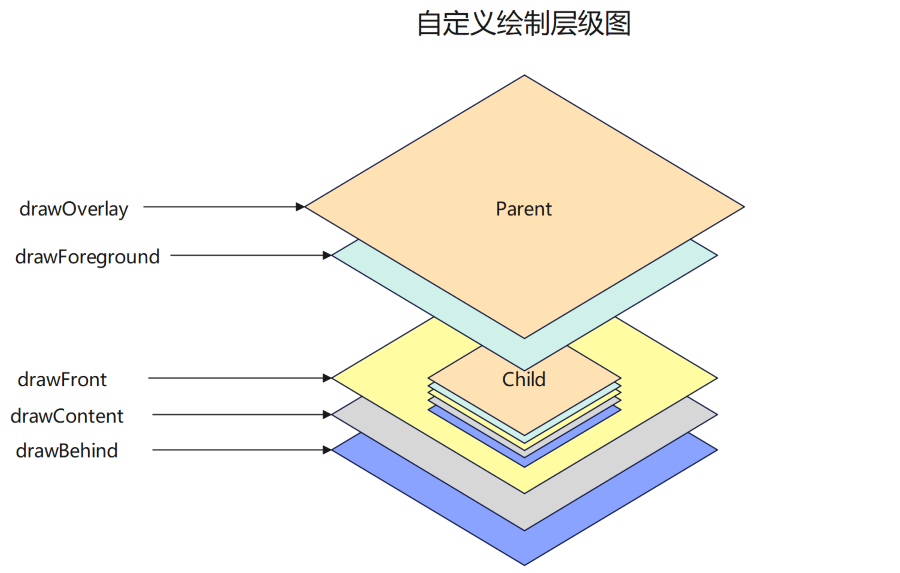
开发者可以通过注册相应的事件类型来实现不同层级的自定义绘制,不同层级对应的枚举如下,NDK接口支持的事件类型范围请参考ArkUI_NodeCustomEventType枚举值。
| 事件类型 | 说明 |
|---|---|
| ARKUI_NODE_CUSTOM_EVENT_ON_DRAW_BEHIND | 自定义内容背景层绘制类型,从API version 20开始支持。 |
| ARKUI_NODE_CUSTOM_EVENT_ON_DRAW | 自定义内容层绘制类型。 |
| ARKUI_NODE_CUSTOM_EVENT_ON_DRAW_FRONT | 自定义内容前景层绘制类型,从API version 20开始支持。 |
| ARKUI_NODE_CUSTOM_EVENT_ON_FOREGROUND_DRAW | 自定义前景层绘制类型。 |
| ARKUI_NODE_CUSTOM_EVENT_ON_OVERLAY_DRAW | 自定义浮层绘制类型。 |
内容层自定义绘制示例
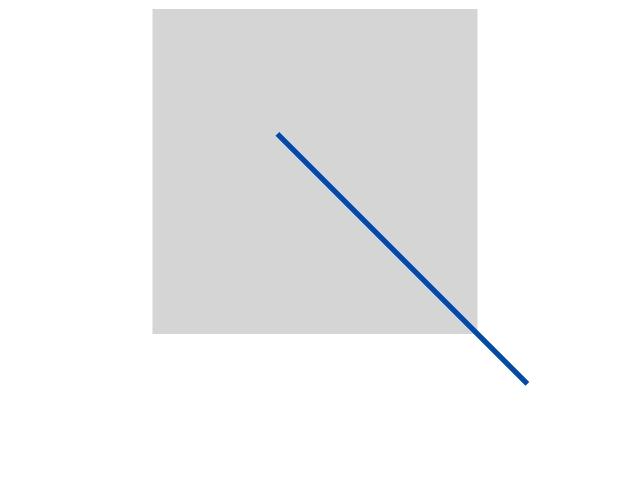
本示例通过注册内容层绘制事件ARKUI_NODE_CUSTOM_EVENT_ON_DRAW在节点内容层绘制一条从左上区域到右下区域的对角线段,效果图如下。
以下场景基于接入ArkTS页面章节,创建前置工程。内容绘制的完整示例请参考NativeDrawPageSample。
-
通过ArkUI_NativeNodeAPI_1的createNode接口,传入ArkUI_NodeType中的ARKUI_NODE_CUSTOM枚举值创建自定义节点。
auto customNode = nodeAPI->createNode(ARKUI_NODE_CUSTOM); -
事件注册时将自定义节点、事件类型、事件ID和UserData作为参数传入。
// UserDatastruct A {int32_t a = 6;bool flag = true;ArkUI_NodeHandle node;};A *a = new A;a->node = customNode;// ...nodeAPI->registerNodeCustomEvent(customNode, ARKUI_NODE_CUSTOM_EVENT_ON_FOREGROUND_DRAW, 1, a);// 事件回调函数的编写nodeAPI->registerNodeCustomEventReceiver([](ArkUI_NodeCustomEvent *event) {// 事件回调函数逻辑// ...}); -
在回调函数中,通过OH_ArkUI_NodeCustomEvent_GetEventType获取自定义事件的事件类型,通过OH_ArkUI_NodeCustomEvent_GetEventTargetId获取事件ID,通过OH_ArkUI_NodeCustomEvent_GetUserData获取UserData,再根据事件类型和事件ID判断当前触发的是哪个绘制事件,从而执行对应的逻辑。
auto type = OH_ArkUI_NodeCustomEvent_GetEventType(event);auto targetId = OH_ArkUI_NodeCustomEvent_GetEventTargetId(event);auto userData = reinterpret_cast<A *>(OH_ArkUI_NodeCustomEvent_GetUserData(event)); -
OH_ArkUI_NodeCustomEvent_GetDrawContextInDraw通过自定义组件事件获取绘制上下文,并将其传入OH_ArkUI_DrawContext_GetCanvas以获取Canvas画布指针,该指针随后将转换为OH_Drawing_Canvas指针进行绘制。
// 获取自定义事件绘制的上下文。auto *drawContext = OH_ArkUI_NodeCustomEvent_GetDrawContextInDraw(event);// 获取Canvas指针。auto *canvas1 = OH_ArkUI_DrawContext_GetCanvas(drawContext);// 转换为OH_Drawing_Canvas指针进行绘制。OH_Drawing_Canvas *canvas = reinterpret_cast<OH_Drawing_Canvas *>(canvas1);// 绘制逻辑。int32_t width = SIZE_1000; // SIZE_1000 = 1000int32_t height = SIZE_1000; // SIZE_1000 = 1000auto path = OH_Drawing_PathCreate();OH_Drawing_PathMoveTo(path, width / SIZE_4, height / SIZE_4); // SIZE_4 = 4OH_Drawing_PathLineTo(path, width * SIZE_3 / SIZE_4, height * SIZE_3 / SIZE_4); // SIZE_3 = 3,SIZE_4 = 4OH_Drawing_PathClose(path);auto pen = OH_Drawing_PenCreate();OH_Drawing_PenSetWidth(pen, SIZE_10); // SIZE_10 = 10OH_Drawing_PenSetColor(pen, OH_Drawing_ColorSetArgb(0xFF, 0x00, 0x4A, 0x4F));OH_Drawing_CanvasAttachPen(canvas, pen);OH_Drawing_CanvasDrawPath(canvas, path);
多层级绘制示例
以下示例创建了一个自定义绘制组件,实现自定义矩形绘制、自定义绘制内容前景层和内容背景层,并支持使用自定义布局容器进行布局排布。完整示例请参考NativeNodeUtilsSample。
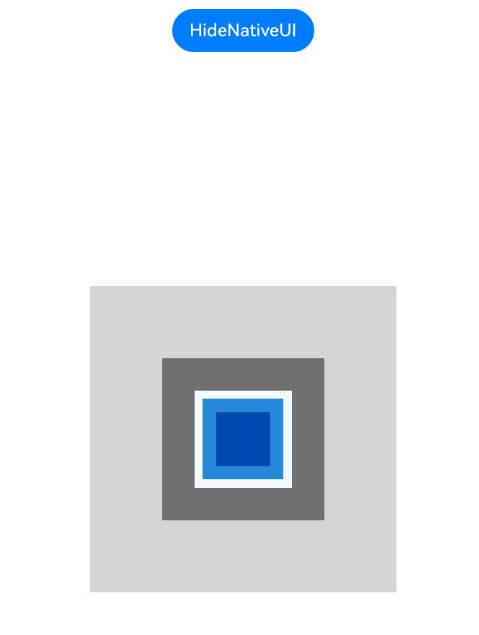
图中深蓝矩形为drawFront内容前景层,浅蓝色矩形为drawContent内容层,白色矩形为drawBehind内容背景层。三层的叠加关系用于验证多层级绘制顺序是否符合预期。
-
按照自定义布局容器章节准备前置工程。
-
创建自定义绘制组件封装对象。
#ifndef MYAPPLICATION_ARKUICUSTOMNODE_H#define MYAPPLICATION_ARKUICUSTOMNODE_H#include <native_drawing/drawing_brush.h>#include <native_drawing/drawing_canvas.h>#include <native_drawing/drawing_path.h>#include "ArkUINode.h"namespace NativeModule {class ArkUICustomNode : public ArkUINode {public:// 使用自定义组件类型ARKUI_NODE_CUSTOM创建组件。ArkUICustomNode(): ArkUINode((NativeModuleInstance::GetInstance()->GetNativeNodeAPI())->createNode(ARKUI_NODE_CUSTOM)){// 注册自定义事件监听器。nativeModule_->addNodeCustomEventReceiver(handle_, OnStaticCustomEvent);// 声明自定义事件并转递自身作为自定义数据。nativeModule_->registerNodeCustomEvent(handle_, ARKUI_NODE_CUSTOM_EVENT_ON_DRAW_FRONT, 0, this);nativeModule_->registerNodeCustomEvent(handle_, ARKUI_NODE_CUSTOM_EVENT_ON_DRAW, 0, this);nativeModule_->registerNodeCustomEvent(handle_, ARKUI_NODE_CUSTOM_EVENT_ON_DRAW_BEHIND, 0, this);// 绘制完成事件通知。OH_ArkUI_RegisterDrawCallbackOnNodeHandle(handle_, nullptr, [](void* userData) {});}~ArkUICustomNode() override{// 反注册自定义事件监听器。nativeModule_->removeNodeCustomEventReceiver(handle_, OnStaticCustomEvent);// 取消声明自定义事件。nativeModule_->unregisterNodeCustomEvent(handle_, ARKUI_NODE_CUSTOM_EVENT_ON_DRAW_FRONT);nativeModule_->unregisterNodeCustomEvent(handle_, ARKUI_NODE_CUSTOM_EVENT_ON_DRAW);nativeModule_->unregisterNodeCustomEvent(handle_, ARKUI_NODE_CUSTOM_EVENT_ON_DRAW_BEHIND);OH_ArkUI_UnregisterDrawCallbackOnNodeHandle(handle_);}private:int32_t NUM_2 = 2;int32_t NUM_3 = 3;int32_t NUM_4 = 4;int32_t NUM_5 = 5;static void OnStaticCustomEvent(ArkUI_NodeCustomEvent *event){// 获取组件实例对象,调用相关实例方法。// ...auto customNode = reinterpret_cast<ArkUICustomNode *>(OH_ArkUI_NodeCustomEvent_GetUserData(event));auto type = OH_ArkUI_NodeCustomEvent_GetEventType(event);switch (type) {// 绘制层级由低到高。case ARKUI_NODE_CUSTOM_EVENT_ON_DRAW_BEHIND:customNode->OnDrawBehind(event);break;case ARKUI_NODE_CUSTOM_EVENT_ON_DRAW:customNode->OnDraw(event);break;case ARKUI_NODE_CUSTOM_EVENT_ON_DRAW_FRONT:customNode->OnDrawFront(event);break;// ...default:break;}}// 自定义绘制逻辑。void OnDrawBehind(ArkUI_NodeCustomEvent *event){auto drawContext = OH_ArkUI_NodeCustomEvent_GetDrawContextInDraw(event);// 获取图形绘制对象。auto drawCanvas = reinterpret_cast<OH_Drawing_Canvas *>(OH_ArkUI_DrawContext_GetCanvas(drawContext));// 获取组件大小。auto size = OH_ArkUI_DrawContext_GetSize(drawContext);// 绘制自定义内容。auto path = OH_Drawing_PathCreate();OH_Drawing_PathMoveTo(path, size.width / NUM_5, size.height / NUM_5);OH_Drawing_PathLineTo(path, size.width * NUM_4 / NUM_5, size.height / NUM_5);OH_Drawing_PathLineTo(path, size.width * NUM_4 / NUM_5, size.height * NUM_4 / NUM_5);OH_Drawing_PathLineTo(path, size.width / NUM_5, size.height * NUM_4 / NUM_5);OH_Drawing_PathLineTo(path, size.width / NUM_5, size.height / NUM_5);OH_Drawing_PathClose(path);auto brush = OH_Drawing_BrushCreate();OH_Drawing_BrushSetColor(brush, 0xFFF0FAFF); // 蓝白色OH_Drawing_CanvasAttachBrush(drawCanvas, brush);OH_Drawing_CanvasDrawPath(drawCanvas, path);// 释放资源OH_Drawing_BrushDestroy(brush);OH_Drawing_PathDestroy(path);}void OnDraw(ArkUI_NodeCustomEvent *event){auto drawContext = OH_ArkUI_NodeCustomEvent_GetDrawContextInDraw(event);// 获取图形绘制对象。auto drawCanvas = reinterpret_cast<OH_Drawing_Canvas *>(OH_ArkUI_DrawContext_GetCanvas(drawContext));// 获取组件大小。auto size = OH_ArkUI_DrawContext_GetSize(drawContext);// 绘制自定义内容。auto path = OH_Drawing_PathCreate();OH_Drawing_PathMoveTo(path, size.width / NUM_4, size.height / NUM_4);OH_Drawing_PathLineTo(path, size.width * NUM_3 / NUM_4, size.height / NUM_4);OH_Drawing_PathLineTo(path, size.width * NUM_3 / NUM_4, size.height * NUM_3 / NUM_4);OH_Drawing_PathLineTo(path, size.width / NUM_4, size.height * NUM_3 / NUM_4);OH_Drawing_PathLineTo(path, size.width / NUM_4, size.height / NUM_4);OH_Drawing_PathClose(path);auto brush = OH_Drawing_BrushCreate();OH_Drawing_BrushSetColor(brush, 0xff2787D9); // 浅蓝色OH_Drawing_CanvasAttachBrush(drawCanvas, brush);OH_Drawing_CanvasDrawPath(drawCanvas, path);// 释放资源OH_Drawing_BrushDestroy(brush);OH_Drawing_PathDestroy(path);}void OnDrawFront(ArkUI_NodeCustomEvent *event){auto drawContext = OH_ArkUI_NodeCustomEvent_GetDrawContextInDraw(event);// 获取图形绘制对象。auto drawCanvas = reinterpret_cast<OH_Drawing_Canvas *>(OH_ArkUI_DrawContext_GetCanvas(drawContext));// 获取组件大小。auto size = OH_ArkUI_DrawContext_GetSize(drawContext);// 绘制自定义内容。auto path = OH_Drawing_PathCreate();OH_Drawing_PathMoveTo(path, size.width / NUM_3, size.height / NUM_3);OH_Drawing_PathLineTo(path, size.width * NUM_2 / NUM_3, size.height / NUM_3);OH_Drawing_PathLineTo(path, size.width * NUM_2 / NUM_3, size.height * NUM_2 / NUM_3);OH_Drawing_PathLineTo(path, size.width / NUM_3, size.height * NUM_2 / NUM_3);OH_Drawing_PathLineTo(path, size.width / NUM_3, size.height / NUM_3);OH_Drawing_PathClose(path);auto brush = OH_Drawing_BrushCreate();OH_Drawing_BrushSetColor(brush, 0xFF004AAF); // 深蓝色OH_Drawing_CanvasAttachBrush(drawCanvas, brush);OH_Drawing_CanvasDrawPath(drawCanvas, path);// 释放资源OH_Drawing_BrushDestroy(brush);OH_Drawing_PathDestroy(path);}// ...};} // namespace NativeModule#endif // MYAPPLICATION_ARKUICUSTOMNODE_H -
使用自定义绘制组件和自定义容器创建示例界面。
#include <arkui/native_node_napi.h>#include <arkui/native_type.h>#include <js_native_api.h>#include "NativeEntry.h"#include "ArkUICustomContainerNode.h"#include "ArkUICustomNode.h"#include "ArkUIMessageMaskNode.h"// 全局环境变量声明static napi_env g_env = nullptr;// ...namespace NativeModule {// ...#define SIZE_150 150// ...napi_value CreateNativeRoot(napi_env env, napi_callback_info info){size_t argc = 1;napi_value args[1] = {nullptr};napi_get_cb_info(env, info, &argc, args, nullptr, nullptr);// 获取NodeContent。ArkUI_NodeContentHandle contentHandle;OH_ArkUI_GetNodeContentFromNapiValue(env, args[0], &contentHandle);NativeEntry::GetInstance()->SetContentHandle(contentHandle);// 创建自定义容器和自定义绘制组件。auto node = std::make_shared<ArkUICustomContainerNode>();node->SetBackgroundColor(0xFFD5D5D5); // 浅灰色。auto customNode = std::make_shared<ArkUICustomNode>();customNode->SetBackgroundColor(0xFF707070); // 深灰色。customNode->SetWidth(SIZE_150);customNode->SetHeight(SIZE_150);node->AddChild(customNode);// 保持Native侧对象到管理类中,维护生命周期。NativeEntry::GetInstance()->SetRootNode(node);g_env = env;return nullptr;}napi_value DestroyNativeRoot(napi_env env, napi_callback_info info){// 从管理类中释放Native侧对象。NativeEntry::GetInstance()->DisposeRootNode();return nullptr;}} // namespace NativeModule
通过前景绘制实现消息蒙层
以下示例创建了一个消息提示组件,通过内容层绘制消息气泡与文本,并在前景层叠加星标装饰,实现消息高亮提示效果,常用于消息提醒和引导标记等场景。完整示例请参考NativeNodeUtilsSample。
未添加消息蒙层,未添加蒙层,没有前景层叠加星标装饰效果:
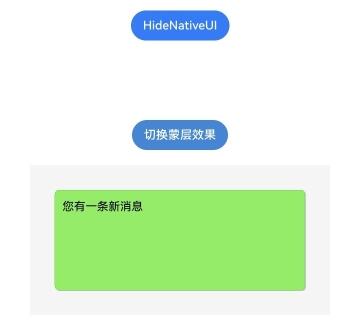
添加消息蒙层,添加后有前景层叠加星标装饰效果:
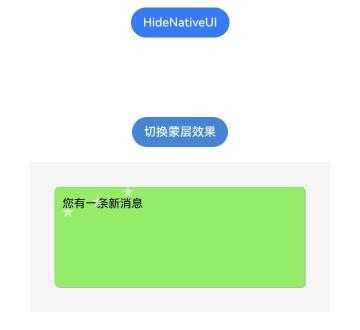
-
按照多层级绘制示例章节准备前置工程。
-
创建消息蒙层组件封装对象。
#ifndef MYAPPLICATION_ARKUIMESSAGEMASKNODE_H#define MYAPPLICATION_ARKUIMESSAGEMASKNODE_H#include <cmath>#include <native_drawing/drawing_brush.h>#include <native_drawing/drawing_canvas.h>#include <native_drawing/drawing_color_filter.h>#include <native_drawing/drawing_font.h>#include <native_drawing/drawing_font_collection.h>#include <native_drawing/drawing_path.h>#include <native_drawing/drawing_pen.h>#include <native_drawing/drawing_point.h>#include <native_drawing/drawing_rect.h>#include <native_drawing/drawing_round_rect.h>#include <native_drawing/drawing_text_typography.h>#include <string>#include "ArkUINode.h"namespace NativeModule {class ArkUIMessageMaskNode : public ArkUINode {public:// 使用自定义组件类型ARKUI_NODE_CUSTOM创建组件ArkUIMessageMaskNode(): ArkUINode((NativeModuleInstance::GetInstance()->GetNativeNodeAPI())->createNode(ARKUI_NODE_CUSTOM)){// 注册自定义事件监听器nativeModule_->addNodeCustomEventReceiver(handle_, OnStaticCustomEvent);// 声明自定义事件并转递自身作为自定义数据nativeModule_->registerNodeCustomEvent(handle_, ARKUI_NODE_CUSTOM_EVENT_ON_DRAW_FRONT, 0, this);nativeModule_->registerNodeCustomEvent(handle_, ARKUI_NODE_CUSTOM_EVENT_ON_DRAW, 0, this);nativeModule_->registerNodeCustomEvent(handle_, ARKUI_NODE_CUSTOM_EVENT_ON_DRAW_BEHIND, 0, this);}~ArkUIMessageMaskNode() override{// 反注册自定义事件监听器nativeModule_->removeNodeCustomEventReceiver(handle_, OnStaticCustomEvent);// 取消声明自定义事件nativeModule_->unregisterNodeCustomEvent(handle_, ARKUI_NODE_CUSTOM_EVENT_ON_DRAW_FRONT);nativeModule_->unregisterNodeCustomEvent(handle_, ARKUI_NODE_CUSTOM_EVENT_ON_DRAW);nativeModule_->unregisterNodeCustomEvent(handle_, ARKUI_NODE_CUSTOM_EVENT_ON_DRAW_BEHIND);}// 设置消息文本void SetMessage(const std::string& message){message_ = message;nativeModule_->markDirty(handle_, NODE_NEED_RENDER);}// 设置是否显示蒙层void SetMaskVisible(bool visible){maskVisible_ = visible;nativeModule_->markDirty(handle_, NODE_NEED_RENDER);}private:static constexpr int starDecorationCount = 3;static constexpr int starPointCount = 5;static constexpr float starStartAngleDegrees = -90.0f;static constexpr float starAngleStepDegrees = 72.0f;static constexpr float starInnerAngleOffsetDegrees = 36.0f;static constexpr float starInnerRadiusRatio = 0.4f;static constexpr float degreeToRadian = 3.14159265f / 180.0f;static constexpr float messageTextFontSize = 23.0f;static void OnStaticCustomEvent(ArkUI_NodeCustomEvent* event){auto customNode = reinterpret_cast<ArkUIMessageMaskNode*>(OH_ArkUI_NodeCustomEvent_GetUserData(event));auto type = OH_ArkUI_NodeCustomEvent_GetEventType(event);switch (type) {case ARKUI_NODE_CUSTOM_EVENT_ON_DRAW_BEHIND:customNode->OnDrawBehind(event);break;case ARKUI_NODE_CUSTOM_EVENT_ON_DRAW:customNode->OnDraw(event);break;case ARKUI_NODE_CUSTOM_EVENT_ON_DRAW_FRONT:customNode->OnDrawFront(event);break;default:break;}}// 自定义内容背景层:绘制聊天界面背景void OnDrawBehind(ArkUI_NodeCustomEvent* event){auto drawContext = OH_ArkUI_NodeCustomEvent_GetDrawContextInDraw(event);auto canvas = reinterpret_cast<OH_Drawing_Canvas*>(OH_ArkUI_DrawContext_GetCanvas(drawContext));auto size = OH_ArkUI_DrawContext_GetSize(drawContext);// 绘制浅灰色背景auto bgRect = OH_Drawing_RectCreate(0, 0, size.width, size.height);auto brush = OH_Drawing_BrushCreate();OH_Drawing_BrushSetColor(brush, 0xFFF5F5F5);OH_Drawing_CanvasAttachBrush(canvas, brush);OH_Drawing_CanvasDrawRect(canvas, bgRect);OH_Drawing_CanvasDetachBrush(canvas);OH_Drawing_BrushDestroy(brush);OH_Drawing_RectDestroy(bgRect);}// 自定义内容层void OnDraw(ArkUI_NodeCustomEvent* event){auto drawContext = OH_ArkUI_NodeCustomEvent_GetDrawContextInDraw(event);auto canvas = reinterpret_cast<OH_Drawing_Canvas*>(OH_ArkUI_DrawContext_GetCanvas(drawContext));auto size = OH_ArkUI_DrawContext_GetSize(drawContext);float padding = 50.0f;float bubbleWidth = size.width - 2 * padding;float bubbleHeight = size.height - 2 * padding;float cornerRadius = 8.0f;float textX = padding + 15.0f;float textY = padding + 20.0f;float textMaxWidth = bubbleWidth - 30.0f;// 绘制气泡阴影auto shadowRect = OH_Drawing_RectCreate(padding + 2, padding + 2, padding + bubbleWidth + 2, padding + bubbleHeight + 2);auto* shadowRoundRect = OH_Drawing_RoundRectCreate(shadowRect, cornerRadius, cornerRadius);auto shadowBrush = OH_Drawing_BrushCreate();OH_Drawing_BrushSetColor(shadowBrush, 0x30000000);OH_Drawing_CanvasAttachBrush(canvas, shadowBrush);OH_Drawing_CanvasDrawRoundRect(canvas, shadowRoundRect);OH_Drawing_CanvasDetachBrush(canvas);OH_Drawing_BrushDestroy(shadowBrush);OH_Drawing_RoundRectDestroy(shadowRoundRect);OH_Drawing_RectDestroy(shadowRect);// 绘制绿色气泡背景auto bubbleRect = OH_Drawing_RectCreate(padding, padding, padding + bubbleWidth, padding + bubbleHeight);auto* bubbleRoundRect = OH_Drawing_RoundRectCreate(bubbleRect, cornerRadius, cornerRadius);auto bubbleBrush = OH_Drawing_BrushCreate();OH_Drawing_BrushSetColor(bubbleBrush, 0xFF95EC69);OH_Drawing_CanvasAttachBrush(canvas, bubbleBrush);OH_Drawing_CanvasDrawRoundRect(canvas, bubbleRoundRect);OH_Drawing_CanvasDetachBrush(canvas);OH_Drawing_BrushDestroy(bubbleBrush);// 绘制气泡边框auto pen = OH_Drawing_PenCreate();OH_Drawing_PenSetWidth(pen, 1.0f);OH_Drawing_PenSetColor(pen, 0xFF7FD65A);OH_Drawing_CanvasAttachPen(canvas, pen);OH_Drawing_CanvasDrawRoundRect(canvas, bubbleRoundRect);OH_Drawing_CanvasDetachPen(canvas);OH_Drawing_PenDestroy(pen);OH_Drawing_RoundRectDestroy(bubbleRoundRect);OH_Drawing_RectDestroy(bubbleRect);// 绘制消息文本DrawMessageText(canvas, textX, textY, textMaxWidth);}// 自定义内容前景层:绘制装饰性蒙层void OnDrawFront(ArkUI_NodeCustomEvent* event){if (!maskVisible_) {return;}auto drawContext = OH_ArkUI_NodeCustomEvent_GetDrawContextInDraw(event);auto canvas = reinterpret_cast<OH_Drawing_Canvas*>(OH_ArkUI_DrawContext_GetCanvas(drawContext));float padding = 50.0f;auto starBrush = OH_Drawing_BrushCreate();OH_Drawing_BrushSetColor(starBrush, 0x88FFFFFF);OH_Drawing_CanvasAttachBrush(canvas, starBrush);const float starRadius = 13.0f;const float textLeftX = padding + 26.0f;const float textRightX = padding + 146.0f;const float starBottomY = padding + 50.0f;const float starTopY = padding + 10.0f;for (int i = 0; i < starDecorationCount; ++i) {float t = static_cast<float>(i) / static_cast<float>(starDecorationCount - 1);float starX = textLeftX + (textRightX - textLeftX) * t;float starY = starBottomY + (starTopY - starBottomY) * t;DrawStar(canvas, starX, starY, starRadius);}OH_Drawing_CanvasDetachBrush(canvas);OH_Drawing_BrushDestroy(starBrush);}// 绘制五角星void DrawStar(OH_Drawing_Canvas* canvas, float cx, float cy, float radius){auto path = OH_Drawing_PathCreate();for (int i = 0; i < starPointCount; ++i) {float angle = starStartAngleDegrees + i * starAngleStepDegrees;float rad = angle * degreeToRadian;float x = cx + radius * std::cos(rad);float y = cy + radius * std::sin(rad);if (i == 0) {OH_Drawing_PathMoveTo(path, x, y);} else {OH_Drawing_PathLineTo(path, x, y);}// 内角点float innerAngle = angle + starInnerAngleOffsetDegrees;float innerRad = innerAngle * degreeToRadian;float innerX = cx + radius * starInnerRadiusRatio * std::cos(innerRad);float innerY = cy + radius * starInnerRadiusRatio * std::sin(innerRad);OH_Drawing_PathLineTo(path, innerX, innerY);}OH_Drawing_PathClose(path);OH_Drawing_CanvasDrawPath(canvas, path);OH_Drawing_PathDestroy(path);}// 绘制消息文本void DrawMessageText(OH_Drawing_Canvas* canvas, float x, float y, float maxWidth){// 创建字体集合auto* fontCollection = OH_Drawing_CreateFontCollection();// 创建排版样式auto* typographyStyle = OH_Drawing_CreateTypographyStyle();OH_Drawing_SetTypographyTextAlign(typographyStyle, TEXT_ALIGN_LEFT);// 创建排版处理器auto* typographyHandler = OH_Drawing_CreateTypographyHandler(typographyStyle, fontCollection);// 创建文本样式auto* textStyle = OH_Drawing_CreateTextStyle();OH_Drawing_SetTextStyleColor(textStyle, 0xFF000000); // 纯黑OH_Drawing_SetTextStyleFontSize(textStyle, messageTextFontSize);OH_Drawing_SetTextStyleFontWeight(textStyle, FONT_WEIGHT_400);auto textBrush = OH_Drawing_BrushCreate();OH_Drawing_BrushSetColor(textBrush, 0xFF000000);OH_Drawing_SetTextStyleForegroundBrush(textStyle, textBrush);// 添加文本OH_Drawing_TypographyHandlerPushTextStyle(typographyHandler, textStyle);OH_Drawing_TypographyHandlerAddText(typographyHandler, message_.c_str());OH_Drawing_TypographyHandlerPopTextStyle(typographyHandler);// 创建排版对象并绘制auto* typography = OH_Drawing_CreateTypography(typographyHandler);OH_Drawing_TypographyLayout(typography, maxWidth);OH_Drawing_TypographyPaint(typography, canvas, x, y);// 释放资源OH_Drawing_DestroyTextStyle(textStyle);OH_Drawing_DestroyTypography(typography);OH_Drawing_DestroyTypographyHandler(typographyHandler);OH_Drawing_DestroyTypographyStyle(typographyStyle);OH_Drawing_DestroyFontCollection(fontCollection);OH_Drawing_BrushDestroy(textBrush);}std::string message_ = "";bool maskVisible_ = false;};} // namespace NativeModule#endif // MYAPPLICATION_ARKUIMESSAGEMASKNODE_H -
使用消息蒙层组件创建示例界面。
#include <arkui/native_node_napi.h>#include <arkui/native_type.h>#include <js_native_api.h>#include "NativeEntry.h"#include "ArkUICustomContainerNode.h"#include "ArkUICustomNode.h"#include "ArkUIMessageMaskNode.h"// 全局环境变量声明static napi_env g_env = nullptr;// ...namespace NativeModule {// ...napi_value CreateNativeMessageRoot(napi_env env, napi_callback_info info){constexpr int32_t messageMaskWidth = 400;constexpr int32_t messageMaskHeight = 200;size_t argc = 1;napi_value args[1] = {nullptr};napi_get_cb_info(env, info, &argc, args, nullptr, nullptr);// 避免重复创建导致的重复挂载NativeEntry::GetInstance()->DisposeRootNode();// 获取NodeContentArkUI_NodeContentHandle contentHandle;OH_ArkUI_GetNodeContentFromNapiValue(env, args[0], &contentHandle);NativeEntry::GetInstance()->SetContentHandle(contentHandle);auto nodeAPI = NativeModuleInstance::GetInstance()->GetNativeNodeAPI();auto rootColumn = std::make_shared<ArkUIColumnNode>();auto rootColumnHandle = rootColumn->GetHandle();// 设置根容器样式ArkUI_NumberValue paddingValue[] = {{.f32 = 20.0f}};ArkUI_AttributeItem paddingItem = {paddingValue, 1};nodeAPI->setAttribute(rootColumnHandle, NODE_PADDING, &paddingItem);ArkUI_NumberValue bgColorValue[] = {{.u32 = 0xFFFFFFFF}};ArkUI_AttributeItem bgColorItem = {bgColorValue, 1};nodeAPI->setAttribute(rootColumnHandle, NODE_BACKGROUND_COLOR, &bgColorItem);// 创建消息气泡组件auto maskNode = std::make_shared<ArkUIMessageMaskNode>();maskNode->SetWidth(messageMaskWidth);maskNode->SetHeight(messageMaskHeight);maskNode->SetMessage("您有一条新消息");maskNode->SetMaskVisible(false); // 初始不显示蒙层// 创建按钮用于切换蒙层效果auto buttonNode = std::make_shared<ArkUINode>(nodeAPI->createNode(ARKUI_NODE_BUTTON));auto buttonHandle = buttonNode->GetHandle();// 设置按钮文本ArkUI_AttributeItem labelItem;const char* buttonLabel = "切换蒙层效果";labelItem.string = buttonLabel;nodeAPI->setAttribute(buttonHandle, NODE_BUTTON_LABEL, &labelItem);// 设置按钮样式ArkUI_NumberValue marginValue[] = {{.f32 = 20.0f}};ArkUI_AttributeItem marginItem = {marginValue, 1};nodeAPI->setAttribute(buttonHandle, NODE_MARGIN, &marginItem);ArkUI_NumberValue btnBgColorValue[] = {{.u32 = 0xFF2787D9}};ArkUI_AttributeItem btnBgColorItem = {btnBgColorValue, 1};nodeAPI->setAttribute(buttonHandle, NODE_BACKGROUND_COLOR, &btnBgColorItem);// 设置按钮点击事件auto onClick = [](ArkUI_NodeEvent *event) {auto maskNode = (ArkUIMessageMaskNode *)OH_ArkUI_NodeEvent_GetUserData(event);static bool highlighted = false;highlighted = !highlighted;maskNode->SetMaskVisible(highlighted);};buttonNode->RegisterOnClick(onClick, maskNode.get());// 将组件添加到根容器rootColumn->AddChild(buttonNode);rootColumn->AddChild(maskNode);// 保持Native侧对象到管理类中,维护生命周期NativeEntry::GetInstance()->SetRootNode(rootColumn);return nullptr;}napi_value DestroyNativeRoot(napi_env env, napi_callback_info info){// 从管理类中释放Native侧对象。NativeEntry::GetInstance()->DisposeRootNode();return nullptr;}} // namespace NativeModule