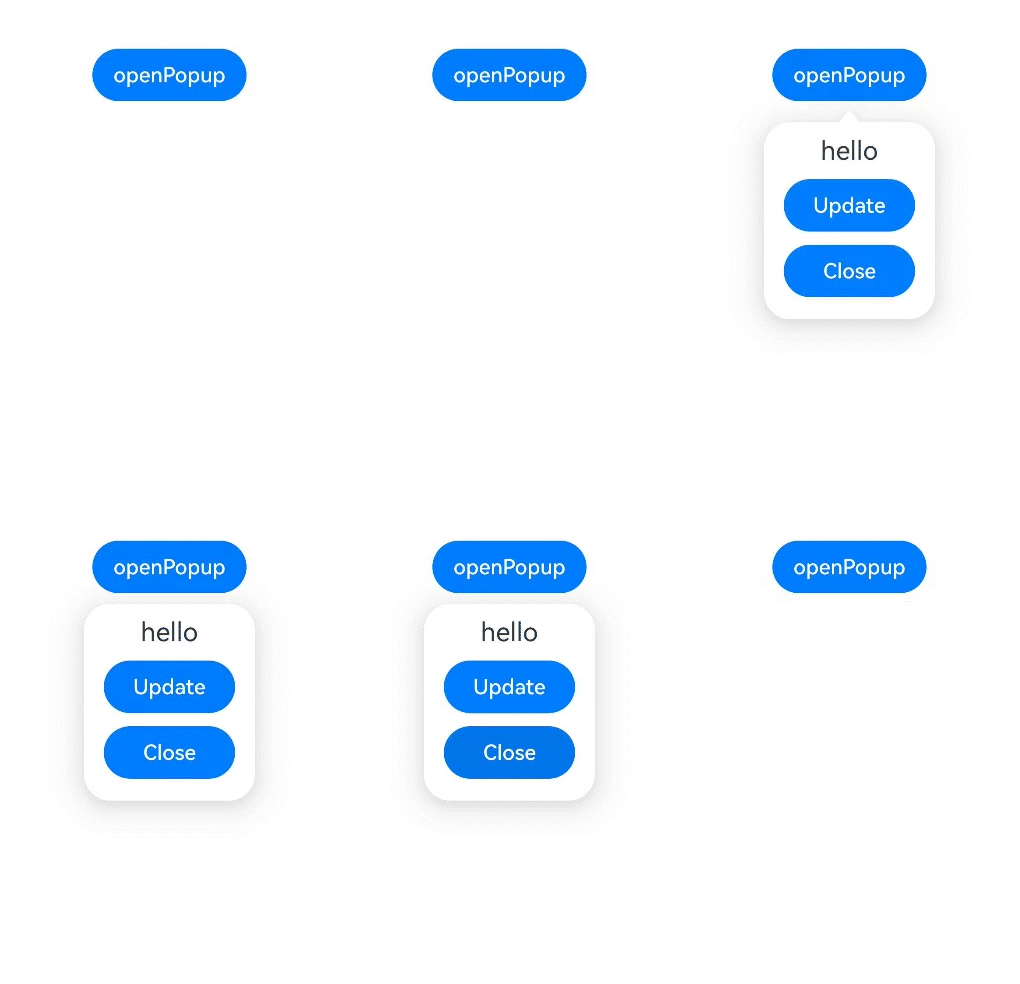
不依赖UI组件的全局气泡提示 (openPopup)
气泡提示(Popup)在使用时依赖绑定UI组件,否则无法使用。从API version 18开始,可以通过使用全局接口openPopup的方式,在无UI组件的场景下直接或封装使用,例如在事件回调中使用或封装后对外提供能力。
弹出气泡
通过openPopup可以弹出气泡。
this.promptAction.openPopup(this.contentNode, { id: targetId }, {
  enableArrow: true
})
  .then(() => {
    hilog.info(0xFF00, 'popupBuildText', 'openPopup success');
  })
  .catch((err: BusinessError) => {
    hilog.error(0xFF00, 'popupBuildText', 'openPopup error: ' + err.code + ' ' + err.message);
  });
创建ComponentContent
通过调用openPopup接口弹出气泡,需要定义ComponentContent,以提供自定义弹出框的内容。详细规格可参考ComponentContent说明。
private contentNode: ComponentContent<Object> =
  new ComponentContent(this.uiContext, wrapBuilder(buildText), this.message);
如果在wrapBuilder中包含其他组件(例如:Popup、Chip组件),则应在创建ComponentContent时设置nestingBuilderSupported属性为true。
@Builder
export function buildText(params: Params) {
  Popup({
    // 类型设置图标内容。
    icon: {
      // 请将$r('app.media.app_icon')替换为实际资源文件
      image: $r('app.media.app_icon'),
      width: 32,
      height: 32,
      fillColor: Color.White,
      borderRadius: 10
    } as PopupIconOptions,
    // 设置文字内容。
    title: {
      text: `This is a Popup title 1`,
      fontSize: 20,
      fontColor: Color.Black,
      fontWeight: FontWeight.Normal
    } as PopupTextOptions,
    // 设置文字内容。
    message: {
      text: `This is a Popup message 1`,
      fontSize: 15,
      fontColor: Color.Black
    } as PopupTextOptions,
    // 设置按钮内容。
    buttons: [{
      text: 'confirm',
      action: () => {
        hilog.info(0xFF00, 'popupBuildText', 'confirm button click');
      },
      fontSize: 15,
      fontColor: Color.Black,
    },
      {
        text: 'cancel',
        action: () => {
          hilog.info(0xFF00, 'popupBuildText', 'cancel button click');
        },
        fontSize: 15,
        fontColor: Color.Black
      },] as [PopupButtonOptions?, PopupButtonOptions?]
  });
}

let contentNode: ComponentContent<Object> =
  new ComponentContent(uiContext, wrapBuilder(buildText), message, { nestingBuilderSupported: true });
绑定组件信息
通过调用openPopup接口弹出气泡,需要提供绑定组件的信息TargetInfo。若未传入有效的target,气泡将无法弹出。
目前有两种设置target的方式。
-
target的id属性设置为number类型,此时需要将id设置为对应组件的UniqueID,组件的UniqueID由系统保证唯一性。
let frameNode: FrameNode | null = this.uiContext.getFrameNodeByUniqueId(this.getUniqueId());let targetId = frameNode?.getChild(0)?.getUniqueId(); -
target的id属性设置为string类型,此时需要将id设置为对应组件的通用属性id值。当无法保证id的唯一性时,如多团队开发或者复用自定义组件,可以通过设置componentId属性明确指定此id的范围来精确指定target,此时componentId属性可以设置为对应组件的父组件或者所在自定义组件的UniqueID。
build() {NavDestination() {Column() {Row() {Button('button1').id(this.targetIdString)}Row() {Button('button2').id(this.targetIdString)}Button('openPopup').onClick(() => {let frameNode: FrameNode | null = this.uiContext.getFrameNodeByUniqueId(this.getUniqueId());let componentId = frameNode?.getChild(1)?.getChild(0)?.getChild(1)?.getUniqueId();if (componentId == undefined) {this.componentId = 0;} else {this.componentId = componentId;}this.promptActionClass.setPromptAction(this.promptAction);this.promptActionClass.setContentNode(this.contentNode);this.promptActionClass.setOptions(this.options);this.promptActionClass.setIsPartialUpdate(false);this.promptActionClass.setTarget({ id: this.targetIdString, componentId: this.componentId });this.promptActionClass.openPopup();})}}}
设置弹出气泡样式
通过调用openPopup接口弹出气泡,可以设置PopupCommonOptions属性调整气泡样式。
private options: PopupCommonOptions = { enableArrow: true };
更新气泡样式
从API version 18开始,通过updatePopup可以更新气泡的样式。支持全量更新和增量更新其气泡样式,不支持更新PopupCommonOptions中的showInSubWindow、focusable、onStateChange、onWillDismiss和transition属性。
this.promptAction.updatePopup(this.contentNode, {
enableArrow: false
}, true)
.then(() => {
hilog.info(0xFF00, 'popupBuildText', 'updatePopup success');
})
.catch((err: BusinessError) => {
hilog.error(0xFF00, 'popupBuildText', 'updatePopup error: ' + err.code + ' ' + err.message);
});
关闭气泡
从API version 18开始,通过调用closePopup可以关闭气泡。
this.promptAction.closePopup(this.contentNode)
.then(() => {
hilog.info(0xFF00, 'popupBuildText', 'closePopup success');
})
.catch((err: BusinessError) => {
hilog.error(0xFF00, 'popupBuildText', 'closePopup error: ' + err.code + ' ' + err.message);
});

由于updatePopup和closePopup依赖content来更新或者关闭指定的气泡,开发者需自行维护传入的content。
在HAR包中使用全局气泡提示
以下示例通过HAR包封装一个Popup,从而对外提供气泡的弹出、更新和关闭能力。
import { BusinessError } from '@kit.BasicServicesKit';
import { ComponentContent, TargetInfo, PromptAction } from '@kit.ArkUI';
import { hilog } from '@kit.PerformanceAnalysisKit';
export class PromptActionClass {
private promptAction: PromptAction | null = null;
private contentNode: ComponentContent<Object> | null = null;
private options: PopupCommonOptions | null = null;
private target: TargetInfo | null = null;
private isPartialUpdate: boolean = false;
public setPromptAction(promptAction: PromptAction) {
this.promptAction = promptAction;
}
public setContentNode(node: ComponentContent<Object>) {
this.contentNode = node;
}
public setTarget(target: TargetInfo) {
this.target = target;
}
public setOptions(options: PopupCommonOptions) {
this.options = options;
}
public setIsPartialUpdate(isPartialUpdate: boolean) {
this.isPartialUpdate = isPartialUpdate;
}
public openPopup() {
if (this.promptAction != null) {
this.promptAction.openPopup(this.contentNode, this.target, this.options)
.then(() => {
hilog.info(0xFF00, 'popupMainPage', 'openPopup success');
})
.catch((err: BusinessError) => {
hilog.error(0xFF00, 'popupMainPage', 'openPopup error: ' + err.code + ' ' + err.message);
});
}
}
public closePopup() {
if (this.promptAction != null) {
this.promptAction.closePopup(this.contentNode)
.then(() => {
hilog.info(0xFF00, 'popupMainPage', 'closePopup success');
})
.catch((err: BusinessError) => {
hilog.error(0xFF00, 'popupMainPage', 'closePopup error: ' + err.code + ' ' + err.message);
});
}
}
public updatePopup(options: PopupCommonOptions) {
if (this.promptAction != null) {
this.promptAction.updatePopup(this.contentNode, options, this.isPartialUpdate)
.then(() => {
hilog.info(0xFF00, 'popupMainPage', 'updatePopup success');
})
.catch((err: BusinessError) => {
hilog.error(0xFF00, 'popupMainPage', 'updatePopup error: ' + err.code + ' ' + err.message);
});
}
}
}
import { PromptActionClass } from './PopupMainPage';
import { ComponentContent, PromptAction } from '@kit.ArkUI';
const ID: number = 0;
class Params {
public text: string = '';
public promptActionClass: PromptActionClass = new PromptActionClass();
constructor(text: string, promptActionClass: PromptActionClass) {
this.text = text;
this.promptActionClass = promptActionClass;
}
}
@Builder
function buildText(params: Params) {
Column() {
Text(params.text)
.fontSize(20)
.margin({ top: 10 })
Button('Update')
.margin({ top: 10 })
.width(100)
.onClick(() => {
params.promptActionClass.updatePopup({
enableArrow: false,
});
})
Button('Close')
.margin({ top: 10 })
.width(100)
.onClick(() => {
params.promptActionClass.closePopup();
})
}.width(130).height(150)
}
@Entry
@Component
export struct OpenPopup {
@State message: string = 'hello';
private uiContext: UIContext = this.getUIContext();
private promptAction: PromptAction = this.uiContext.getPromptAction();
private promptActionClass: PromptActionClass = new PromptActionClass();
private targetId: number = ID;
private contentNode: ComponentContent<Object> =
new ComponentContent(this.uiContext, wrapBuilder(buildText), this.message);
private options: PopupCommonOptions = { enableArrow: true };
build() {
NavDestination() {
Column() {
Button('openPopup')
.margin({ top: 50, left: 100 })
.onClick(() => {
let frameNode: FrameNode | null = this.uiContext.getFrameNodeByUniqueId(this.getUniqueId());
let targetId = frameNode?.getChild(0)?.getUniqueId();
if (targetId == undefined) {
this.targetId = 0;
} else {
this.targetId = targetId;
}
this.promptActionClass.setPromptAction(this.promptAction);
this.promptActionClass.setContentNode(this.contentNode);
this.promptActionClass.setOptions(this.options);
this.promptActionClass.setIsPartialUpdate(false);
this.promptActionClass.setTarget({ id: this.targetId });
this.promptActionClass.openPopup();
})
}
}
}
}