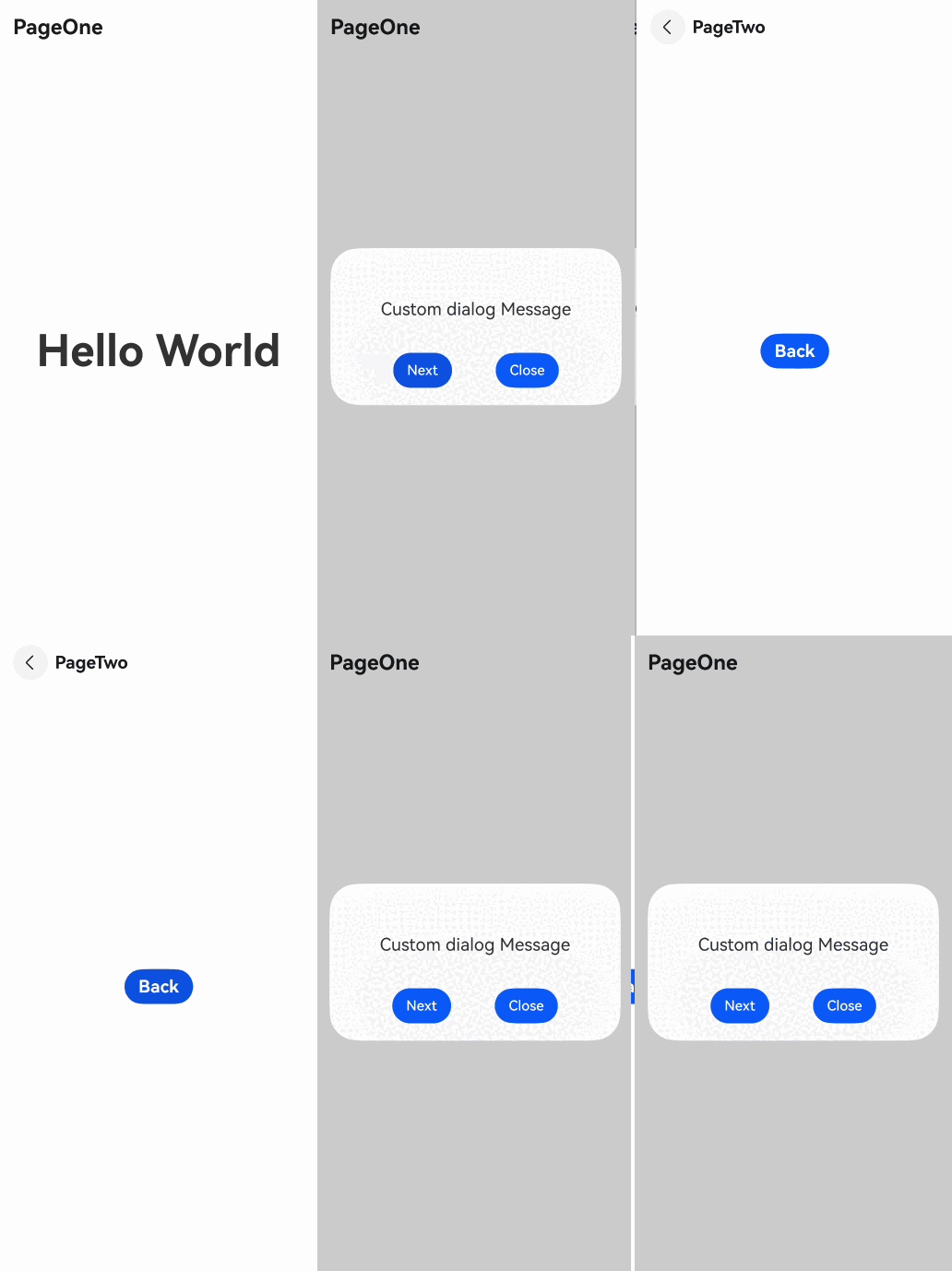
页面级弹出框
ArkUI的弹出框默认设置为全局级别,弹窗节点作为页面根节点的子节点,显示层级高于应用中的所有路由/导航页面。当页面内进行路由跳转时,如果应用未主动调用close方法关闭弹出框,弹出框不会自动关闭,并且会在下一个跳转页面上继续显示。
从API version 15开始,如果开发者希望在路由跳转后,弹出框能够随前一个路由页面的切换而消失,并在路由返回后弹出框能够继续正常显示,可以通过页面级弹出框来实现。

当且仅当弹出框为非子窗模式时,页面级能力才会生效。即showInSubWindow参数不设置或设置为false。
页面级弹出框通常与导航路由能力结合使用,可以参考组件导航和页面路由概述了解相关术语。
页面级弹出框的使用方式是在当前弹出框的入参之中新增了相关属性能力,使用前可以通过弹出框概述了解基础的弹出框使用方法。
设置参数
详细变量定义请参考完整示例。
在弹出框的options入参中设置levelMode属性,值为LevelMode.EMBEDDED表示开启页面级弹出框能力。
当弹出框弹出时,会自动获取当前显示的Page页面并将弹出框节点挂载在此页面下。此时弹出框的显示层级高于此Page页面下的所有Navigation页面。
this.getUIContext().getPromptAction().openCustomDialog({
  builder: () => {
    this.customDialogComponent();
  },
  levelMode: LevelMode.EMBEDDED, // 启用页面级弹出框
  // ···
})
如果希望弹出框显示在某个指定页面内,需通过第二个参数levelUniqueId来实现。此参数接收页面内的节点id,设置后,弹出框显示时会自动查询此id对应的节点所在的Navigation页面,并将其挂载在子页面的NavDestination节点下。
- 当levelMode参数设置为LevelMode.EMBEDDED,但是levelUniqueId传入的ID无法正确找到节点时,页面级能力不生效。如果levelUniqueId所映射的节点存在但向上遍历不存在NavDestination节点则会将弹出框节点挂载在Page节点下。
- levelUniqueId必须传入FrameNode的uniqueId,建议使用FrameNode的getUniqueId方法获取uniqueId。
如下代码示例所示,Text节点为指定页面的节点,设置自定义id后,通过getFrameNodeById方法获取该节点,再通过getUniqueId获取节点的内部id,并将其作为levelUniqueId的值传入。
Text(this.message).id('test_text')
  .onClick(() => {
    const node: FrameNode | null = this.getUIContext().getFrameNodeById('test_text') || null;
    this.getUIContext().getPromptAction().openCustomDialog({
      builder: () => {
        this.customDialogComponent();
      },
      // ···
      levelMode: LevelMode.EMBEDDED, // 启用页面级弹出框
      levelUniqueId: node?.getUniqueId(), // 设置页面级弹出框所在页面的任意节点ID
    })
      .then((dialogId: number) => {
        customDialogId = dialogId;
      });
  })
如果弹出框配置了蒙层,蒙层的遮盖范围会根据页面层级的变化进行调整,默认遮罩范围为弹出框父节点的显示区域(Page页面或者Navigation页面)。此时,状态栏和导航条不会被蒙层遮挡。若希望遮挡状态栏和导航条,可将immersiveMode参数的值设为ImmersiveMode.EXTEND。
Text(this.message).id('test_text')
  .fontSize(50)
  .fontWeight(FontWeight.Bold)
  .onClick(() => {
    const node: FrameNode | null = this.getUIContext().getFrameNodeById('test_text') || null;
    this.getUIContext().getPromptAction().openCustomDialog({
      builder: () => {
        this.customDialogComponent();
      },
      levelMode: LevelMode.EMBEDDED, // 启用页面级弹出框
      levelUniqueId: node?.getUniqueId(), // 设置页面级弹出框所在页面的任意节点ID
      immersiveMode: ImmersiveMode.EXTEND, // 设置页面级弹出框蒙层的显示模式
    })
      .then((dialogId: number) => {
        customDialogId = dialogId;
      });
  })
交互说明
页面内弹出框在部分交互逻辑上依然遵循部分弹出框指定的交互策略:
- 侧滑时先关闭弹出框。通过侧滑手势返回上一页时,如果页面上存在弹出框,弹出框会优先关闭并结束本次手势行为。如果期望返回上一页,需要再次触发侧滑手势。
- 点击弹出框的蒙层,默认会关闭弹出框,点击蒙层以外的区域则不会。
完整示例
下述示例为基于Router路由模式下的页面级弹出框。
import { LevelMode, ImmersiveMode } from '@kit.ArkUI';

let customDialogId: number = 0;

@Builder
function customDialogBuilder(uiContext: UIContext) {
  Column() {
    Text('Custom dialog Message').fontSize(20).height(100)
    Row() {
      Button('Next').onClick(() => {
        // 在弹窗内部进行路由跳转。
        uiContext.getRouter().pushUrl({ url: 'pages/Next' });
      })
      Blank().width(50)
      Button('Close').onClick(() => {
        uiContext.getPromptAction().closeCustomDialog(customDialogId);
      })
    }
  }.padding(20)
}

@Entry
@Component
export struct PageLevelDialogBox {
  @State message: string = 'Hello World';
  private uiContext: UIContext = this.getUIContext();

  @Builder
  customDialogComponent() {
    customDialogBuilder(this.uiContext);
  }

  build() {
    NavDestination() {
      Row() {
        Column() {
          Text(this.message).id('test_text')
            .fontSize(50)
            .fontWeight(FontWeight.Bold)
            .onClick(() => {
              const node: FrameNode | null = this.getUIContext().getFrameNodeById('test_text') || null;
              this.getUIContext().getPromptAction().openCustomDialog({
                builder: () => {
                  this.customDialogComponent();
                },
                levelMode: LevelMode.EMBEDDED, // 启用页面级弹出框
                levelUniqueId: node?.getUniqueId(), // 设置页面级弹出框所在页面的任意节点ID
                immersiveMode: ImmersiveMode.EXTEND, // 设置页面级弹出框蒙层的显示模式
              })
                .then((dialogId: number) => {
                  customDialogId = dialogId;
                });
            })
        }
        .width('100%')
      }
      .height('100%')
    }
  }
}
// Next.ets
@Entry
@Component
struct Next {
  @State message: string = 'Back';

  build() {
    Row() {
      Column() {
        Button(this.message)
          .fontSize(20)
          .fontWeight(FontWeight.Bold)
          .onClick(() => {
            this.getUIContext().getRouter().back();
          })
      }
      .width('100%')
    }
    .height('100%')
  }
}
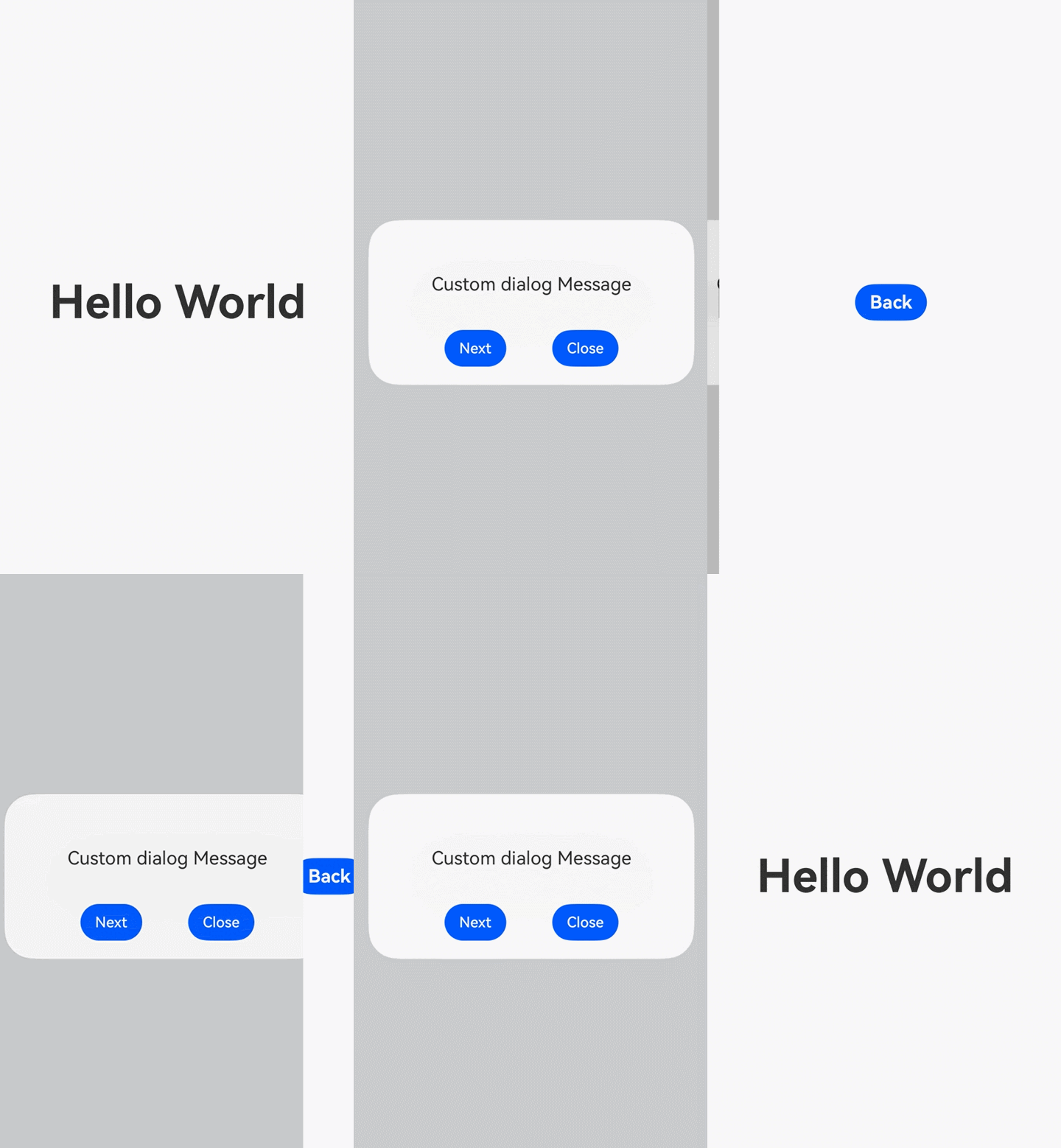
下述示例为基于Navigation导航模式下的页面级弹出框。使用本示例前需要参考Navigation使用NavDestination作为导航页文档完成Index首页和router_map.json的创建与配置。并使用下述示例代码中的PageLevelDialogInNavigation和PageLevelDialogInNavigationTestTwo组件替换Navigation参考文档中的PageHome和PageOne组件。
import { LevelMode, ImmersiveMode } from '@kit.ArkUI';

let customDialogId: number = 0;

@Builder
function customDialogBuilder(uiContext: UIContext, stack: NavPathStack | undefined) {
  Column() {
    Text('Custom dialog Message').fontSize(20).height(100)
    Row() {
      Button('Next').onClick(() => {
        // 在弹窗内部进行路由跳转。
        if (stack) {
          stack.pushPath({ name: 'Custom_ROUTE_PREFIX/PageLevelDialogInNavigationPageTwo'})
        }
      })
      Blank().width(50)
      Button('Close').onClick(() => {
        uiContext.getPromptAction().closeCustomDialog(customDialogId);
      })
    }
  }.padding(20)
}

@Component
export struct PageLevelDialogInNavigation {
  @State info: string = '';
  private stack: NavPathStack | undefined = undefined;
  private uiContext: UIContext = this.getUIContext();
  @State message: string = 'Hello World';

  @Builder
  customDialogComponent() {
    customDialogBuilder(this.uiContext, this.stack);
  }

  build() {
    NavDestination() {
      Stack({alignContent: Alignment.Center}) {
        Column() {
          Text(this.message).id('test_text')
            .fontSize(50)
            .fontWeight(FontWeight.Bold)
            .onClick(() => {
              const node: FrameNode | null = this.getUIContext().getFrameNodeById('test_text') || null;
              this.uiContext.getPromptAction().openCustomDialog({
                builder: () => {
                  this.customDialogComponent();
                },
                levelMode: LevelMode.EMBEDDED, // 启用页面级弹出框
                levelUniqueId: node?.getUniqueId(), // 设置页面级弹出框所在页面的任意节点ID
                immersiveMode: ImmersiveMode.EXTEND, // 设置页面级弹出框蒙层的显示模式
              }).then((dialogId: number) => {
                customDialogId = dialogId;
              })
            })
        }
        .width('100%')
      }.width('100%').height('100%')
    }
    .width('100%').height('100%')
    .title('PageOne')
    .onReady((ctx: NavDestinationContext) => {
      this.stack = ctx.pathStack;
    })
  }
}

@Component
export struct PageLevelDialogInNavigationTestTwo {
  @State message: string = 'Back';
  private stack: NavPathStack | undefined = undefined;

  build() {
    NavDestination() {
      Stack({alignContent: Alignment.Center}) {
        Column() {
          Button(this.message)
            .fontSize(20)
            .fontWeight(FontWeight.Bold)
            .onClick(() => {
              if (this.stack) {
                this.stack.pop()
              }
            })
        }
        .width('100%')
      }.width('100%').height('100%')
    }
    .width('100%').height('100%')
    .title('PageTwo')
    .onReady((ctx: NavDestinationContext) => {
      this.stack = ctx.pathStack;
    })
  }
}