绑定全模态页面(bindContentCover)
全模态页面(bindContentCover)是全屏模态形式的弹窗交互页面,完全覆盖底层父视图。适用于查看大图,全屏查看文稿等场景。
使用约束
全模态页面本质上是弹窗类组件,其交互层级默认为应用内顶层。
Navigation导航转场时,新push的页面层级无法超出全模态,其效果仍然显示在模态页面之下。针对此类场景,建议将模态页面的内容迁移至转场页面中实现。例如,在上述情况下,可以使用NavDestination来替代拉起的模态页面,新push的页面层级低于全模态。
生命周期
全模态页面提供了生命周期函数,用于通知应用程序该弹窗的生命周期状态。生命周期的触发顺序依次为:onWillAppear -> onAppear -> onWillDisappear -> onDisappear。
| 名称 | 类型 | 说明 |
|---|---|---|
| onWillAppear | () => void | 全模态页面显示(动画开始前)回调函数。 |
| onAppear | () => void | 全模态页面显示(动画结束后)回调函数。 |
| onWillDisappear | () => void | 全模态页面回退(动画开始前)回调函数。 |
| onDisappear | () => void | 全模态页面回退(动画结束后)回调函数。 |
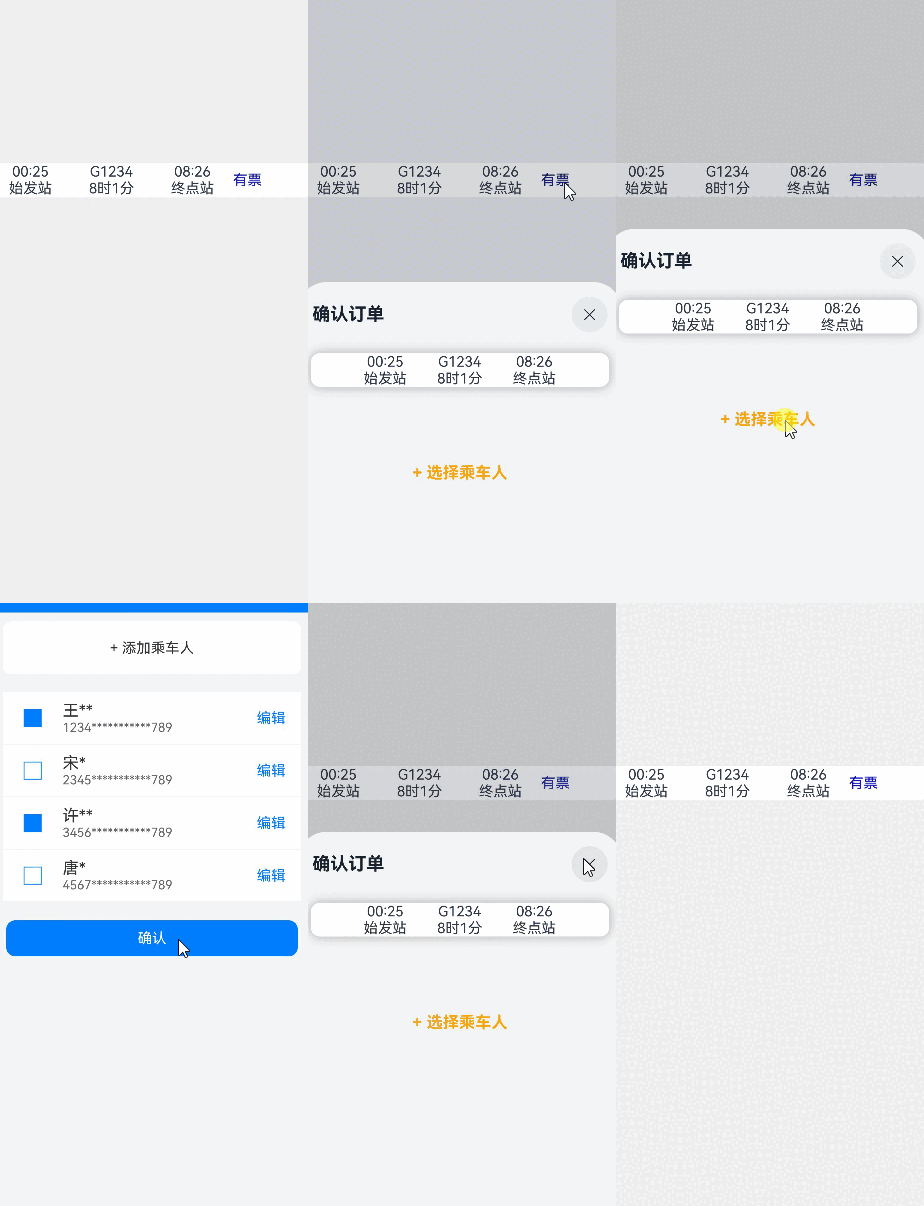
使用bindContentCover构建全屏模态内容覆盖半模态
全模态与半模态之间存在弹窗式的层级交互。后拉起的模态页面能够覆盖先前的模态页面。若开发者期望实现全屏转场,以覆盖半模态,并在全屏页面侧滑退出后,半模态页面仍保持显示,使用bindSheet结合bindContentCover将满足这一场景诉求。
详见模态转场章节,了解使用bindContentCover构建全屏模态转场效果。
import { curves } from '@kit.ArkUI';
import { common } from '@kit.AbilityKit';

interface PersonList {
  name: string,
  cardNum: string
}

@Entry
@Component
struct BindContentCoverDemo {
  private context = this.getUIContext().getHostContext() as common.UIAbilityContext;
  private manager = this.context.resourceManager;
  private personList: Array<PersonList> = [
    // 'Person_example1'资源文件中的value值为'王**'
    { name: this.manager.getStringByNameSync('Person_example1'), cardNum: '1234***********789' },
    // 'Person_example2'资源文件中的value值为'宋*'
    { name: this.manager.getStringByNameSync('Person_example2'), cardNum: '2345***********789' },
    // 'Person_example3'资源文件中的value值为'许**'
    { name: this.manager.getStringByNameSync('Person_example3'), cardNum: '3456***********789' },
    // 'Person_example4'资源文件中的value值为'唐*'
    { name: this.manager.getStringByNameSync('Person_example4'), cardNum: '4567***********789' }
  ];
  // 半模态转场控制变量
  @State isSheetShow: boolean = false;
  // 全模态转场控制变量
  @State isPresent: boolean = false;

  @Builder
  MyContentCoverBuilder() {
    Column() {
      Row() {
        // 请将$r('app.string.Text_choose_person')替换为实际资源文件,在本示例中该资源文件的value值为"选择乘车人"
        Text($r('app.string.Text_choose_person'))
          .fontSize(20)
          .fontColor(Color.White)
          .width('100%')
          .textAlign(TextAlign.Center)
          .padding({ top: 30, bottom: 15 })
      }
      .backgroundColor(0x007dfe)

      Row() {
        // 请将$r('app.string.Text_add_person')替换为实际资源文件,在本示例中该资源文件的value值为"+ 添加乘车人"
        Text($r('app.string.Text_add_person'))
          .fontSize(16)
          .fontColor(0x333333)
          .margin({ top: 10 })
          .padding({ top: 20, bottom: 20 })
          .width('92%')
          .borderRadius(10)
          .textAlign(TextAlign.Center)
          .backgroundColor(Color.White)
      }

      Column() {
        ForEach(this.personList, (item: PersonList, index: number) => {
          Row() {
            Column() {
              if (index % 2 == 0) {
                Column()
                  .width(20)
                  .height(20)
                  .border({ width: 1, color: 0x007dfe })
                  .backgroundColor(0x007dfe)
              } else {
                Column()
                  .width(20)
                  .height(20)
                  .border({ width: 1, color: 0x007dfe })
              }
            }
            .width('20%')

            Column() {
              Text(item.name)
                .fontColor(0x333333)
                .fontSize(18)
              Text(item.cardNum)
                .fontColor(0x666666)
                .fontSize(14)
            }
            .width('60%')
            .alignItems(HorizontalAlign.Start)

            Column() {
              // 请将$r('app.string.Text_edit')替换为实际资源文件,在本示例中该资源文件的value值为"编辑"
              Text($r('app.string.Text_edit'))
                .fontColor(0x007dfe)
                .fontSize(16)
            }
            .width('20%')
          }
          .padding({ top: 10, bottom: 10 })
          .border({ width: { bottom: 1 }, color: 0xf1f1f1 })
          .width('92%')
          .backgroundColor(Color.White)
        })
      }
      .padding({ top: 20, bottom: 20 })

      // 请将$r('app.string.Text_confirm')替换为实际资源文件,在本示例中该资源文件的value值为"确认"
      Text($r('app.string.Text_confirm'))
        .width('90%')
        .height(40)
        .textAlign(TextAlign.Center)
        .borderRadius(10)
        .fontColor(Color.White)
        .backgroundColor(0x007dfe)
        .onClick(() => {
          this.isPresent = !this.isPresent;
        })
    }
    .size({ width: '100%', height: '100%' })
    .backgroundColor(0xf5f5f5)
  }

  @Builder
  TripInfo() {
    Row() {
      Column() {
        Text('00:25')
        // 请将$r('app.string.Label_origin_station')替换为实际资源文件,在本示例中该资源文件的value值为"始发站"
        Text($r('app.string.Label_origin_station'))
      }
      .width('25%')

      Column() {
        Text('G1234')
        // 请将$r('app.string.Label_start_time')替换为实际资源文件,在本示例中该资源文件的value值为"8时1分"
        Text($r('app.string.Label_start_time'))
      }
      .width('25%')

      Column() {
        Text('08:26')
        // 请将$r('app.string.Label_destination_station')替换为实际资源文件,在本示例中该资源文件的value值为"终点站"
        Text($r('app.string.Label_destination_station'))
      }
      .width('25%')
    }
  }

  // 第二步:定义半模态展示界面
  // 通过@Builder构建模态展示界面
  @Builder
  MySheetBuilder() {
    Column() {
      Column() {
        this.TripInfo()
      }
      .width('92%')
      .margin(15)
      .backgroundColor(Color.White)
      .shadow({ radius: 30, color: '#aaaaaa' })
      .borderRadius(10)

      Column() {
        // 请将$r('app.string.Sheet_choose_person')替换为实际资源文件,在本示例中该资源文件的value值为"+ 选择乘车人"
        Text($r('app.string.Sheet_choose_person'))
          .fontSize(18)
          .fontColor(Color.Orange)
          .fontWeight(FontWeight.Bold)
          .padding({ top: 10, bottom: 10 })
          .width('60%')
          .textAlign(TextAlign.Center)
          .borderRadius(15)
          .onClick(() => {
            // 第三步:通过全模态接口调起全模态展示界面,新拉起的模态面板默认显示在最上层
            this.isPresent = !this.isPresent;
          })
          // 通过全模态接口,绑定模态展示界面MyContentCoverBuilder。transition属性支持自定义转场效果,此处定义了x轴横向入场
          .bindContentCover($$this.isPresent, this.MyContentCoverBuilder(), {
            transition: TransitionEffect.translate({ x: 500 }).animation({ curve: curves.springMotion(0.6, 0.8) })
          })
      }
      .padding({ top: 60 })
    }
  }

  build() {
    Column() {
      Row() {
        this.TripInfo()
        // 请将$r('app.string.Sheet_tickets_available')替换为实际资源文件,在本示例中该资源文件的value值为"有票"
        Text($r('app.string.Sheet_tickets_available'))
          .fontColor(Color.Blue)
          .width('25%')
      }
      .width('100%')
      .margin({top: 200, bottom: 30})
      .borderRadius(10)
      .backgroundColor(Color.White)
      .onClick(()=>{
        this.isSheetShow = !this.isSheetShow;
      })
      // 第一步:定义半模态转场效果
      .bindSheet($$this.isSheetShow, this.MySheetBuilder(), {
        height: SheetSize.MEDIUM,
        // 请将$r('app.string.Text_confirm_order')替换为实际资源文件,在本示例中该资源文件的value值为"确认订单"
        title: {title: $r('app.string.Text_confirm_order')},
      })
    }
    .width('100%')
    .height('100%')
    .backgroundColor('#30aaaaaa')
  }
}