@BuilderParam装饰器:引用@Builder函数
当开发者创建自定义组件并需要为其添加特定功能(例如页面跳转功能)时,如果直接在组件内嵌入事件方法,会导致所有该自定义组件的实例都增加此功能。为了解决此问题,ArkUI引入了@BuilderParam装饰器。@BuilderParam用于装饰指向@Builder方法的变量,开发者可以在初始化自定义组件时,使用不同的方式(如参数修改、尾随闭包、借用箭头函数等)对@BuilderParam装饰的自定义构建函数进行传参赋值。在自定义组件内部,通过调用@BuilderParam为组件增加特定功能。
在阅读本文档前,建议提前阅读:@Builder。

从API version 7开始支持。
从API version 9开始,该装饰器支持在ArkTS卡片中使用。
从API version 11开始,该装饰器支持在元服务中使用。
装饰器使用说明
初始化@BuilderParam装饰的方法
@BuilderParam装饰的方法只能被自定义构建函数(@Builder装饰的方法)初始化。
-
使用所属自定义组件的自定义构建函数或者全局的自定义构建函数,在本地初始化@BuilderParam装饰的方法。
@Builderfunction overBuilder() {}@Componentstruct Child {@BuilderdoNothingBuilder() {}// 使用自定义组件的自定义构建函数初始化@BuilderParam装饰的方法@BuilderParam customBuilderParam: () => void = this.doNothingBuilder;// 使用全局自定义构建函数初始化@BuilderParam装饰的方法@BuilderParam customOverBuilderParam: () => void = overBuilder;build() {}} -
使用父组件自定义构建函数初始化子组件@BuilderParam装饰的方法。
@Componentstruct Child {@BuildercustomBuilder() {}@BuilderParam customBuilderParam: () => void = this.customBuilder;build() {Column() {this.customBuilderParam()}}}@Entry@Componentstruct Parent {@BuildercomponentBuilder() {Text('Parent builder')}build() {Column() {Child({ customBuilderParam: this.componentBuilder })}}}
图1 示例效果图

-
需要注意this的指向。
示例如下:
@Componentstruct Child {label: string = 'Child';@BuildercustomBuilder() {}@BuildercustomChangeThisBuilder() {}@BuilderParam customBuilderParam: () => void = this.customBuilder;@BuilderParam customChangeThisBuilderParam: () => void = this.customChangeThisBuilder;build() {Column() {this.customBuilderParam()this.customChangeThisBuilderParam()}}}@Entry@Componentstruct Parent {label: string = 'Parent';@BuildercomponentBuilder() {Text(`${this.label}`)}build() {Column() {// 调用this.componentBuilder()时,this指向当前@Entry所装饰的Parent组件,即label变量的值为'Parent'。this.componentBuilder()Child({// 把this.componentBuilder传给子组件Child的@BuilderParam customBuilderParam,this指向的是子组件Child,即label变量的值为'Child'。customBuilderParam: this.componentBuilder,// 把():void=>{this.componentBuilder()}传给子组件Child的@BuilderParam customChangeThisBuilderParam,// 因为箭头函数的this指向的是宿主对象,所以label变量的值为'Parent'。customChangeThisBuilderParam: (): void => {this.componentBuilder()}})}}}
图2 示例效果图

限制条件
- 使用@BuilderParam装饰的变量只能通过@Builder函数进行初始化。具体参考@BuilderParam装饰器初始化的值必须为@Builder。
- 当@Require装饰器和@BuilderParam装饰器一起使用时,必须初始化@BuilderParam装饰器。具体参考@Require装饰器和@BuilderParam装饰器联合使用。
- 在自定义组件尾随闭包的场景下,子组件有且仅有一个@BuilderParam用来接收此尾随闭包,且此@BuilderParam装饰的方法不能有参数。具体参考尾随闭包初始化组件。
使用场景
参数初始化组件
@BuilderParam装饰的方法为有参数或无参数的形式,必须与指向的@Builder方法类型匹配。
class Tmp {
  public label: string = '';
}

@Builder
function overBuilder($$: Tmp) {
  Text($$.label)
    .width('100%')
    .height(50)
    .backgroundColor(Color.Green)
}

@Component
struct Child {
  label: string = 'Child';

  @Builder
  customBuilder() {
  }

  // 无参数类型,指向的customBuilder也是无参数类型
  @BuilderParam customBuilderParam: () => void = this.customBuilder;
  // 有参数类型,指向的overBuilder也是有参数类型的方法
  @BuilderParam customOverBuilderParam: ($$: Tmp) => void = overBuilder;

  build() {
    Column() {
      this.customBuilderParam()
      this.customOverBuilderParam({ label: 'global Builder label' })
    }
  }
}

@Entry
@Component
struct Parent {
  label: string = 'Parent';

  @Builder
  componentBuilder() {
    Text(`${this.label}`)
  }

  build() {
    Column() {
      this.componentBuilder()
      Child({ customBuilderParam: this.componentBuilder, customOverBuilderParam: overBuilder })
    }
  }
}
图3 示例效果图

尾随闭包初始化组件
在自定义组件中,使用@BuilderParam装饰的属性可通过尾随闭包进行初始化。初始化时,组件后需紧跟一个大括号“{}”形成尾随闭包场景。
- 此场景下自定义组件内仅有一个使用@BuilderParam装饰的属性。
- 此场景下自定义组件不支持通用属性。
开发者可将尾随闭包内的内容看作@Builder装饰的函数传给@BuilderParam。
示例1:
@Component
struct CustomContainer {
  @Prop header: string = '';

  @Builder
  closerBuilder() {
  }

  // 使用父组件的尾随闭包{}(@Builder装饰的方法)初始化子组件@BuilderParam装饰的方法
  @BuilderParam closer: () => void = this.closerBuilder;

  build() {
    Column() {
      Text(this.header)
        .fontSize(30)
      this.closer()
    }
  }
}

@Builder
function specificParam(label1: string, label2: string) {
  Column() {
    Text(label1)
      .fontSize(30)
    Text(label2)
      .fontSize(30)
  }
}

@Entry
@Component
struct CustomContainerUser {
  @State text: string = 'header';

  build() {
    Column() {
      // 创建CustomContainer,在创建CustomContainer时,通过其后紧跟一个大括号“{}”形成尾随闭包
      // 作为传递给子组件CustomContainer @BuilderParam closer: () => void的参数
      CustomContainer({ header: this.text }) {
        Column() {
          specificParam('testA', 'testB')
        }.backgroundColor(Color.Yellow)
        .onClick(() => {
          this.text = 'changeHeader';
        })
      }
    }
  }
}
图4 示例效果图
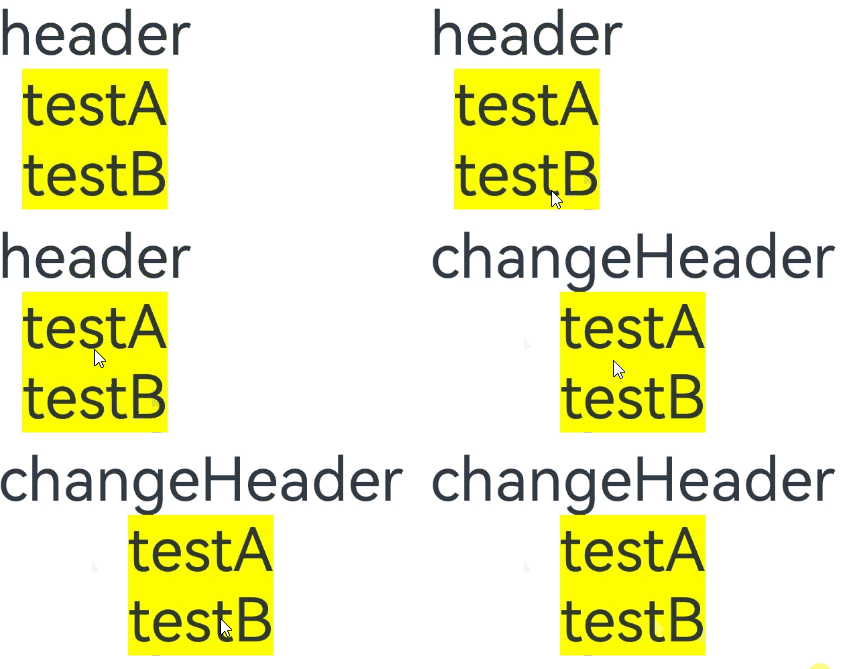
可以使用全局或局部@Builder通过尾随闭包的形式对@ComponentV2装饰的自定义组件中的@BuilderParam装饰的方法进行初始化。
示例2:
@ComponentV2
struct ChildPage {
  @Require @Param message: string = '';

  @Builder
  customBuilder() {
  }

  @BuilderParam customBuilderParam: () => void = this.customBuilder;

  build() {
    Column() {
      Text(this.message)
        .fontSize(30)
        .fontWeight(FontWeight.Bold)
      this.customBuilderParam()
    }
  }
}

const builderValue: string = 'Hello World';

@Builder
function overBuilder() {
  Row() {
    Text(`Global Builder: ${builderValue}`)
      .fontSize(20)
      .fontWeight(FontWeight.Bold)
  }
}

@Entry
@ComponentV2
struct ParentPage {
  @Local label: string = 'Parent Page';

  @Builder
  componentBuilder() {
    Row() {
      Text(`Local Builder: ${this.label}`)
        .fontSize(20)
        .fontWeight(FontWeight.Bold)
    }
  }

  build() {
    Column() {
      ChildPage({ message: this.label }) {
        Column() { // 使用局部@Builder,通过组件后紧跟一个大括号“{}”形成尾随闭包去初始化自定义组件@BuilderParam装饰的方法
          this.componentBuilder();
        }
      }

      Line()
        .width('100%')
        .height(10)
        .backgroundColor('#000000').margin(10)
      ChildPage({ message: this.label }) { // 使用全局@Builder,通过组件后紧跟一个大括号“{}”形成尾随闭包去初始化自定义组件@BuilderParam装饰的方法
        Column() {
          overBuilder();
        }
      }
    }
  }
}
使用@BuilderParam隔离多组件对@Builder跳转逻辑的调用
当@Builder封装的系统组件包含跳转逻辑时,所有调用该@Builder的自定义组件将具备该跳转功能。如果需要禁用特定组件的跳转功能,可使用@BuilderParam来隔离跳转逻辑。
当前示例代码中使用了Navigation组件导航,具体实现逻辑可以查询Navigation指南。
import { HelloWorldPageBuilder } from './helloworld';
import { hilog } from '@kit.PerformanceAnalysisKit';

const DOMAIN = 0x0000;

class NavigationParams {
  public pathStack: NavPathStack = new NavPathStack();
  public boo: boolean = true;
}

@Builder
function navigationAction(params: NavigationParams) {
  Column() {
    Navigation(params.pathStack) {
      Button('router to page', { stateEffect: true, type: ButtonType.Capsule })
        .width('80%')
        .height(40)
        .margin(20)
        .onClick(() => {
          // 通过修改@BuilderParam参数决定是否跳转。
          if (params.boo) {
            params.pathStack.pushPath({ name: 'HelloWorldPage' });
          } else {
            hilog.info(DOMAIN, 'testTag', '%{public}s', '@BuilderParam setting does not jump');
          }
        })
    }
    .navDestination(HelloWorldPageBuilder)
    .hideTitleBar(true)
    .height('100%')
    .width('100%')
  }
  .height('25%')
  .width('100%')
}

@Entry
@Component
struct ParentPage {
  @State info: NavigationParams = new NavigationParams();

  build() {
    Column() {
      Text('ParentPage')
      navigationAction({ pathStack: this.info.pathStack, boo: true })
      ChildPageOne()
      ChildPage_BuilderParam({ eventBuilder: navigationAction })
    }
    .height('100%')
    .width('100%')
  }
}

@Component
struct ChildPageOne {
  @State info: NavigationParams = new NavigationParams();

  build() {
    Column() {
      Text('ChildPage')
      navigationAction({ pathStack: this.info.pathStack, boo: true })
    }
  }
}

@Component
struct ChildPage_BuilderParam {
  @State info: NavigationParams = new NavigationParams();
  @BuilderParam eventBuilder: (param: NavigationParams) => void = navigationAction;

  build() {
    Column() {
      Text('ChildPage_BuilderParam')
      // 对传递过来的全局@Builder进行参数修改,可以实现禁用点击跳转的功能。
      this.eventBuilder({ pathStack: this.info.pathStack, boo: false })
    }
  }
}
@Builder
export function HelloWorldPageBuilder() {
  HelloWorldPage()
}

@Component
struct HelloWorldPage {
  @State message: string = 'Hello World';
  @State pathStack: NavPathStack = new NavPathStack();

  build() {
    NavDestination() {
      Column() {
        Text(this.message)
          .fontSize(20)
          .fontWeight(FontWeight.Bold)
      }
    }
    .height('100%')
    .width('100%')
  }
}
router_map.json
这个文件位于项目的resources/base/profile目录下。
{
  "routerMap": [
    {
      "name": "HelloWorldPage",
      "buildFunction": "HelloWorldPageBuilder",
      "pageSourceFile": "src/main/ets/pages/helloworld.ets"
    }
  ]
}
module.json5
这个文件位于应用模块的根目录下,例如entry/src/main/module.json5。
{
  "module": {
    "routerMap": "$profile:router_map",
    ......
  }
}
图5 示例效果图
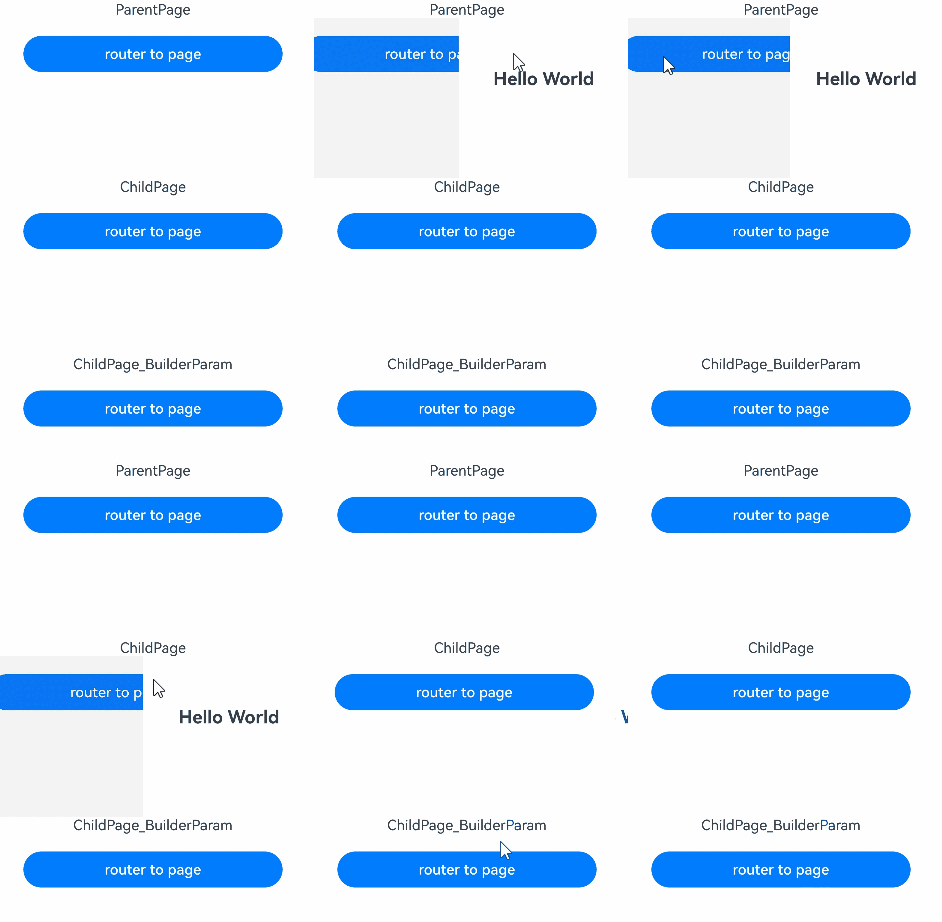
使用全局和局部@Builder初始化@BuilderParam
在自定义组件中,使用@BuilderParam装饰的变量接收父组件通过@Builder传递的内容进行初始化,由于父组件的@Builder可以使用箭头函数改变当前的this指向,因此使用@BuilderParam装饰的变量会展示不同的内容。
@Component
struct ChildPage {
  label: string = 'Child Page';

  @Builder
  customBuilder() {
  }

  @BuilderParam customBuilderParam: () => void = this.customBuilder;
  @BuilderParam customChangeThisBuilderParam: () => void = this.customBuilder;

  build() {
    Column() {
      this.customBuilderParam()
      this.customChangeThisBuilderParam()
    }
  }
}

const builderValue: string = 'Hello World';

@Builder
function overBuilder() {
  Row() {
    Text(`Global Builder: ${builderValue}`)
      .fontSize(20)
      .fontWeight(FontWeight.Bold)
  }
}

@Entry
@Component
struct ParentPage {
  label: string = 'Parent Page';

  @Builder
  componentBuilder() {
    Row() {
      Text(`Local Builder: ${this.label}`)
        .fontSize(20)
        .fontWeight(FontWeight.Bold)
    }
  }

  build() {
    Column() {
      // 调用this.componentBuilder()时,this指向当前@Entry所装饰的ParentPage组件,所以label变量的值为'Parent Page'。
      this.componentBuilder()
      ChildPage({
        // 把this.componentBuilder传给子组件ChildPage的@BuilderParam customBuilderParam,
        // this指向的是子组件ChildPage,所以label变量的值为'Child Page'。
        customBuilderParam: this.componentBuilder,
        // 把():void=>{this.componentBuilder()}传给子组件ChildPage的@BuilderParam customChangeThisBuilderParam,
        // 因为箭头函数的this指向的是宿主对象,所以label变量的值为'Parent Page'。
        customChangeThisBuilderParam: (): void => {
          this.componentBuilder()
        }
      })
      Line()
        .width('100%')
        .height(10)
        .backgroundColor('#000000').margin(10)
      // 调用全局overBuilder()时,this指向当前整个活动页,所以展示的内容为'Hello World'。
      overBuilder()
      ChildPage({
        // 把全局overBuilder传给子组件ChildPage的@BuilderParam customBuilderParam,
        // this指向当前整个活动页,所以展示的内容为'Hello World'。
        customBuilderParam: overBuilder,
        // 把全局overBuilder传给子组件ChildPage的@BuilderParam customChangeThisBuilderParam,
        // this指向当前整个活动页,所以展示的内容为'Hello World'。
        customChangeThisBuilderParam: overBuilder
      })
    }
  }
}
图6 示例效果图
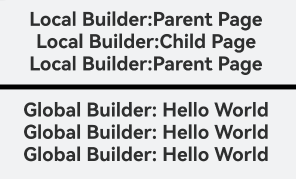
在@ComponentV2装饰的自定义组件中使用@BuilderParam
使用全局或局部@Builder初始化@ComponentV2装饰的自定义组件中的@BuilderParam属性。
@ComponentV2
struct ChildPage {
  @Param label: string = 'Child Page';

  @Builder
  customBuilder() {
  }

  @BuilderParam customBuilderParam: () => void = this.customBuilder;
  @BuilderParam customChangeThisBuilderParam: () => void = this.customBuilder;

  build() {
    Column() {
      this.customBuilderParam()
      this.customChangeThisBuilderParam()
    }
  }
}

const builderValue: string = 'Hello World';

@Builder
function overBuilder() {
  Row() {
    Text(`Global Builder: ${builderValue}`)
      .fontSize(20)
      .fontWeight(FontWeight.Bold)
  }
}

@Entry
@ComponentV2
struct ParentPage {
  @Local label: string = 'Parent Page';

  @Builder
  componentBuilder() {
    Row() {
      Text(`Local Builder: ${this.label}`)
        .fontSize(20)
        .fontWeight(FontWeight.Bold)
    }
  }

  build() {
    Column() {
      // 调用this.componentBuilder()时,this指向当前@Entry所装饰的ParentPage组件,所以label变量的值为'Parent Page'。
      this.componentBuilder()
      ChildPage({
        // 把this.componentBuilder传给子组件ChildPage的@BuilderParam customBuilderParam,
        // this指向的是子组件ChildPage,所以label变量的值为'Child Page'。
        customBuilderParam: this.componentBuilder,
        // 把():void=>{this.componentBuilder()}传给子组件ChildPage的@BuilderParam customChangeThisBuilderPara
        // 因为箭头函数的this指向的是宿主对象,所以label变量的值为'Parent Page'。
        customChangeThisBuilderParam: (): void => {
          this.componentBuilder()
        }
      })
      Line()
        .width('100%')
        .height(5)
        .backgroundColor('#000000').margin(10)
      // 调用全局overBuilder()时,this指向当前整个活动页,所以展示的内容为'Hello World'。
      overBuilder()
      ChildPage({
        // 把全局overBuilder传给子组件ChildPage的@BuilderParam customBuilderParam,
        // this指向当前整个活动页,所以展示的内容为'Hello World'。
        customBuilderParam: overBuilder,
        // 把全局overBuilder传给子组件ChildPage的@BuilderParam customChangeThisBuilderParam,
        // this指向当前整个活动页,所以展示的内容为'Hello World'。
        customChangeThisBuilderParam: overBuilder
      })
    }
  }
}
图7 示例效果图
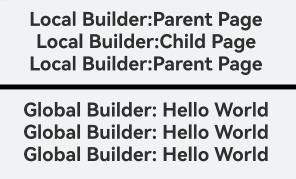
常见问题
改变内容UI不刷新
调用自定义组件ChildPage时,通过this.componentBuilder传递@Builder参数。this指向自定义组件内部,因此父组件中改变label的值时,ChildPage无法感知这一变化。
【反例】
@Component
struct ChildPage {
  @State label: string = 'Child Page';

  @Builder
  customBuilder() {
  }

  @BuilderParam customChangeThisBuilderParam: () => void = this.customBuilder;

  build() {
    Column() {
      this.customChangeThisBuilderParam()
    }
  }
}

@Entry
@Component
struct ParentPage {
  @State label: string = 'Parent Page';

  @Builder
  componentBuilder() {
    Row() {
      Text(`Builder :${this.label}`)
        .fontSize(20)
        .fontWeight(FontWeight.Bold)
    }
  }

  build() {
    Column() {
      ChildPage({
        // 当前写法this指向ChildPage组件内
        customChangeThisBuilderParam: this.componentBuilder
      })
      // 请将$r('app.string.builderOpp_text1')替换为实际资源文件,在本示例中该资源文件的value值为"点击改变label内容"
      Button($r('app.string.builderOpp_text1'))
        .onClick(() => {
          this.label = 'Hello World';
        })
    }
  }
}
使用箭头函数将@Builder传递到自定义组件ChildPage中,this指向会停留在父组件ParentPage里。在父组件中改变label的值时,ChildPage会感知到并重新渲染UI。
【正例】
@Component
struct ChildPage {
  @State label: string = 'Child Page';

  @Builder
  customBuilder() {
  }

  @BuilderParam customChangeThisBuilderParam: () => void = this.customBuilder;

  build() {
    Column() {
      this.customChangeThisBuilderParam()
    }
  }
}

@Entry
@Component
struct ParentPage {
  @State label: string = 'Parent Page';

  @Builder
  componentBuilder() {
    Row() {
      Text(`Builder :${this.label}`)
        .fontSize(20)
        .fontWeight(FontWeight.Bold)
    }
  }

  build() {
    Column() {
      ChildPage({
        customChangeThisBuilderParam: () => {
          this.componentBuilder()
        }
      })
      // 请将$r('app.string.builderOpp_text1')替换为实际资源文件,在本示例中该资源文件的value值为"点击改变label内容"
      Button($r('app.string.builderOpp_text1'))
        .onClick(() => {
          this.label = 'Hello World';
        })
    }
  }
}
@Require装饰器和@BuilderParam装饰器联合使用
由于@Require装饰器所装饰的变量需进行初始化,未初始化会导致编译报错。
【反例】
@Builder
function globalBuilder() {
  Text('Hello World')
}

@Entry
@Component
struct CustomBuilderDemo {
  build() {
    Column() {
      // 由于未对@Require装饰的变量ChildBuilder进行赋值,此处无论是编译还是编辑,均会报错。
      ChildPage()
    }
  }
}

@Component
struct ChildPage {
  @Require @BuilderParam ChildBuilder: () => void = globalBuilder;

  build() {
    Column() {
      this.ChildBuilder()
    }
  }
}
@Require装饰的变量必须从外部初始化。
【正例】
@Builder
function globalBuilder() {
  Text('Hello World')
}

@Entry
@Component
struct CustomBuilderDemo {
  build() {
    Column() {
      ChildPage({ childBuilder: globalBuilder })
    }
  }
}

@Component
struct ChildPage {
  @Require @BuilderParam childBuilder: () => void = globalBuilder;

  build() {
    Column() {
      this.childBuilder()
    }
  }
}
@BuilderParam装饰器初始化的值必须为@Builder
使用@State装饰器装饰的变量,在初始化子组件的@BuilderParam和ChildBuilder变量时,编译时会输出报错信息。
【反例】
@Builder
function globalBuilder() {
  Text('Hello World')
}

@Entry
@Component
struct CustomBuilderDemo {
  @State message: string = '';

  build() {
    Column() {
      // @BuilderParam装饰的变量ChildBuilder接收@State装饰的变量,会出现编译和编辑报错
      ChildPage({ ChildBuilder: this.message })
    }
  }
}

@Component
struct ChildPage {
  @BuilderParam ChildBuilder: () => void = globalBuilder;

  build() {
    Column() {
      this.ChildBuilder()
    }
  }
}
使用全局@Builder装饰的globalBuilder()方法为子组件@BuilderParam装饰的ChildBuilder变量初始化,编译无报错,功能正常。
【正例】
@Builder
function globalBuilder() {
  Text('Hello World')
}

@Entry
@Component
struct CustomBuilderDemo {
  build() {
    Column() {
      ChildPage({ childBuilder: globalBuilder })
    }
  }
}

@Component
struct ChildPage {
  @BuilderParam childBuilder: () => void = globalBuilder;

  build() {
    Column() {
      this.childBuilder()
    }
  }
}