@Builder装饰器:自定义构建函数
ArkUI提供轻量的UI元素复用机制@Builder,其内部UI结构固定,仅与使用方进行数据传递。开发者可将重复使用的UI元素抽象成函数,在build函数中调用。
@Builder装饰的函数也称为“自定义构建函数”。
在阅读本文档前,建议提前阅读:基本语法概述、声明式UI描述、自定义组件-创建自定义组件。
@Builder装饰器和@Component装饰器在功能和使用方式上的主要差异:
- @Builder装饰器用于封装可复用的UI结构,通过提取重复的布局代码提高开发效率。该装饰器严格禁止在其内部定义状态变量或使用生命周期函数,必须通过参数传递或者访问所属组件的状态变量完成数据交互。
- 在ArkUI框架中,@Component装饰器作为封装复杂UI组件的核心机制,允许开发者通过组合多个基础组件来构建可复用的复合界面。该装饰器不仅支持内部状态变量的定义,还能完整管理组件的生命周期。

从API version 7开始支持。
从API version 9开始,该装饰器支持在ArkTS卡片中使用。
从API version 11开始,该装饰器支持在元服务中使用。
装饰器使用说明
@Builder装饰器有两种使用方式,分别是定义在自定义组件内部的私有自定义构建函数和定义在全局的全局自定义构建函数。
私有自定义构建函数
示例:
@Entry
@Component
struct BuilderDemo {
  @Builder
  showTextBuilder() {
    // @Builder装饰此函数,使其能以链式调用的方式配置并构建Text组件
    Text('Hello World')
      .fontSize(30)
      .fontWeight(FontWeight.Bold)
  }

  @Builder
  showTextValueBuilder(param: string) {
    Text(param)
      .fontSize(30)
      .fontWeight(FontWeight.Bold)
  }

  build() {
    Column() {
      // 无参数
      this.showTextBuilder()
      // 有参数
      this.showTextValueBuilder('Hello @Builder')
    }
  }
}
使用方法:
- 允许在自定义组件内定义一个或多个@Builder函数,该函数被认为是该组件的私有、特殊类型的成员函数。
- 私有自定义构建函数允许在自定义组件内、build函数和其他自定义构建函数中调用。
- 在自定义组件中,this指代当前所属组件,组件的状态变量可在自定义构建函数内访问。建议通过this访问组件的状态变量,而不是通过参数传递。
全局自定义构建函数
示例:
@Builder
function showTextBuilder() {
  Text('Hello World')
    .fontSize(30)
    .fontWeight(FontWeight.Bold)
}

@Entry
@Component
struct BuilderSample {
  build() {
    Column() {
      showTextBuilder()
    }
  }
}
- 如果不涉及组件状态变量变化,建议使用全局的自定义构建函数。
- 全局自定义构建函数允许在build函数和其他自定义构建函数中调用。
参数传递规则
自定义构建函数的参数传递有按回调传递,按引用传递和按值传递,均需遵守以下规则:
- @Builder装饰的函数参数类型不允许为undefined、null和返回undefined、null的表达式。
- 在@Builder装饰的函数内部,不允许改变参数值。
- @Builder内UI语法遵循UI语法规则。
- 按回调传递和按引用传递时,支持@Builder函数内UI组件刷新。按引用传递只在传入一个参数且该参数直接传入对象字面量时生效,有多个参数时不支持@Builder函数内UI组件刷新。
- 使用引用传递时,在@Builder函数中不能修改参数的属性,但使用UIUtils.makeBinding并传入写回调时,我们可以在@Builder函数内修改属性,并同步到调用@Builder的组件中。
按回调传递参数
从API version 20开始,开发者可以通过使用UIUtils.makeBinding()函数、Binding类和MutableBinding类实现@Builder函数中状态变量的刷新。详细用例见@Builder支持状态变量刷新。
使用UIUtils.makeBinding()包装读取状态变量的回调函数作为参数传入@Builder函数,可以支持@Builder函数中UI组件刷新;UIUtils.makeBinding()中额外传入写状态变量的回调函数可以将@Builder函数内对参数的修改,传递到调用@Builder函数的组件中。
import { Binding, MutableBinding, UIUtils } from '@kit.ArkUI';

@Builder
function customButton(num1: Binding<number>, num2: MutableBinding<number>) {
  Row() {
    Column() {
      Text(`number1: ${num1.value}, number2: ${num2.value}`)
      Button(`only change number2`)
        .onClick(() => {
          // 赋值MutableBinding类型传递该修改到父组件中。
          num2.value += 1;
        })
    }
  }
}

@Entry
@ComponentV2
struct ParameterMakeBinding {
  @Local number1: number = 5;
  @Local number2: number = 12;

  build() {
    Column() {
      customButton(
        // 使用makeBinding传入参数,需要传入读回调,返回Binding类型,支持@Builder内组件UI刷新。
        UIUtils.makeBinding<number>(() => this.number1),
        // makeBinding额外传入写回调时返回MutableBinding类型,支持@Builder内组件UI刷新并且同步属性修改。
        UIUtils.makeBinding<number>(
          () => this.number2,
          (val: number) => {
            this.number2 = val;
          })
      )
    }
  }
}
按引用传递参数
按引用传递参数时,传递的参数可为状态变量,且状态变量的改变会引起@Builder函数内的UI刷新。
class Tmp {
  public paramA1: string = '';
}

@Builder
function overBuilderByReference(params: Tmp) {
  Row() {
    Text(`UseStateVarByReference: ${params.paramA1} `)
  }
}

@Entry
@Component
struct ParameterReference {
  @State label: string = 'Hello';

  build() {
    Column() {
      // 在父组件中调用overBuilderByReference组件时,
      // 把this.label通过引用传递的方式传给overBuilderByReference组件。
      overBuilderByReference({ paramA1: this.label })
      Button('Click me').onClick(() => {
        // 单击Click me后,UI文本从Hello更改为ArkUI。
        this.label = 'ArkUI';
      })
    }
  }
}
按值传递参数
调用@Builder装饰的函数默认按值传递。当传递的参数为状态变量时,状态变量的改变不会引起@Builder函数内的UI刷新。所以当使用状态变量的时候,推荐使用按回调传递或按引用传递。
@Builder
function overBuilderByValue(paramA1: string) {
  Row() {
    Text(`UseStateVarByValue: ${paramA1} `)
  }
}

@Entry
@Component
struct ParameterValue {
  @State label: string = 'Hello';

  build() {
    Column() {
      overBuilderByValue(this.label)
    }
  }
}
限制条件
- @Builder装饰的函数内部在没有使用MutableBinding时不允许修改参数值,修改不会触发UI刷新。若按引用传递参数且仅传入一个参数时,修改参数内部的属性会抛出运行时错误。使用MutableBinding可以帮助开发者在@Builder装饰的函数内部修改参数值,请参考在@Builder装饰的函数内部修改入参内容。
- @Builder按引用传递传入一个参数时,可以触发动态渲染UI,请参考按引用传递参数。
- 如果@Builder传入的参数是两个或两个以上,且未使用按回调传递参数,不会触发动态渲染UI,请参考@Builder存在两个或两个以上参数。
- @Builder传入的参数中同时包含按值传递和按引用传递,不会触发动态渲染UI,请参考@Builder存在两个或两个以上参数。
- 不允许在@Builder函数里修改参数的属性,否则会抛出运行时错误,从API version 23开始,将返回错误码140109,示例请参考在@Builder装饰的函数内部修改入参内容。
使用场景
自定义组件内使用自定义构建函数
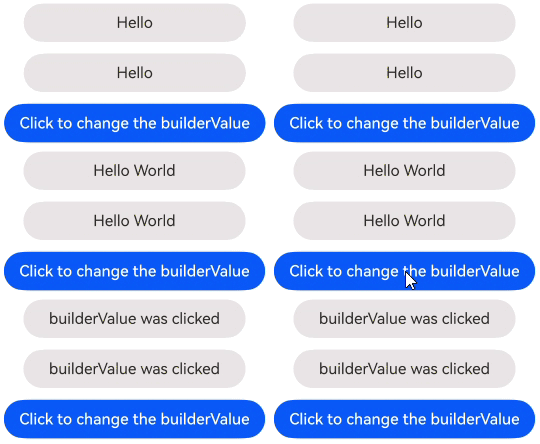
创建私有的@Builder函数,在Column中使用this.builder()调用。通过aboutToAppear生命周期函数和按钮的点击事件更新builderValue,实现UI的动态渲染。
@Entry
@Component
struct PrivateBuilder {
  @State builderValue: string = 'Hello';

  @Builder
  builder() {
    Column() {
      Text(this.builderValue)
        .width(230)
        .height(40)
        .backgroundColor('#ffeae5e5')
        .borderRadius(20)
        .margin(12)
        .textAlign(TextAlign.Center)
    }
  }

  aboutToAppear(): void {
    setTimeout(() => {
      this.builderValue = 'Hello World';
    }, 2000);
  }

  build() {
    Row() {
      Column() {
        Text(this.builderValue)
          .width(230)
          .height(40)
          .backgroundColor('#ffeae5e5')
          .borderRadius(20)
          .textAlign(TextAlign.Center)
        this.builder()
        Button('Click to change the builderValue')
          .onClick(() => {
            this.builderValue = 'builderValue was clicked';
          })
      }
      .height('100%')
      .width('100%')
    }
  }
}
示例效果图
全局自定义构建函数
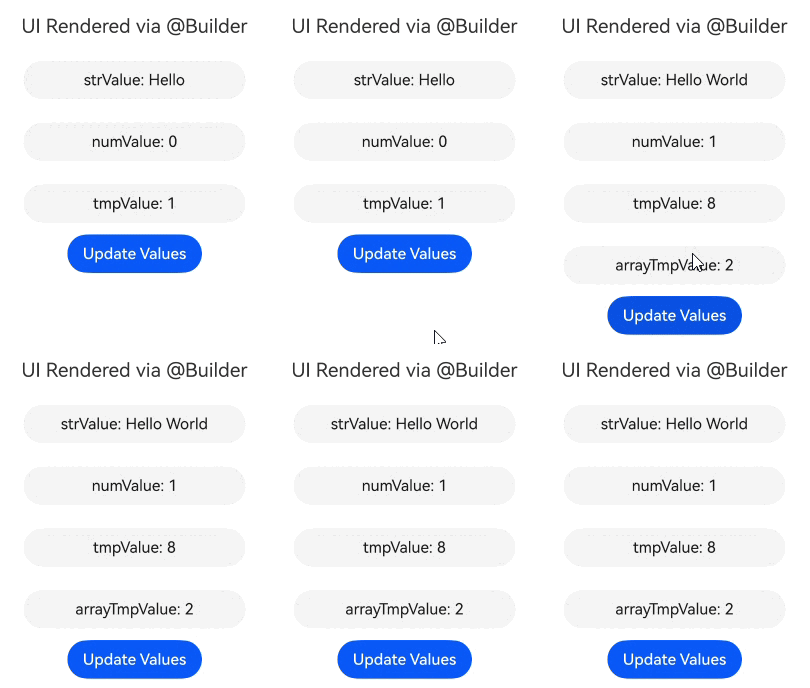
创建全局的@Builder函数,并在Column中通过overBuilder()方式调用。传递参数时,可以使用对象字面量形式,无论是简单类型还是复杂类型,值的任何变化都会触发UI界面的刷新。
class ChildTmp {
  public val: number = 1;
}

class ParamTmp {
  public strValue: string = 'Hello';
  public numValue: number = 0;
  public tmpValue: ChildTmp = new ChildTmp();
  public arrayTmpValue: Array<ChildTmp> = [];
}

@Builder
function overBuilder(param: ParamTmp) {
  Column() {
    Text(`strValue: ${param.strValue}`)
      .width(230)
      .height(40)
      .margin(12)
      .backgroundColor('#0d000000')
      .fontColor('#e6000000')
      .borderRadius(20)
      .textAlign(TextAlign.Center)
    Text(`numValue: ${param.numValue}`)
      .width(230)
      .height(40)
      .margin(12)
      .backgroundColor('#0d000000')
      .fontColor('#e6000000')
      .borderRadius(20)
      .textAlign(TextAlign.Center)
    Text(`tmpValue: ${param.tmpValue.val}`)
      .width(230)
      .height(40)
      .margin(12)
      .backgroundColor('#0d000000')
      .fontColor('#e6000000')
      .borderRadius(20)
      .textAlign(TextAlign.Center)
    ForEach(param.arrayTmpValue, (item: ChildTmp) => {
      ListItem() {
        Text(`arrayTmpValue: ${item.val}`)
          .width(230)
          .height(40)
          .margin(12)
          .backgroundColor('#0d000000')
          .fontColor('#e6000000')
          .borderRadius(20)
          .textAlign(TextAlign.Center)
      }
    }, (item: ChildTmp) => JSON.stringify(item))
  }
}

@Entry
@Component
struct ParentDemo {
  @State objParam: ParamTmp = new ParamTmp();

  build() {
    Column() {
      Text('UI Rendered via @Builder')
        .fontSize(20)
        .margin(12)
      // 调用全局@Builder函数overBuilder
      overBuilder({
        strValue: this.objParam.strValue,
        numValue: this.objParam.numValue,
        tmpValue: this.objParam.tmpValue,
        arrayTmpValue: this.objParam.arrayTmpValue
      })
      Button('Update Values').onClick(() => {
        this.objParam.strValue = 'Hello World';
        this.objParam.numValue = 1;
        this.objParam.tmpValue.val = 8;
        const childValue: ChildTmp = {
          val: 2
        }
        this.objParam.arrayTmpValue.push(childValue);
      })
    }
    .height('100%')
    .width('100%')
  }
}
示例效果图
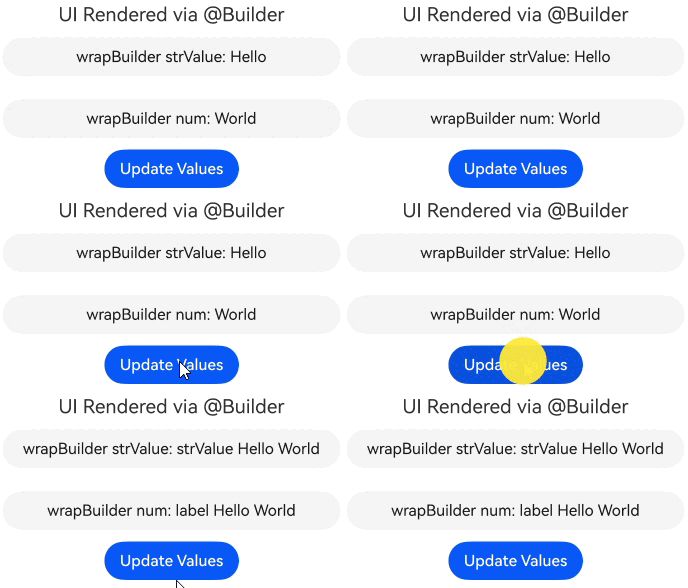
修改装饰器修饰的变量触发UI刷新
在该场景中,@Builder被用来展示Text组件,不会参与动态UI刷新。Text组件中值的变化是通过使用装饰器的特性,监听到值的改变触发的UI刷新,而不是通过@Builder的能力触发的。
class ChildrenTmp {
  public strValue: string = 'Hello';
}

@Entry
@Component
struct ParentSample {
  @State objParam: ChildrenTmp = new ChildrenTmp();
  @State label: string = 'World';

  @Builder
  privateBuilder() {
    Column() {
      Text(`wrapBuilder strValue: ${this.objParam.strValue}`)
        .width(350)
        .height(40)
        .margin(12)
        .backgroundColor('#0d000000')
        .fontColor('#e6000000')
        .borderRadius(20)
        .textAlign(TextAlign.Center)
      Text(`wrapBuilder num: ${this.label}`)
        .width(350)
        .height(40)
        .margin(12)
        .backgroundColor('#0d000000')
        .fontColor('#e6000000')
        .borderRadius(20)
        .textAlign(TextAlign.Center)
    }
  }

  build() {
    Column() {
      Text('UI Rendered via @Builder')
        .fontSize(20)
      this.privateBuilder()
      Button('Update Values').onClick(() => {
        this.objParam.strValue = 'strValue Hello World';
        this.label = 'label Hello World';
      })
    }
    .height('100%')
    .width('100%')
  }
}
示例效果图
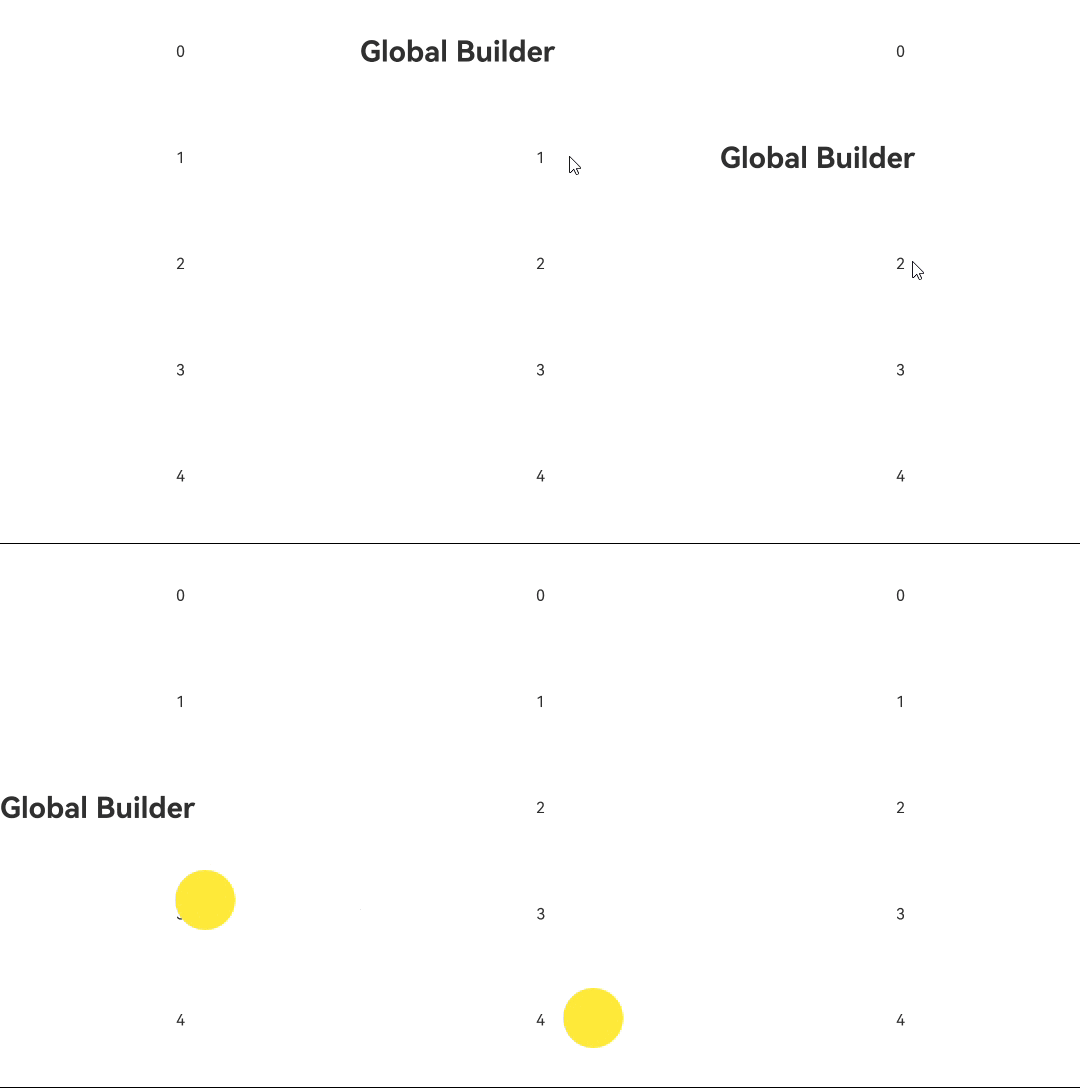
将@Builder装饰的函数当作CustomBuilder类型使用
当参数类型为CustomBuilder时,可以传入定义的@Builder函数。因为CustomBuilder实际上是Function(() => any)或void类型,而@Builder也是Function类型。所以通过传入@Builder可以实现特定效果。
全局@Builder函数当作CustomBuilder类型传递时需要绑定this上下文,开发者可以直接调用全局@Builder函数,编译工具链会自动生成绑定this上下文的代码。
@Builder
function overBuilderDemo() {
  Row() {
    Text('Global Builder')
      .fontSize(30)
      .fontWeight(FontWeight.Bold)
  }
}

@Entry
@Component
struct customBuilderDemo {
  @State arr: number[] = [0, 1, 2, 3, 4];

  @Builder
  privateBuilder() {
    Row() {
      Text('Private Builder')
        .fontSize(30)
        .fontWeight(FontWeight.Bold)
    }
  }

  build() {
    Column() {
      List({ space: 10 }) {
        ForEach(this.arr, (item: number) => {
          ListItem() {
            Text(`${item}`)
              .width('100%')
              .height(100)
              .fontSize(16)
              .textAlign(TextAlign.Center)
              .borderRadius(10)
              .backgroundColor(0xFFFFFF)
          }
          .swipeAction({
            start: {
              builder: overBuilderDemo() // 编译工具链会自动绑定this上下文
            },
            end: {
              builder: () => {
                // 在箭头函数中调用局部@Builder会自动绑定this上下文,无需编译工具链处理
                this.privateBuilder()
              }
            }
          })
        }, (item: number) => JSON.stringify(item))
      }
    }
  }
}
示例效果图
多层@Builder函数嵌套
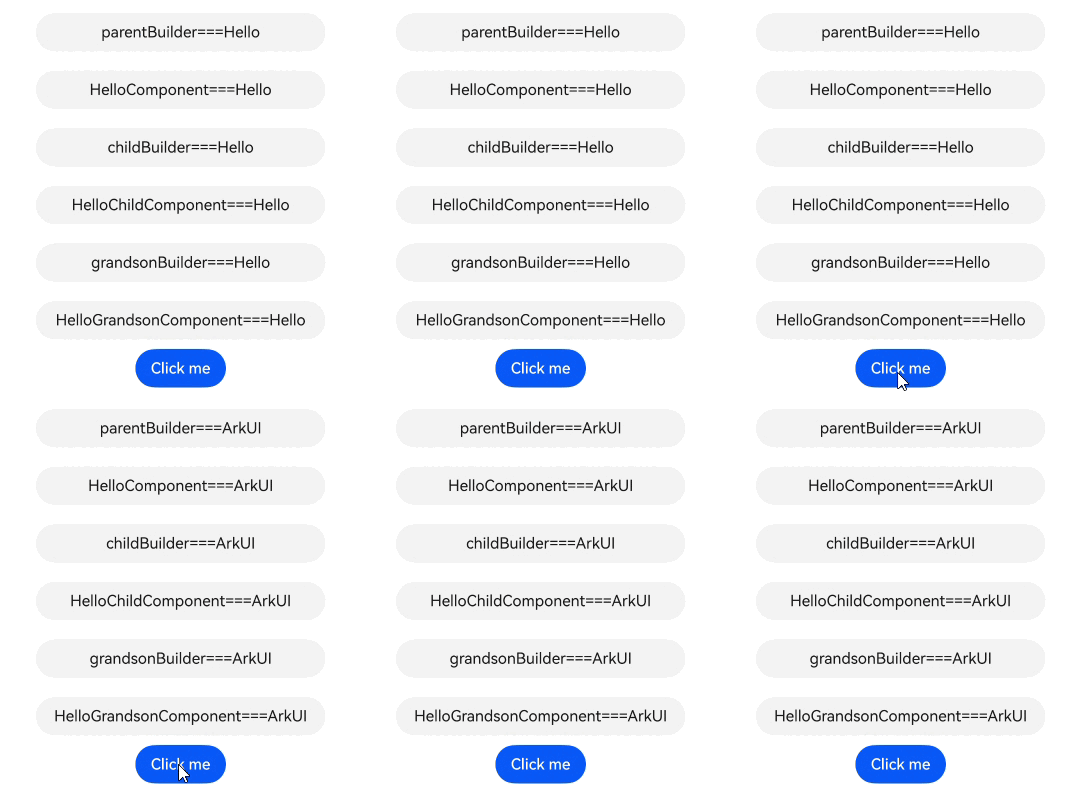
在@Builder函数内调用自定义组件或其他@Builder函数,实现多个@Builder嵌套使用。若要实现最内层的@Builder动态UI刷新功能,每层调用@Builder的地方必须使用按引用传递的方式。这里$$不是必须的参数形式,可以换成其他名称。
class ThisTmp {
  public paramA1: string = '';
}

@Builder
function parentBuilder($$: ThisTmp) {
  Row() {
    Column() {
      Text(`parentBuilder===${$$.paramA1}`)
        .width(300)
        .height(40)
        .margin(10)
        .backgroundColor('#0d000000')
        .fontColor('#e6000000')
        .borderRadius(20)
        .textAlign(TextAlign.Center)
      // 调用自定义组件HelloComponent
      HelloComponent({ message: $$.paramA1 })
      // 调用全局@Builder函数childBuilder
      childBuilder({ paramA1: $$.paramA1 })
    }
  }
}

@Component
struct HelloComponent {
  @Prop message: string = '';

  build() {
    Row() {
      Text(`HelloComponent===${this.message}`)
        .width(300)
        .height(40)
        .margin(10)
        .backgroundColor('#0d000000')
        .fontColor('#e6000000')
        .borderRadius(20)
        .textAlign(TextAlign.Center)
    }
  }
}

@Builder
function childBuilder($$: ThisTmp) {
  Row() {
    Column() {
      Text(`childBuilder===${$$.paramA1}`)
        .width(300)
        .height(40)
        .margin(10)
        .backgroundColor('#0d000000')
        .fontColor('#e6000000')
        .borderRadius(20)
        .textAlign(TextAlign.Center)
      // 调用自定义组件HelloChildComponent
      HelloChildComponent({ message: $$.paramA1 })
      // 调用全局@Builder函数grandsonBuilder
      grandsonBuilder({ paramA1: $$.paramA1 })
    }
  }
}

@Component
struct HelloChildComponent {
  @Prop message: string = '';

  build() {
    Row() {
      Text(`HelloChildComponent===${this.message}`)
        .width(300)
        .height(40)
        .margin(10)
        .backgroundColor('#0d000000')
        .fontColor('#e6000000')
        .borderRadius(20)
        .textAlign(TextAlign.Center)
    }
  }
}

@Builder
function grandsonBuilder($$: ThisTmp) {
  Row() {
    Column() {
      Text(`grandsonBuilder===${$$.paramA1}`)
        .width(300)
        .height(40)
        .margin(10)
        .backgroundColor('#0d000000')
        .fontColor('#e6000000')
        .borderRadius(20)
        .textAlign(TextAlign.Center)
      // 调用自定义组件HelloGrandsonComponent
      HelloGrandsonComponent({ message: $$.paramA1 })
    }
  }
}

@Component
struct HelloGrandsonComponent {
  @Prop message: string;

  build() {
    Row() {
      Text(`HelloGrandsonComponent===${this.message}`)
        .width(300)
        .height(40)
        .margin(10)
        .backgroundColor('#0d000000')
        .fontColor('#e6000000')
        .borderRadius(20)
        .textAlign(TextAlign.Center)
    }
  }
}

@Entry
@Component
struct ParentExample {
  @State label: string = 'Hello';

  build() {
    Column() {
      // 调用全局@Builder函数parentBuilder
      parentBuilder({ paramA1: this.label })
      Button('Click me').onClick(() => {
        this.label = 'ArkUI';
      })
    }
    .height('100%')
    .width('100%')
  }
}
示例效果图
@Builder函数联合V2装饰器
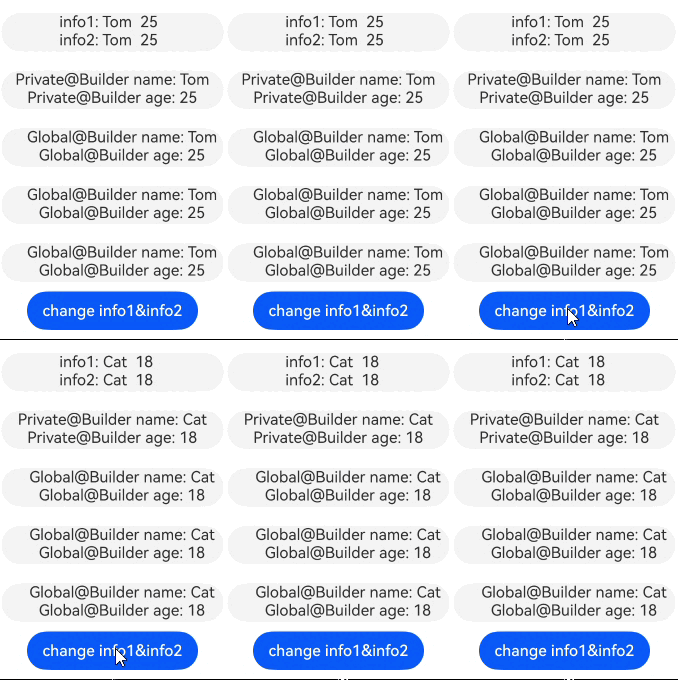
由@ObservedV2和@Trace装饰的类对象实例具备深度观测属性变化的能力。在@ComponentV2装饰的自定义组件中,当调用全局Builder或局部Builder且使用值传递的方式传递参数时,修改@Trace装饰的对象属性可以触发UI刷新。
@ObservedV2
class Info {
  @Trace public name: string;
  @Trace public age: number;

  constructor(name: string, age: number) {
    this.name = name;
    this.age = age;
  }
}

@Builder
function overBuilderTest(param: Info) {
  Column() {
    Text(`Global@Builder name: ${param.name}`)
    Text(`Global@Builder age: ${param.age}`)
  }
  .width(230)
  .height(40)
  .margin(10)
  .padding({ left: 20 })
  .backgroundColor('#0d000000')
  .borderRadius(20)
}

@ComponentV2
struct ChildPage {
  @Require @Param childInfo: Info;

  build() {
    Column() {
      // 此处必须为值传递方式,如果使用引用传递的方式会被ArkTS语法拦截
      overBuilderTest(this.childInfo)
    }
  }
}

@Entry
@ComponentV2
struct ParentPage {
  info1: Info = new Info('Tom', 25);
  info2: Info = new Info('Tom', 25);

  @Builder
  privateBuilder() {
    Column() {
      Text(`Private@Builder name: ${this.info1.name}`)
      Text(`Private@Builder age: ${this.info1.age}`)
    }
    .width(230)
    .height(40)
    .margin(10)
    .backgroundColor('#0d000000')
    .borderRadius(20)
  }

  build() {
    Column() {
      Flex() {
        Column() {
          Text(`info1: ${this.info1.name}  ${this.info1.age}`) // Text1
          Text(`info2: ${this.info2.name}  ${this.info2.age}`) // Text2
        }
      }
      .width(230)
      .height(40)
      .margin(10)
      .padding({ left: 60 })
      .backgroundColor('#0d000000')
      .borderRadius(20)

      // 调用局部@Builder
      this.privateBuilder()
      // 调用全局@Builder, 此处必须为值传递方式,如果使用引用传递的方式会被ArkTS语法拦截
      overBuilderTest(this.info2)
      ChildPage({ childInfo: this.info1 }) // 调用自定义组件
      ChildPage({ childInfo: this.info2 }) // 调用自定义组件
      Button('change info1&info2')
        .onClick(() => {
          this.info1.name = 'Cat'; // 修改Text1显示的info1的name值
          this.info1.age = 18; // 修改Text1显示的info1的age值
          this.info2.name = 'Cat'; // 修改Text2显示的info2的name值
          this.info2.age = 18; // 修改Text2显示的info2的age值
        })
    }
    .height('100%')
    .width('100%')
  }
}
示例效果图
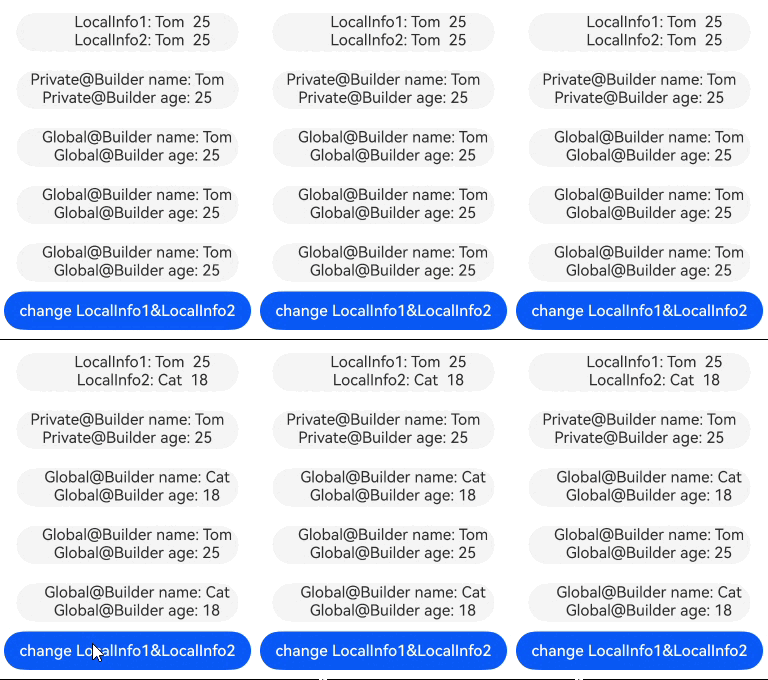
当通过引用传递方式向@Builder传递参数时,若参数为@Local装饰的对象,对该对象进行整体赋值会触发@Builder中UI刷新。
class LocalInfo {
  public name: string = 'Tom';
  public age: number = 25;
}

@Builder
function overBuilderLocal(param: LocalInfo) {
  Column() {
    Text(`Global@Builder name: ${param.name}`)
    Text(`Global@Builder age: ${param.age}`)
  }
  .width(230)
  .height(40)
  .margin(10)
  .padding({ left: 20 })
  .backgroundColor('#0d000000')
  .borderRadius(20)
}

@ComponentV2
struct ChildLocalPage {
  @Require @Param childLocalInfo: LocalInfo;

  build() {
    Column() {
      // 此处为引用传递方式
      overBuilderLocal({ name: this.childLocalInfo.name, age: this.childLocalInfo.age })
    }
  }
}

@Entry
@ComponentV2
struct ParentLocalPage {
  LocalInfo1: LocalInfo = { name: 'Tom', age: 25 };
  @Local LocalInfo2: LocalInfo = { name: 'Tom', age: 25 };

  @Builder
  privateBuilder() {
    Column() {
      Text(`Private@Builder name: ${this.LocalInfo1.name}`)
      Text(`Private@Builder age: ${this.LocalInfo1.age}`)
    }
    .width(230)
    .height(40)
    .margin(10)
    .backgroundColor('#0d000000')
    .borderRadius(20)
  }

  build() {
    Column() {
      Flex() {
        Column() {
          Text(`LocalInfo1: ${this.LocalInfo1.name}  ${this.LocalInfo1.age}`) // Text1
          Text(`LocalInfo2: ${this.LocalInfo2.name}  ${this.LocalInfo2.age}`) // Text2
        }
      }
      .width(230)
      .height(40)
      .margin(10)
      .padding({ left: 60 })
      .backgroundColor('#0d000000')
      .borderRadius(20)

      // 调用局部@Builder
      this.privateBuilder()
      // 调用全局@Builder, 此处为引用传递方式
      overBuilderLocal({ name: this.LocalInfo2.name, age: this.LocalInfo2.age })
      ChildLocalPage({ childLocalInfo: this.LocalInfo1 }) // 调用自定义组件
      ChildLocalPage({ childLocalInfo: this.LocalInfo2 }) // 调用自定义组件
      Button('change LocalInfo1&LocalInfo2')
        .onClick(() => {
          this.LocalInfo1 = { name: 'Cat', age: 18 }; // Text1不会刷新,原因是没有装饰器修饰监听不到值的改变
          this.LocalInfo2 = { name: 'Cat', age: 18 }; // Text2会刷新,原因是有装饰器修饰,可以监听到值的改变
        })
    }
    .height('100%')
    .width('100%')
  }
}
示例效果图
跨组件复用的全局@Builder
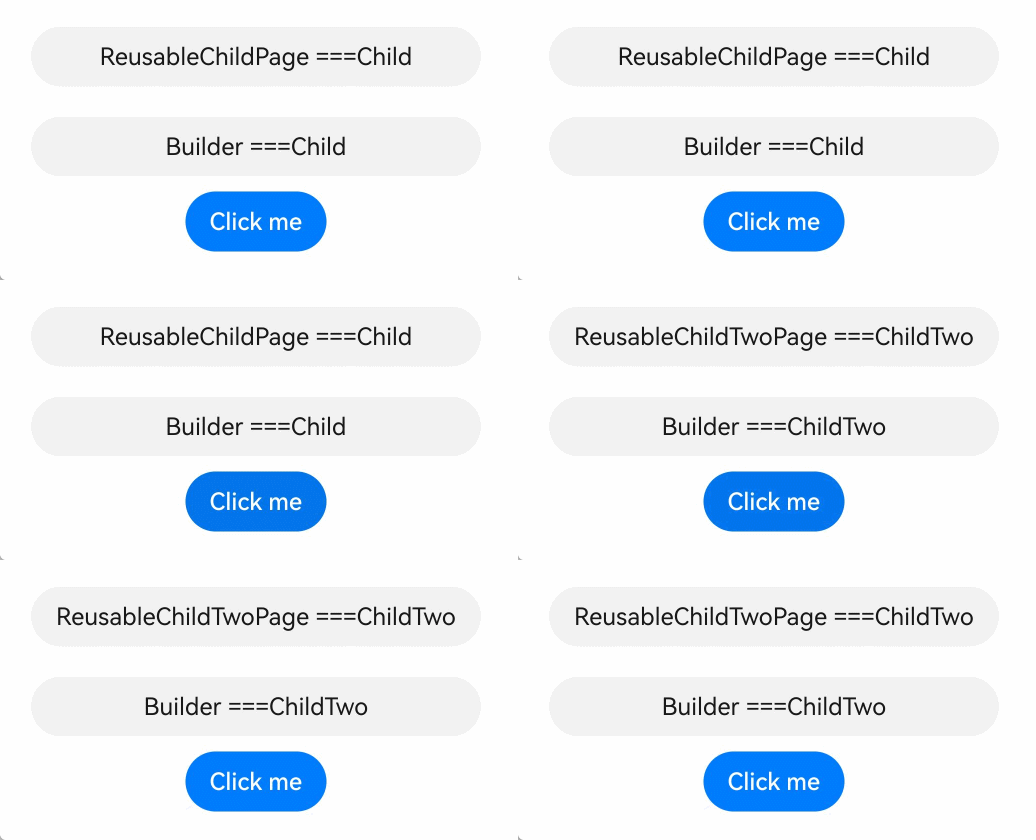
在跨组件的场景中调用全局@Builder,通过按引用传递的方式传递参数,可以实现UI的动态刷新功能。
class ReusableTmp {
  public componentName: string = 'Child';
}

@Builder
function itemBuilder(params: ReusableTmp) {
  Column() {
    Text(`Builder ===${params.componentName}`)
      .width(300)
      .height(40)
      .margin(10)
      .backgroundColor('#0d000000')
      .fontColor('#e6000000')
      .borderRadius(20)
      .textAlign(TextAlign.Center)
  }
}

@Entry
@Component
struct ReusablePage {
  @State switchFlag: boolean = true;

  build() {
    Column() {
      if (this.switchFlag) {
        // 调用自定义组件ReusableChildPage
        ReusableChildPage({ message: 'Child' })
      } else {
        // 调用自定义组件ReusableChildTwoPage
        ReusableChildTwoPage({ message: 'ChildTwo' })
      }
      Button('Click me')
        .onClick(() => {
          this.switchFlag = !this.switchFlag;
        })
    }
    .height('100%')
    .width('100%')
  }
}

@Reusable
@Component
struct ReusableChildPage {
  @State message: string = 'Child';

  aboutToReuse(params: Record<string, ESObject>): void {
    console.info('Recycle ====Child');
    this.message = params.message;
  }

  build() {
    Column() {
      Text(`ReusableChildPage ===${this.message}`)
        .width(300)
        .height(40)
        .margin(10)
        .backgroundColor('#0d000000')
        .fontColor('#e6000000')
        .borderRadius(20)
        .textAlign(TextAlign.Center)
      // 调用全局@Builder函数itemBuilder
      itemBuilder({ componentName: this.message })
    }
  }
}

@Reusable
@Component
struct ReusableChildTwoPage {
  @State message: string = 'ChildTwo';

  aboutToReuse(params: Record<string, ESObject>): void {
    console.info('Recycle ====ChildTwo');
    this.message = params.message;
  }

  build() {
    Column() {
      Text(`ReusableChildTwoPage ===${this.message}`)
        .width(300)
        .height(40)
        .margin(10)
        .backgroundColor('#0d000000')
        .fontColor('#e6000000')
        .borderRadius(20)
        .textAlign(TextAlign.Center)
      // 调用全局@Builder函数itemBuilder
      itemBuilder({ componentName: this.message })
    }
  }
}
示例效果图
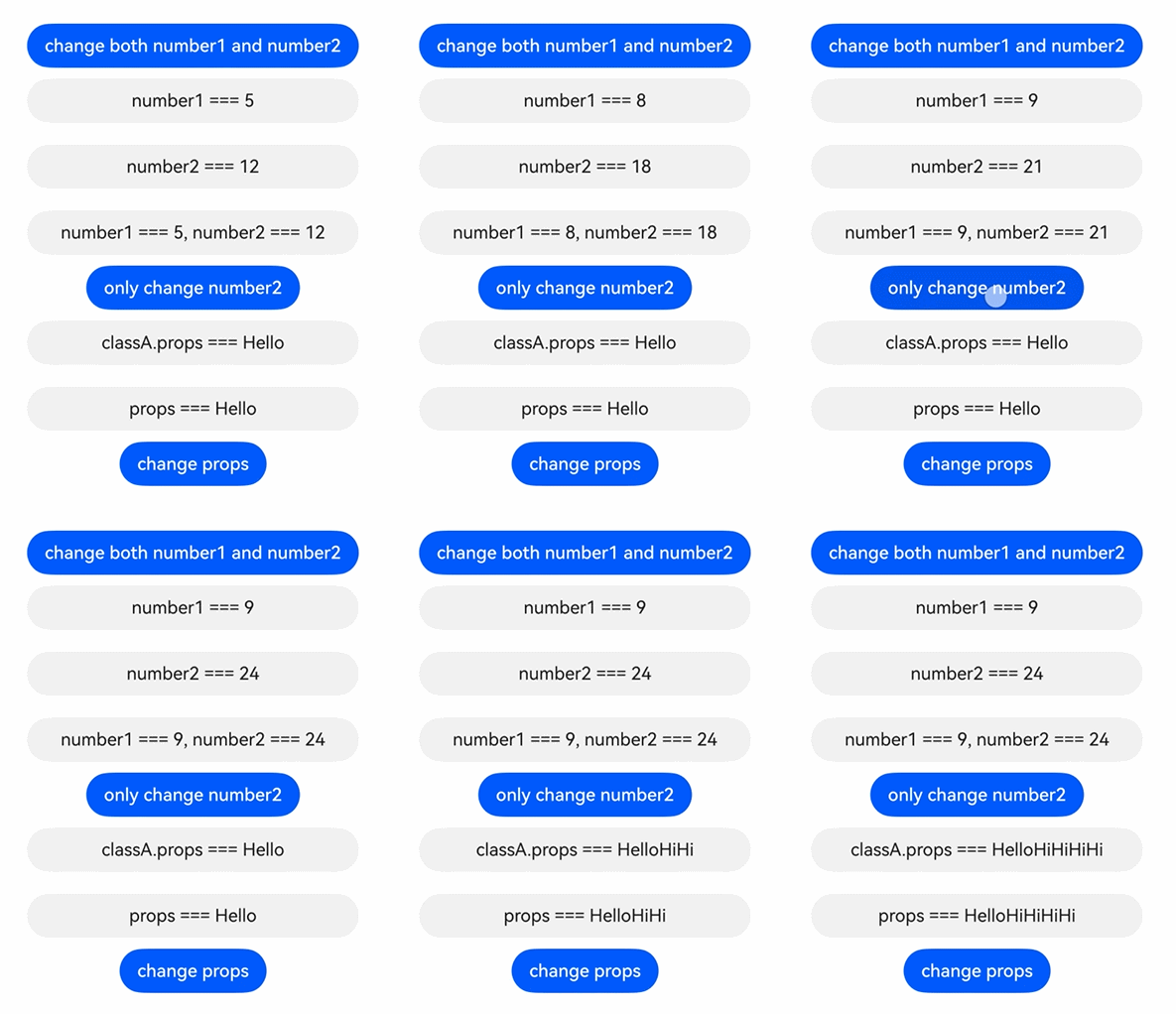
@Builder支持状态变量刷新
从API version 20开始,开发者可以通过使用UIUtils.makeBinding()函数、Binding类和MutableBinding类实现@Builder函数中状态变量的刷新。详情请参考状态管理API文档。
import { Binding, MutableBinding, UIUtils } from '@kit.ArkUI';

@ObservedV2
class ClassA {
  @Trace public props: string = 'Hello';
}

@Builder
function customButton(num1: Binding<number>, num2: MutableBinding<number>) {
  Row() {
    Column() {
      Text(`number1 === ${num1.value},  number2 === ${num2.value}`)
        .width(300)
        .height(40)
        .margin(10)
        .backgroundColor('#0d000000')
        .fontColor('#e6000000')
        .borderRadius(20)
        .textAlign(TextAlign.Center)

      Button(`only change number2`)
        .onClick(() => {
          num2.value += 1;
        })
    }
  }
}

@Builder
function customButtonObj(obj1: MutableBinding<ClassA>) {
  Row() {
    Column() {
      Text(`props === ${obj1.value.props}`)
        .width(300)
        .height(40)
        .margin(10)
        .backgroundColor('#0d000000')
        .fontColor('#e6000000')
        .borderRadius(20)
        .textAlign(TextAlign.Center)

      Button(`change props`)
        .onClick(() => {
          obj1.value.props += 'Hi';
        })
    }
  }
}

@Entry
@ComponentV2
struct Single {
  @Local number1: number = 5;
  @Local number2: number = 12;
  @Local classA: ClassA = new ClassA();

  build() {
    Column() {
      Button(`change both number1 and number2`)
        .onClick(() => {
          this.number1 += 1;
          this.number2 += 2;
        })
      Text(`number1 === ${this.number1}`)
        .width(300)
        .height(40)
        .margin(10)
        .backgroundColor('#0d000000')
        .fontColor('#e6000000')
        .borderRadius(20)
        .textAlign(TextAlign.Center)
      Text(`number2 === ${this.number2}`)
        .width(300)
        .height(40)
        .margin(10)
        .backgroundColor('#0d000000')
        .fontColor('#e6000000')
        .borderRadius(20)
        .textAlign(TextAlign.Center)
      // 调用全局@Builder函数customButton
      customButton(
        UIUtils.makeBinding<number>(() => this.number1), // 使用UIUtils.makeBinding()函数实现@Builder函数中状态变量的刷新
        UIUtils.makeBinding<number>(
          () => this.number2,
          (val: number) => {
            this.number2 = val;
          })
      )
      Text(`classA.props === ${this.classA.props}`)
        .width(300)
        .height(40)
        .margin(10)
        .backgroundColor('#0d000000')
        .fontColor('#e6000000')
        .borderRadius(20)
        .textAlign(TextAlign.Center)
      // 调用全局@Builder函数customButtonObj
      customButtonObj(
        UIUtils.makeBinding<ClassA>( // 使用UIUtils.makeBinding()函数实现@Builder函数中状态变量的刷新
          () => this.classA,
          (val: ClassA) => {
            this.classA = val;
          })
      )
    }
    .width('100%')
    .height('100%')
    .alignItems(HorizontalAlign.Center)
    .justifyContent(FlexAlign.Center)
  }
}
示例效果图
常见问题
@Builder存在两个或两个以上参数
当存在两个或两个以上的参数时,即使通过对象字面量形式传递,值的改变也不会触发UI刷新。
【反例】
class GlobalTmp1 {
  public strValue: string = 'Hello';
}

@Builder
function overBuilder1(param: GlobalTmp1, num: number) {
  Column() {
    Text(`strValue: ${param.strValue}`)
    Text(`num: ${num}`)
  }
}

@Entry
@Component
struct Parent1 {
  @State objParam: GlobalTmp1 = new GlobalTmp1();
  @State num: number = 0;

  build() {
    Column() {
      Text('UI Rendered via @Builder')
        .fontSize(20)
      // 使用了两个参数,用法错误。
      overBuilder1({ strValue: this.objParam.strValue }, this.num)
      Line()
        .width('100%')
        .height(10)
        .backgroundColor('#000000').margin(10)
      Button('Update Values').onClick(() => {
        this.objParam.strValue = 'Hello World';
        this.num = 1;
      })
    }
  }
}
【反例】
class GlobalTmp2 {
  public strValue: string = 'Hello';
}

class SecondTmp {
  public numValue: number = 0;
}

@Builder
function overBuilder2(param: GlobalTmp2, num: SecondTmp) {
  Column() {
    Text(`strValue: ${param.strValue}`)
    Text(`num: ${num.numValue}`)
  }
}

@Entry
@Component
struct Parent2 {
  @State strParam: GlobalTmp2 = new GlobalTmp2();
  @State numParam: SecondTmp = new SecondTmp();

  build() {
    Column() {
      Text('UI Rendered via @Builder')
        .fontSize(20)
      // 使用了两个参数,用法错误。
      overBuilder2({ strValue: this.strParam.strValue }, { numValue: this.numParam.numValue })
      Line()
        .width('100%')
        .height(10)
        .backgroundColor('#000000').margin(10)
      Button('Update Values').onClick(() => {
        this.strParam.strValue = 'Hello World';
        this.numParam.numValue = 1;
      })
    }
  }
}
@Builder只接受一个参数。当传入一个参数的时候,通过对象字面量的形式传递,值的改变会引起UI的刷新。
【正例】
class GlobalTmp3 {
  public strValue: string = 'Hello';
  public numValue: number = 0;
}

@Builder
function overBuilder3(param: GlobalTmp3) {
  Column() {
    Text(`strValue: ${param.strValue}`)
    Text(`num: ${param.numValue}`)
  }
}

@Entry
@Component
struct Parent3 {
  @State objParam: GlobalTmp3 = new GlobalTmp3();

  build() {
    Column() {
      Text('UI Rendered via @Builder')
        .fontSize(20)
      // 传入一个参数,正确用法
      overBuilder3({ strValue: this.objParam.strValue, numValue: this.objParam.numValue })
      Line()
        .width('100%')
        .height(10)
        .backgroundColor('#000000').margin(10)
      Button('Update Values').onClick(() => {
        this.objParam.strValue = 'Hello World';
        this.objParam.numValue = 1;
      })
    }
  }
}
使用@ComponentV2装饰器触发动态刷新
在@ComponentV2装饰的组件中,配合@ObservedV2和@Trace装饰器,通过按值传递实现UI刷新功能。
【反例】
在@ComponentV2装饰的自定义组件中,使用简单数据类型不可以触发UI的刷新。
@ObservedV2
class ParamTemp {
  @Trace public count : number = 0;
}

@Builder
function renderNumber(paramNum: number) {
  Text(`paramNum : ${paramNum}`)
    .fontSize(30)
    .fontWeight(FontWeight.Bold)
}

@Entry
@ComponentV2
struct PageBuilderIncorrectUsage {
  @Local classValue: ParamTemp = new ParamTemp();
  // 此处使用简单数据类型不支持刷新UI的能力。
  @Local numValue: number = 0;
  private progressTimer: number = -1;

  aboutToAppear(): void {
    this.progressTimer = setInterval(() => {
      if (this.classValue.count < 100) {
        this.classValue.count += 5;
        this.numValue += 5;
      } else {
        clearInterval(this.progressTimer);
      }
    }, 500);
  }

  build() {
    Column() {
      renderNumber(this.numValue)
    }
    .width('100%')
    .height('100%')
    .padding(50)
  }
}
【正例】
在@ComponentV2装饰器装饰的自定义组件中,只有使用@ObservedV2装饰的ParamTmpClass类和使用@Trace装饰的count属性才能触发UI刷新。
@ObservedV2
class ParamTmpClass {
  @Trace public count: number = 0;
}

@Builder
function renderText(param: ParamTmpClass) {
  Column() {
    Text(`param : ${param.count}`)
      .fontSize(20)
      .fontWeight(FontWeight.Bold)
  }
}

@Builder
function renderMap(paramMap: Map<string, number>) {
  Text(`paramMap : ${paramMap.get('name')}`)
    .fontSize(20)
    .fontWeight(FontWeight.Bold)
}

@Builder
function renderSet(paramSet: Set<number>) {
  Text(`paramSet : ${paramSet.size}`)
    .fontSize(20)
    .fontWeight(FontWeight.Bold)
}

@Builder
function renderNumberArr(paramNumArr: number[]) {
  Text(`paramNumArr : ${paramNumArr[0]}`)
    .fontSize(20)
    .fontWeight(FontWeight.Bold)
}

@Entry
@ComponentV2
struct PageBuilderCorrectUsage {
  @Local builderParams: ParamTmpClass = new ParamTmpClass();
  @Local mapValue: Map<string, number> = new Map();
  @Local setValue: Set<number> = new Set([0]);
  @Local numArrValue: number[] = [0];
  private progressTimer: number = -1;

  aboutToAppear(): void {
    this.progressTimer = setInterval(() => {
      if (this.builderParams.count < 100) {
        this.builderParams.count += 5;
        this.mapValue.set('name', this.builderParams.count);
        this.setValue.add(this.builderParams.count);
        this.numArrValue[0] = this.builderParams.count;
      } else {
        clearInterval(this.progressTimer);
      }
    }, 500);
  }

  @Builder
  localBuilder() {
    Column() {
      Text(`localBuilder : ${this.builderParams.count}`)
        .fontSize(20)
        .fontWeight(FontWeight.Bold)
    }
  }

  build() {
    Column() {
      this.localBuilder()
      Text(`builderParams :${this.builderParams.count}`)
        .fontSize(20)
        .fontWeight(FontWeight.Bold)
      renderText(this.builderParams)
      renderText({ count: this.builderParams.count })
      renderMap(this.mapValue)
      renderSet(this.setValue)
      renderNumberArr(this.numArrValue)
    }
    .width('100%')
    .height('100%')
  }
}
在@Builder内创建自定义组件传递参数不刷新问题
在parentBuilder1函数中创建自定义组件HelloComponent1,传递参数为class对象并修改对象内的值时,UI不会触发刷新功能。
【反例】
class Tmp4 {
  public name: string = 'Hello';
  public age: number = 16;
}

@Builder
function parentBuilder1(params: Tmp4) {
  Row() {
    Column() {
      Text(`parentBuilder1===${params.name}===${params.age}`)
        .fontSize(20)
        .fontWeight(FontWeight.Bold)
      // 此写法不属于按引用传递方式,用法错误导致UI不刷新。
      HelloComponent1({ info: params })
    }
  }
}

@Component
struct HelloComponent1 {
  @Prop info: Tmp4 = new Tmp4();

  build() {
    Row() {
      Text(`HelloComponent1===${this.info.name}===${this.info.age}`)
        .fontSize(20)
        .fontWeight(FontWeight.Bold)
    }
  }
}

@Entry
@Component
struct ParentPage1 {
  @State nameValue: string = 'Zhang San';
  @State ageValue: number = 18;

  build() {
    Column() {
      parentBuilder1({ name: this.nameValue, age: this.ageValue })
      Button('Click me')
        .onClick(() => {
          // 此处修改内容时,不会引起HelloComponent1处的变化
          this.nameValue = 'Li Si';
          this.ageValue = 20;
        })
    }
    .height('100%')
    .width('100%')
  }
}
在parentBuilder2函数中创建自定义组件HelloComponent2,传递参数为对象字面量形式并修改对象内的值时,UI触发刷新功能。
【正例】
class Tmp5 {
  public name: string = 'Hello';
  public age: number = 16;
}

@Builder
function parentBuilder2(params: Tmp5) {
  Row() {
    Column() {
      Text(`parentBuilder2===${params.name}===${params.age}`)
        .fontSize(20)
        .fontWeight(FontWeight.Bold)
      // 将整个对象拆分开变成简单类型,属于按引用传递方式,更改属性能够触发UI刷新。
      HelloComponent2({ childName: params.name, childAge: params.age })
    }
  }
}

@Component
struct HelloComponent2 {
  @Prop childName: string = '';
  @Prop childAge: number = 0;

  build() {
    Row() {
      Text(`HelloComponent2===${this.childName}===${this.childAge}`)
        .fontSize(20)
        .fontWeight(FontWeight.Bold)
    }
  }
}

@Entry
@Component
struct ParentPage2 {
  @State nameValue: string = 'Zhang San';
  @State ageValue: number = 18;

  build() {
    Column() {
      parentBuilder2({ name: this.nameValue, age: this.ageValue })
      Button('Click me')
        .onClick(() => {
          // 此处修改内容时,会引起HelloComponent2处的变化
          this.nameValue = 'Li Si';
          this.ageValue = 20;
        })
    }
    .height('100%')
    .width('100%')
  }
}
在UI语句外调用@Builder函数或方法影响节点正常刷新
当@Builder方法赋值给变量或者数组后,在UI方法中无法使用,且会造成刷新时节点显示异常。
【反例】
@Entry
@Component
struct BackGround1 {
  @Builder
  myImages() {
    Column() {
      // 从应用media目录加载名为startIcon的图像资源。此处'app.media.startIcon'仅作示例,请开发者自行替换。
      Image($r('app.media.startIcon')).width('100%').height('100%')
    }
  };

  @Builder
  myImages2() {
    Column() {
      // 从应用media目录加载名为startIcon的图像资源。此处'app.media.startIcon'仅作示例,请开发者自行替换。
      Image($r('app.media.startIcon')).width('100%').height('100%')
    }
  };

  private bgList: Array<CustomBuilder> = [this.myImages(), this.myImages2()]; // 错误用法,应避免在UI方法外调用@Builder方法
  @State bgBuilder: CustomBuilder = this.myImages(); // 错误用法,应避免在UI方法外调用@Builder方法
  @State bgColor: ResourceColor = Color.Orange;
  @State bgColor2: ResourceColor = Color.Orange;
  @State index: number = 0;

  build() {
    Column({ space: 10 }) {
      Text('1').width(100).height(50)
      Text('2').width(100).height(50)
      Text('3').width(100).height(50)

      Text('4-1').width(100).height(50).fontColor(this.bgColor)
      Text('5-1').width(100).height(50)
      Text('4-2').width(100).height(50)
      Text('5-2').width(100).height(50)
      Stack() {
        Column() {
          Text('Vsync2')
        }
        .size({ width: '100%', height: '100%' })
        .border({ width: 1, color: Color.Black })
      }
      .size({ width: 100, height: 80 })
      .backgroundColor('#ffbbd4bb')

      Button('change').onClick((event: ClickEvent) => {
        this.index = 1;
        this.bgColor = Color.Red;
        this.bgColor2 = Color.Red;
      })
    }
    .margin(10)
  }
}
@Builder方法赋值给变量或数组后在UI方法中无法使用,开发者应避免将@Builder赋值给变量或数组后再使用。
【正例】
@Entry
@Component
struct BackGround2 {
  @Builder
  myImages() {
    Column() {
      // 从应用media目录加载名为startIcon的图像资源。此处'app.media.startIcon'仅作示例,请开发者自行替换。
      Image($r('app.media.startIcon')).width('100%').height('100%')
    }
  }

  @Builder
  myImages2() {
    Column() {
      // 从应用media目录加载名为startIcon的图像资源。此处'app.media.startIcon'仅作示例,请开发者自行替换。
      Image($r('app.media.startIcon')).width('100%').height('100%')
    }
  }

  @State bgColor: ResourceColor = Color.Orange;
  @State bgColor2: ResourceColor = Color.Orange;
  @State index: number = 0;

  build() {
    Column({ space: 10 }) {
      Text('1').width(100).height(50)
      Text('2').width(100).height(50).background(this.myImages) // 直接传递@Builder方法
      Text('3').width(100).height(50).background(this.myImages()) // 直接调用@Builder方法

      Text('4-1').width(100).height(50).fontColor(this.bgColor)
      Text('5-1').width(100).height(50)
      Text('4-2').width(100).height(50)
      Text('5-2').width(100).height(50)
      Stack() {
        Column() {
          Text('Vsync2')
        }
        .size({ width: '100%', height: '100%' })
        .border({ width: 1, color: Color.Black })
      }
      .size({ width: 100, height: 80 })
      .backgroundColor('#ffbbd4bb')

      Button('change').onClick((event: ClickEvent) => {
        this.index = 1;
        this.bgColor = Color.Red;
        this.bgColor2 = Color.Red;
      })
    }
    .margin(10)
  }
}
在@Builder方法中使用MutableBinding未传递set访问器
@Builder方法定义时使用MutableBinding,构造时没有给MutableBinding类型参数传递set访问器,触发set访问器会造成运行时错误。
【反例】
import { UIUtils, Binding, MutableBinding } from '@kit.ArkUI';

@ObservedV2
class GlobalTmp1 {
  @Trace public strValue: string = 'Hello';
}

@Builder
function builderWithTwoParams1(param1: Binding<GlobalTmp1>, param2: MutableBinding<number>) {
  Column() {
    Text(`strValue: ${param1.value.strValue}`)
    Button(`num: ${param2.value}`)
      .onClick(() => {
        param2.value += 1; // 点击Button触发set访问器会造成运行时错误
      })
  }.borderWidth(1)
}

@Entry
@ComponentV2
struct MakeBindingTest1 {
  @Local GlobalTmp1: GlobalTmp1 = new GlobalTmp1();
  @Local num: number = 0;

  build() {
    Column() {
      Text(`${this.GlobalTmp1.strValue}`)
      builderWithTwoParams1(UIUtils.makeBinding(() => this.GlobalTmp1),
        UIUtils.makeBinding<number>(() => this.num)) // 构造MutableBinding类型参数时没有传SetterCallback
      Button('Update Values').onClick(() => {
        this.GlobalTmp1.strValue = 'Hello World 2025';
        this.num = 1;
      })
    }
  }
}
使用规格详见状态管理API文档中的MutableBinding。
【正例】
import { UIUtils, Binding, MutableBinding } from '@kit.ArkUI';

@ObservedV2
class GlobalTmp2 {
  @Trace public strValue: string = 'Hello';
}

@Builder
function builderWithTwoParams2(param1: Binding<GlobalTmp2>, param2: MutableBinding<number>) {
  Column() {
    Text(`strValue: ${param1.value.strValue}`)
    Button(`num: ${param2.value}`)
      .onClick(() => {
        param2.value += 1; // 修改了MutableBinding类型参数的value属性
      })
  }.borderWidth(1)
}

@Entry
@ComponentV2
struct MakeBindingTest2 {
  @Local GlobalTmp2: GlobalTmp2 = new GlobalTmp2();
  @Local num: number = 0;

  build() {
    Column() {
      Text(`${this.GlobalTmp2.strValue}`)
      builderWithTwoParams2(UIUtils.makeBinding(() => this.GlobalTmp2),
        UIUtils.makeBinding<number>(() => this.num,
          val => {
            this.num = val;
          }))
      Button('Update Values').onClick(() => {
        this.GlobalTmp2.strValue = 'Hello World 2025';
        this.num = 1;
      })
    }
  }
}
在@Builder装饰的函数内部修改入参内容
不使用MutableBinding的情况下,在@Builder装饰的函数内部修改参数值,修改不会生效且可能造成运行时错误。从API version 23开始,将返回错误码140109。
【反例】
@Builder
function myGlobalBuilder(value: string) {
  Column() {
    Text(`myGlobalBuilder: ${value} `)
      .fontSize(16)
      .onClick(() => {
        // 简单类型按值传递的@Builder函数中修改参数,不闪退但UI不刷新
        value = 'value change';
      })
  }.borderWidth(1)
}

interface TempMod1 {
  paramA: string;
}

@Builder
function overBuilderMod1(param: TempMod1) {
  Row() {
    Column() {
      Button(`overBuilderMod1 === ${param.paramA}`)
        .onClick(() => {
          // 错误写法,不允许在@Builder装饰的函数内部修改对象类型参数的属性,闪退且UI不刷新
          param.paramA = 'Yes';
        })
      Button('change')
        .onClick(() => {
          // 错误写法,不允许在@Builder装饰的函数内部修改对象类型参数的引用,不闪退但UI不刷新
          param = { paramA: 'change trial' };
        })
    }
  }
}

@Entry
@Component
struct ParentMod1 {
  @State label: string = 'Hello';
  @State message1: string = 'Value Passing';

  @Builder
  extendBlank() {
    Row() {
      Blank()
    }
    .height(20)
  }

  build() {
    Column() {
      // 按引用传递能实现参数变化时的UI刷新,但不能在@Builder函数内部修改参数
      overBuilderMod1({ paramA: this.label });
      this.extendBlank();
      Button('click me')
        .onClick(() => {
          this.label = 'ArkUI';
        })
      this.extendBlank();
      myGlobalBuilder(this.message1);
    }
  }
}
正确使用MutableBinding可以帮助开发者在@Builder装饰的函数内部修改参数值。
【正例】
import { UIUtils, MutableBinding } from '@kit.ArkUI';

// 使用MutableBinding在@Builder装饰的函数中修改参数值
@Builder
function myGlobalBuilderMod(str: MutableBinding<string>) {
  Column() {
    Text(`Mod--MyGlobalBuilder: ${str.value}`)
      .fontSize(16)
      .onClick(() => {
        str.value = 'value change mod';
      })
  }
}

interface TempMod2 {
  paramA: string;
}

// 使用MutableBinding在@Builder装饰的函数内部修改参数值
@Builder
function overBuilderMod2(param: MutableBinding<TempMod2>) {
  Column() {
    Button(`Mod--overBuilder === ${param.value.paramA}`)
      .onClick(() => {
        param.value.paramA = 'Yes';
      })
    Button(`change`)
      .onClick(() => {
        param.value = { paramA: 'trialOne' };
      })
  }
}

@Entry
@Component
struct ParentMod2 {
  @State label: string = 'Hello';
  @State message1: string = 'Value Passing';
  @State objectOne: TempMod2 = {
    paramA: this.label
  };

  @Builder
  extendBlank() {
    Row() {
      Blank()
    }
    .height(20)
  }

  build() {
    Column() {
      // 使用MutableBinding时无法传对象字面量,需要先将字面量对象抽出为状态变量
      overBuilderMod2(
        UIUtils.makeBinding<TempMod2>(
          () => this.objectOne,
          value => {
            this.objectOne = value; // 必须要传SetterCallback,否则触发时会造成运行时错误
          }
        )
      )
      this.extendBlank();
      Button('click me')
        .onClick(() => {
          this.objectOne.paramA = 'ArkUI';
        })
      this.extendBlank();
      myGlobalBuilderMod(
        UIUtils.makeBinding<string>(
          () => this.message1,
          value => {
            this.message1 = value; // 必须要传SetterCallback,否则触发时会造成运行时错误
          }
        )
      );
    }
  }
}
在@Watch函数中执行@Builder函数
在@Watch函数中执行@Builder函数,会导致UI刷新异常。
【反例】
@Entry
@Component
struct Child1 {
  @Provide @Watch('provideWatch') content: string = 'Index: hello world';

  @Builder
  watchBuilder(content: string) {
    Row() {
      Text(`${content}`)
    }
  }

  provideWatch() {
    this.watchBuilder(this.content); // 错误写法,在@Watch函数中使用@Builder函数
  }

  build() {
    Column() {
      Button(`content value: ${this.content}`)
        .onClick(() => {
          this.content += '_world';
        })
      this.watchBuilder(this.content);
    }
  }
}
Button按钮会出现UI异常的情况,开发者需要避免在@Watch函数中使用@Builder函数。
【正例】
@Entry
@Component
struct Child2 {
  @Provide @Watch('provideWatch') content: string = 'Index: hello world';

  @Builder
  watchBuilder(content: string) {
    Row() {
      Text(`${content}`)
    }
  }

  provideWatch() {
    console.info(`content value has changed.`);
  }

  build() {
    Column() {
      Button(`content value: ${this.content}`)
        .onClick(() => {
          this.content += '_world';
        })
      this.watchBuilder(this.content);
    }
  }
}