自定义组件冻结功能(V2)
当@ComponentV2装饰的自定义组件处于非激活状态时,状态变量将不响应更新,即@Monitor不会调用,状态变量关联的节点不会刷新。该冻结机制在复杂UI场景下能显著优化性能,避免非激活组件因状态变量更新进行无效刷新,从而减少资源消耗。通过freezeWhenInactive属性来决定是否使用冻结功能,不传参数时默认不使用。支持的场景有:页面路由、TabContent、Navigation、Repeat。
在阅读本文档前,开发者需要了解@ComponentV2基本语法。建议提前阅读:@ComponentV2。

从API version 12开始,支持@ComponentV2装饰的自定义组件冻结功能。
从API version 18开始,支持自定义组件冻结混用场景。
从API version 22开始,通过将BuilderNode的inheritFreezeOptions配置为true,可实现如下场景:当父组件启用组件冻结,且组件树的中间层级启用了BuilderNode时,BuilderNode的子组件能够被冻结。具体可参考设置BuilderNode继承冻结能力。
与@Component的组件冻结不同,@ComponentV2装饰的自定义组件不支持在LazyForEach场景下缓存节点组件冻结。
当前支持的场景
页面路由
本示例使用了router进行页面跳转,建议开发者使用组件导航(Navigation)代替页面路由(router)来实现页面切换。Navigation提供了更多的功能和更灵活的自定义能力。请参考使用Navigation的组件冻结用例。
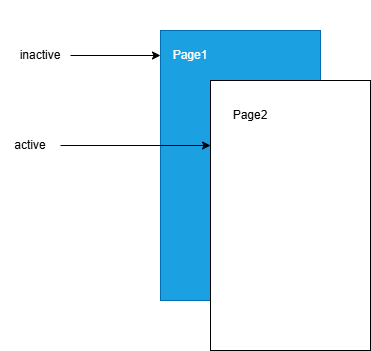
当页面1调用this.getUIContext().getRouter().pushUrl()接口跳转到页面2时,页面1为隐藏不可见状态,此时如果更新页面1中的状态变量,不会触发页面1刷新。
图示如下:
页面1:
import { hilog } from '@kit.PerformanceAnalysisKit';

const DOMAIN = 0x0000;
const BOOK_INITIAL_NAME = '100';

@ObservedV2
export class Book {
  @Trace public name: string = BOOK_INITIAL_NAME;

  constructor(page: string) {
    this.name = page;
  }
}

@Entry
@ComponentV2({ freezeWhenInactive: true })
export struct Page1 {
  @Local bookTest: Book = new Book(`A Midsummer Night's Dream`);

  @Monitor('bookTest.name')
  onMessageChange(monitor: IMonitor) {
    hilog.info(DOMAIN, 'testTag', `The book name change from ${monitor.value()?.before} to ${monitor.value()?.now}`);
  }

  build() {
    Column() {
      Text(`Book name is  ${this.bookTest.name}`).fontSize(25)
      Button('changeBookName').fontSize(25)
        .onClick(() => {
          this.bookTest.name = 'The Old Man and the Sea';
        })
      Button('go to next page').fontSize(25)
        .onClick(() => {
          this.getUIContext().getRouter().pushUrl({ url: 'pages/freeze/template1/Page2' });
          setTimeout(() => {
            this.bookTest = new Book(`Jane Austen's Pride and Prejudice`);
          }, 1000)
        })
    }
  }
}
页面2:
@Entry
@ComponentV2
struct Page2 {
  build() {
    Column() {
      Text('This is the page2').fontSize(25)
      Button('Back')
        .onClick(() => {
          this.getUIContext().getRouter().back();
        })
    }
  }
}
在上面的示例中:
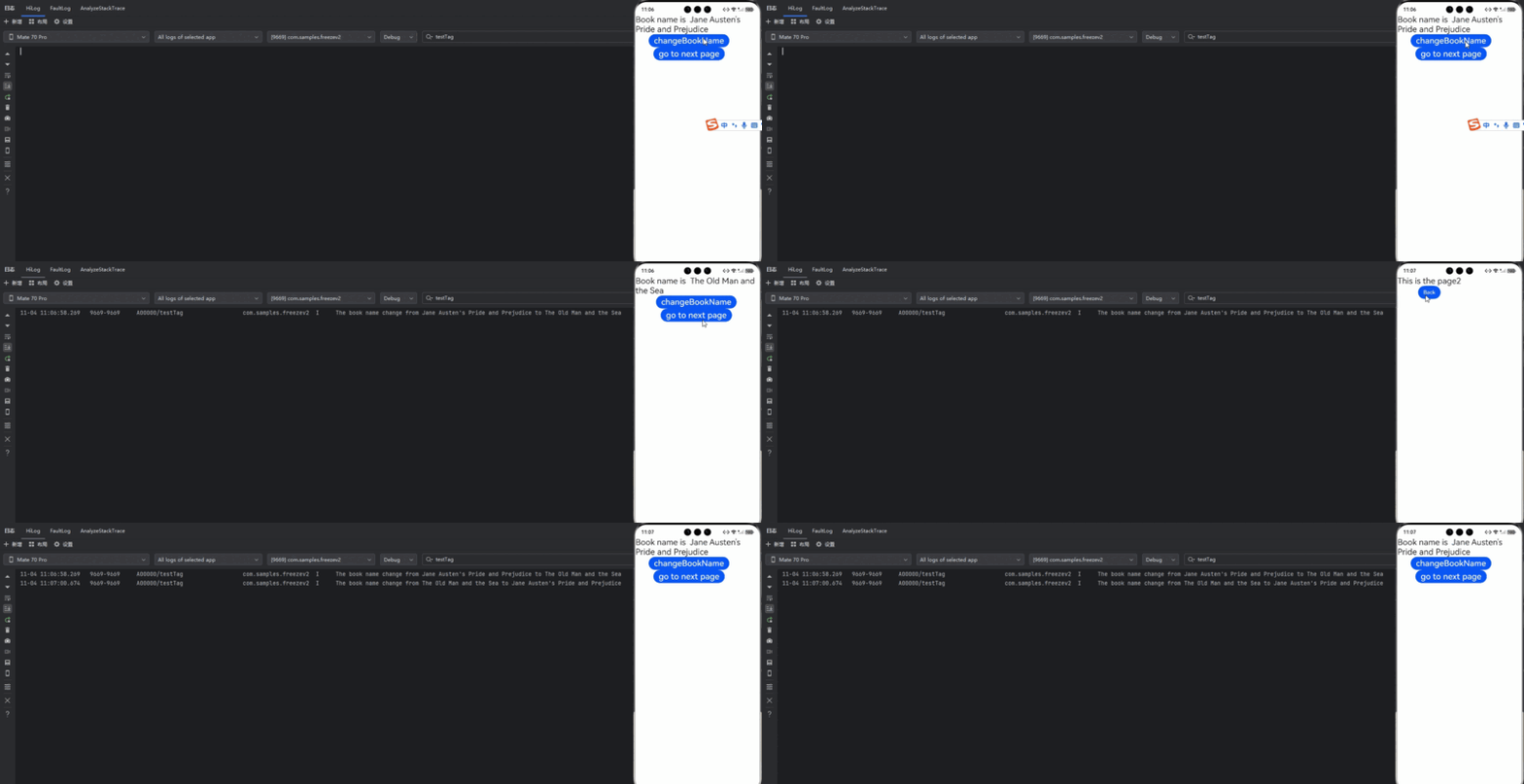
1.在页面1中点击changeBookName,bookTest变量的name属性改变,@Monitor中注册的方法onMessageChange会被调用。
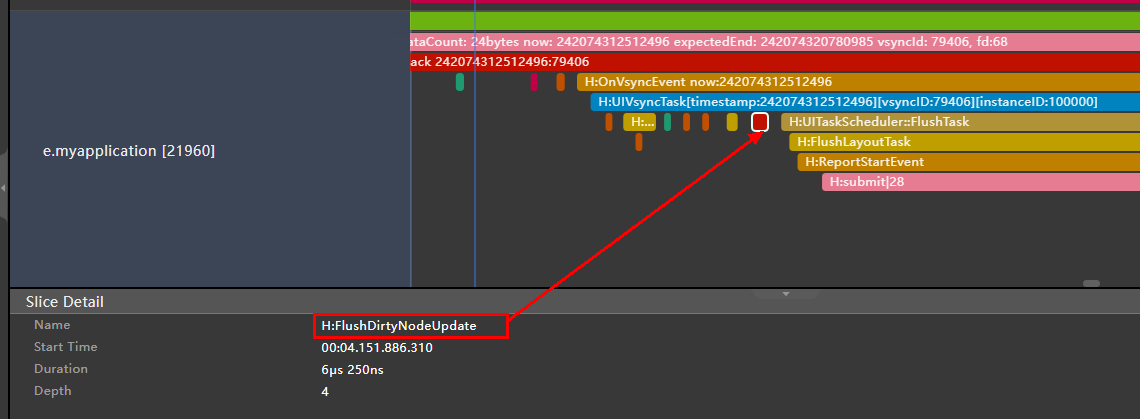
2.在页面1中点击go to next page,跳转到页面2,然后延迟1s更新状态变量bookTest。在更新bookTest的时候,已经跳转到页面2,页面1处于inactive状态,@Local装饰的状态变量bookTest将不响应更新,其@Monitor不会调用,关联的节点不会刷新。
Trace如下:
3.点击Back,页面2被销毁,页面1的状态由inactive变为active。状态变量bookTest的更新被观察到,@Monitor中注册的方法onMessageChange被调用,对应的Text显示内容改变。
TabContent
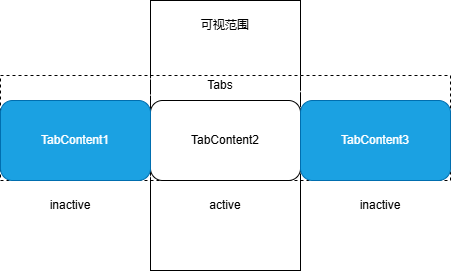
对Tabs中当前不可见的TabContent进行冻结,修改状态变量不会触发冻结组件的更新。
需要注意的是:在首次渲染时,Tabs只会创建当前正在显示的TabContent,当切换全部的TabContent后,TabContent才会被全部创建。
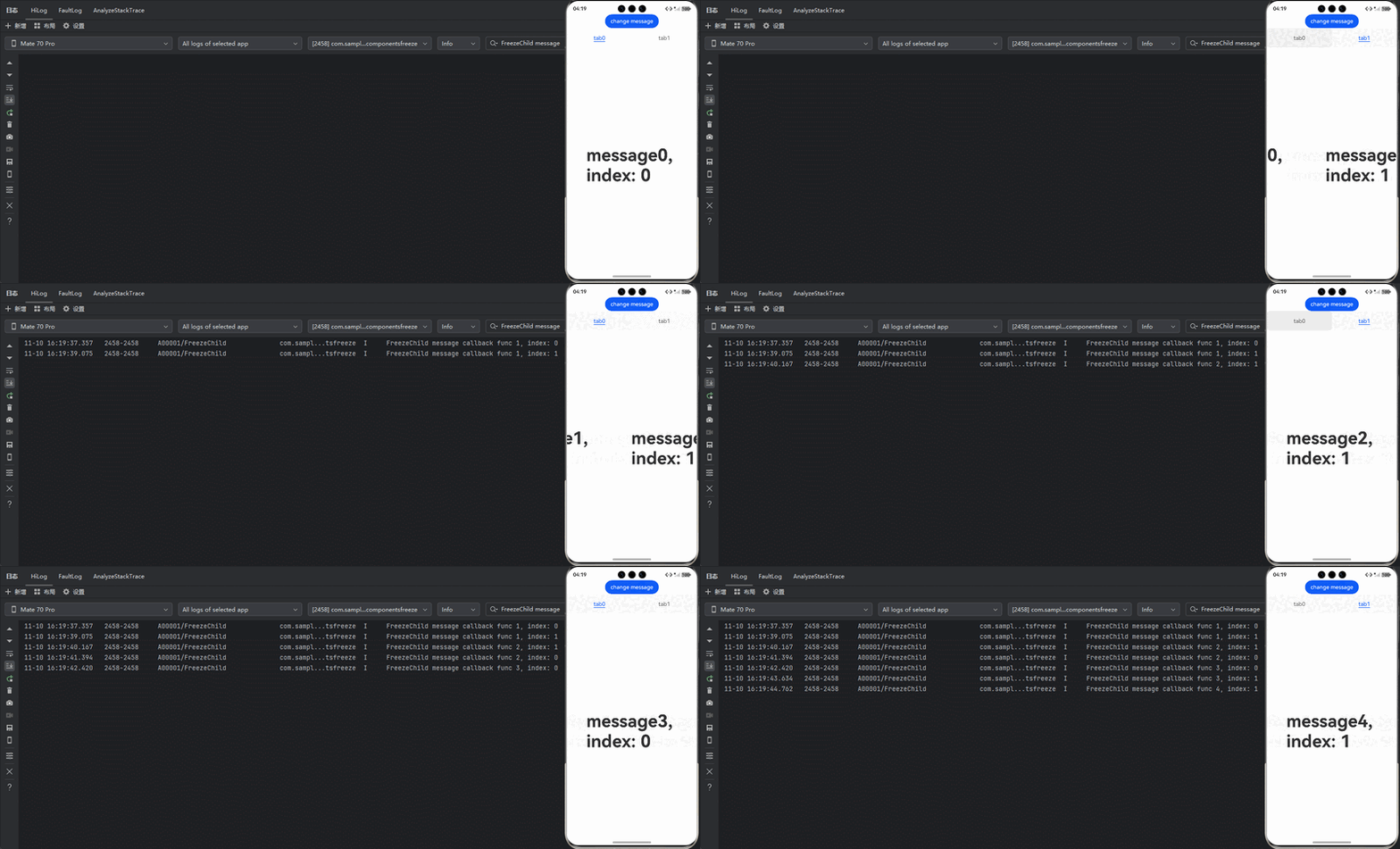
图示如下:
import { hilog } from '@kit.PerformanceAnalysisKit';

const DOMAIN = 0x0000;

@Entry
@ComponentV2
struct TabContentTest {
  @Local message: number = 0;
  @Local data: number[] = [0, 1];

  build() {
    Row() {
      Column() {
        Button('change message').onClick(() => {
          this.message++;
        })

        Tabs() {
          ForEach(this.data, (item: number) => {
            TabContent() {
              FreezeChild({ message: this.message, index: item })
            }.tabBar(`tab${item}`)
          }, (item: number) => item.toString())
        }
      }
      .width('100%')
    }
    .height('100%')
  }
}

@ComponentV2({ freezeWhenInactive: true })
struct FreezeChild {
  @Param message: number = 0;
  @Param index: number = 0;

  @Monitor('message')
  onMessageUpdated(mon: IMonitor) {
    hilog.info(DOMAIN, 'testTag', `FreezeChild message callback func ${this.message}, index: ${this.index}`);
  }

  build() {
    Text('message' + `${this.message}, index: ${this.index}`)
      .fontSize(50)
      .fontWeight(FontWeight.Bold)
  }
}
在上面的示例中:
1.点击change message更改message的值,当前正在显示的TabContent组件中@Monitor注册的方法onMessageUpdated被触发。
2.点击tab1切换到另外的TabContent,该TabContent的状态由inactive变为active,对应的@Monitor注册的方法onMessageUpdated被触发。
3.再次点击change message更改message的值,仅当前显示的TabContent子组件中@Monitor注册的方法onMessageUpdated被触发。其他inactive的TabContent组件不会触发@Monitor。
Navigation
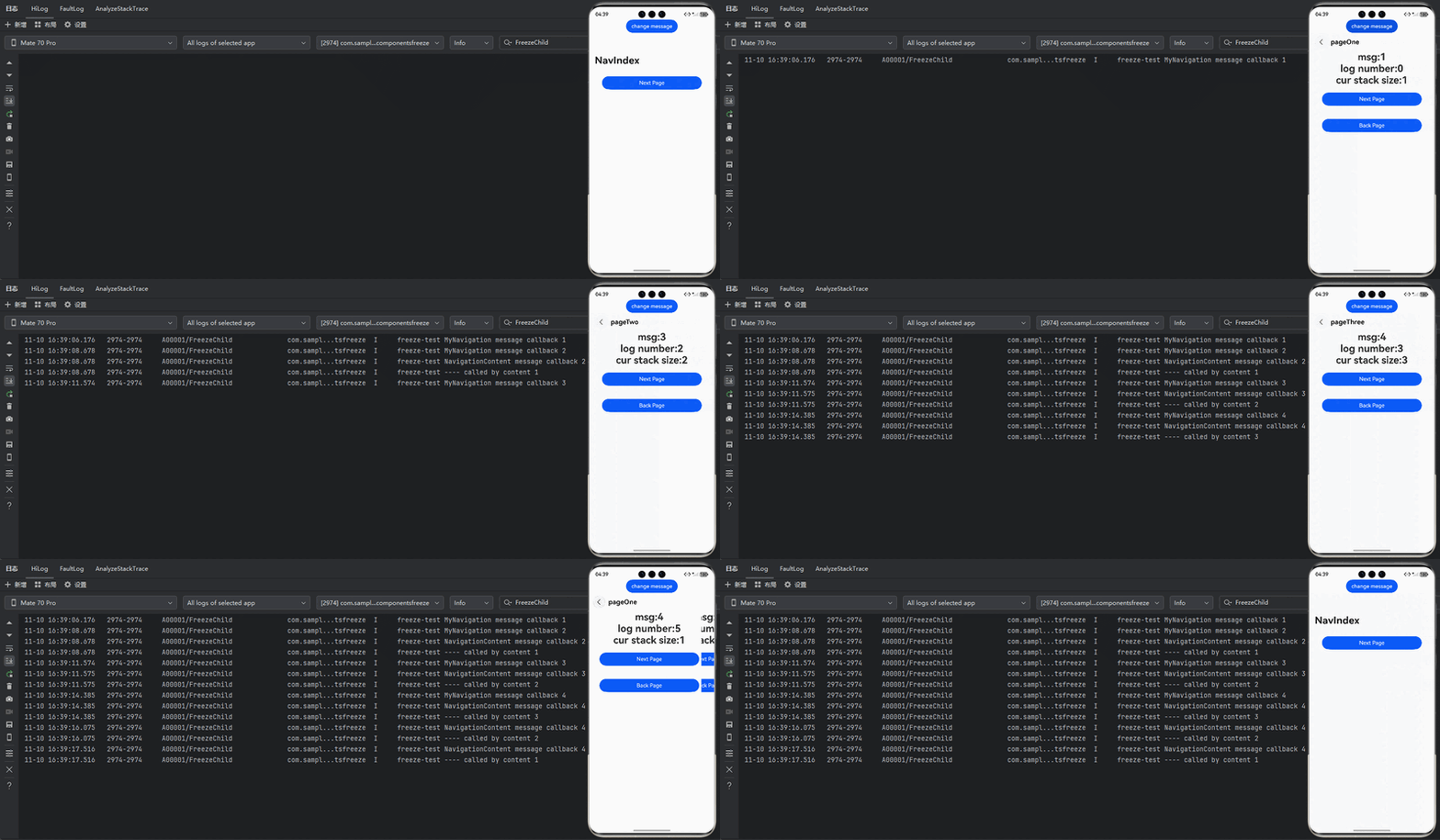
当NavDestination不可见时,会将其子自定义组件设置成非激活态,修改状态变量不会触发冻结组件的刷新。当返回该页面时,其子自定义组件重新恢复成激活态,触发@Monitor回调进行刷新。
需要注意:本文档里说的“激活(active)/非激活(inactive)”是指组件冻结的激活/非激活状态,和NavDestination组件中的onActive和onInactive不同。
import { hilog } from '@kit.PerformanceAnalysisKit';

const DOMAIN = 0x0000;
const PAGE_ONE_INDEX = 1;
const PAGE_TWO_INDEX = 2;
const PAGE_THREE_INDEX = 3;

@Entry
@ComponentV2
struct MyNavigationTestStack {
  @Provider('pageInfo') pageInfo: NavPathStack = new NavPathStack();
  @Local message: number = 0;

  @Monitor('message')
  info() {
    hilog.info(DOMAIN, 'testTag', `freeze-test MyNavigation message callback ${this.message}`);
  }

  @Builder
  PageMap(name: string) {
    if (name === 'pageOne') {
      PageOneStack({ message: this.message })
    } else if (name === 'pageTwo') {
      PageTwoStack({ message: this.message })
    } else if (name === 'pageThree') {
      PageThreeStack({ message: this.message })
    }
  }

  build() {
    Column() {
      Button('change message')
        .onClick(() => {
          this.message++;
        })
      Navigation(this.pageInfo) {
        Column() {
          Button('Next Page', { stateEffect: true, type: ButtonType.Capsule })
            .onClick(() => {
              this.pageInfo.pushPath({ name: 'pageOne' }); // 将name指定的NavDestination页面信息入栈
            })
        }
      }.title('NavIndex')
      .navDestination(this.PageMap)
      .mode(NavigationMode.Stack)
    }
  }
}

@ComponentV2
struct PageOneStack {
  @Consumer('pageInfo') pageInfo: NavPathStack = new NavPathStack();
  @Local index: number = PAGE_ONE_INDEX;
  @Param message: number = 0;

  build() {
    NavDestination() {
      Column() {
        NavigationContentMsgStack({ message: this.message, index: this.index })
        Text('cur stack size:' + `${this.pageInfo.size()}`)
          .fontSize(30)
        Button('Next Page', { stateEffect: true, type: ButtonType.Capsule })
          .onClick(() => {
            this.pageInfo.pushPathByName('pageTwo', null);
          })
        Button('Back Page', { stateEffect: true, type: ButtonType.Capsule })
          .onClick(() => {
            this.pageInfo.pop();
          })
      }.width('100%').height('100%')
    }.title('pageOne')
    .onBackPressed(() => {
      this.pageInfo.pop();
      return true;
    })
  }
}

@ComponentV2
struct PageTwoStack {
  @Consumer('pageInfo') pageInfo: NavPathStack = new NavPathStack();
  @Local index: number = PAGE_TWO_INDEX;
  @Param message: number = 0;

  build() {
    NavDestination() {
      Column() {
        NavigationContentMsgStack({ message: this.message, index: this.index })
        Text('cur stack size:' + `${this.pageInfo.size()}`)
          .fontSize(30)
        Button('Next Page', { stateEffect: true, type: ButtonType.Capsule })
          .onClick(() => {
            this.pageInfo.pushPathByName('pageThree', null);
          })
        Button('Back Page', { stateEffect: true, type: ButtonType.Capsule })
          .onClick(() => {
            this.pageInfo.pop();
          })
      }
    }.title('pageTwo')
    .onBackPressed(() => {
      this.pageInfo.pop();
      return true;
    })
  }
}

@ComponentV2
struct PageThreeStack {
  @Consumer('pageInfo') pageInfo: NavPathStack = new NavPathStack();
  @Local index: number = PAGE_THREE_INDEX;
  @Param message: number = 0;

  build() {
    NavDestination() {
      Column() {
        NavigationContentMsgStack({ message: this.message, index: this.index })
        Text('cur stack size:' + `${this.pageInfo.size()}`)
          .fontSize(30)
        Button('Next Page', { stateEffect: true, type: ButtonType.Capsule })
          .height(40)
          .onClick(() => {
            this.pageInfo.pushPathByName('pageOne', null);
          })
        Button('Back Page', { stateEffect: true, type: ButtonType.Capsule })
          .height(40)
          .onClick(() => {
            this.pageInfo.pop();
          })
      }
    }.title('pageThree')
    .onBackPressed(() => {
      this.pageInfo.pop();
      return true;
    })
  }
}

@ComponentV2({ freezeWhenInactive: true })
struct NavigationContentMsgStack {
  @Param message: number = 0;
  @Param index: number = 0;

  @Monitor('message')
  info() {
    hilog.info(DOMAIN, 'testTag', `freeze-test NavigationContent message callback ${this.message}`);
    hilog.info(DOMAIN, 'testTag', `freeze-test ---- called by content ${this.index}`);
  }

  build() {
    Column() {
      Text('msg:' + `${this.message}`)
        .fontSize(30)
    }
  }
}
在上面的示例中:
1.点击change message更改message的值,当前正在显示的MyNavigationTestStack组件中@Monitor注册的方法info被触发。
2.点击Next Page切换到PageOne,创建PageOneStack节点。
3.再次点击change message更改message的值,仅PageOneStack中的NavigationContentMsgStack子组件中@Monitor注册的方法info被触发。
4.再次点击Next Page切换到PageTwo,创建PageTwoStack节点。PageOneStack节点状态由active变为inactive。
5.再次点击change message更改message的值,仅PageTwoStack中的NavigationContentMsgStack子组件中@Monitor注册的方法info被触发。Navigation路由栈中非栈顶的NavDestination中的子自定义组件是inactive状态,@Monitor方法不会触发。
6.再次点击Next Page切换到PageThree,创建PageThreeStack节点。PageTwoStack节点状态由active变为inactive。
7.再次点击change message更改message的值,仅PageThreeStack中的NavigationContentMsgStack子组件中@Monitor注册的方法info被触发。Navigation路由栈中非栈顶的NavDestination中的子自定义组件是inactive状态,@Monitor方法不会触发。
8.点击Back Page回到PageTwo,此时,PageTwoStack节点状态由inactive变为active,其NavigationContentMsgStack子组件中@Monitor注册的方法info被触发。
9.再次点击Back Page回到PageOne,此时,PageOneStack节点状态由inactive变为active,其NavigationContentMsgStack子组件中@Monitor注册的方法info被触发。
10.再次点击Back Page回到初始页,此时,无任何触发。
Repeat
Repeat从API version 18开始支持自定义组件冻结。
对Repeat缓存池中的自定义组件进行冻结,避免不必要的组件刷新。建议提前阅读Repeat节点更新/复用能力说明。
import { hilog } from '@kit.PerformanceAnalysisKit';

const DOMAIN = 0x0000;

@Entry
@ComponentV2
struct RepeatVirtualScrollFreeze {
  @Local simpleList: Array<string> = [];
  @Local bgColor: Color = Color.Pink;

  aboutToAppear(): void {
    for (let i = 0; i < 7; i++) {
      this.simpleList.push(`item${i}`);
    }
  }

  build() {
    Column() {
      Row() {
        Button('Reduce length to 5')
          .onClick(() => {
            this.simpleList = this.simpleList.slice(0, 5);
          })
        Button('Change bgColor')
          .onClick(() => {
            this.bgColor = this.bgColor == Color.Pink ? Color.Blue : Color.Pink;
          })
      }

      List() {
        Repeat(this.simpleList)
          .each((obj: RepeatItem<string>) => {
          })
          .key((item: string, index: number) => item)
          .virtualScroll({ totalCount: this.simpleList.length })
          .templateId(() => 'a')
          .template('a', (ri) => {
            ChildComponent({
              message: ri.item,
              bgColor: this.bgColor
            })
          }, { cachedCount: 2 })
      }
      .cachedCount(0)
      .height(500)
    }
    .height('100%')
  }
}

// 开启组件冻结
@ComponentV2({ freezeWhenInactive: true })
struct ChildComponent {
  @Param @Require message: string = '';
  @Param @Require bgColor: Color = Color.Pink;

  @Monitor('bgColor')
  onBgColorChange(monitor: IMonitor) {
    // bgColor改变时,缓存池中组件不刷新,不会打印日志
    hilog.info(DOMAIN, 'testTag', `repeat---bgColor change from ${monitor.value()?.before} to ${monitor.value()?.now}`);
  }

  build() {
    Text(`[a]: ${this.message}`)
      .fontSize(50)
      .backgroundColor(this.bgColor)
  }
}
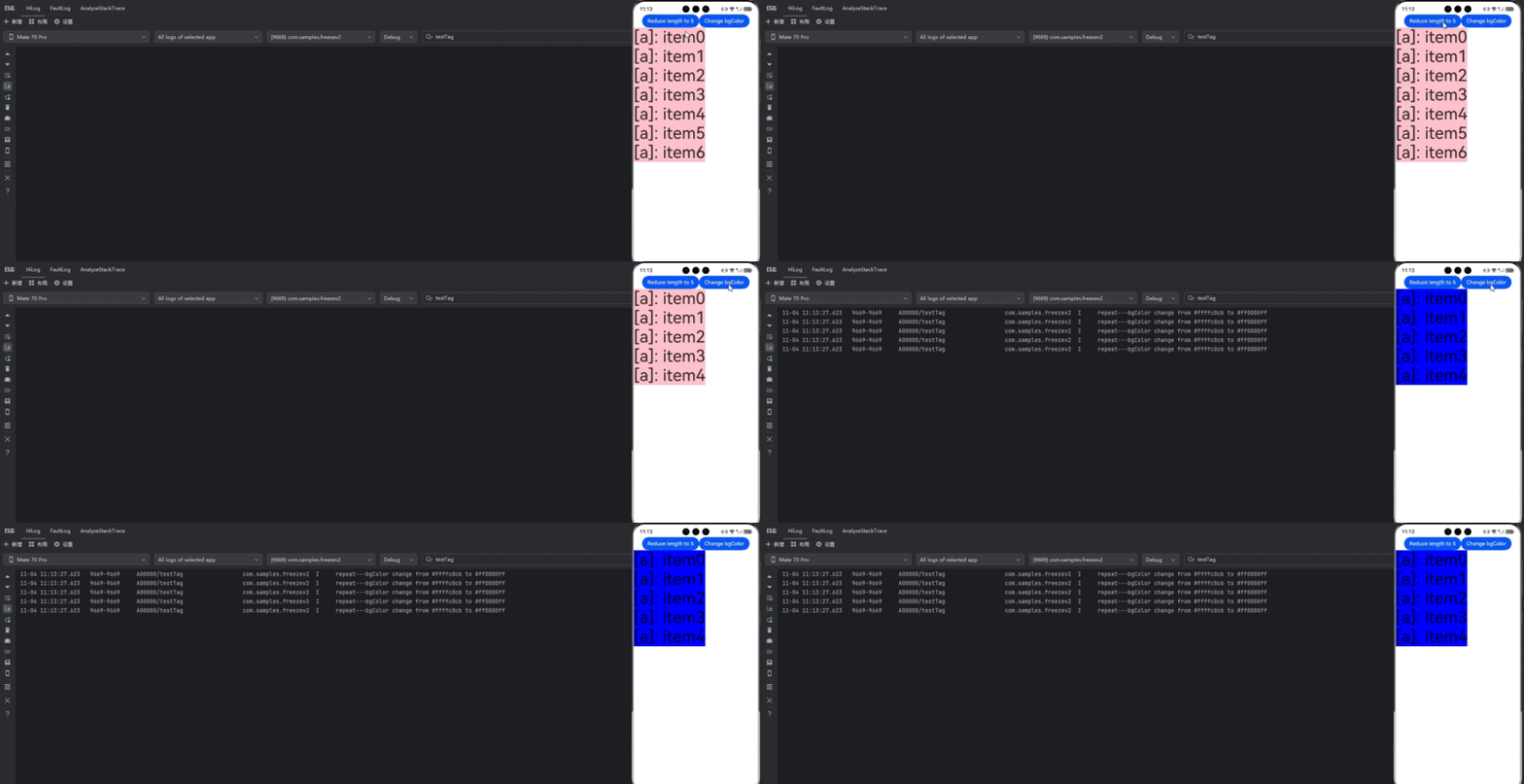
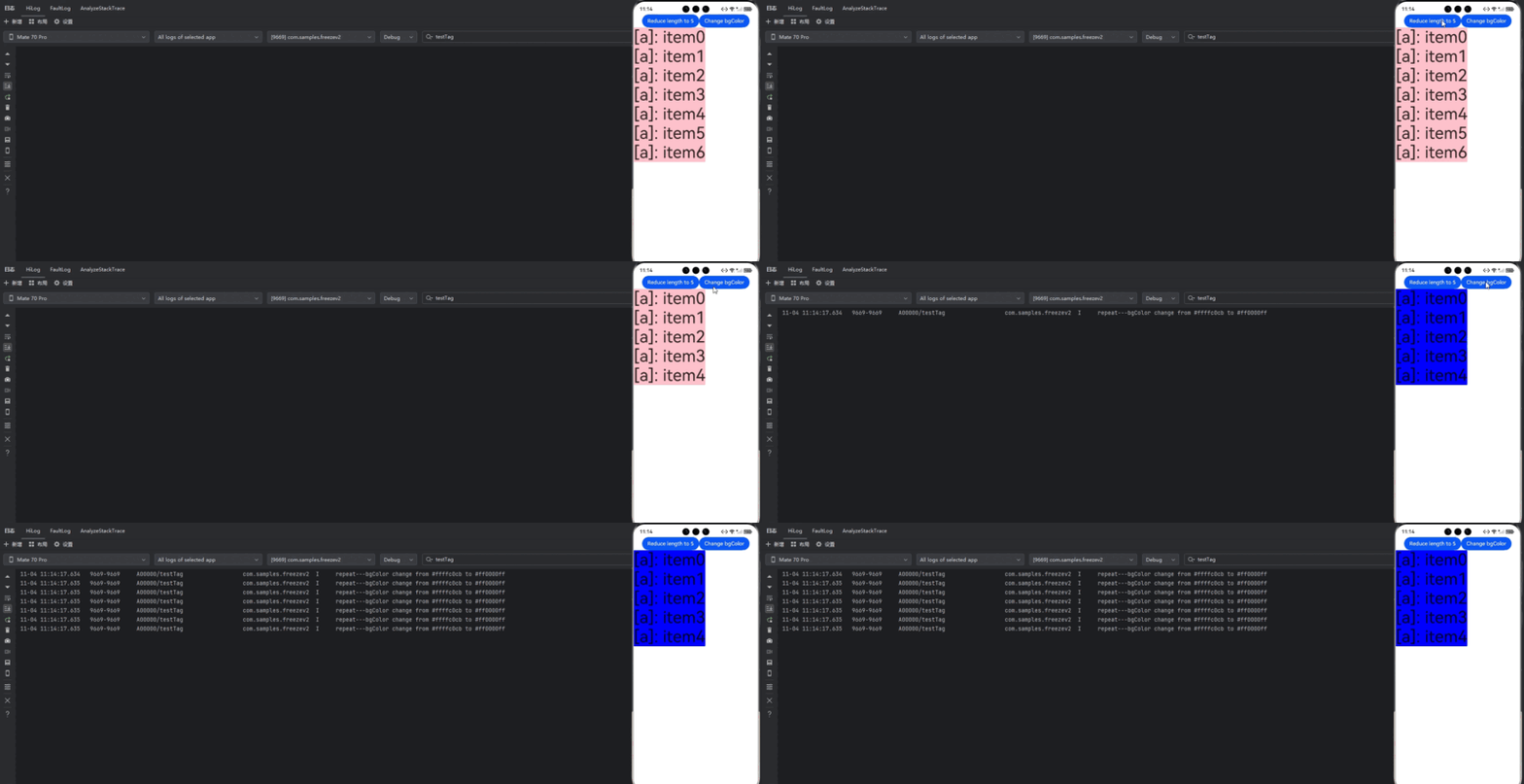
在上面的示例中:
点击Reduce length to 5后,被移除的两个组件会进入Repeat缓存池,然后点击Change bgColor更改bgColor的值触发节点刷新。
开启组件冻结(freezeWhenInactive: true),只有剩余节点中@Monitor装饰的方法onBgColorChange被触发,如示例中屏上的5个节点会刷新并打印5条日志,缓存池中的节点则不会。
import { hilog } from '@kit.PerformanceAnalysisKit';

const DOMAIN = 0x0000;
// ...
// 关闭组件冻结
@ComponentV2({ freezeWhenInactive: false })
struct ChildComponent1 {
  @Param @Require message: string = '';
  @Param @Require bgColor: Color = Color.Pink;

  @Monitor('bgColor')
  onBgColorChange(monitor: IMonitor) {
    // bgColor改变时,缓存池组件也会刷新,并打印日志
    hilog.info(DOMAIN, 'testTag', `repeat---bgColor change from ${monitor.value()?.before} to ${monitor.value()?.now}`);
  }

  build() {
    Text(`[a]: ${this.message}`)
      .fontSize(50)
      .backgroundColor(this.bgColor)
  }
}
不开启组件冻结(freezeWhenInactive: false,当未指定freezeWhenInactive参数时默认不开启组件冻结),剩余节点和缓存池节点中@Monitor装饰的方法onBgColorChange都会被触发,即会有7个节点会刷新并打印7条日志。
仅子组件开启组件冻结
如果开发者只想冻结某个子组件,可以选择只在子组件设置freezeWhenInactive为true。
// src/main/ets/pages/freeze/template5/PageA.ets
import { hilog } from '@kit.PerformanceAnalysisKit';

const DOMAIN = 0x0000;

@ObservedV2
class Book {
  @Trace public name: string = 'TS';

  constructor(name: string) {
    this.name = name;
  }
}

@Entry
@ComponentV2
struct PageA {
  pageInfo: NavPathStack = new NavPathStack();

  build() {
    Column() {
      Navigation(this.pageInfo) {
        Child()

        Button('Go to next page').fontSize(30)
          .onClick(() => {
            this.pageInfo.pushPathByName('PageB', null);
          })
      }
    }
  }
}

@ComponentV2({ freezeWhenInactive: true })
export struct Child {
  @Local bookTest: Book = new Book(`A Midsummer Night's Dream`);

  @Monitor('bookTest.name')
  onMessageChange(monitor: IMonitor) {
    hilog.info(DOMAIN, 'testTag', `The book name change from ${monitor.value()?.before} to ${monitor.value()?.now}`);
  }

  textUpdate(): number {
    hilog.info(DOMAIN, 'testTag', 'The text is update');
    return 25;
  }

  build() {
    Column() {
      Text(`The book name is ${this.bookTest.name}`).fontSize(this.textUpdate())

      Button('change BookName')
        .onClick(() => {
          setTimeout(() => {
            this.bookTest = new Book(`Jane Austen's Pride and Prejudice`);
          }, 3000);
        })
    }
  }
}
// src/main/ets/pages/freeze/template5/PageB.ets
@Builder
function pageBBuilder() {
  PageB()
}

@ComponentV2
struct PageB {
  pathStack: NavPathStack = new NavPathStack();

  build() {
    NavDestination() {
      Column() {
        Text('This is the PageB')

        Button('Back').fontSize(30)
          .onClick(() => {
            this.pathStack.pop();
          })
      }
    }.onReady((context: NavDestinationContext) => {
      this.pathStack = context.pathStack;
    })
  }
}
使用Navigation时,需要添加配置系统路由表文件src/main/resources/base/profile/route_map.json,并替换pageSourceFile为PageB页面的路径,并且在module.json5中添加:"routerMap": "$profile:route_map"。
{
  "routerMap": [
    {
      "name": "PageB",
      "pageSourceFile": "src/main/ets/pages/freeze/template5/PageB.ets",
      "buildFunction": "pageBBuilder",
      "data": {
        "description" : "This is the PageB"
      }
    }
  ]
}
在上面的示例中:
- PageA的子组件Child,设置freezeWhenInactive: true, 开启了组件冻结功能。
- 点击change BookName,然后3s内点击Go to next page。在更新bookTest的时候,已经跳转到PageB,PageA的组件处于inactive状态,又因为Child组件开启了组件冻结,状态变量@Local bookTest将不响应更新,其@Monitor装饰的回调方法不会被调用,状态变量关联的组件不会刷新。
- 点击Back回到前一个页面,调用@Monitor装饰的回调方法,状态变量关联的组件刷新。
混用场景
当支持组件冻结的场景彼此之间组合使用时,对于不同的API版本,冻结行为会有不同。给父组件设置组件冻结标志,在API version 17及以下,当父组件解冻时,会解冻其子组件所有的节点;从API version 18开始,父组件解冻时,只会解冻子组件的屏上节点,详细说明见@Component的自定义组件冻结的混用场景。
Navigation和TabContent的混用
import { hilog } from '@kit.PerformanceAnalysisKit';

const DOMAIN = 0x0000;
const TAB_STATE_INITIAL_VALUE = 47;

@ComponentV2
struct ChildOfParamComponent {
  @Require @Param childVal: number;

  @Monitor('childVal')
  onChange(m: IMonitor) {
    hilog.info(DOMAIN, 'testTag',
      `Appmonitor ChildOfParamComponent: changed ${m.dirty[0]}: ${m.value()?.before} -> ${m.value()?.now}`);
  }

  build() {
    Column() {
      Text(`Child Param: ${this.childVal}`)
    }
  }
}

@ComponentV2
struct ParamComponent {
  @Require @Param val: number;

  @Monitor('val')
  onChange(m: IMonitor) {
    hilog.info(DOMAIN, 'testTag',
      `Appmonitor ParamComponent: changed ${m.dirty[0]}: ${m.value()?.before} -> ${m.value()?.now}`);
  }

  build() {
    Column() {
      Text(`val: ${this.val}`)
      ChildOfParamComponent({ childVal: this.val })
    }
  }
}

@ComponentV2
struct DelayComponent {
  @Require @Param delayVal1: number;

  @Monitor('delayVal1')
  onChange(m: IMonitor) {
    hilog.info(DOMAIN, 'testTag',
      `Appmonitor DelayComponent: changed ${m.dirty[0]}: ${m.value()?.before} -> ${m.value()?.now}`);
  }

  build() {
    Column() {
      Text(`Delay Param: ${this.delayVal1}`)
    }
  }
}

@ComponentV2({ freezeWhenInactive: true })
struct TabsComponent {
  private controller: TabsController = new TabsController();
  @Local tabState: number = TAB_STATE_INITIAL_VALUE;

  @Monitor('tabState')
  onChange(m: IMonitor) {
    hilog.info(DOMAIN, 'testTag',
      `Appmonitor TabsComponent: changed ${m.dirty[0]}: ${m.value()?.before} -> ${m.value()?.now}`);
  }

  build() {
    Column({ space: 10 }) {
      Button(`Incr state ${this.tabState}`)
        .fontSize(25)
        .onClick(() => {
          hilog.info(DOMAIN, 'testTag', 'Button increment state value');
          this.tabState = this.tabState + 1;
        })
      Tabs({ barPosition: BarPosition.Start, index: 0, controller: this.controller }) {
        TabContent() {
          ParamComponent({ val: this.tabState })
        }.tabBar('Update')
        TabContent() {
          DelayComponent({ delayVal1: this.tabState })
        }.tabBar('DelayUpdate')
      }
      .vertical(false)
      .scrollable(true)
      .barMode(BarMode.Fixed)
      .barWidth(400)
      .barHeight(150)
      .animationDuration(400)
      .width('100%')
      .height(200)
      .backgroundColor(0xF5F5F5)
    }
  }
}

@Entry
@Component
struct MyNavigationTestStack1 {
  @Provide('pageInfo') pageInfo: NavPathStack = new NavPathStack();

  @Builder
  PageMap(name: string) {
    if (name === 'pageOne') {
      PageOneStack1()
    } else if (name === 'pageTwo') {
      PageTwoStack2()
    }
  }

  build() {
    Column() {
      Navigation(this.pageInfo) {
        Column() {
          Button('Next Page', { stateEffect: true, type: ButtonType.Capsule })
            .width('80%')
            .height(40)
            .margin(20)
            .onClick(() => {
              this.pageInfo.pushPath({ name: 'pageOne' }); // 将name指定的NavDestination页面信息入栈
            })
        }
      }.title('NavIndex')
      .navDestination(this.PageMap)
      .mode(NavigationMode.Stack)
    }
  }
}

@Component
struct PageOneStack1 {
  @Consume('pageInfo') pageInfo: NavPathStack;

  build() {
    NavDestination() {
      Column() {
        TabsComponent()

        Button('Next Page', { stateEffect: true, type: ButtonType.Capsule })
          .width('80%')
          .height(40)
          .margin(20)
          .onClick(() => {
            this.pageInfo.pushPathByName('pageTwo', null);
          })
      }.width('100%').height('100%')
    }.title('pageOne')
    .onBackPressed(() => {
      this.pageInfo.pop();
      return true;
    })
  }
}

@Component
struct PageTwoStack2 {
  @Consume('pageInfo') pageInfo: NavPathStack;

  build() {
    NavDestination() {
      Column() {
        Button('Back Page', { stateEffect: true, type: ButtonType.Capsule })
          .width('80%')
          .height(40)
          .margin(20)
          .onClick(() => {
            this.pageInfo.pop();
          })
      }.width('100%').height('100%')
    }.title('pageTwo')
    .onBackPressed(() => {
      this.pageInfo.pop();
      return true;
    })
  }
}
在API version 17及以下:
点击Next page进入下一个页面并返回,会解冻Tabcontent所有的标签。
在API version 18及以上:
点击Next page进入下一个页面并返回,只会解冻对应标签的节点。
限制条件
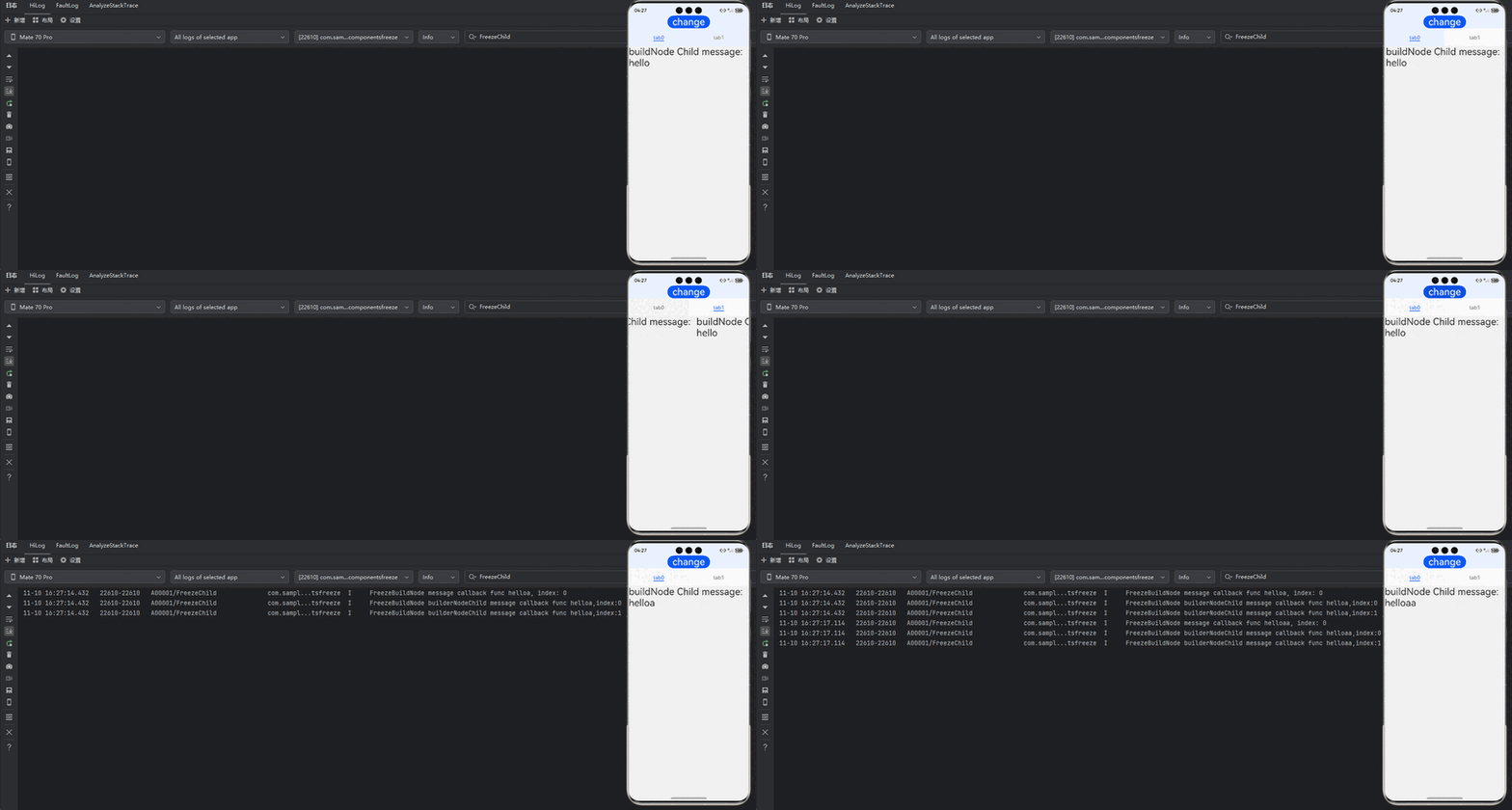
API version 21及之前版本,如下面示例所示,FreezeBuildNode中使用了自定义节点BuilderNode。BuilderNode可以通过命令式动态挂载组件,而组件冻结又是强依赖父子关系来通知是否开启组件冻结。如果父组件使用组件冻结,且组件树的中间层级上又启用了BuilderNode,则BuilderNode的子组件将无法被冻结。从API version 22开始,可以设置BuilderNode继承冻结能力。
import { BuilderNode, FrameNode, NodeController, UIContext } from '@kit.ArkUI';
import { hilog } from '@kit.PerformanceAnalysisKit';

const DOMAIN = 0x0000;

// 定义一个Params类,用于传递参数
@ObservedV2
class Params {
  // 单例模式,确保只有一个Params实例
  public static singleton_: Params;

  // 获取Params实例的方法
  public static instance() {
    if (!Params.singleton_) {
      Params.singleton_ = new Params(0);
    }
    return Params.singleton_;
  }

  // 使用@Trace装饰器装饰message属性,以便跟踪其变化
  @Trace public message: string = 'Hello';
  public index: number = 0;

  constructor(index: number) {
    this.index = index;
  }
}

// 定义一个BuildNodeChild组件,它包含一个storage属性和一个index属性
@ComponentV2
struct BuildNodeChild {
  // 使用Params实例作为storage属性
  storage: Params = Params.instance();
  @Param index: number = 0;

  // 使用@Monitor装饰器监听storage.message的变化
  @Monitor('storage.message')
  onMessageChange(monitor: IMonitor) {
    hilog.info(DOMAIN, 'onMessageChange',
      `FreezeBuildNode BuildNodeChild message callback func ${this.storage.message}, index:${this.index}`);
  }

  build() {
    Text(`buildNode Child message: ${this.storage.message}`).fontSize(30)
  }
}

// 定义一个buildText函数,它接收一个Params参数并构建一个Column组件
@Builder
function buildText(params: Params) {
  Column() {
    BuildNodeChild({ index: params.index })
  }
}

class TextNodeController extends NodeController {
  private textNode: BuilderNode<[Params]> | null = null;
  private index: number = 0;

  // 构造函数接收一个index参数
  constructor(index: number) {
    super();
    this.index = index;
  }

  // 创建并返回一个FrameNode
  makeNode(context: UIContext): FrameNode | null {
    this.textNode = new BuilderNode(context);
    this.textNode.build(wrapBuilder<[Params]>(buildText), new Params(this.index));
    return this.textNode.getFrameNode();
  }
}

// 定义一个Index组件,它包含一个message属性和一个data数组
@Entry
@ComponentV2
struct Index {
  // 使用Params实例作为storage属性
  storage: Params = Params.instance();
  private data: number[] = [0, 1];

  build() {
    Row() {
      Column() {
        Button('change').fontSize(30)
          .onClick(() => {
            this.storage.message += 'a';
          })

        Tabs() {
          // 使用Repeat重复渲染TabContent组件
          Repeat<number>(this.data)
            .each((obj: RepeatItem<number>) => {
              TabContent() {
                FreezeBuildNode({ index: obj.item })
                  .margin({ top: 20 })
              }.tabBar(`tab${obj.item}`)
            })
            .key((item: number) => item.toString())
        }
      }
    }
    .width('100%')
    .height('100%')
  }
}

// 定义一个FreezeBuildNode组件,它包含一个message属性和一个index属性
@ComponentV2({ freezeWhenInactive: true })
struct FreezeBuildNode {
  // 使用Params实例作为storage属性
  storage: Params = Params.instance();
  @Param index: number = 0;

  // 使用@Monitor装饰器监听storage.message的变化
  @Monitor('storage.message')
  onMessageChange(monitor: IMonitor) {
    hilog.info(DOMAIN, 'onMessageChange',
      `FreezeBuildNode message callback func ${this.storage.message}, index: ${this.index}`);
  }

  build() {
    NodeContainer(new TextNodeController(this.index))
      .width('100%')
      .height('100%')
      .backgroundColor('#FFF0F0F0')
  }
}
点击change,改变message的值,当前正在显示的TabContent组件中@Monitor注册的方法onMessageChange被触发。未显示的TabContent中的BuilderNode节点下组件的@Monitor方法onMessageChange也被触发,并没有被冻结。