设置应用内主题换肤
概述
对于采用ArkTS开发的应用,提供了应用内组件的主题换肤功能,支持局部的深浅色切换及动态换肤。目前,该功能只支持设置应用内主题换肤,暂不支持在UIAbility或窗口层面进行主题设置,同时也不支持C-API和Node-API。
自定义主题色
当应用需要使用换肤功能时,应自定义主题颜色。CustomTheme用于自定义主题色的内容,其属性可选,仅需对需要修改的token字段赋值,其余token将继承系统默认颜色值,可参考系统默认的token颜色值。请参照以下示例自定义主题色:
import { CustomColors, CustomTheme } from '@kit.ArkUI';

export class AppColors implements CustomColors {
  // 自定义主题色
  public brand: ResourceColor = '#FF75D9';
  // 使用$r,让一级警示色在深色和浅色模式下,设置为不同的颜色
  public warning: ResourceColor = $r('sys.color.ohos_id_color_warning');
}

export class AppTheme implements CustomTheme {
  public colors: AppColors = new AppColors();
}

export let gAppTheme: CustomTheme = new AppTheme();
设置应用内组件自定义主题色
-
若在页面入口处设置应用内组件自定义主题色,需确保在页面build前执行ThemeControl.setDefaultTheme。
示例代码中,onWillApplyTheme回调函数用于使自定义组件获取当前生效的Theme对象。
// Index.etsimport { Theme, ThemeControl } from '@kit.ArkUI';import { gAppTheme } from './AppTheme';//在页面build前执行ThemeControlThemeControl.setDefaultTheme(gAppTheme);@Entry@Componentstruct DisplayPage {@State menuItemColor: ResourceColor = $r('sys.color.background_primary');onWillApplyTheme(theme: Theme) {this.menuItemColor = theme.colors.backgroundPrimary;}build() {Column() {List({ space: 10 }) {ListItem() {Column({ space: '5vp' }) {Text('Color mode').margin({ top: '5vp', left: '14fp' }).width('100%')Row() {Column() {Text('Light').fontSize('16fp').textAlign(TextAlign.Start).alignSelf(ItemAlign.Center)Radio({ group: 'light or dark', value: 'light' }).checked(true)}.width('50%')Column() {Text('Dark').fontSize('16fp').textAlign(TextAlign.Start).alignSelf(ItemAlign.Center)Radio({ group: 'light or dark', value: 'dark' })}.width('50%')}}.width('100%').height('90vp').borderRadius('10vp').backgroundColor(this.menuItemColor)}ListItem() {Column() {Text('Brightness').width('100%').margin({ top: '5vp', left: '14fp' })Slider({ value: 40, max: 100 })}.width('100%').height('70vp').borderRadius('10vp').backgroundColor(this.menuItemColor)}ListItem() {Column() {Row() {Column({ space: '5vp' }) {Text('Touch sensitivity').fontSize('16fp').textAlign(TextAlign.Start).width('100%')Text('Increase the touch sensitivity of your screen' +' for use with screen protectors').fontSize('12fp').fontColor(Color.Blue).textAlign(TextAlign.Start).width('100%')}.alignSelf(ItemAlign.Center).margin({ left: '14fp' }).width('75%')Toggle({ type: ToggleType.Switch, isOn: true }).margin({ right: '14fp' }).alignSelf(ItemAlign.Center)}.width('100%').height('80vp')}.width('100%').borderRadius('10vp').backgroundColor(this.menuItemColor)}ListItem() {Column() {Text('Warning').width('100%').margin({ top: '5vp', left: '14fp' })Button('Text').type(ButtonType.Capsule).role(ButtonRole.ERROR).width('40%')}.width('100%').height('70vp').borderRadius('10vp').backgroundColor(this.menuItemColor)}}}.padding('10vp').backgroundColor('#dcdcdc').width('100%').height('100%')}} -
若在UIAbility中设置应用内组件自定义主题色,需在onWindowStageCreate()方法的windowStage.loadContent的完成时回调中调用ThemeControl.setDefaultTheme,设置应用内组件的自定义主题色。
// EntryAbility.etsimport {AbilityConstant, UIAbility, Want } from '@kit.AbilityKit';import { hilog } from '@kit.PerformanceAnalysisKit';import { window, CustomColors, ThemeControl } from '@kit.ArkUI';class AppColors implements CustomColors {fontPrimary = 0xFFD53032;iconOnPrimary = 0xFFD53032;iconFourth = 0xFFD53032;}const abilityThemeColors = new AppColors();export default class EntryAbility extends UIAbility {onCreate(want: Want, launchParam: AbilityConstant.LaunchParam) {hilog.info(0x0000, 'testTag', '%{public}s', 'Ability onCreate');}onDestroy() {hilog.info(0x0000, 'testTag', '%{public}s', 'Ability onDestroy');}onWindowStageCreate(windowStage: window.WindowStage) {// Main window is created, set main page for this abilityhilog.info(0x0000, 'testTag', '%{public}s', 'Ability onWindowStageCreate');windowStage.loadContent('pages/Index', (err, data) => {if (err.code) {hilog.error(0x0000, 'testTag', 'Failed to load the content. Cause: %{public}s', JSON.stringify(err) ?? '');return;}hilog.info(0x0000, 'testTag', 'Succeeded in loading the content. Data: %{public}s', JSON.stringify(data) ?? '');// 在onWindowStageCreate()方法中setDefaultThemeThemeControl.setDefaultTheme({ colors: abilityThemeColors });hilog.info(0x0000, 'testTag', '%{public}s', 'ThemeControl.setDefaultTheme done');});}}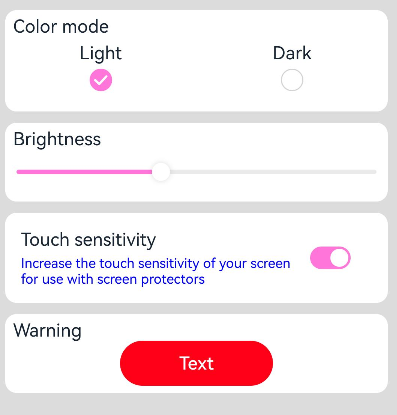

- 当setDefaultTheme的参数为undefined时,会清除先前设置的自定义主题,默认token值对应的色值参考系统缺省token色值。
- setDefaultTheme需要在ArkUI初始化后即windowStage.loadContent的完成时回调中使用。
设置应用局部页面自定义主题风格
通过设置WithTheme,将自定义主题Theme的配色应用于内部组件的默认样式。在WithTheme的作用范围内,组件的配色会根据Theme的配色进行调整。
在自定义节点BuilderNode中使用WithTheme,为了确保显示效果正确,需手动传递系统环境变化事件,触发节点的全量更新,详细请参考BuilderNode系统环境变化更新。
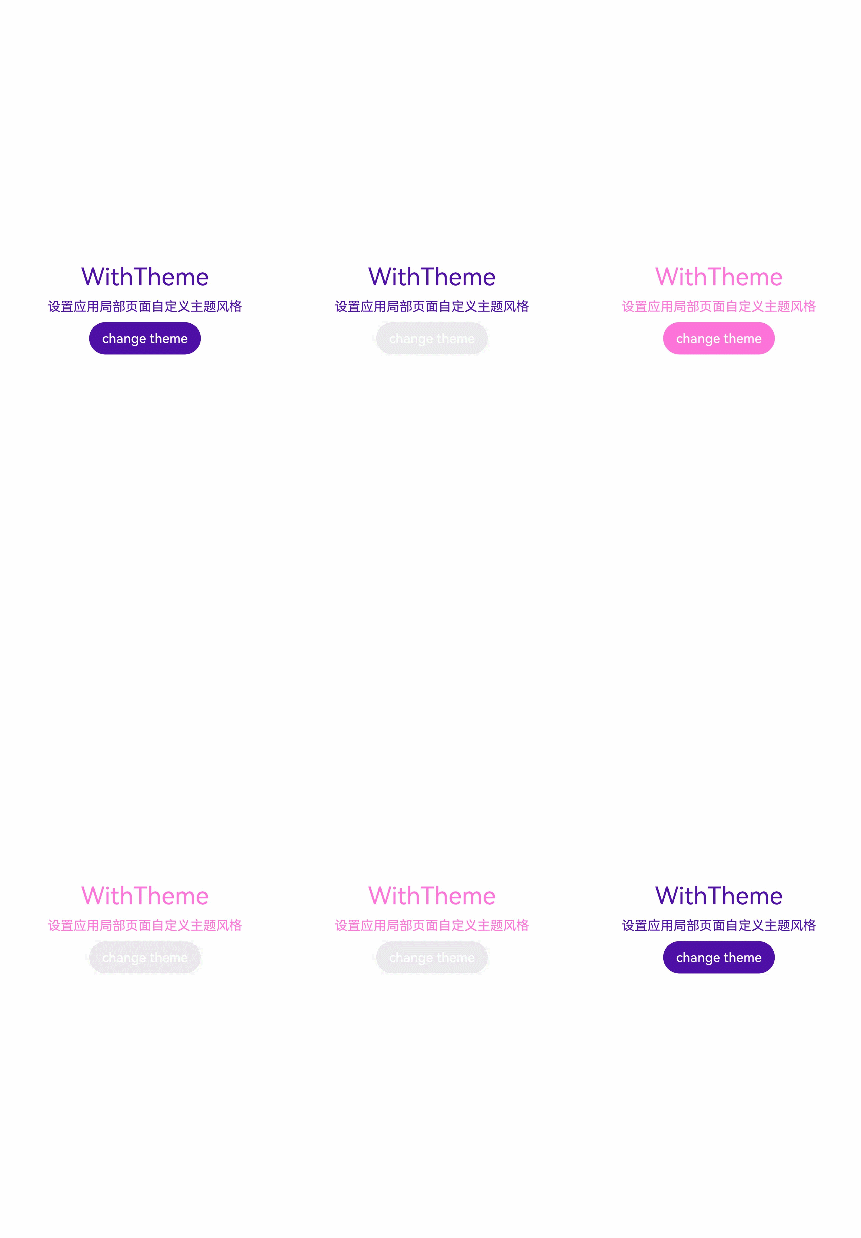
如示例所示,使用WithTheme({ theme: this.CustomTheme })可将作用域内组件的配色设置为自定义主题风格。后续可以通过更新this.CustomTheme来更换主题风格。onWillApplyTheme回调函数用于使自定义组件能够获取当前生效的Theme对象。
import { CustomColors, CustomTheme, Theme } from '@kit.ArkUI';
import { common } from '@kit.AbilityKit';
//请将$r('app.color.xxx')替换为实际资源文件
class AppColors implements CustomColors {
  public fontPrimary: ResourceColor = $r('app.color.brand_purple');
  public backgroundEmphasize: ResourceColor = $r('app.color.brand_purple');
}

class AppColorsSec implements CustomColors {
  public fontPrimary: ResourceColor = $r('app.color.brand');
  public backgroundEmphasize: ResourceColor = $r('app.color.brand');
}

class AppTheme implements CustomTheme {
  public colors: AppColors = new AppColors();
}

class AppThemeSec implements CustomTheme {
  public colors: AppColors = new AppColorsSec();
}

@Entry
@Component
struct DisplayPage1 {
  @State customTheme: CustomTheme = new AppTheme();
  // 请将$r('app.string.SetCustomThemeStyle')替换为实际资源文件,在本示例中该资源文件的value值为"设置应用局部页面自定义主题风格"
  @State message: ResourceStr = $r('app.string.SetCustomThemeStyle');
  count = 0;

  build() {
    WithTheme({ theme: this.customTheme }) {
      Row(){
        Column() {
          Text('WithTheme')
            .fontSize(30)
            .margin({bottom: 10})
          Text(this.message)
            .margin({bottom: 10})
          Button('change theme').onClick(() => {
            this.count++;
            if (this.count > 1) {
              this.count = 0;
            }
            switch (this.count) {
              case 0:
                this.customTheme = new AppTheme();
                break;
              case 1:
                this.customTheme = new AppThemeSec();
                break;
              default:
                break;
            }
          })
        }
        .width('100%')
      }
      .height('100%')
      .width('100%')
    }
  }
}
设置应用页面局部深浅色
通过WithTheme可以设置三种颜色模式,跟随系统模式,浅色模式和深色模式。
在WithTheme的作用范围内,组件的样式资源值会根据指定的模式,读取对应的深浅色模式系统和应用资源值。这意味着,在WithTheme作用范围内,组件的配色会根据所指定的深浅模式进行调整。
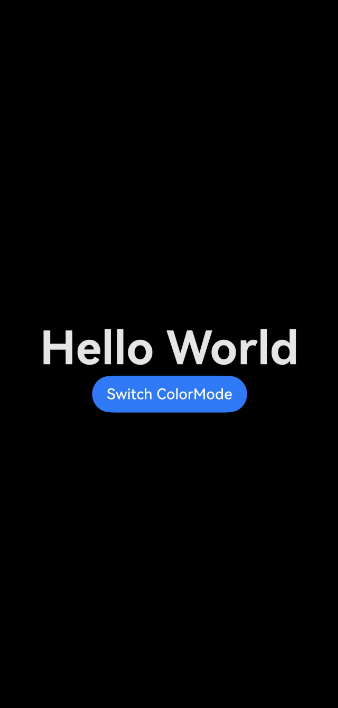
如下面的示例所示,通过WithTheme({ colorMode: ThemeColorMode.DARK }),可以将作用范围内的组件设置为深色模式。
设置局部深浅色时,需要添加dark.json资源文件,深浅色模式才会生效。

dark.json数据示例:
  {
    "color": [
      {
        "name": "start_window_background",
        "value": "#000000"
      }
    ]
  }
import { ThemeControl } from '@kit.ArkUI';

ThemeControl.setDefaultTheme(undefined);

@Entry
@Component
struct DisplayPage3 {
  @State message: string = 'Hello World';
  @State colorMode: ThemeColorMode = ThemeColorMode.DARK;

  build() {
    WithTheme({ colorMode: this.colorMode }) {
      Row() {
        Column() {
          Text(this.message)
            .fontSize(50)
            .fontWeight(FontWeight.Bold)
          Button('Switch ColorMode').onClick(() => {
            if (this.colorMode === ThemeColorMode.LIGHT) {
              this.colorMode = ThemeColorMode.DARK;
            } else if (this.colorMode === ThemeColorMode.DARK) {
              this.colorMode = ThemeColorMode.LIGHT;
            }
          })
        }
        .width('100%')
      }
      .backgroundColor($r('sys.color.background_primary'))
      .height('100%')
      // 扩展安全区,实现沉浸式深浅色变更效果
      .expandSafeArea(
        [SafeAreaType.SYSTEM], [SafeAreaEdge.TOP, SafeAreaEdge.END, SafeAreaEdge.BOTTOM, SafeAreaEdge.START])
    }
  }
}
系统缺省token色值
| Token | 场景类别 | Light | 说明 | Dark | 说明 |
|---|---|---|---|---|---|
| theme.colors.brand | 品牌色 | #ff0a59f7 | #ff317af7 | ||
| theme.colors.warning | 一级警示色 | #ffe84026 | #ffd94838 | ||
| theme.colors.alert | 二级警示色 | #ffed6f21 | #ffdb6b42 | ||
| theme.colors.confirm | 确认色 | #ff64bb5c | #ff5be854 | ||
| theme.colors.fontPrimary | 一级文本 | #e5000000 | #e5ffffff | ||
| theme.colors.fontSecondary | 二级文本 | #99000000 | #99ffffff | ||
| theme.colors.fontTertiary | 三级文本 | #66000000 | #66ffffff | ||
| theme.colors.fontFourth | 四级文本 | #33000000 | #33ffffff | ||
| theme.colors.fontEmphasize | 高亮文本 | #ff0a59f7 | #ff317af7 | ||
| theme.colors.fontOnPrimary | 一级文本反色 | #ffffffff | #ff000000 | ||
| theme.colors.fontOnSecondary | 二级文本反色 | #99ffffff | #99000000 | ||
| theme.colors.fontOnTertiary | 三级文本反色 | #66ffffff | #66000000 | ||
| theme.colors.fontOnFourth | 四级文本反色 | #33ffffff | #33000000 | ||
| theme.colors.iconPrimary | 一级图标 | #e5000000 | #e5ffffff | ||
| theme.colors.iconSecondary | 二级图标 | #99000000 | #99ffffff | ||
| theme.colors.iconTertiary | 三级图标 | #66000000 | #66ffffff | ||
| theme.colors.iconFourth | 四级图标 | #33000000 | #33ffffff | ||
| theme.colors.iconEmphasize | 高亮图标 | #ff0a59f7 | #ff317af7 | ||
| theme.colors.iconSubEmphasize | 高亮辅助图标 | #660a59f7 | #66317af7 | ||
| theme.colors.iconOnPrimary | 一级图标反色 | #ffffffff | #ff000000 | ||
| theme.colors.iconOnSecondary | 二级图标反色 | #99ffffff | #99000000 | ||
| theme.colors.iconOnTertiary | 三级图标反色 | #66ffffff | #66000000 | ||
| theme.colors.iconOnFourth | 四级图标反色 | #33ffffff | #33000000 | ||
| theme.colors.backgroundPrimary | 一级背景(实色/不透明色) | #ffffffff | #ffe5e5e5 | ||
| theme.colors.backgroundSecondary | 二级背景(实色/不透明色) | #fff1f3f5 | #ff191a1c | ||
| theme.colors.backgroundTertiary | 三级背景(实色/不透明色) | #ffe5e5ea | #ff202224 | ||
| theme.colors.backgroundFourth | 四级背景(实色/不透明色) | #ffd1d1d6 | #ff2e3033 | ||
| theme.colors.backgroundEmphasize | 高亮背景(实色/不透明色) | #ff0a59f7 | #ff317af7 | ||
| theme.colors.compForegroundPrimary | 前背景 | #ff000000 | #ffe5e5e5 | ||
| theme.colors.compBackgroundPrimary | 白色背景 | #ffffffff | #ffffffff | ||
| theme.colors.compBackgroundPrimaryTran | 白色透明背景 | #ffffffff | #33ffffff | ||
| theme.colors.compBackgroundPrimaryContrary | 常亮背景 | #ffffffff | #ffe5e5e5 | ||
| theme.colors.compBackgroundGray | 灰色背景 | #fff1f3f5 | #ffe5e5ea | ||
| theme.colors.compBackgroundSecondary | 二级背景 | #19000000 | #19ffffff | ||
| theme.colors.compBackgroundTertiary | 三级背景 | #0c000000 | #0cffffff | ||
| theme.colors.compBackgroundEmphasize | 高亮背景 | #ff0a59f7 | #ff317af7 | ||
| theme.colors.compBackgroundNeutral | 黑色中性高亮背景 | #ff000000 | #ffffffff | ||
| theme.colors.compEmphasizeSecondary | 20%高亮背景 | #330a59f7 | #33317af7 | ||
| theme.colors.compEmphasizeTertiary | 10%高亮背景 | #190a59f7 | #19317af7 | ||
| theme.colors.compDivider | 分割线颜色 | #33000000 | #33ffffff | ||
| theme.colors.compCommonContrary | 通用反色 | #ffffffff | #ff000000 | ||
| theme.colors.compBackgroundFocus | 获焦态背景色 | #fff1f3f5 | #ff000000 | ||
| theme.colors.compFocusedPrimary | 获焦态一级反色 | #e5000000 | #e5ffffff | ||
| theme.colors.compFocusedSecondary | 获焦态二级反色 | #99000000 | #99ffffff | ||
| theme.colors.compFocusedTertiary | 获焦态三级反色 | #66000000 | #66ffffff | ||
| theme.colors.interactiveHover | 通用悬停交互式颜色 | #0c000000 | #0cffffff | ||
| theme.colors.interactivePressed | 通用按压交互式颜色 | #19000000 | #19ffffff | ||
| theme.colors.interactiveFocus | 通用获焦交互式颜色 | #ff0a59f7 | #ff317af7 | ||
| theme.colors.interactiveActive | 通用激活交互式颜色 | #ff0a59f7 | #ff317af7 | ||
| theme.colors.interactiveSelect | 通用选择交互式颜色 | #33000000 | #33ffffff | ||
| theme.colors.interactiveClick | 通用点击交互式颜色 | #19000000 | #19ffffff |
各个token色值可影响的组件可参考Colors接口说明。