AnimateTo使用迁移
在状态管理从V1迁移至V2的过程中,animateTo执行动画前如需修改状态变量,可参考本文档的适配方案。
执行动画前重新定义初始态场景
V1实现代码如下:
@Entry
@Component
struct Index {
  @State w: number = 50; // 宽度
  @State h: number = 50; // 高度
  @State message: string = 'Hello';

  build() {
    Column() {
      Button('change size')
        .margin(20)
        .onClick(() => {
          // 在执行动画前,存在额外的修改
          this.w = 100;
          this.h = 100;
          this.message = 'Hello World';
          this.getUIContext().animateTo({
            duration: 1000
          }, () => {
            this.w = 200;
            this.h = 200;
            this.message = 'Hello ArkUI';
          })
        })
      Column() {
        Text(`${this.message}`)
      }
      .backgroundColor('#ff17a98d')
      .width(this.w)
      .height(this.h)
    }
  }
}
预期动画效果:绿色矩形从长宽100变为200,字符串从Hello World变为Hello ArkUI。
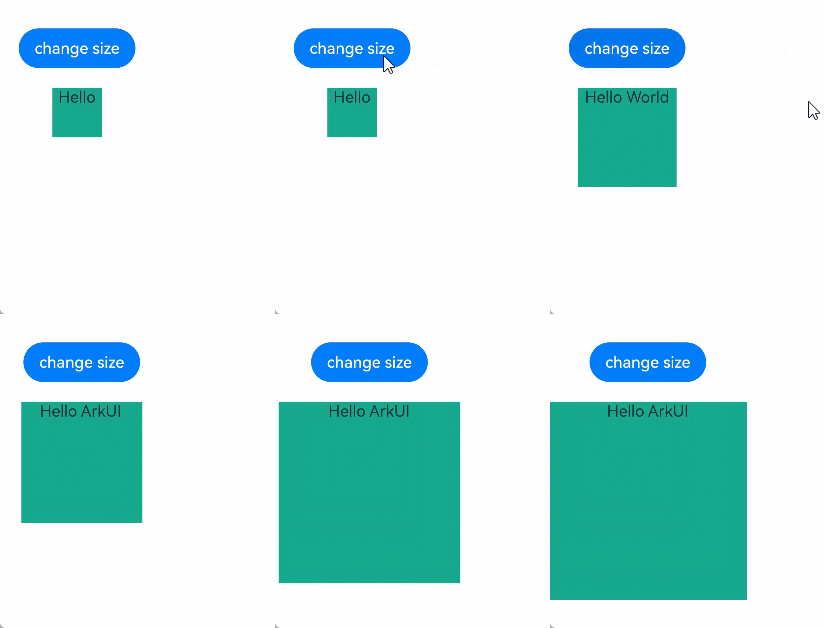
V1迁移V2
@Entry
@ComponentV2
struct Index {
  @Local w: number = 50; // 宽度
  @Local h: number = 50; // 高度
  @Local message: string = 'Hello';

  build() {
    Column() {
      Button('change size')
        .margin(20)
        .onClick(() => {
          // 在执行动画前,存在额外的修改
          this.w = 100;
          this.h = 100;
          this.message = 'Hello World';
          this.getUIContext().animateTo({
            duration: 1000
          }, () => {
            this.w = 200;
            this.h = 200;
            this.message = 'Hello ArkUI';
          })
        })
      Column() {
        Text(`${this.message}`)
      }
      .backgroundColor('#ff17a98d')
      .width(this.w)
      .height(this.h)
    }
  }
}
由于当前animateTo与V2的刷新机制不兼容,执行动画前的额外修改未生效,实际显示的动画效果如下图所示:绿色矩形从长宽50变为200,字符串从Hello变为Hello ArkUI。
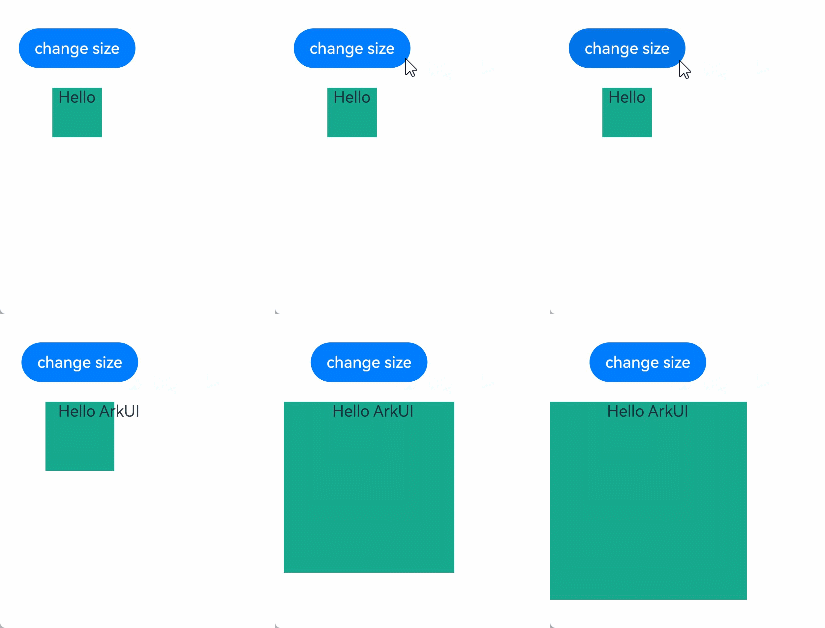
迁移方案
API version 22之前的迁移方案
从API version 22之前,可以使用一个duration为0的animateToImmediately将额外的修改先刷新,再执行原来的动画达成预期的效果。
完整代码如下:
@Entry
@ComponentV2
struct Index {
  @Local w: number = 50; // 宽度
  @Local h: number = 50; // 高度
  @Local message: string = 'Hello';

  build() {
    Column() {
      Button('change size')
        .margin(20)
        .onClick(() => {
          // 在执行动画前,存在额外的修改
          this.w = 100;
          this.h = 100;
          this.message = 'Hello World';
          animateToImmediately({
            duration: 0
          }, () => {
          })
          this.getUIContext().animateTo({
            duration: 1000
          }, () => {
            this.w = 200;
            this.h = 200;
            this.message = 'Hello ArkUI';
          })
        })
      Column() {
        Text(`${this.message}`)
      }
      .backgroundColor('#ff17a98d')
      .width(this.w)
      .height(this.h)
    }
  }
}
API version 22及以后的迁移方案
从API version 22开始,可以使用applySync接口实现预期的显示效果。
原理为使用applySync接口同步刷新闭包函数内的状态变量变化,再执行原来的动画达成预期的效果。
import { UIUtils } from '@kit.ArkUI';

@Entry
@ComponentV2
struct Index {
  @Local w: number = 50; // 宽度
  @Local h: number = 50; // 高度
  @Local message: string = 'Hello';

  build() {
    Column() {
      Button('change size')
        .margin(20)
        .onClick(() => {
          // 在执行动画前,存在额外的修改
          UIUtils.applySync(() => {
            this.w = 100;
            this.h = 100;
            this.message = 'Hello World';
          })
          this.getUIContext().animateTo({
            duration: 1000
          }, () => {
            this.w = 200;
            this.h = 200;
            this.message = 'Hello ArkUI';
          })
        })
      Column() {
        Text(`${this.message}`)
      }
      .backgroundColor('#ff17a98d')
      .width(this.w)
      .height(this.h)
    }
  }
}