makeObserved接口:将非观察数据变为可观察数据
为了将普通不可观察数据变为可观察数据,开发者可以使用makeObserved接口。
makeObserved可以在@Trace无法标记的情况下使用。在阅读本文档前,建议提前阅读:@Trace。

从API version 12开始,开发者可以使用UIUtils中的makeObserved接口将普通不可观察数据变为可观察数据。
概述
-
状态管理框架已提供@ObservedV2/@Trace用于观察类属性变化,makeObserved接口提供主要应用于@ObservedV2/@Trace无法涵盖的场景:
- class的定义在三方包中:开发者无法手动对class中需要观察的属性加上@Trace标签,可以使用makeObserved使得当前对象可以被观察。
- 当前类的成员属性不能被修改:因为@Trace观察类属性会动态修改类的属性,这个行为在@Sendable装饰的class中是不被允许的,此时可以使用makeObserved。
- interface或者JSON.parse返回的匿名对象:这类场景往往没有明确的class声明,开发者无法使用@Trace标记当前属性可以被观察,此时可以使用makeObserved。
-
使用makeObserved接口需要导入UIUtils。
import { UIUtils } from '@kit.ArkUI';
限制条件
-
makeObserved仅支持非空的对象类型传参。
- 不支持undefined和null:返回自身,不做任何处理。
- 非Object类型:编译拦截报错。
import { UIUtils } from '@kit.ArkUI';let res1 = UIUtils.makeObserved(2); // 非法类型入参,错误用法,编译报错let res2 = UIUtils.makeObserved(undefined); // 非法类型入参,错误用法,返回自身,res2 === undefinedlet res3 = UIUtils.makeObserved(null); // 非法类型入参,错误用法,返回自身,res3 === nullclass Info {id: number = 0;}let rawInfo: Info = UIUtils.makeObserved(new Info()); // 正确用法 -
makeObserved不支持传入被@ObservedV2、@Observed装饰的类的实例和被makeObserved封装过的代理数据。为了防止数据被双重代理,makeObserved发现入参为上述情况时则直接返回,不做处理。
import { UIUtils } from '@kit.ArkUI';@ObservedV2class Info {@Trace id: number = 0;}// 错误用法:makeObserved发现传入的实例是@ObservedV2装饰的类的实例,则返回传入对象自身let observedInfo: Info = UIUtils.makeObserved(new Info());class Info2 {id: number = 0;}// 正确用法:传入对象既不是@ObservedV2/@Observed装饰的类的实例,也不是makeObserved封装过的代理数据// 返回可观察数据let observedInfo1: Info2 = UIUtils.makeObserved(new Info2());// 错误用法:传入对象为makeObserved封装过的代理数据,此次makeObserved不做处理let observedInfo2: Info2 = UIUtils.makeObserved(observedInfo1); -
makeObserved可以用在@Component装饰的自定义组件中,但不能和状态管理V1的状态变量装饰器配合使用,如果一起使用,则会抛出运行时异常。
// 错误写法,运行时异常@State message: Info = UIUtils.makeObserved(new Info(20));注意:下面message2的写法不会抛异常。原因是:
- this.message是@State装饰的,其实现等同于@Observed。
- UIUtils.makeObserved的入参如果是@Observed装饰的class的实例,会直接返回自身。
因此message2的初始值不是makeObserved返回的代理对象,而是@State装饰的this.message。
import { UIUtils } from '@kit.ArkUI';class Person {public age: number = 10;}class Info {public id: number = 0;public person: Person = new Person();}@Entry@Componentstruct Page1 {@State message: Info = new Info();@State message2: Info = UIUtils.makeObserved(this.message); // 不会抛异常build() {Column() {Text(`${this.message2.person.age}`).onClick(() => {// UI不会刷新,因为State只能观察到第一层的变化this.message2.person.age++;})}}}
makeObserved仅对入参对象进行深度观察
- message被@Local装饰,本身具有观察自身赋值的能力。其初始值为makeObserved的返回值,具有深度观察能力。需要注意,makeObserved仅对message进行深度观察,而message自身赋值的变化,则是由@Local观察的。
- 点击change id可以触发UI刷新。
- 点击change Info,将this.message重新赋值为不可观察数据后,再次点击change id,无法触发UI刷新。
- 再次点击change Info1,将this.message重新赋值为可观察数据,再次点击change id,可以触发UI刷新。
import { UIUtils } from '@kit.ArkUI';
class Info {
  public id: number = 0;
  constructor(id: number) {
    this.id = id;
  }
}
@Entry
@ComponentV2
struct Page2 {
  @Local message: Info = UIUtils.makeObserved(new Info(20));
  build() {
    Column() {
      Button(`change id`).onClick(() => {
        this.message.id++;
      })
      Button(`change Info ${this.message.id}`).onClick(() => {
        this.message = new Info(30);
      })
      Button(`change Info1 ${this.message.id}`).onClick(() => {
        this.message = UIUtils.makeObserved(new Info(30));
      })
    }
  }
}
支持类型和观察变化
支持类型
- 支持未被@Observed或@ObservedV2装饰的类。
- 支持Array、Map、Set和Date。
- 支持collections.Array, collections.Set和collections.Map。
- JSON.parse返回的Object。
- @Sendable装饰的类。
观察变化
-
makeObserved传入内置类型或collections类型的实例时,可以观测其API带来的变化:
类型 可观测变化的API Array push、pop、shift、unshift、splice、copyWithin、fill、reverse、sort collections.Array push、pop、shift、unshift、splice、fill、reverse、sort、shrinkTo、extendTo Map/collections.Map set、clear、delete Set/collections.Set add、clear、delete Date setFullYear、setMonth、setDate、setHours、setMinutes、setSeconds、setMilliseconds、setTime、setUTCFullYear、setUTCMonth、setUTCDate、setUTCHours、setUTCMinutes、setUTCSeconds、setUTCMilliseconds
使用场景
makeObserved和@Sendable装饰的class配合使用
@Sendable主要是为了处理应用场景中的并发任务。将makeObserved和@Sendable配合使用,可以满足一般应用开发中,在子线程做大数据处理,在UI线程做ViewModel的显示和观察数据的需求。@Sendable具体内容可参考并发任务文档。
本章节将说明下面的场景:
- makeObserved在传入@Sendable类型的数据后有观察能力,且其变化可以触发UI刷新。
- 从子线程中获取一个整体数据,然后对UI线程的可观察数据做整体替换。
- 从子线程获取的数据重新执行makeObserved,将数据变为可观察数据。
- 将数据从主线程传递回子线程时,仅传递不可观察的数据。makeObserved的返回值不可直接传给子线程。
例子如下:
@Sendable
export class SendableData  {
  public name: string = 'Tom';
  public age: number = 20;
  public gender: number = 1;
  // ....更多其他属性
  public likes: number = 1;
  public follow: boolean = false;
}
import { taskpool } from '@kit.ArkTS';
import { SendableData } from '../Model/modelView';
import { UIUtils } from '@kit.ArkUI';
import { hilog } from '@kit.PerformanceAnalysisKit';

@Concurrent
function threadGetData(param: string): SendableData {
  const DOMAIN = 0xF811;
  const TAG = '[Sample_MakeObserved]';
  // 在子线程处理数据
  let ret = new SendableData();
  hilog.info(DOMAIN, TAG, `Concurrent threadGetData, param ${param}`);
  ret.name = param + '-o';
  ret.age = Math.floor(Math.random() * 40);
  ret.likes = Math.floor(Math.random() * 100);
  return ret;
}

@Entry
@ComponentV2
struct Page3 {
  // 通过makeObserved给普通对象或是SendableData对象添加可观察能力
  @Local send: SendableData = UIUtils.makeObserved(new SendableData());

  build() {
    Column() {
      Text(this.send.name)
      Button('change name').onClick(() => {
        // ok 可以观察到属性的改变
        this.send.name += '0';
      })

      Button('task').onClick(() => {
        // 将待执行的函数放入taskpool内部任务队列等待,等待分发到工作线程执行。
        taskpool.execute(threadGetData, this.send.name).then(val => {
          // 和@Local一起使用,可以观察this.send的变化
          this.send = UIUtils.makeObserved(val as SendableData);
        })
      })
    }
  }
}
需要注意:数据的构建和处理可以在子线程中完成,但有观察能力的数据不能传给子线程,只有在主线程里才可以操作可观察的数据。所以上述例子中只是将this.send的属性name传给子线程操作。
makeObserved和collections.Array/Set/Map配合使用
collections提供ArkTS容器集,可用于并发场景下的高性能数据传递。详情见@arkts.collections (ArkTS容器集)相关文档。
makeObserved可以在ArkUI中导入可观察的collections容器,但makeObserved不能和状态管理V1的状态变量装饰器如@State和@Prop等配合使用,否则会抛出运行时异常。
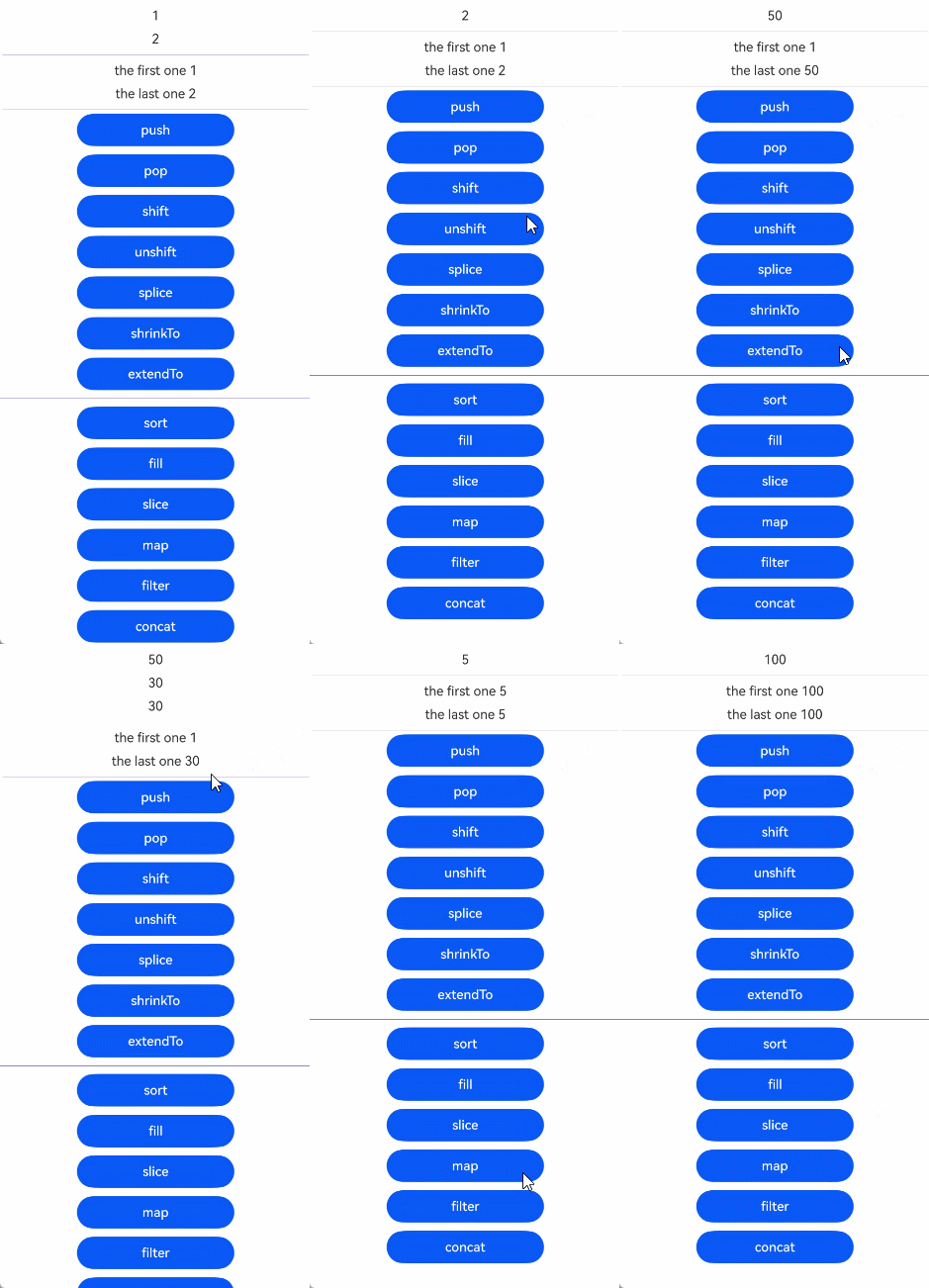
collections.Array
collections.Array可以触发UI刷新的API有:
- 改变数组长度:push、pop、shift、unshift、splice、shrinkTo、extendTo
- 改变数组项本身:sort、fill
其他API不会改变原始数组,所以不会触发UI刷新。
import { collections } from '@kit.ArkTS';
import { UIUtils } from '@kit.ArkUI';

@Sendable
class Info {
  public id: number = 0;
  public name: string = 'cc';

  constructor(id: number) {
    this.id = id;
  }
}


@Entry
@ComponentV2
struct Page4 {
  scroller: Scroller = new Scroller();
  @Local arrCollect: collections.Array<Info> =
    UIUtils.makeObserved(new collections.Array<Info>(new Info(1), new Info(2)));

  build() {
    Column() {
      // ForEach接口仅支持Array<any>,不支持collections.Array<any>。
      // 但ForEach的实现用到的Array的API,collections.Array都有提供。所以可以使用as类型断言Array。
      // 需要注意断言并不会改变原本的数据类型。
      ForEach(this.arrCollect as object as Array<Info>, (item: Info) => {
        Text(`${item.id}`)
          .margin(5)
          .onClick(() => {
            item.id++;
          })
      }, (item: Info, index) => item.id.toString() + index.toString())
      Divider()
        .color('blue')
        .margin(5)
      if (this.arrCollect.length > 0) {
        Text(`the first one ${this.arrCollect[0].id}`)
          .margin(5)
        Text(`the last one ${this.arrCollect[this.arrCollect.length - 1].id}`)
          .margin(5)
      }
      Divider()
        .color('blue')
        .margin(5)

      // 改变数据长度的API
      Scroll(this.scroller) {
        Column({ space: 10 }) {
          // push: 新增新元素
          Button('push')
            .width('50%')
            .onClick(() => {
              this.arrCollect.push(new Info(30));
            })
          // pop: 删除最后一个
          Button('pop')
            .width('50%')
            .onClick(() => {
              this.arrCollect.pop();
            })
          // shift: 删除第一个
          Button('shift')
            .width('50%')
            .onClick(() => {
              this.arrCollect.shift();
            })
          // unshift: 在数组的开头插入新项
          Button('unshift')
            .width('50%')
            .onClick(() => {
              this.arrCollect.unshift(new Info(50));
            })
          // splice: 从数组的指定位置删除元素
          Button('splice')
            .width('50%')
            .onClick(() => {
              this.arrCollect.splice(1);
            })

          // shrinkTo: 将数组长度缩小到给定的长度
          Button('shrinkTo')
            .width('50%')
            .onClick(() => {
              this.arrCollect.shrinkTo(1);
            })
          // extendTo: 将数组长度扩展到给定的长度
          Button('extendTo')
            .width('50%')
            .onClick(() => {
              this.arrCollect.extendTo(6, new Info(20));
            })

          Divider()
            .color('blue')

          // 改变数组item本身
          // sort:从大到小排序
          Button('sort')
            .width('50%')
            .onClick(() => {
              this.arrCollect.sort((a: Info, b: Info) => b.id - a.id);
            })
          // fill: 用值填充指定部分
          Button('fill')
            .width('50%')
            .onClick(() => {
              this.arrCollect.fill(new Info(5), 0, 2);
            })

          // 不会改变数组本身的API
          // slice:返回新的数组,根据start end对原数组的拷贝,不会改变原数组,所以直接调用slice不会触发UI刷新
          // 可以构建用例为返回的浅拷贝的数据赋值给this.arrCollect,需要注意这里依然要调用makeObserved,否则this.arrCollect被普通变量赋值后,会丧失观察能力
          Button('slice')
            .width('50%')
            .onClick(() => {
              this.arrCollect = UIUtils.makeObserved(this.arrCollect.slice(0, 1));
            })
          // map:原理同上
          Button('map')
            .width('50%')
            .onClick(() => {
              this.arrCollect = UIUtils.makeObserved(this.arrCollect.map((value) => {
                value.id += 10;
                return value;
              }))
            })
          // filter:原理同上
          Button('filter')
            .width('50%')
            .onClick(() => {
              this.arrCollect = UIUtils.makeObserved(this.arrCollect.filter((value: Info) => value.id % 2 === 0));
            })
          // concat:原理同上
          Button('concat')
            .width('50%')
            .onClick(() => {
              let array1 = new collections.Array(new Info(100))
              this.arrCollect = UIUtils.makeObserved(this.arrCollect.concat(array1));
            })
        }
        .height('200%')
      }
      .height('100%')
    }
    .height('100%')
    .width('100%')
  }
}
collections.Map
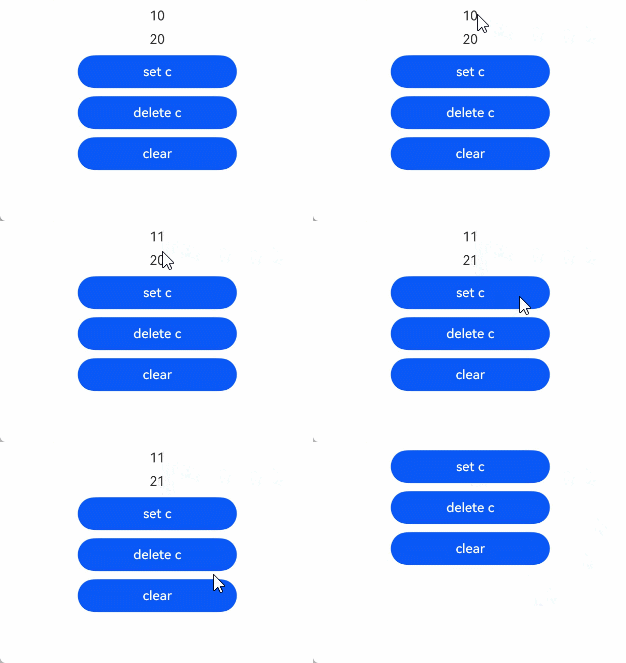
collections.Map可以触发UI刷新的API有:set、clear、delete。
import { collections } from '@kit.ArkTS';
import { UIUtils } from '@kit.ArkUI';

@Sendable
class Info {
  public id: number = 0;

  constructor(id: number) {
    this.id = id;
  }
}


@Entry
@ComponentV2
struct Page5 {
  mapCollect: collections.Map<string, Info> =
    UIUtils.makeObserved(new collections.Map<string, Info>([['a', new Info(10)], ['b', new Info(20)]]));

  build() {
    Column() {
      // this.mapCollect.keys()返回迭代器。Foreach不支持迭代器,所以要Array.from浅拷贝生成数据。
      ForEach(Array.from(this.mapCollect.keys()), (item: string) => {
        Text(`${this.mapCollect.get(item)?.id}`)
          .margin(5)
          .onClick(() => {
            let value: Info | undefined = this.mapCollect.get(item);
            if (value) {
              value.id++;
            }
          })
      }, (item: string, index) => item + index.toString())

      // set c
      Button('set c')
        .width('50%')
        .margin(5)
        .onClick(() => {
          this.mapCollect.set('c', new Info(30));
        })
      // delete c
      Button('delete c')
        .width('50%')
        .margin(5)
        .onClick(() => {
          if (this.mapCollect.has('c')) {
            this.mapCollect.delete('c');
          }
        })
      // clear
      Button('clear')
        .width('50%')
        .margin(5)
        .onClick(() => {
          this.mapCollect.clear();
        })
    }
    .height('100%')
    .width('100%')
  }
}
collections.Set
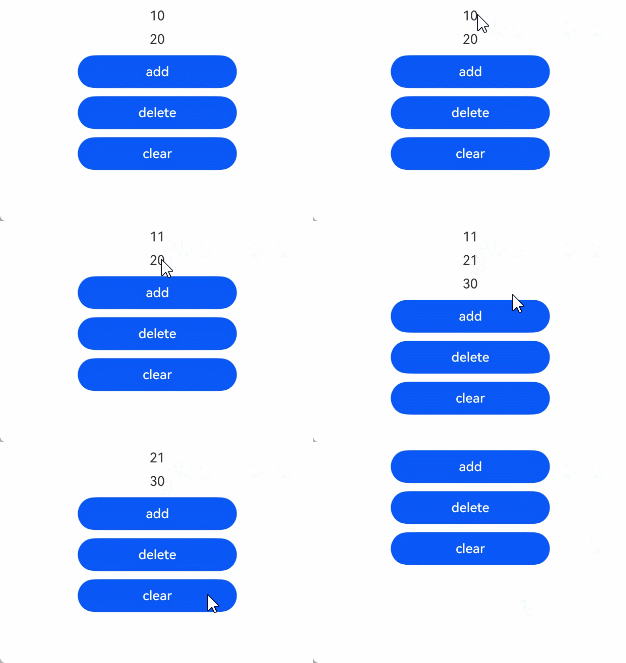
collections.Set可以触发UI刷新的API有:add、clear、delete。
import { collections } from '@kit.ArkTS';
import { UIUtils } from '@kit.ArkUI';
import { hilog } from '@kit.PerformanceAnalysisKit';

const DOMAIN = 0xF811;
const TAG = '[Sample_MakeObserved]';

@Sendable
class Info {
  public id: number = 0;

  constructor(id: number) {
    this.id = id;
  }
}


@Entry
@ComponentV2
struct Page6 {
  set: collections.Set<Info> = UIUtils.makeObserved(new collections.Set<Info>([new Info(10), new Info(20)]));

  build() {
    Column() {
      // 因为ForEach不支持迭代器,所以需要使用Array.from浅拷贝生成数组。
      // 但是浅拷贝生成的新的数组没有观察能力,为了ForEach组件在访问item的时候是可观察的数据,所以需要重新调用makeObserved。
      ForEach((UIUtils.makeObserved(Array.from(this.set.values()))), (item: Info) => {
        Text(`${item.id}`)
          .margin(5)
          .onClick(() => {
            item.id++;
          })
      }, (item: Info, index) => item.id + index.toString())

      Button('add')
        .margin(5)
        .width('50%')
        .onClick(() => {
          this.set.add(new Info(30));
          hilog.info(DOMAIN, TAG, ('size:' + this.set.size));
        })
      Button('delete')
        .margin(5)
        .width('50%')
        .onClick(() => {
          let iterator = this.set.keys();
          this.set.delete(iterator.next().value);
        })
      Button('clear')
        .margin(5)
        .width('50%')
        .onClick(() => {
          this.set.clear();
        })
    }
    .height('100%')
    .width('100%')
  }
}
makeObserved的入参为JSON.parse的返回值
JSON.parse返回Object,无法使用@Trace装饰其属性,可以使用makeObserved使其变为可观察数据。
import { JSON } from '@kit.ArkTS';
import { UIUtils } from '@kit.ArkUI';

class Info {
  public id: number = 0;

  constructor(id: number) {
    this.id = id;
  }
}

let test: Record<string, number> = { 'a': 123 };
let testJsonStr: string = JSON.stringify(test);
let test2: Record<string, Info> = { 'a': new Info(20) };
let test2JsonStr: string = JSON.stringify(test2);

@Entry
@ComponentV2
struct Page7 {
  message: Record<string, number> =
        UIUtils.makeObserved<Record<string, number>>(JSON.parse(testJsonStr) as Record<string, number>);
  message2: Record<string, Info> =
        UIUtils.makeObserved<Record<string, Info>>(JSON.parse(test2JsonStr) as Record<string, Info>);

  build() {
    Column() {
      Text(`${this.message.a}`)
        .id('textId1')
        .fontSize(50)
        .onClick(() => {
          this.message.a++;
        })
      Text(`${this.message2.a.id}`)
        .id('textId2')
        .fontSize(50)
        .onClick(() => {
          this.message2.a.id++;
        })
    }
    .height('100%')
    .width('100%')
  }
}
makeObserved和V2装饰器配合使用
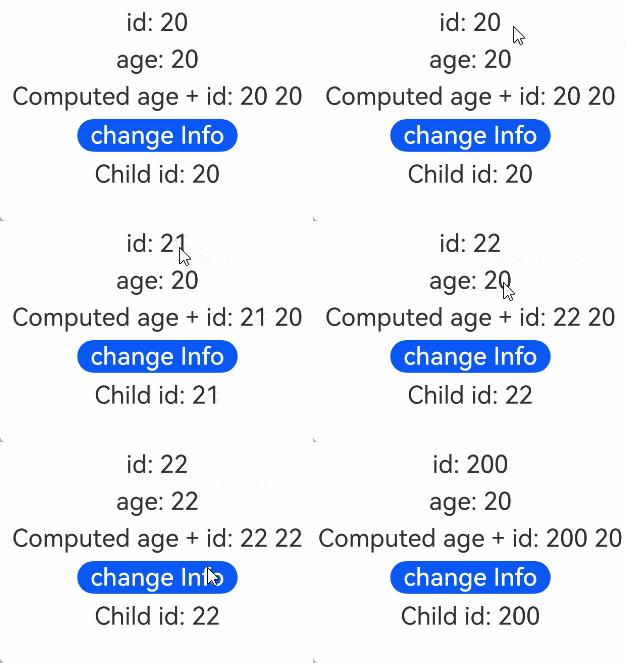
makeObserved可以和V2的装饰器一起使用。对于@Monitor和@Computed,因为makeObserved传入@Observed或ObservedV2装饰的类实例会返回其自身,所以@Monitor或者@Computed不能定义在class中,只能定义在自定义组件里。
例子如下:
import { UIUtils } from '@kit.ArkUI';
import { hilog } from '@kit.PerformanceAnalysisKit';

const DOMAIN = 0xF811;
const TAG = '[Sample_MakeObserved]';

class Info {
  public id: number = 0;
  public age: number = 20;

  constructor(id: number) {
    this.id = id;
  }
}

@Entry
@ComponentV2
struct Page8 {
  @Local message: Info = UIUtils.makeObserved(new Info(20));

  // 当message.id发生变化时,触发该函数调用
  @Monitor('message.id')
  onStrChange(monitor: IMonitor) {
    hilog.info(DOMAIN, TAG, `name change from ${monitor.value()?.before} to ${monitor.value()?.now}`);
  }

  // 当message.id和message.age发生变化,需要重新计算时,触发该函数调用
  @Computed
  get ageId() {
    hilog.info(DOMAIN, TAG, '---------Computed----------');
    return this.message.id + ' ' + this.message.age;
  }

  build() {
    Column() {
      Text(`id: ${this.message.id}`)
        .id('textIdMessage')
        .fontSize(30)
        .margin(5)
        .onClick(() => {
          this.message.id++;
        })
      Text(`age: ${this.message.age}`)
        .id('textAgeMessageAge')
        .fontSize(30)
        .margin(5)
        .onClick(() => {
          this.message.age++;
        })
      Text(`Computed age + id: ${this.ageId}`)
        .fontSize(30)
        .margin(5)
      Button('change Info')
        .id('buttonChangeInfo')
        .fontSize(30)
        .margin(5)
        .onClick(() => {
          // 返回类实例本身,并赋值给message,触发@Computed和@Monitor
          this.message = UIUtils.makeObserved(new Info(200));
        })
      Child({ message: this.message })
    }
    .height('100%')
    .width('100%')
  }
}

@ComponentV2
struct Child {
  @Param @Require message: Info;

  build() {
    Text(`Child id: ${this.message.id}`)
      .fontSize(30)
      .margin(5)
  }
}
makeObserved在@Component内使用
makeObserved不能和V1的状态变量装饰器一起使用,但可以在@Component装饰的自定义组件里使用。
import { UIUtils } from '@kit.ArkUI';
class Info {
  public id: number = 0;

  constructor(id: number) {
    this.id = id;
  }
}


@Entry
@Component
struct Page9 {
  // 如果和@State一起使用会抛出运行时异常
  message: Info = UIUtils.makeObserved(new Info(20));

  build() {
    RelativeContainer() {
      Text(`${this.message.id}`)
        .id('textNumber')
        .onClick(() => {
          this.message.id++;
        })
    }
    .height('100%')
    .width('100%')
  }
}
常见问题
getTarget后的数据可以正常赋值,但是无法触发UI刷新
getTarget可以获取状态管理框架代理前的原始对象。
makeObserved封装的观察对象,可以通过getTarget获取到其原始对象,对原始对象的赋值不会触发UI刷新。
如下面例子:
- 先点击第一个Text组件,通过getTarget获取其原始对象,此时修改原始对象的属性不会触发UI刷新,但数据会正常赋值。
- 再点击第二个Text组件,此时修改this.observedObj的属性会触发UI刷新,Text显示21。
import { UIUtils } from '@kit.ArkUI';
class Info {
  public id: number = 0;
}

@Entry
@Component
struct Page10 {
  observedObj: Info = UIUtils.makeObserved(new Info());
  build() {
    Column() {
      Text(`${this.observedObj.id}`)
        .id('textobservedObj1')
        .fontSize(50)
        .onClick(() => {
          // 通过getTarget获取其原始对象,将this.observedObj赋值为不可观察的数据
          let rawObj: Info= UIUtils.getTarget(this.observedObj);
          // 不会触发UI刷新,但数据会正常赋值
          rawObj.id = 20;
        })

      Text(`${this.observedObj.id}`)
        .id('textobservedObj2')
        .fontSize(50)
        .onClick(() => {
          // 触发UI刷新,Text显示21
          this.observedObj.id++;
        })
    }
  }
}