applySync/flushUpdates/flushUIUpdates接口:同步刷新
为了实现状态管理V2与animateTo等动效的同步刷新,开发者可以使用applySync、flushUpdates或flushUIUpdates接口。

从API version 22开始,开发者可以使用UIUtils中的applySync、flushUpdates和flushUIUpdates接口实现状态管理V2的同步标脏。
概述
与状态管理V1不同的是,状态管理V2修改完状态变量后不会立即标脏,而是抛出一个Promise微任务(优先级低于宏任务),该微任务在当前宏任务执行完成后才会处理自定义组件标脏,具体差异可参考V1状态变量更新和V2状态变量更新差异。而animateTo动效会立刻刷新已标脏节点来决定动效首帧。如果动效中使用了V2状态变量,并且在动效前修改了该状态变量,由于调用animateTo时状态变量的变化尚未标脏,这会导致animateTo的动效首帧不符合预期。为此,引入applySync、flushUpdates和flushUIUpdates接口,实现状态管理V2的同步标脏,确保动效达到预期效果。
使用applySync/flushUpdates/flushUIUpdates接口需要导入UIUtils工具。
import { UIUtils } from '@kit.ArkUI';
使用规则
-
applySync接口用于同步刷新指定的状态变量,该接口接收一个闭包函数,仅刷新闭包函数内的修改,包括更新@Computed计算、@Monitor回调以及重新渲染UI节点。
import { UIUtils } from '@kit.ArkUI';@Entry@ComponentV2struct Index {@Local w: number = 50; // 宽度@Local h: number = 50; // 高度@Local message: string = 'Hello';@Monitor('message')onMessageChange(monitor: IMonitor) {monitor.dirty.forEach((path: string) => {console.info(`${path} change from ${monitor.value(path)?.before} to ${monitor.value(path)?.now}`);});}build() {Column() {Button('change size').margin(20).onClick(() => {// 在执行动画前,存在额外的修改UIUtils.applySync(() => {this.w = 100;this.h = 100;this.message = 'Hello World';});this.getUIContext().animateTo({duration: 1000}, () => {this.w = 200;this.h = 200;this.message = 'Hello ArkUI';});})// ...Column() {Text(`${this.message}`)}.backgroundColor('#ff17a98d').width(this.w).height(this.h)}}}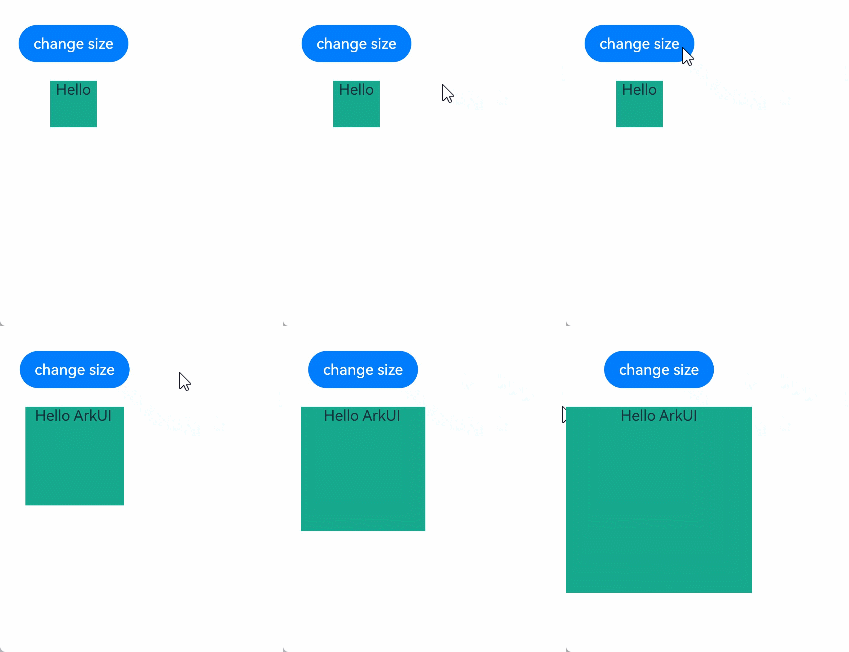
-
flushUpdates接口用于同步刷新在调用该函数之前所有的状态变量修改,包括更新@Computed计算、@Monitor回调以及重新渲染UI节点。
import { UIUtils } from '@kit.ArkUI';@Entry@ComponentV2struct Index {@Local w: number = 50; // 宽度@Local h: number = 50; // 高度@Local message: string = 'Hello';@Monitor('message')onMessageChange(monitor: IMonitor) {monitor.dirty.forEach((path: string) => {console.info(`${path} change from ${monitor.value(path)?.before} to ${monitor.value(path)?.now}`);});}build() {Column() {Button('change size').margin(20).onClick(() => {// 在执行动画前,存在额外的修改this.w = 100;this.h = 100;this.message = 'Hello World';UIUtils.flushUpdates();this.getUIContext().animateTo({duration: 1000}, () => {this.w = 200;this.h = 200;this.message = 'Hello ArkUI';});})// ...Column() {Text(`${this.message}`)}.backgroundColor('#ff17a98d').width(this.w).height(this.h)}}} -
上述的applySync、flushUpdates接口都会同步执行@Computed计算和@Monitor回调,这会使得在上述示例代码中,一次点击事件里触发了两次@Monitor回调,这可能会与开发者的预期不符,因此引入了flushUIUpdates接口,该接口仅用于同步刷新在调用该函数之前所有的UI节点,不会执行@Computed计算和@Monitor回调。
import { UIUtils } from '@kit.ArkUI';@Entry@ComponentV2struct Index {@Local message: string = 'Hello';@Monitor('message')onMessageChange(monitor: IMonitor) {monitor.dirty.forEach((path: string) => {console.info(`${path} change from ${monitor.value(path)?.before} to ${monitor.value(path)?.now}`);});}build() {Column() {Text(`message: ${this.message}`)Button('change size').margin(20).onClick(() => {// test1:调用applySync接口,日志打印两次// UIUtils.applySync(() => { this.message = 'Hello World'; });// test2:调用flushUpdates接口,日志打印两次// this.message = 'Hello World';// UIUtils.flushUpdates();// test3:调用flushUIUpdates接口,日志打印一次this.message = 'Hello World';UIUtils.flushUIUpdates();this.message = 'Hello ArkUI';})// ...}}}
限制条件
-
在applySync闭包函数中嵌套调用applySync,内层的applySync将会被跳过并返回undefined,同时打印出警告信息UIUtils.applySync will be skipped when called within another UIUtils.applySync. The inner UIUtils.applySync will return undefined。
import { UIUtils } from '@kit.ArkUI';@Entry@ComponentV2struct Index {@Local w: number = 50; // 宽度@Local h: number = 50; // 高度build() {Column() {Button('change size').margin(20).onClick(() => {// 在执行动画前,存在额外的修改UIUtils.applySync(() => {this.w = 100;// 内层applySync会被跳过UIUtils.applySync(() => {this.h = 100;});});this.getUIContext().animateTo({duration: 1000}, () => {this.w = 200;this.h = 200;});})// ...Column() {Text('BOX')}.backgroundColor('#ff17a98d').width(this.w).height(this.h)}}} -
在applySync闭包函数中调用flushUpdates或flushUIUpdates接口将不起作用。同时打印出对应警告信息UIUtils.flushUpdates will be skipped when called within UIUtils.applySync/UIUtils.flushUIUpdates will be skipped when called within UIUtils.applySync。
import { UIUtils } from '@kit.ArkUI';@Entry@ComponentV2struct Index {@Local w: number = 50; // 宽度@Local h: number = 50; // 高度build() {Column() {Button('change size').margin(20).onClick(() => {// 在执行动画前,存在额外的修改UIUtils.applySync(() => {this.w = 100;UIUtils.flushUpdates(); // 在applySync中,flushUpdates被忽略UIUtils.flushUIUpdates(); // 在applySync中,flushUIUpdates被忽略});this.h = 100;UIUtils.flushUpdates(); // 会生效this.getUIContext().animateTo({duration: 1000}, () => {this.w = 200;this.h = 200;});})// ...Column() {Text('BOX')}.backgroundColor('#ff17a98d').width(this.w).height(this.h)}}} -
不支持在@Computed装饰的getter方法中调用applySync、flushUpdates和flushUIUpdates接口,否则运行时会报错。错误信息为The function is not allowed to be called in @Computed,错误码为140001。
import { UIUtils } from '@kit.ArkUI';@Entry@ComponentV2struct Page {@Local firstName: string = 'Hua';@Local lastName: string = 'Li';@Local count: number = 0;@Computedget fullName() {// 在computed中调用applySync、flushUpdates、flushUIUpdates运行时报错UIUtils.flushUIUpdates();UIUtils.flushUpdates();UIUtils.applySync(() => {this.count++;});return this.firstName + ' ' + this.lastName;}build() {Column() {Text(`${this.fullName}`)Text(`${this.count}`)Button('change fullName').onClick(() => {this.firstName = 'Zhang';this.lastName = 'San';})}}} -
不支持在@Monitor回调函数中调用flushUpdates和flushUIUpdates接口,否则运行时会报错。错误信息为The function is not allowed to be called in @Monitor,错误码为140002。
import { UIUtils } from '@kit.ArkUI';@Entry@ComponentV2struct Page {@Local count: number = 0;@Monitor('count')onCountChange(monitor: IMonitor) {monitor.dirty.forEach((path: string) => {console.info(`${path} changed from ${monitor.value(path)?.before} to ${monitor.value(path)?.now}`);});UIUtils.flushUpdates(); // 在monitor中调用flushUpdates会运行时报错UIUtils.flushUIUpdates(); // 在monitor中调用flushUIUpdates会运行时报错}build() {Column() {Text(`${this.count}`)Button('change count').onClick(() => {this.count++;})// ...}}}
使用场景
动效场景
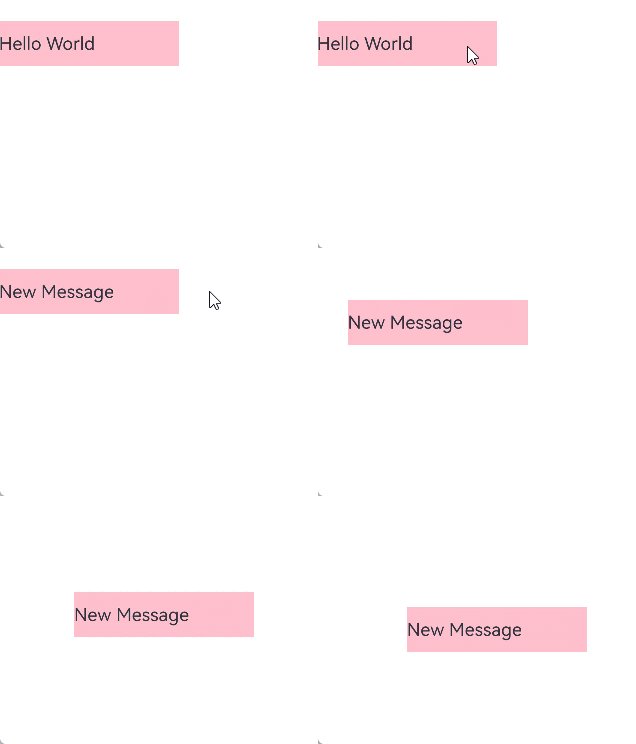
状态管理V2的异步标脏逻辑与animateTo立即刷新脏节点的逻辑存在冲突,导致在@Monitor中触发animateTo时不显示动画。使用applySync接口同步刷新状态变量的改变能够实现预期效果,示例如下。
import { UIUtils } from '@kit.ArkUI';

@Entry
@ComponentV2
struct Index {
  @Local message: string = 'Hello World';
  @Local x: number = 0;
  @Local y: number = 0;
  @Local w: number = 200;
  @Local h: number = 50;

  @Monitor('message')
  onMsgChange() {
    console.info('message change to', this.message);
    this.animateAction();
  }

  animateAction() {
    this.getUIContext().animateTo({
      duration: 1000
    }, () => {
      // 调用applySync接口同步刷新动画尾帧,若不调用该接口则不显示动画
      UIUtils.applySync(() => {
        this.x = 100;
        this.y = 100;
      });
    });
  }

  build() {
    Column() {
      Text(this.message)
        .fontSize(20)
        .width(this.w)
        .height(this.h)
        .backgroundColor(Color.Pink)
        .onClick(() => {
          this.message = 'New Message';
        })
        .position({
          x: this.x,
          y: this.y
        })
        // ...
    }
    .height('100%')
    .width('100%')
  }
}
路由场景
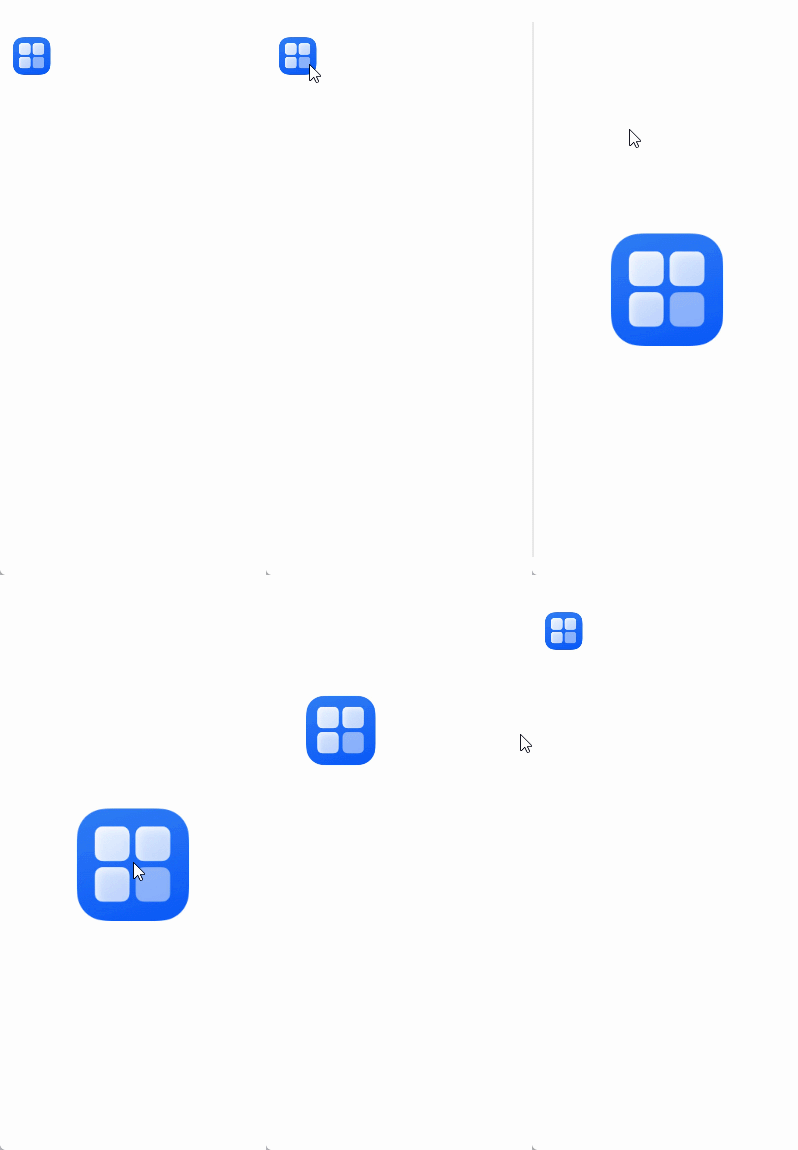
在路由场景下设置共享元素转场动效,使用applySync接口可以使得转场时同步刷新name值,实现转场动效效果。在如下示例代码中,从Index页面向PageTransitionTwo页面跳转时,两个页面的id值不匹配,没有转场动效。从PageTransitionTwo页面返回Index页面时,两个页面的id值匹配,有转场动效。
// PageUse.ets

import { UIUtils, AppStorageV2 } from '@kit.ArkUI';

@ObservedV2
export class Info {
  @Trace public name: string = '';
}

@Entry
@ComponentV2
struct SharedTransitionExample {
  @Local info: Info = AppStorageV2.connect(Info, () => new Info())!;

  build() {
    Column() {
      // 此处'app.media.startIcon'仅做示例,请开发者自行替换
      Image($r('app.media.startIcon'))
        .width(50)
        .height(50)
        .margin({ left: 20, top: 20 })
        .sharedTransition(this.info.name, { duration: 800, curve: Curve.Linear, delay: 100 })
    }
    .width('100%')
    .height('100%')
    .alignItems(HorizontalAlign.Start)
    .onClick(() => {
      UIUtils.applySync(() => {
        this.info.name = 'id1'; // 不匹配
      });
      this.getUIContext().getRouter().pushUrl({ url: 'pages/PageTransitionTwo' })
    })
    // ...
  }
}
// PageTransitionTwo.ets

import { UIUtils, AppStorageV2 } from '@kit.ArkUI';
import { Info } from './PageUse';

@Entry
@ComponentV2
struct PageBExample {
  build() {
    Stack() {
      // 此处'app.media.startIcon'仅做示例,请开发者自行替换
      Image($r('app.media.startIcon'))
        .width(150)
        .height(150)
        .sharedTransition('sharedImage', { duration: 800, curve: Curve.Linear, delay: 100 })
        .onClick(() => {
          UIUtils.applySync(() => {
            AppStorageV2.connect(Info, () => new Info())!.name = 'sharedImage'; // 匹配
          });
          this.getUIContext().getRouter().back();
        })
        // ...
    }
    .width('100%')
    .height('100%')
  }
}