MVVM模式(V1)
当开发者掌握了状态管理的基本概念后,通常会尝试开发自己的应用,在应用开发初期,如果未能精心规划项目结构,随着项目扩展和复杂化,状态变量的增多将导致组件间关系变得错综复杂。此时,开发新功能可能引起连锁反应,维护成本也会增加。为此,本文旨在介绍MVVM模式以及ArkUI的UI开发模式与MVVM的关系,指导开发者如何设计项目结构,以便在产品迭代和升级时能更轻松地开发和维护。
本文档涵盖了大多数状态管理V1装饰器,所以在阅读本文档前,建议开发者对状态管理V1有一定的了解。建议提前阅读:状态管理概述和状态管理V1装饰器相关文档。
MVVM模式介绍
概念
在应用开发中,UI更新需要实时同步数据状态变化,这直接影响应用程序的性能和用户体验。为了解决数据与UI同步的复杂性,ArkUI采用了 Model-View-ViewModel(MVVM)架构模式。MVVM 将应用分为Model、View和ViewModel三个核心部分,实现数据、视图与逻辑的分离。通过这种模式,UI可以自动更新状态变化,从而更高效地管理数据和视图的绑定与更新。
-
View:用户界面层。负责用户界面展示并与用户交互,不包含任何业务逻辑。它通过绑定ViewModel层提供的数据实现动态更新。
-
Model:数据访问层。以数据为中心,不直接与用户界面交互。负责数据结构定义,数据管理(获取、存储、更新等),以及业务逻辑处理。
-
ViewModel:表示逻辑层。作为连接Model和View的桥梁,通常一个View对应一个ViewModel。View和ViewModel有两种通信方式:
- 方法调用:View通过事件监听用户行为,在回调里面触发ViewModel层的方法。例如当View监听到用户Button点击行为,调用ViewModel对应的方法,处理用户操作。
- 双向绑定:View绑定ViewModel的数据,实现双向同步。
ArkUI的UI开发模式就属于MVVM模式,通过对MVVM概念的基本介绍,开发者大致能猜到状态管理能在MVVM中起什么样的作用,状态管理旨在数据驱动更新,让开发者只用关注页面设计,而不去关注整个UI的刷新逻辑,数据的维护也无需开发者进行感知,由状态变量自动更新完成,而这就是属于ViewModel层所需要支持的内容,因此开发者使用MVVM模式开发自己的应用是最省心省力的。
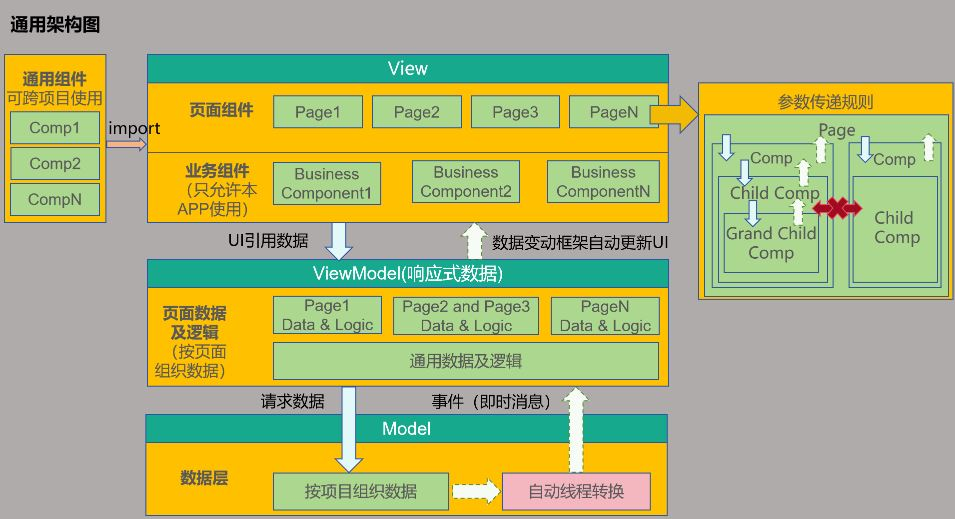
ArkUI开发模式图
ArkUI的UI开发模式即是MVVM模式,而状态变量在MVVM模式中扮演着ViewModel的角色,向上刷新UI,向下更新数据,整体框架如下图:
分层说明
View层
View层通常可以分为下列组件:
- 页面组件:所有应用基本都是按照页面进行分类的,比如登录页,列表页,编辑页,帮助页,版权页等。每个页面对应需要的数据可能是完全不一样的,也可能多个页面需要的数据是同一套。
- 业务组件:本身具备本APP部分业务能力的功能组件,典型的就是这个业务组件可能关联了本项目的ViewModel中的数据,不可以被共享给其他项目使用。
- 通用组件:像系统组件一样,这类组件不会关联本APP中ViewModel的数据,这些组件可实现跨越多个项目进行共享,来完成比较通用的功能。
Model层
Model层是应用的原始数据提供者,代表应用的核心业务逻辑和数据。
ViewModel层
为View层的组件提供对应数据,按照页面组织,当用户浏览页面时,某些页面可能不会被显示,因此,页面数据最好设计成懒加载(按需加载)的模式。
ViewModel层数据和Model层数据的区别:
Model层数据是按照整个工程、项目来组织数据,构成一套完整的APP业务数据体系。
ViewModel层数据,是提供某个页面上使用的数据,它可能是整个APP的业务数据的一部分。另外ViewModel层还可以附加对应Page的辅助页面显示数据,这部分数据可能与本APP的业务完全无关,仅仅是为页面展示提供便利的辅助数据。
架构核心原则
不可跨层访问
- View层不可以直接调用Model层的数据,只能通过ViewModel提供的方法进行调用。
- Model层不能直接操作UI,只能通知ViewModel层数据有更新,由ViewModel层更新对应的数据。
下层不可访问上层数据
下层数据通过通知模式更新上层数据。在业务逻辑中,下层不可直接获取上层数据。例如,ViewModel层的逻辑处理不应该依赖View层界面上的某个值。
非父子组件间不可直接访问
这是针对View层设计的核心原则,一个组件应该具备以下逻辑:
- 禁止直接访问父组件(必须使用事件或是订阅能力)。
- 禁止直接访问兄弟组件。这是因为组件应该仅能访问自己的子节点(通过传参)和父节点(通过事件或通知),以此完成组件之间的解耦。
对于一个组件,这样设计的原因如下:
- 组件自己使用了哪些子组件是明确的,因此可以访问。
- 组件被放置于哪个父节点下是未知的,因此组件想访问父节点,就只能通过通知或者事件能力完成。
- 组件不可能知道自己的兄弟节点是谁,因此组件不可以操作兄弟节点。
备忘录开发实战
本节通过备忘录应用的开发,使开发者了解如何使用ArkUI框架设计自己的应用。本节直接进行功能开发,未设计代码架构,即根据需求即时开发,不考虑后续维护,同时,本节还将介绍功能开发所需的装饰器。
@State状态变量
- @State装饰器是最常用的装饰器之一,用于定义状态变量。通常,这些状态变量作为父组件的数据源,开发者点击时,触发状态变量的更新,刷新UI。
@Entry
@Component
struct StateIndex {
  @State isFinished: boolean = false;

  build() {
    Column() {
      Row() {
        // 请将$r('app.string.all_tasks')替换为实际资源文件,在本示例中该资源文件的value值为"全部待办"
        Text($r('app.string.all_tasks'))
          .fontSize(30)
          .fontWeight(FontWeight.Bold)
      }
      .width('100%')
      .margin({ top: 10, bottom: 10 })

      // 待办事项
      Row({ space: 15 }) {
        if (this.isFinished) {
          // 请将$r('app.media.finished')替换为实际资源文件
          Image($r('app.media.finished'))
            .width(28)
            .height(28)
        } else {
          // 请将$r('app.media.unfinished')替换为实际资源文件
          Image($r('app.media.unfinished'))
            .width(28)
            .height(28)
        }
        // 请将$r('app.string.all_learn_advanced_math')替换为实际资源文件,在本示例中该资源文件的value值为"学习高数"
        Text($r('app.string.learn_advanced_math'))
          .fontSize(24)
          .decoration({ type: this.isFinished ? TextDecorationType.LineThrough : TextDecorationType.None })
      }
      .height('40%')
      .width('100%')
      .border({ width: 5 })
      .padding({ left: 15 })
      .onClick(() => {
        this.isFinished = !this.isFinished;
      })
    }
    .height('100%')
    .width('100%')
    .margin({ top: 5, bottom: 5 })
    .backgroundColor('#90f1f3f5')
  }
}
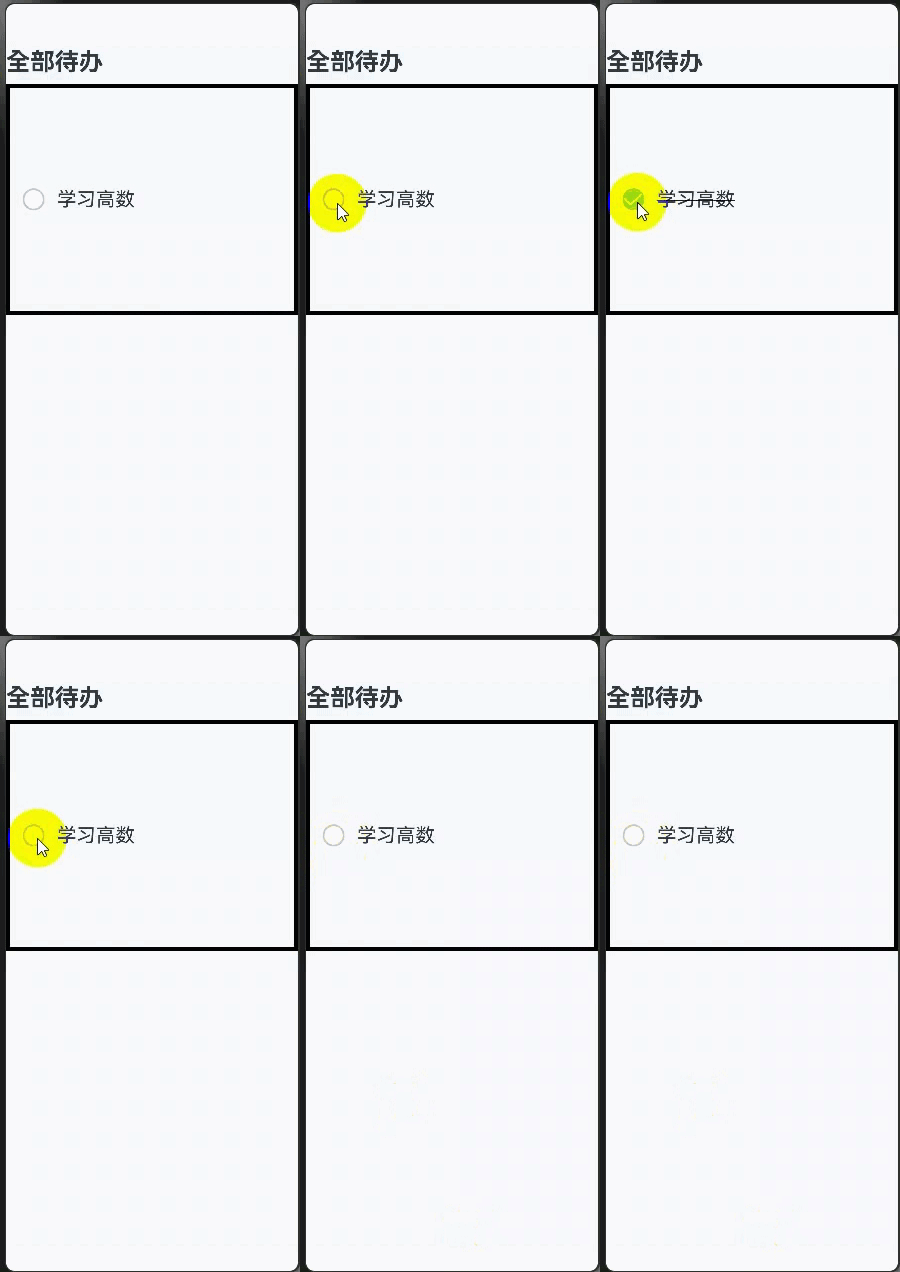
效果图:
@Prop、@Link的作用
上述示例中,所有代码都写在了@Entry组件中。随着需要渲染的组件越来越多,@Entry组件必然需要进行拆分,为此,拆分出的子组件就需要使用@Prop和@Link装饰器:
- @Prop是父子间单向传递,子组件会深拷贝父组件数据,可从父组件更新,也可自己更新数据,但不会同步回父组件。
- @Link是父子间双向传递,父组件改变,会通知所有的@Link,同时@Link的更新也会通知父组件的数据源进行刷新。
@Component
struct PropLinkTodoComponent {
  build() {
    Row() {
      // 请将$r('app.string.all_tasks')替换为实际资源文件,在本示例中该资源文件的value值为"全部待办"
      Text($r('app.string.all_tasks'))
        .fontSize(30)
        .fontWeight(FontWeight.Bold)
    }
    .width('100%')
    .margin({ top: 10, bottom: 10 })
  }
}

@Component
struct PropLinkAllChooseComponent {
  @Link isFinished: boolean;

  build() {
    Row() {
      // 请将$r('app.string.check_all')替换为实际资源文件,在本示例中该资源文件的value值为"全选"
      Button($r('app.string.check_all'), { type: ButtonType.Normal })
        .onClick(() => {
          this.isFinished = !this.isFinished;
        })
        .fontSize(30)
        .fontWeight(FontWeight.Bold)
        .backgroundColor('#f7f6cc74')
    }
    .padding({ left: 15 })
    .width('100%')
    .margin({ top: 10, bottom: 10 })
  }
}

@Component
struct ThingComponent1 {
  @Prop isFinished: boolean;

  build() {
    // 待办事项1
    Row({ space: 15 }) {
      if (this.isFinished) {
        // 请将$r('app.media.finished')替换为实际资源文件
        Image($r('app.media.finished'))
          .width(28)
          .height(28)
      } else {
        // 请将$r('app.media.unfinished')替换为实际资源文件
        Image($r('app.media.unfinished'))
          .width(28)
          .height(28)
      }
      // 请将$r('app.string.learn_chinese')替换为实际资源文件,在本示例中该资源文件的value值为"学习语文"
      Text($r('app.string.learn_chinese'))
        .fontSize(24)
        .decoration({ type: this.isFinished ? TextDecorationType.LineThrough : TextDecorationType.None })
    }
    .height('40%')
    .width('100%')
    .border({ width: 5 })
    .padding({ left: 15 })
    .onClick(() => {
      this.isFinished = !this.isFinished;
    })
  }
}

@Component
struct ThingComponent2 {
  @Prop isFinished: boolean;

  build() {
    // 待办事项1
    Row({ space: 15 }) {
      if (this.isFinished) {
        // 请将$r('app.media.finished')替换为实际资源文件
        Image($r('app.media.finished'))
          .width(28)
          .height(28)
      } else {
        // 请将$r('app.media.unfinished')替换为实际资源文件
        Image($r('app.media.unfinished'))
          .width(28)
          .height(28)
      }
      // 请将$r('app.string.learn_advanced_math')替换为实际资源文件,在本示例中该资源文件的value值为"学习高数"
      Text($r('app.string.learn_advanced_math'))
        .fontSize(24)
        .decoration({ type: this.isFinished ? TextDecorationType.LineThrough : TextDecorationType.None })
    }
    .height('40%')
    .width('100%')
    .border({ width: 5 })
    .padding({ left: 15 })
    .onClick(() => {
      this.isFinished = !this.isFinished;
    })
  }
}

@Entry
@Component
struct PropLinkIndex {
  @State isFinished: boolean = false;

  build() {
    Column() {
      // 全部待办
      PropLinkTodoComponent()

      // 全选
      PropLinkAllChooseComponent({ isFinished: this.isFinished })

      // 待办事项1
      ThingComponent1({ isFinished: this.isFinished })

      // 待办事项2
      ThingComponent2({ isFinished: this.isFinished })
    }
    .height('100%')
    .width('100%')
    .margin({ top: 5, bottom: 5 })
    .backgroundColor('#90f1f3f5')
  }
}
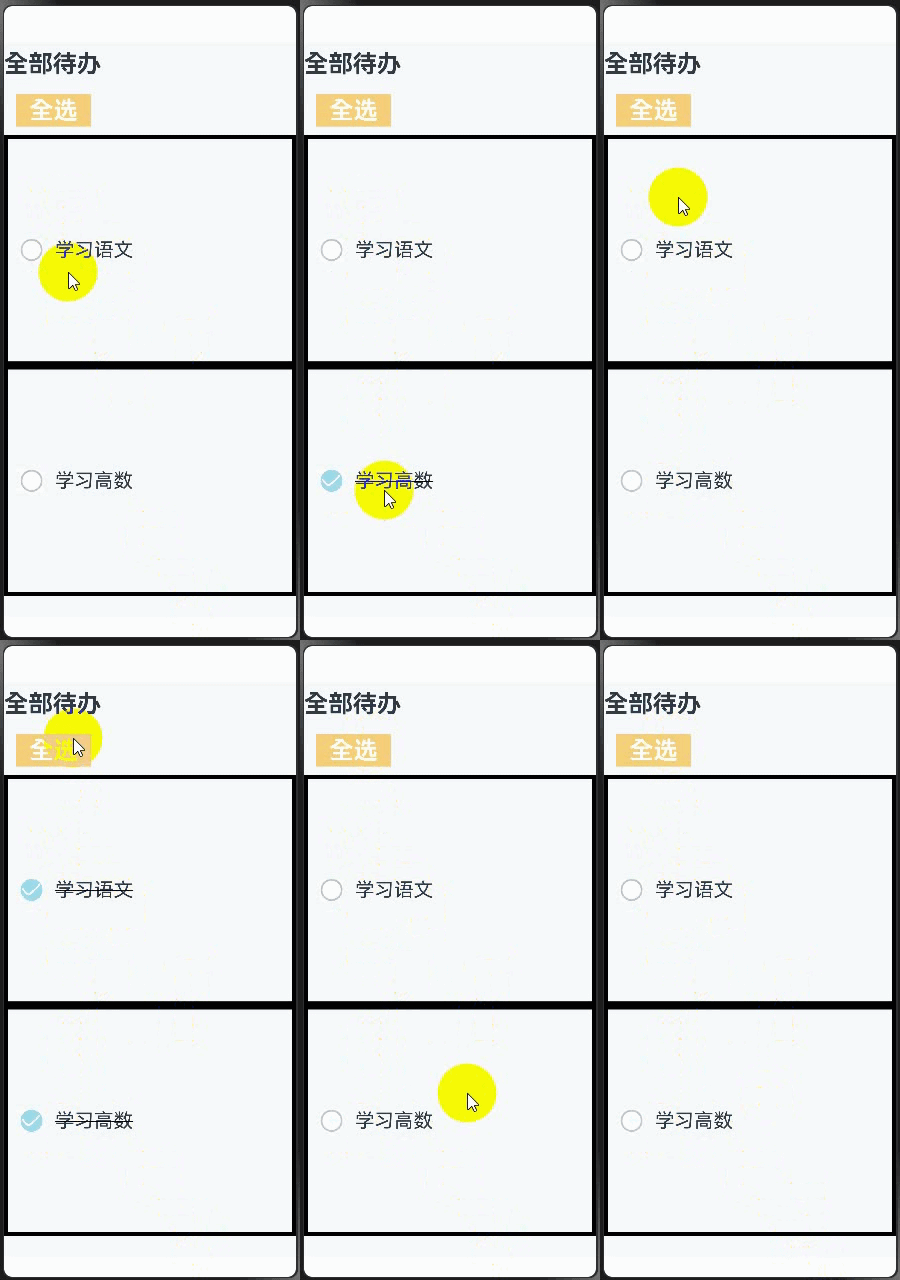
效果图如下:
循环渲染组件
- 上个示例虽然拆分出了子组件,但发现组件1和组件2的代码非常相似,当渲染的组件除了数据外,其他设置都相同时,此时就需要使用ForEach循环渲染。
- ForEach使用之后,冗余代码变得更少,并且代码结构更加清晰。
@Component
struct ForEachTodoComponent {
  build() {
    Row() {
      // 请将$r('app.string.all_tasks')替换为实际资源文件,在本示例中该资源文件的value值为"全部待办"
      Text($r('app.string.all_tasks'))
        .fontSize(30)
        .fontWeight(FontWeight.Bold)
    }
    .width('100%')
    .margin({ top: 10, bottom: 10 })
  }
}

@Component
struct ForEachAllChooseComponent {
  @Link isFinished: boolean;

  build() {
    Row() {
      // 请将$r('app.string.check_all')替换为实际资源文件,在本示例中该资源文件的value值为"全选"
      Button($r('app.string.check_all'), { type: ButtonType.Normal })
        .onClick(() => {
          this.isFinished = !this.isFinished;
        })
        .fontSize(30)
        .fontWeight(FontWeight.Bold)
        .backgroundColor('#f7f6cc74')
    }
    .padding({ left: 15 })
    .width('100%')
    .margin({ top: 10, bottom: 10 })
  }
}

@Component
struct ForEachThingComponent {
  @Prop isFinished: boolean;
  @Prop thing: string;

  build() {
    // 待办事项1
    Row({ space: 15 }) {
      if (this.isFinished) {
        // 请将$r('app.media.finished')替换为实际资源文件
        Image($r('app.media.finished'))
          .width(28)
          .height(28)
      } else {
        // 请将$r('app.media.unfinished')替换为实际资源文件
        Image($r('app.media.unfinished'))
          .width(28)
          .height(28)
          // ...
      }
      Text(`${this.thing}`)
        .fontSize(24)
        .decoration({ type: this.isFinished ? TextDecorationType.LineThrough : TextDecorationType.None })
    }
    .height('8%')
    .width('90%')
    .padding({ left: 15 })
    .opacity(this.isFinished ? 0.3 : 1)
    .border({ width: 1 })
    .borderColor(Color.White)
    .borderRadius(25)
    .backgroundColor(Color.White)
    .onClick(() => {
      this.isFinished = !this.isFinished;
    })
  }
}

@Entry
@Component
struct ForEachIndex {
  @State isFinished: boolean = false;
  @State planList: ResourceStr[] = [
    // 请将$r('app.string.get_up')替换为实际资源文件,在本示例中该资源文件的value值为"7.30 起床"
    $r('app.string.get_up'),
    // 请将$r('app.string.breakfast')替换为实际资源文件,在本示例中该资源文件的value值为"8.30 早餐"
    $r('app.string.breakfast'),
    // 请将$r('app.string.lunch')替换为实际资源文件,在本示例中该资源文件的value值为"11.30 中餐"
    $r('app.string.lunch'),
    // 请将$r('app.string.dinner')替换为实际资源文件,在本示例中该资源文件的value值为"17.30 晚餐"
    $r('app.string.dinner'),
    // 请将$r('app.string.midnight_snack')替换为实际资源文件,在本示例中该资源文件的value值为"21.30 夜宵"
    $r('app.string.midnight_snack'),
    // 请将$r('app.string.bathe')替换为实际资源文件,在本示例中该资源文件的value值为"22.30 洗澡"
    $r('app.string.bathe'),
    // 请将$r('app.string.sleep')替换为实际资源文件,在本示例中该资源文件的value值为"1.30 睡觉"
    $r('app.string.sleep')
  ];
  context1 = this.getUIContext().getHostContext();

  aboutToAppear(): void {
    for (let i = 0; i < this.planList.length; i++) {
      this.planList[i] = resource.resourceToString(this.planList[i] as Resource);
    };
  }

  build() {
    Column() {
      // 全部待办
      ForEachTodoComponent()

      // 全选
      ForEachAllChooseComponent({ isFinished: this.isFinished })

      List() {
        ForEach(this.planList, (item: string) => {
          // 待办事项1
          ForEachThingComponent({ isFinished: this.isFinished, thing: item })
            .margin(5)
        })
      }
    }
    .height('100%')
    .width('100%')
    .margin({ top: 5, bottom: 5 })
    .backgroundColor('#90f1f3f5')
  }
}
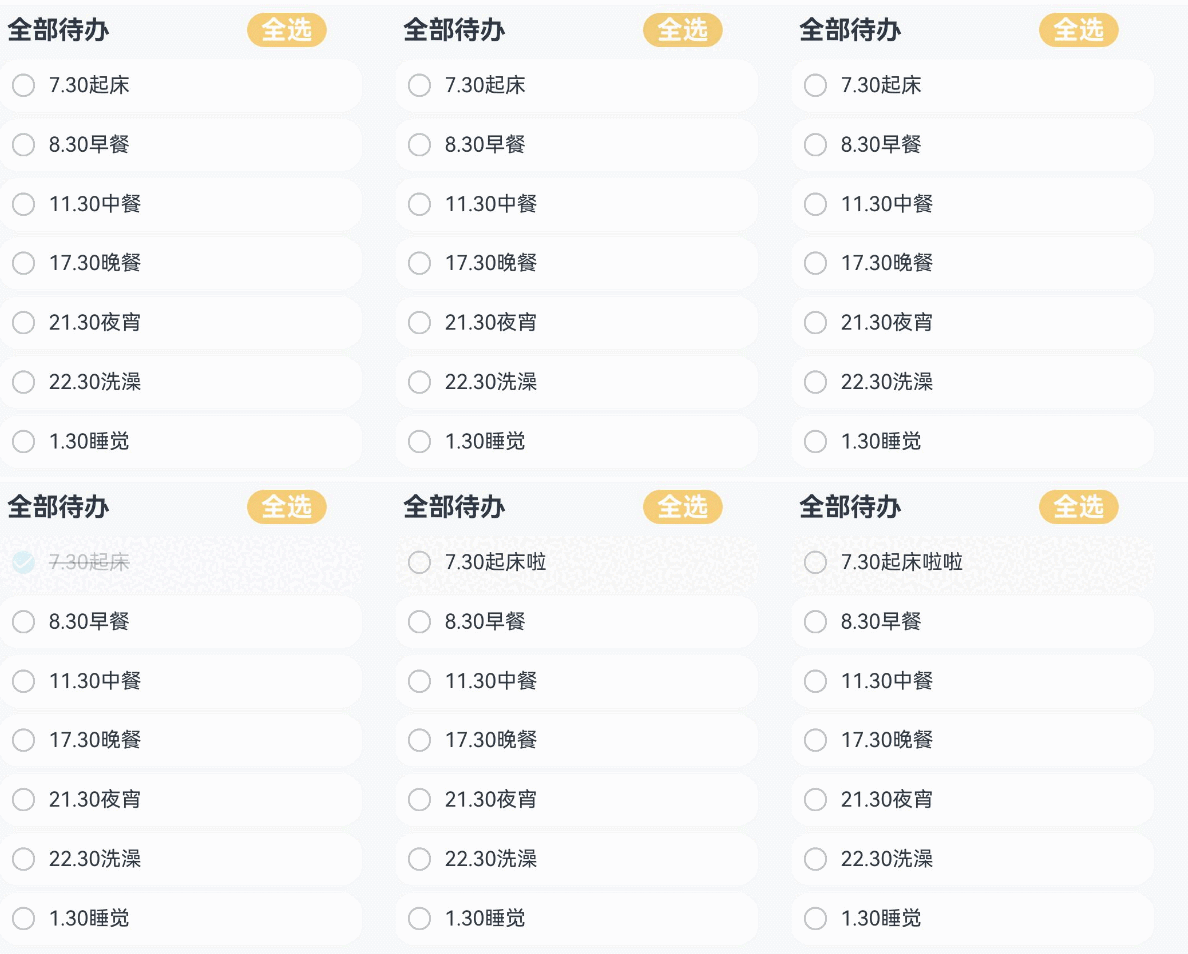
效果图如下:
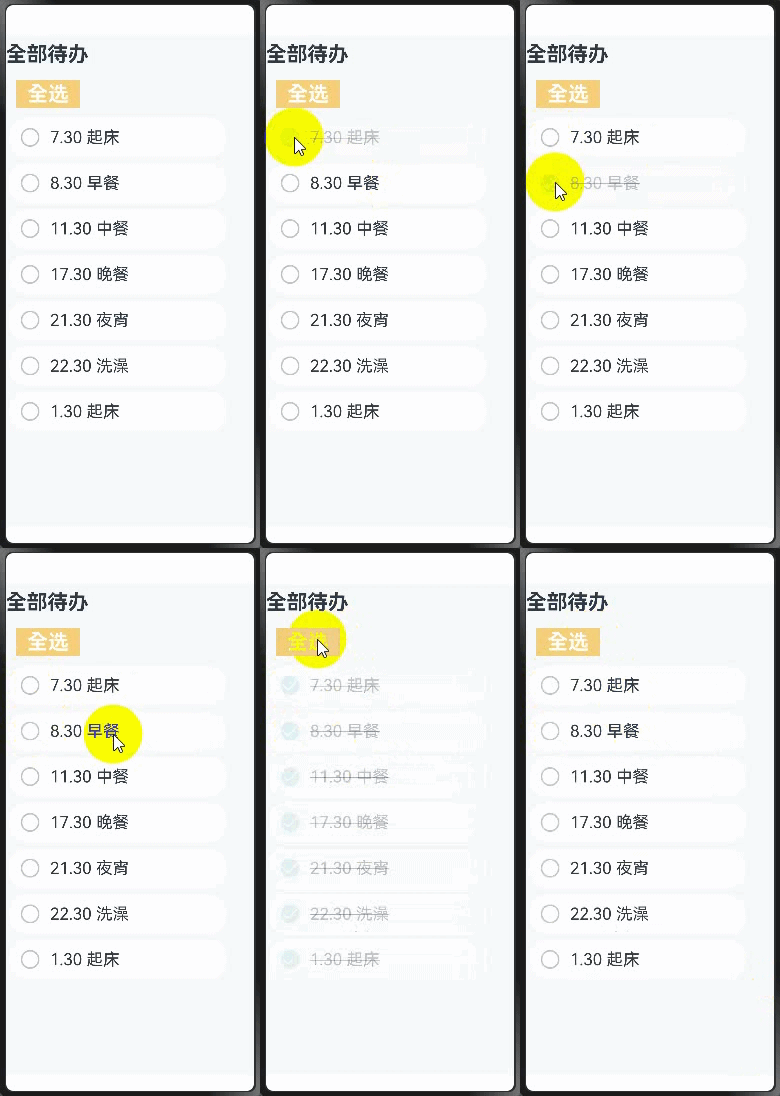
@Builder方法
- Builder方法用于组件内定义方法,可以使得相同代码可以在组件内进行复用。
- 本示例不仅使用了@Builder方法进行去重,还对数据进行了移除,可以看到此时代码更加清晰易读,相对于最开始的代码,@Entry组件基本只用于处理页面构建逻辑,而不处理大量与页面设计无关的内容。
@Observed
class TodoListData {
  public planList: ResourceStr[] = [
    // 请将$r('app.string.get_up')替换为实际资源文件,在本示例中该资源文件的value值为"7.30 起床"
    $r('app.string.get_up'),
    // 请将$r('app.string.breakfast')替换为实际资源文件,在本示例中该资源文件的value值为"8.30 早餐"
    $r('app.string.breakfast'),
    // 请将$r('app.string.lunch')替换为实际资源文件,在本示例中该资源文件的value值为"11.30 中餐"
    $r('app.string.lunch'),
    // 请将$r('app.string.dinner')替换为实际资源文件,在本示例中该资源文件的value值为"17.30 晚餐"
    $r('app.string.dinner'),
    // 请将$r('app.string.midnight_snack')替换为实际资源文件,在本示例中该资源文件的value值为"21.30 夜宵"
    $r('app.string.midnight_snack'),
    // 请将$r('app.string.bathe')替换为实际资源文件,在本示例中该资源文件的value值为"22.30 洗澡"
    $r('app.string.bathe'),
    // 请将$r('app.string.sleep')替换为实际资源文件,在本示例中该资源文件的value值为"1.30 睡觉"
    $r('app.string.sleep')
  ];
}

@Component
struct StateTodoComponent {
  build() {
    Row() {
      // 请将$r('app.string.all_tasks')替换为实际资源文件,在本示例中该资源文件的value值为"全部待办"
      Text($r('app.string.all_tasks'))
        .fontSize(30)
        .fontWeight(FontWeight.Bold)
    }
    .width('100%')
    .margin({ top: 10, bottom: 10 })
  }
}

@Component
struct BuilderAllChooseComponent {
  @Link isFinished: boolean;

  build() {
    Row() {
      // 请将$r('app.string.check_all')替换为实际资源文件,在本示例中该资源文件的value值为"全选"
      Button($r('app.string.check_all'), { type: ButtonType.Capsule })
        .onClick(() => {
          this.isFinished = !this.isFinished;
        })
        .fontSize(30)
        .fontWeight(FontWeight.Bold)
        .backgroundColor('#f7f6cc74')
    }
    .padding({ left: 15 })
    .width('100%')
    .margin({ top: 10, bottom: 10 })
  }
}

@Component
struct BuilderThingComponent {
  @Prop isFinished: boolean;
  @Prop thing: string;

  @Builder
  displayIcon(icon: Resource) {
    Image(icon)
      .width(28)
      .height(28)
      .onClick(() => {
        this.isFinished = !this.isFinished;
      })
      // ...
  }

  build() {
    // 待办事项1
    Row({ space: 15 }) {
      if (this.isFinished) {
        // 请将$r('app.media.finished')替换为实际资源文件
        this.displayIcon($r('app.media.finished'));
      } else {
        // 请将$r('app.media.unfinished')替换为实际资源文件
        this.displayIcon($r('app.media.unfinished'));
      }
      Text(`${this.thing}`)
        .fontSize(24)
        .decoration({ type: this.isFinished ? TextDecorationType.LineThrough : TextDecorationType.None })
        .onClick(() => {
          this.thing += 'lala';
        })
    }
    .height('8%')
    .width('90%')
    .padding({ left: 15 })
    .opacity(this.isFinished ? 0.3 : 1)
    .border({ width: 1 })
    .borderColor(Color.White)
    .borderRadius(25)
    .backgroundColor(Color.White)
  }
}

@Entry
@Component
struct BuilderIndex {
  @State isFinished: boolean = false;
  @State data: TodoListData = new TodoListData(); // View绑定ViewModel的数据

  aboutToAppear(): void {
    for (let i = 0; i < this.data.planList.length; i++) {
      this.data.planList[i] =
        resource.resourceToString(this.data.planList[i] as Resource);
    }
  }

  build() {
    Column() {
      // 全部待办
      StateTodoComponent()

      // 全选
      BuilderAllChooseComponent({ isFinished: this.isFinished })

      List() {
        ForEach(this.data.planList, (item: string) => {
          // 待办事项1
          BuilderThingComponent({ isFinished: this.isFinished, thing: item })
            .margin(5)
        })
      }
    }
    .height('100%')
    .width('100%')
    .margin({ top: 5, bottom: 5 })
    .backgroundColor('#90f1f3f5')
  }
}
效果图如下:
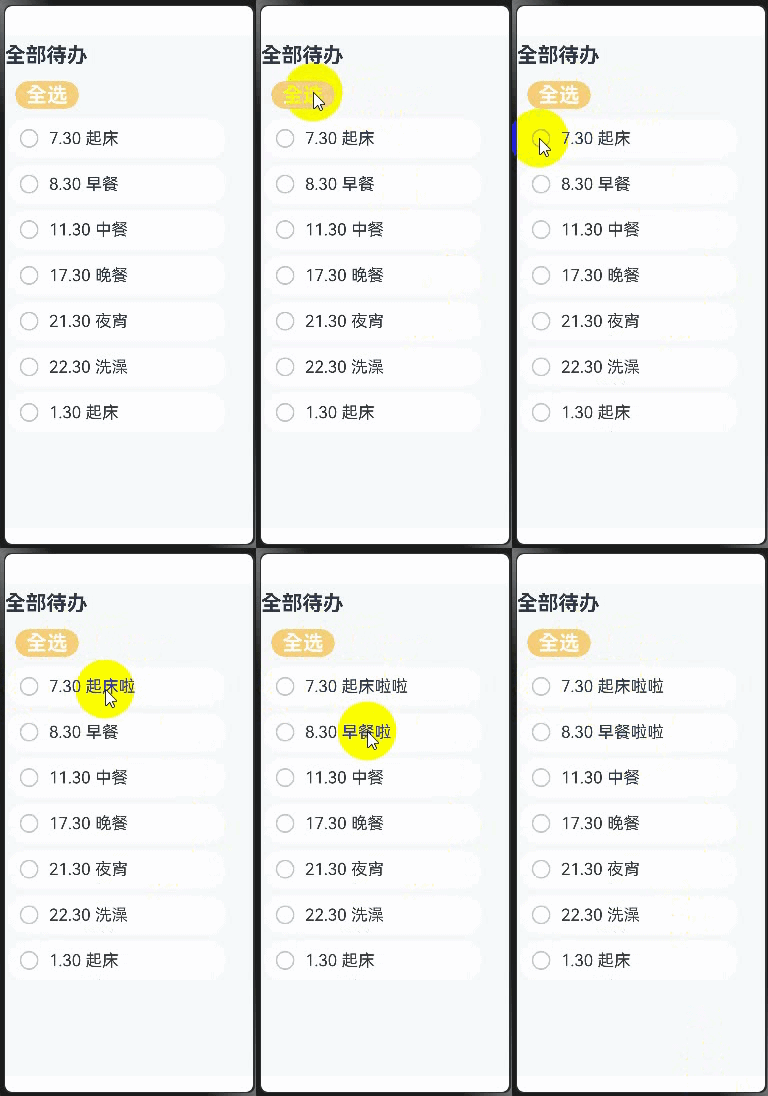
总结
- 通过逐步优化代码结构,可以看到@Entry组件作为页面的入口,其build函数应该仅考虑将需要的组件组合起来,类似于搭积木。被page调用的子组件则如同积木,等着被需要的page进行调用。状态变量类似于粘合剂,当触发UI刷新事件时,状态变量自动刷新绑定的组件,实现page的按需刷新。
- 虽然现有的架构并未使用到MVVM的设计理念,但MVVM的核心理念已初见端倪。ArkUI的UI开发天然适合MVVM模式。在ArkUI中,page和组件构成View层,page负责组织组件,组件则作为构成元素。当组件需要更新时,通过状态变量驱动组件刷新,从而更新page。ViewModel的数据则来源于Model层。
- 示例中的代码功能较为简单,但随着功能的增加,主页面的代码量也会逐渐增多。当备忘录需要添加更多功能,且其他页面也需要使用到主页面的组件时,可以考虑采用MVVM模式来组织项目结构。
通过MVVM开发备忘录实战
上一章节展示了非MVVM模式下的代码组织方式。随着主页面代码的增加,应该采取合理的分层策略,使项目结构清晰,组件之间不互相引用,避免后期维护时牵一发而动全身,增加功能更新的困难。本章将通过对MVVM的核心文件组织模式,向开发者展示如何使用MVVM来重构上一章节的代码。
MVVM文件结构说明
├── src
│   ├── ets
│   │   ├── pages 存放页面组件。
│   │   ├── views 存放业务组件。
│   │   ├── shares 存放通用组件。
│   │   └── viewmodel 数据服务。
│   │   │   ├── LoginViewModel.ets 登录页ViewModel。
│   │   │   └── xxxViewModel.ets 其他页ViewModel。
│
分层设计技巧
Model层
- model层存放本应用核心数据结构,这层本身和UI开发关系不大,让用户按照自己的业务逻辑进行封装。
ViewModel层
注意:
ViewModel层不只是存放数据,它同时需要提供数据的服务及处理。
- ViewModel层是为视图服务的数据层。其设计具有两个特点:
- 按照页面组织数据。
- 每个页面数据进行懒加载。
View层
View层根据需要来组织,但View层需要区分一下三种组件:
- 页面组件:提供整体页面布局,实现多页面之间的跳转,前后台事件处理等页面内容。
- 业务组件:被页面引用,构建出页面。
- 共享组件:与项目无关的多项目共享组件。
共享组件和业务组件的区别:
业务组件包含了ViewModel数据,没有ViewModel,这个组件不能运行。
共享组件:不包含ViewModel层的数据,需要的数据从外部传入。共享组件包含一个自定义组件,只要外部参数(无业务参数)满足,就可以工作。
代码示例
按MVVM模式组织结构,重构如下:
├── src
│   ├── ets
│   │   ├── model
│   │   │   ├── ThingModel.ets
│   │   │   └── TodoListModel.ets
│   │   ├── pages
│   │   │   ├── Index.ets
│   │   ├── views
│   │   │   ├── AllChooseComponent.ets
│   │   │   ├── ThingComponent.ets
│   │   │   ├── TodoComponent.ets
│   │   │   └── TodoListComponent.ets
│   │   ├── viewmodel
│   │   │   ├── ThingViewModel.ets
│   │   │   └── TodoListViewModel.ets
│   └── resources
│   │   ├── rawfile
│   │   │   ├── default_tasks.json
│
文件代码如下:
- ThingModel.ets
export default class ThingModel {
  public thingName: string = 'Todo';
  public isFinish: boolean = false;
}
- TodoListModel.ets
import { common } from '@kit.AbilityKit';
import { util } from '@kit.ArkTS';
import { hilog } from '@kit.PerformanceAnalysisKit';
import ThingModel from './ThingModel';

const DOMAIN = 0x0001;
const TAG = 'TodoListModel';

export default class TodoListModel {
  public things: Array<ThingModel> = [];

  constructor(things: Array<ThingModel>) {
    this.things = things;
  }

  async loadTasks(context: common.UIAbilityContext) {
    try {
      let getJson = await context.resourceManager.getRawFileContent('default_tasks.json');
      let textDecoderOptions: util.TextDecoderOptions = { ignoreBOM: true };
      let textDecoder = util.TextDecoder.create('utf-8', textDecoderOptions);
      let result = textDecoder.decodeToString(getJson, { stream: false });
      this.things = JSON.parse(result);
    } catch (error) {
      hilog.error(DOMAIN, TAG, 'Failed to load tasks. Cause: %{public}s', JSON.stringify(error.message));
    }
  }
}
- Index.ets
import { common } from '@kit.AbilityKit';
// import ViewModel
import TodoListViewModel from '../viewmodel/TodoListViewModel';

// import View
import { TodoComponent } from '../views/TodoComponent';
import { AllChooseComponent } from '../views/AllChooseComponent';
import { TodoListComponent } from '../views/TodoListComponent';

@Entry
@Component
struct TodoList {
  @State todoListViewModel: TodoListViewModel = new TodoListViewModel(); // View绑定ViewModel的数据
  private context = this.getUIContext().getHostContext() as common.UIAbilityContext;

  async aboutToAppear() {
    await this.todoListViewModel.loadTasks(this.context);
  }

  build() {
    Column() {
      Row({ space: 40 }) {
        // 全部待办
        TodoComponent()
        // 全选
        AllChooseComponent({ todoListViewModel: this.todoListViewModel })
      }

      Column() {
        TodoListComponent({ thingViewModelArray: this.todoListViewModel.things })
      }
    }
    .height('100%')
    .width('100%')
    .margin({ top: 5, bottom: 5 })
    .backgroundColor('#90f1f3f5')
  }
}
- AllChooseComponent.ets
import TodoListViewModel from '../viewmodel/TodoListViewModel';
import { common } from '@kit.AbilityKit';

@Component
export struct AllChooseComponent {
  context1 = this.getUIContext().getHostContext() as common.UIAbilityContext;
  // 请在resources\base\element\string.json文件中配置name为'check_all',value为非空字符串的资源
  @State titleName: ResourceStr = this.context1.resourceManager.getStringSync($r('app.string.check_all').id);
  @Link todoListViewModel: TodoListViewModel;

  build() {
    Row() {
      Button(`${this.titleName}`, { type: ButtonType.Capsule })
        .onClick(() => {
          this.todoListViewModel.chooseAll(); // View层点击事件发生时,调用ViewModel层方法chooseAll处理逻辑
          this.titleName = this.todoListViewModel.isChosen ?
            // 请在resources\base\element\string.json文件中配置name为'check_all',value为非空字符串的资源
            this.context1.resourceManager.getStringSync($r('app.string.check_all').id)
            // 请在resources\base\element\string.json文件中配置name为'deselect_all',value为非空字符串的资源
            : this.context1.resourceManager.getStringSync($r('app.string.deselect_all').id);
        })
        .fontSize(30)
        .fontWeight(FontWeight.Bold)
        .backgroundColor('#f7f6cc74')
    }
    .padding({ left: this.todoListViewModel.isChosen ? 15 : 0 })
    .width('100%')
    .margin({ top: 10, bottom: 10 })
  }
}
- ThingComponent.ets
import ThingViewModel from '../viewmodel/ThingViewModel';

@Component
export struct ThingComponent {
  @ObjectLink thing: ThingViewModel;

  @Builder
  displayIcon(icon: Resource) {
    Image(icon)
      .width(28)
      .height(28)
      .onClick(() => {
        this.thing.updateIsFinish(); // View层点击事件发生时,调用ViewModel层方法updateIsFinish处理逻辑
      })
      .id(this.thing.thingName)
  }

  build() {
    // 待办事项
    Row({ space: 15 }) {
      if (this.thing.isFinish) {
        // 请将$r('app.media.finished')替换为实际资源文件
        this.displayIcon($r('app.media.finished'));
      } else {
        // 请将$r('app.media.unfinished')替换为实际资源文件
        this.displayIcon($r('app.media.unfinished'));
      }

      Text(`${this.thing.thingName}`)
        .fontSize(24)
        .decoration({ type: this.thing.isFinish ? TextDecorationType.LineThrough : TextDecorationType.None })
        .onClick(() => {
          this.thing.addSuffixes(); // View层点击事件发生时,调用ViewModel层方法addSuffixes处理逻辑
        })
    }
    .height('8%')
    .width('90%')
    .padding({ left: 15 })
    .opacity(this.thing.isFinish ? 0.3 : 1)
    .border({ width: 1 })
    .borderColor(Color.White)
    .borderRadius(25)
    .backgroundColor(Color.White)
  }
}
- TodoComponent.ets
@Component
export struct TodoComponent {
  build() {
    Row() {
      // 请将$r('app.string.all_tasks')替换为实际资源文件,在本示例中该资源文件的value值为"全部待办"
      Text($r('app.string.all_tasks'))
        .fontSize(30)
        .fontWeight(FontWeight.Bold)
    }
    .padding({ left: 15 })
    .width('50%')
    .margin({ top: 10, bottom: 10 })
  }
}
- TodoListComponent.ets
import ThingViewModel from '../viewmodel/ThingViewModel';
import { ThingViewModelArray } from '../viewmodel/TodoListViewModel'
import { ThingComponent } from './ThingComponent';

@Component
export struct TodoListComponent {
  @ObjectLink thingViewModelArray: ThingViewModelArray;

  build() {
    Column() {
      List() {
        ForEach(this.thingViewModelArray, (item: ThingViewModel) => {
          // 待办事项
          ListItem() {
            ThingComponent({ thing: item })
              .margin(5)
          }
        }, (item: ThingViewModel) => {
          return item.thingName;
        })
      }
    }
  }
}
- ThingViewModel.ets
import ThingModel from '../model/ThingModel';

@Observed
export default class ThingViewModel {
  @Track public thingName: string = 'Todo';
  @Track public isFinish: boolean = false;
  public context: Context = AppStorage.get('context')!;

  updateTask(thing: ThingModel) {
    this.thingName = thing.thingName;
    this.isFinish = thing.isFinish;
  }

  updateIsFinish(): void {
    this.isFinish = !this.isFinish;
  }

  addSuffixes(): void {
    this.thingName += 'lala';
  }
}
- TodoListViewModel.ets
import ThingViewModel from './ThingViewModel';
import { common } from '@kit.AbilityKit';
import TodoListModel from '../model/TodoListModel';

@Observed
export class ThingViewModelArray extends Array<ThingViewModel> {
}

@Observed
export default class TodoListViewModel {
  @Track public isChosen: boolean = true;
  @Track public things: ThingViewModelArray = new ThingViewModelArray();

  async loadTasks(context: common.UIAbilityContext) {
    let todoList = new TodoListModel([]);
    await todoList.loadTasks(context);
    for (let thing of todoList.things) {
      let todoListViewModel = new ThingViewModel();
      todoListViewModel.updateTask(thing);
      this.things.push(todoListViewModel);
    }
  }

  chooseAll(): void {
    for (let thing of this.things) {
      thing.isFinish = this.isChosen;
    }
    this.isChosen = !this.isChosen;
  }
}
- default_tasks.json
[
  {"thingName": "7.30起床", "isFinish": false},
  {"thingName": "8.30早餐", "isFinish": false},
  {"thingName": "11.30中餐", "isFinish": false},
  {"thingName": "17.30晚餐", "isFinish": false},
  {"thingName": "21.30夜宵", "isFinish": false},
  {"thingName": "22.30洗澡", "isFinish": false},
  {"thingName": "1.30睡觉", "isFinish": false}
]
MVVM模式拆分后的代码结构更加清晰,模块职责更明确。新页面需要使用事件组件,比如TodoListComponent组件,只需导入组件。
效果图如下: