Transferable对象(NativeBinding对象)
Transferable对象,也称为NativeBinding对象,是指绑定C++对象的JS对象,其主要功能由C++提供,JS对象壳则分配在虚拟机的本地堆(LocalHeap)中。跨线程传输时复用同一个C++对象,相比JS对象的拷贝模式,传输效率更高。因此,可共享或转移的NativeBinding对象被称为Transferable对象。开发者可以自定义Transferable对象,详细示例请参考自定义Native Transferable对象的多线程操作场景。
共享模式
如果C++实现能够确保线程安全性,则NativeBinding对象的C++部分支持跨线程共享。NativeBinding对象跨线程传输后,只需重新创建JS壳即可桥接到同一个C++对象上,实现C++对象的共享。通信过程如下图所示:
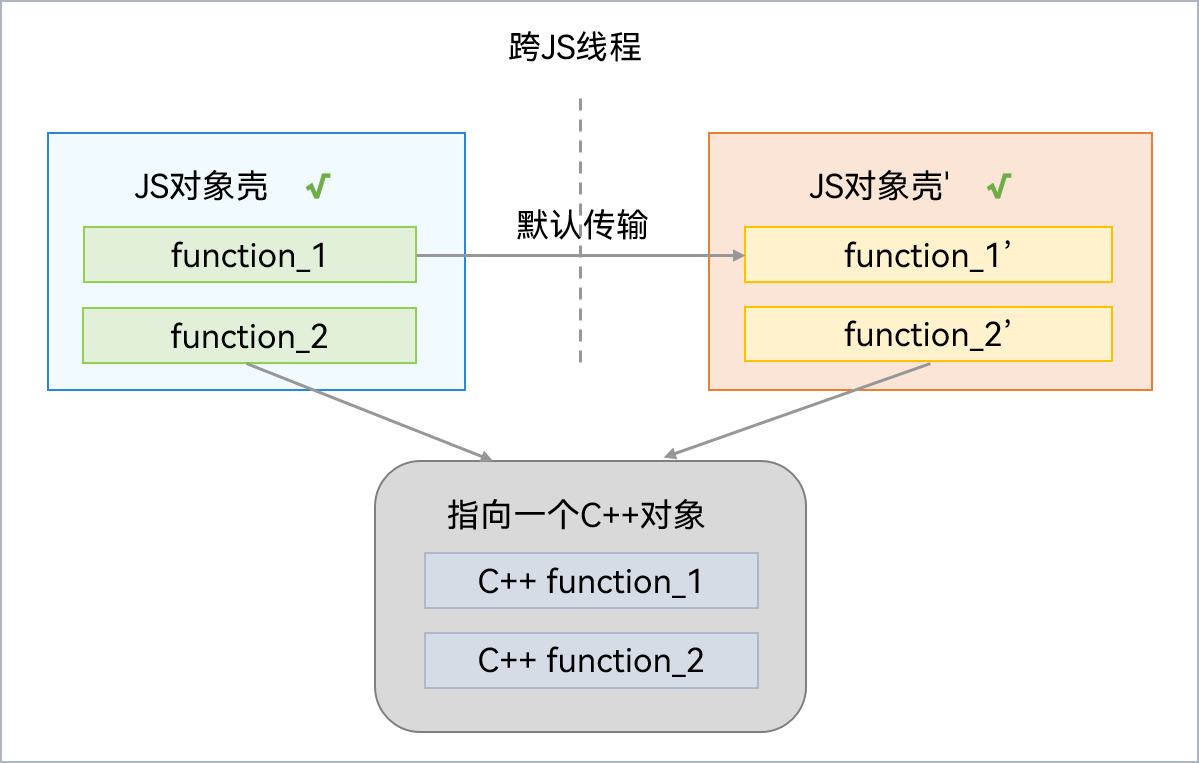
常见的共享模式NativeBinding对象包括:应用上下文(ApplicationContext)、窗口上下文(WindowContext)、组件上下文(AbilityContext或ComponentContext)等Context类型对象。这些上下文对象封装了应用程序组件的上下文信息,提供了访问系统服务和资源的能力,使得应用程序组件可以与系统进行交互。获取Context信息的方法可以参考获取上下文信息。
示例可参考使用TaskPool进行频繁数据库操作。
转移模式
如果C++实现包含数据且无法保证线程安全性,则NativeBinding对象的C++部分需要采用转移方式传输。NativeBinding对象跨线程传输后,重新创建JS壳可桥接到C++对象上,但需移除原JS壳与C++对象的绑定关系。通信过程如下图所示:
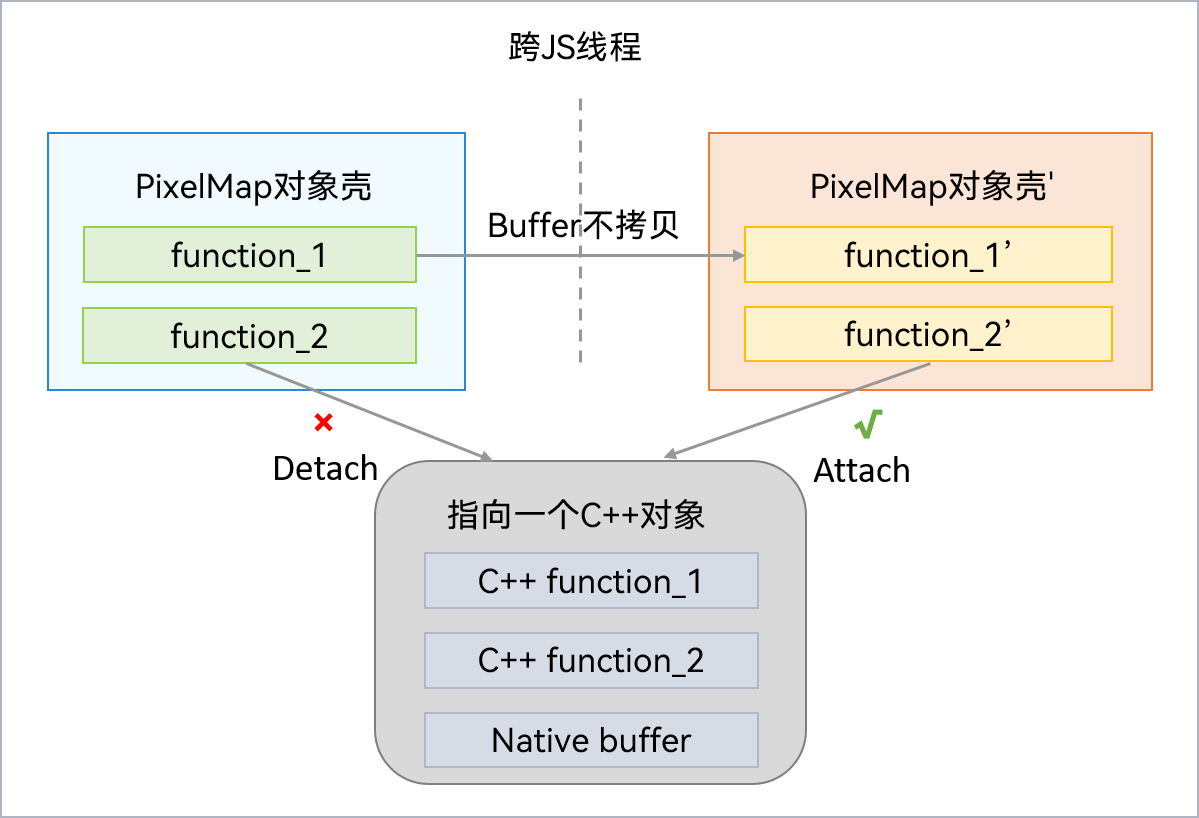
常见的转移模式NativeBinding对象包括PixelMap对象,它可以读取或写入图像数据,获取图像信息,常用于显示图片。
这里提供了一个跨线程传递PixelMap对象的示例。首先从rawfile文件夹中获取图片资源,然后在子线程中创建PixelMap对象并传递给主线程,具体实现如下:
import { taskpool } from '@kit.ArkTS';
import { loadPixelMap } from './pixelMapTest';
import { BusinessError } from '@kit.BasicServicesKit';

@Entry
@Component
struct Index {
  uiContext = this.getUIContext();
  @State message: string = 'Hello World';
  @State pixelMap: PixelMap | undefined = undefined;

  private loadImageFromThread(): void {
    const resourceMgr = this.uiContext?.getHostContext()?.resourceManager;
    // 此处‘startIcon.png’为media下复制到rawfile文件夹中,请开发者自行替换,否则imageSource创建失败会导致后续无法正常执行。
    resourceMgr?.getRawFd('startIcon.png').then(rawFileDescriptor => {
      taskpool.execute(loadPixelMap, rawFileDescriptor).then(pixelMap => {
        if (pixelMap) {
          this.pixelMap = pixelMap as PixelMap;
          console.info('Succeeded in creating pixelMap.');
          // 主线程释放pixelMap。由于子线程返回pixelMap时已调用setTransferDetached,所以此处能够立即释放pixelMap。
          this.pixelMap.release();
        } else {
          console.error('Failed to create pixelMap.');
        }
      }).catch((e: BusinessError) => {
        console.error('taskpool execute loadPixelMap failed. Code: ' + e.code + ', message: ' + e.message);
      });
    }).catch(() => {
      console.error(`Failed to get RawFd`);
    });
  }

  build() {
    RelativeContainer() {
      Text(this.message)
        .id('HelloWorld')
        .fontSize(50)
        .fontWeight(FontWeight.Bold)
        .alignRules({
          center: { anchor: '__container__', align: VerticalAlign.Center },
          middle: { anchor: '__container__', align: HorizontalAlign.Center }
        })
        .onClick(() => {
          this.loadImageFromThread();
          this.message = 'success';
        })
    }
    .height('100%')
    .width('100%')
  }
}
import { image } from '@kit.ImageKit';

@Concurrent
export async function loadPixelMap(rawFileDescriptor: number): Promise<PixelMap> {
  // 创建imageSource。
  const imageSource = image.createImageSource(rawFileDescriptor);
  // 创建pixelMap。
  const pixelMap = imageSource.createPixelMapSync();
  // 释放imageSource。
  imageSource.release();
  // 使pixelMap在跨线程传输完成后,脱离原线程的引用。
  pixelMap.setTransferDetached(true);
  // 返回pixelMap给主线程。
  return pixelMap;
}