简单文本绘制与显示(C/C++)
场景介绍
在一个简单的用户界面中,可能只需要展示几行静态文本,例如标签、按钮上的文字、菜单项或状态栏中的提示信息。此时,开发者只需要选择合适的字体、大小和颜色即可完成渲染。
接口说明
| 接口定义 | 描述 |
|---|---|
| OH_Drawing_TextStyle* OH_Drawing_CreateTextStyle(void) | 创建指向OH_Drawing_TextStyle对象的指针。 |
| void OH_Drawing_SetTextStyleFontSize(OH_Drawing_TextStyle* style, double fontSize) | 设置字号。 |
| void OH_Drawing_SetTextStyleFontWeight(OH_Drawing_TextStyle* style, int fontWeight) | 设置字重。目前只有系统默认字体支持字重的调节,其他字体设置字重值小于semi-bold时字体粗细无变化,当设置字重值大于等于semi-bold时可能会触发伪加粗效果。 |
开发步骤
-
创建Canvas画布对象,画布Canvas对象创建方法具体可见画布的获取与绘制结果的显示。
-
初始化段落样式,设置文本对齐方式为居中对齐。
// 创建一个 TypographyStyle 创建 Typography 时需要使用OH_Drawing_TypographyStyle *typoStyle = OH_Drawing_CreateTypographyStyle();// 设置文本对齐方式为居中OH_Drawing_SetTypographyTextAlign(typoStyle, TEXT_ALIGN_CENTER); -
初始化文本样式,此处设置字体颜色为纯黑色,字体大小为60,字重为400。
// 设置文字颜色、大小、字重,不设置 TextStyle 会使用 TypographyStyle 中的默认 TextStyleOH_Drawing_TextStyle *txtStyle = OH_Drawing_CreateTextStyle();OH_Drawing_SetTextStyleColor(txtStyle, OH_Drawing_ColorSetArgb(0xFF, 0x00, 0x00, 0x00));OH_Drawing_SetTextStyleFontSize(txtStyle, 60);OH_Drawing_SetTextStyleFontWeight(txtStyle, FONT_WEIGHT_400); -
初始化段落对象,并添加文本。
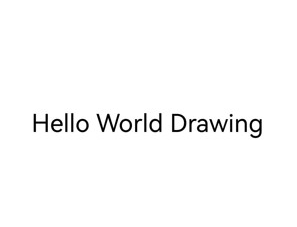
// 创建 FontCollection,FontCollection 用于管理字体匹配逻辑OH_Drawing_FontCollection *fc = OH_Drawing_CreateFontCollection();// 使用 FontCollection 和 之前创建的 TypographyStyle 创建 TypographyCreate。TypographyCreate 用于创建 TypographyOH_Drawing_TypographyCreate *handler = OH_Drawing_CreateTypographyHandler(typoStyle, fc);// 将之前创建的 TextStyle 加入 handler 中OH_Drawing_TypographyHandlerPushTextStyle(handler, txtStyle);// 设置文本内容,并将文本添加到 handler 中const char *text = "Hello World Drawing\n";OH_Drawing_TypographyHandlerAddText(handler, text);OH_Drawing_Typography *typography = OH_Drawing_CreateTypography(handler); -
排版段落并进行文本绘制。
// 设置页面最大宽度double maxWidth = width_;OH_Drawing_TypographyLayout(typography, maxWidth);// 将文本绘制到画布上OH_Drawing_TypographyPaint(typography, cCanvas_, 0, 100); -
释放内存
// 释放内存OH_Drawing_DestroyTypographyStyle(typoStyle);OH_Drawing_DestroyTextStyle(txtStyle);OH_Drawing_DestroyFontCollection(fc);OH_Drawing_DestroyTypographyHandler(handler);OH_Drawing_DestroyTypography(typography);
效果展示