复杂文本绘制与显示(C/C++)
在进行文本绘制时,可以通过选择合适的字体、大小和颜色完成简单文本的绘制与显示;此外,还支持通过设置其他丰富的样式、语言、段落等进行复杂文本的绘制。
复杂文本绘制主要包含以下几个场景:
- 多语言文本绘制与显示
- 多行文本绘制与显示
- 多样式文本绘制与显示
- 样式的拷贝、绘制与显示
多语言文本绘制与显示
多语言支持是全球化应用的基础。多语言文本绘制需要支持不同语言的字符集及其独特的显示需求,例如右到左语言(如阿拉伯语)或竖排文本(如中文)。开发者需要理解不同语言的渲染特性,确保文本的正确显示。
在多语言文本使用的场景下,主要通过指定TextStyle文本样式中的locale字段来实现,可直接通过locale字段的值优先匹配对应字体,跳过遍历列表匹配字体的过程,从而降低匹配时间和内存使用。
接口说明
| 接口定义 | 描述 |
|---|---|
| void OH_Drawing_SetTypographyTextLocale(OH_Drawing_TypographyStyle* style, const char* locale) | 设置指定排版样式的语言环境。 |
开发步骤
画布Canvas对象具体可见画布的获取与绘制结果的显示。
// 创建一个 TypographyStyle,创建 TypographyCreate 时需要使用
OH_Drawing_TypographyStyle *typoStyle = OH_Drawing_CreateTypographyStyle();
// 设置文本对齐方式为居中
OH_Drawing_SetTypographyTextAlign(typoStyle, TEXT_ALIGN_CENTER);
// 设置 locale 为中文
OH_Drawing_SetTypographyTextLocale(typoStyle, "zh-Hans");

// 设置文字颜色、大小、字重,不设置 TextStyle 会使用 TypographyStyle 中的默认 TextStyle
OH_Drawing_TextStyle *txtStyle = OH_Drawing_CreateTextStyle();
OH_Drawing_SetTextStyleColor(txtStyle, OH_Drawing_ColorSetArgb(0xFF, 0x00, 0x00, 0x00));
OH_Drawing_SetTextStyleFontSize(txtStyle, DIV_TEN(width_));
OH_Drawing_SetTextStyleFontWeight(txtStyle, FONT_WEIGHT_400);

// 创建 FontCollection,FontCollection 用于管理字体匹配逻辑
OH_Drawing_FontCollection *fc = OH_Drawing_CreateSharedFontCollection();
// 使用 FontCollection 和 之前创建的 TypographyStyle 创建 TypographyCreate。TypographyCreate 用于创建 Typography
OH_Drawing_TypographyCreate *handler = OH_Drawing_CreateTypographyHandler(typoStyle, fc);

// 将之前创建的 TextStyle 加入 handler 中
OH_Drawing_TypographyHandlerPushTextStyle(handler, txtStyle);
// 设置文本内容,并将文本添加到 handler 中
const char *text = "你好,中文\n";
OH_Drawing_TypographyHandlerAddText(handler, text);

// 通过 handler 创建一个 Typography
OH_Drawing_Typography *typography = OH_Drawing_CreateTypography(handler);
// 设置页面最大宽度
double maxWidth = width_;
OH_Drawing_TypographyLayout(typography, maxWidth);
// 将文本绘制到画布上
OH_Drawing_TypographyPaint(typography, cCanvas_, 0, DIV_TEN(width_));

// 释放内存
OH_Drawing_DestroyTypographyStyle(typoStyle);
OH_Drawing_DestroyTextStyle(txtStyle);
OH_Drawing_DestroyFontCollection(fc);
OH_Drawing_DestroyTypographyHandler(handler);
OH_Drawing_DestroyTypography(typography);
效果展示

多行文本绘制与显示
多行文本相对于单行文本比较复杂,一般针对多行文本,需要进行文本排版、断词策略设置、文本对齐方式、最大行数限制等,主要通过设置段落样式实现。
接口说明
| 接口定义 | 描述 |
|---|---|
| void OH_Drawing_SetTypographyTextAlign(OH_Drawing_TypographyStyle* style, int align) | 设置文本对齐方式。 |
| void OH_Drawing_SetTypographyTextWordBreakType(OH_Drawing_TypographyStyle* style, int wordBreakType) | 设置单词的断词方式。 |
| void OH_Drawing_SetTypographyTextMaxLines(OH_Drawing_TypographyStyle* style, int lineNumber) | 设置文本最大行数。 |
开发步骤
以下以断行策略为 BREAK_ALL 的场景为例,其余策略同理。
// 创建 FontCollection,FontCollection 用于管理字体匹配逻辑
OH_Drawing_FontCollection *fc = OH_Drawing_CreateSharedFontCollection();

// 设置文字颜色、大小、字重,不设置 TextStyle 会使用 TypographyStyle 中的默认 TextStyle
OH_Drawing_TextStyle *txtStyle = OH_Drawing_CreateTextStyle();
OH_Drawing_SetTextStyleColor(txtStyle, OH_Drawing_ColorSetArgb(0xFF, 0x00, 0x00, 0x00));
OH_Drawing_SetTextStyleFontSize(txtStyle, DIV_TWENTY(width_));
OH_Drawing_SetTextStyleFontWeight(txtStyle, FONT_WEIGHT_400);

// 设置文本内容
const char *text =
    "Nunc quis augue viverra, venenatis arcu eu, gravida odio. Integer posuere nisi quis ex pretium, a dapibus "
    "nisl gravida. Mauris lacinia accumsan enim, non tempus ligula. Mauris iaculis dui eu nisi tristique, in porta "
    "urna varius. Orci varius natoque penatibus et magnis dis parturient montes, nascetur ridiculus mus. Mauris "
    "congue nibh mi, vel ultrices ex volutpat et. Aliquam consectetur odio in libero tristique, a mattis ex "
    "mollis. Praesent et nisl iaculis, facilisis metus nec, faucibus lacus. Duis nec dolor at nibh eleifend "
    "tempus. Nunc et enim interdum, commodo eros ac, pretium sapien. Pellentesque laoreet orci a nunc pharetra "
    "pharetra.";

// 创建一个断词策略为 BREAK_ALL 的 TypographyStyle
OH_Drawing_TypographyStyle *typoStyle = OH_Drawing_CreateTypographyStyle();
// 设置文本对齐方式为居中
OH_Drawing_SetTypographyTextAlign(typoStyle, TEXT_ALIGN_CENTER);
// 设置断词策略为 WORD_BREAK_TYPE_BREAK_ALL
OH_Drawing_SetTypographyTextWordBreakType(typoStyle, OH_Drawing_WordBreakType::WORD_BREAK_TYPE_BREAK_ALL);
// 设置最大行数为 10,行数大于 10 的部分不显示
OH_Drawing_SetTypographyTextMaxLines(typoStyle, 10);

// 使用之前创建的 FontCollection 和 TypographyStyle 创建 TypographyCreate。TypographyCreate 用于创建 Typography
OH_Drawing_TypographyCreate *handler = OH_Drawing_CreateTypographyHandler(typoStyle, fc);
// 将之前创建的 TextStyle 加入 handler
OH_Drawing_TypographyHandlerPushTextStyle(handler, txtStyle);
// 将文本添加到 handler 中
OH_Drawing_TypographyHandlerAddText(handler, text);

OH_Drawing_Typography *typography = OH_Drawing_CreateTypography(handler);
// 设置页面最大宽度
double maxWidth = width_;
OH_Drawing_TypographyLayout(typography, maxWidth);
// 将文本绘制到画布上
OH_Drawing_TypographyPaint(typography, cCanvas_, 0, DIV_TEN(width_));

// 释放内存
OH_Drawing_DestroyFontCollection(fc);
OH_Drawing_DestroyTextStyle(txtStyle);
OH_Drawing_DestroyTypographyStyle(typoStyle);
OH_Drawing_DestroyTypographyHandler(handler);
OH_Drawing_DestroyTypography(typography);
| BREAK_ALL | BREAK_WORD |
|---|---|
| BREAK_HYPHEN(locale:未设置) | BREAK_HYPHEN(locale:en-gb) | BREAK_HYPHEN(locale:en-us) |
|---|---|---|
多样式文本绘制与显示
除基本文字、排版属性之外,针对应用中不同文本的设计,开发者可能需要设置使用不同的绘制样式或能力,以凸显对应文本的独特表现或风格,此时可以结合使用多种绘制样式进行文本的渲染。
当前支持的多样式绘制及各绘制样式侧重效果如下:
- 装饰线样式绘制: 主要通过不同的线条样式对文本进行装饰,可以使文本更加突出,富有表现力。
- 字体特性绘制: 主要通过字体的变化,包括粗细、斜体等特性来改变文本的外观,增强文本的可读性和美观性。
- 可变字体绘制: 对应提供文本在不同的显示环境和设备上灵活调整的能力,可满足更为精细的视觉效果。
- 文本阴影绘制: 主要通过在文本周围添加阴影效果,以提升文本的层次感和立体感,从而使文本更具吸引力。
- 占位符绘制: 可以在不确定文本内容时保持文本布局的稳定性,使得文本显示更为流畅和自然。
- 自动间距绘制: 可以在一些字符混排切换的地方自动添加额外间距,提升阅读体验。
- 渐变色绘制: 可以为文字提供颜色渐变效果,增强文字表现力。
- 垂直对齐: 调整文本在垂直方向排版位置,提升排版质量。
- 上下标: 可以将任意字符处理成上标或下标,更精准表达文本含义。
- 高对比度文字绘制: 主要通过将深色文字变黑、浅色文字变白,增强文本的对比效果。
- 行高调整: 调整行高可改变文本行的垂直间距,使行间距更松散或更紧凑,显著改善文本垂直截断问题,提高可读性。
- 行间距调整: 通过调整行间距的方式可以实现行高调整一样的效果,优化阅读体验。
装饰线
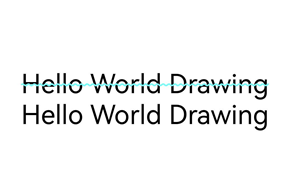
装饰线是指在文本上方、下方或中间添加的装饰性线条,当前支持上划线、下划线、删除线。
可以通过添加文本装饰线,提升文本的视觉效果和可读性。
使用装饰线需要初始化装饰线样式对象,并添加到文本样式中,从而在文本绘制时生效。
| 接口定义 | 描述 |
|---|---|
| void OH_Drawing_SetTextStyleDecoration(OH_Drawing_TextStyle* style, int decoration) | 设置指定文本样式中的装饰线类型,只能设置一个装饰线类型,添加多个需要使用OH_Drawing_AddTextStyleDecoration。 |
| void OH_Drawing_SetTextStyleDecorationStyle(OH_Drawing_TextStyle* style, int decorationStyle) | 设置指定文本样式中的装饰线样式。 |
| void OH_Drawing_SetTextStyleDecorationColor(OH_Drawing_TextStyle* style, uint32_t color) | 设置指定文本样式中的装饰线颜色。 |
示例及示意效果如下所示:
// 创建一个TypographyStyle创建Typography时需要使用
OH_Drawing_TypographyStyle *typoStyle = OH_Drawing_CreateTypographyStyle();
// 设置文本对齐方式为居中
OH_Drawing_SetTypographyTextAlign(typoStyle, TEXT_ALIGN_CENTER);
// 设置文本内容
const char *text = "Hello World Drawing\n";

// 设置文字颜色、大小、字重,不设置 TextStyle 会使用 TypographyStyle 中的默认 TextStyle
OH_Drawing_TextStyle *txtStyleWithDeco = OH_Drawing_CreateTextStyle();
OH_Drawing_SetTextStyleColor(txtStyleWithDeco, OH_Drawing_ColorSetArgb(0xFF, 0x00, 0x00, 0x00));
OH_Drawing_SetTextStyleFontSize(txtStyleWithDeco, DIV_TEN(width_));
OH_Drawing_SetTextStyleFontWeight(txtStyleWithDeco, FONT_WEIGHT_400);
// 设置装饰线为 LINE_THROUGH
OH_Drawing_SetTextStyleDecoration(txtStyleWithDeco, TEXT_DECORATION_LINE_THROUGH);
// 设置装饰线样式为 WAVY
OH_Drawing_SetTextStyleDecorationStyle(txtStyleWithDeco, TEXT_DECORATION_STYLE_WAVY);
// 设置装饰线颜色
OH_Drawing_SetTextStyleDecorationColor(txtStyleWithDeco, OH_Drawing_ColorSetArgb(0xFF, 0x6F, 0xFF, 0xFF));

// 创建一个不带装饰线的 TextStyle 用于对比
OH_Drawing_TextStyle *txtStyleNoDeco = OH_Drawing_CreateTextStyle();
// 设置文字颜色、大小、字重,不设置 TextStyle 会使用 TypographyStyle 中的默认 TextStyle
OH_Drawing_SetTextStyleColor(txtStyleNoDeco, OH_Drawing_ColorSetArgb(0xFF, 0x00, 0x00, 0x00));
OH_Drawing_SetTextStyleFontSize(txtStyleNoDeco, DIV_TEN(width_));
OH_Drawing_SetTextStyleFontWeight(txtStyleNoDeco, FONT_WEIGHT_400);

// 创建 FontCollection,FontCollection 用于管理字体匹配逻辑
OH_Drawing_FontCollection *fc = OH_Drawing_CreateSharedFontCollection();
// 使用 FontCollection 和 之前创建的 TypographyStyle 创建 TypographyCreate。TypographyCreate 用于创建 Typography
OH_Drawing_TypographyCreate *handler = OH_Drawing_CreateTypographyHandler(typoStyle, fc);

// 加入带有装饰线的文本样式
OH_Drawing_TypographyHandlerPushTextStyle(handler, txtStyleWithDeco);
// 将文本添加到 handler 中
OH_Drawing_TypographyHandlerAddText(handler, text);

// 后续加入的不带装饰线的文本样式
OH_Drawing_TypographyHandlerPushTextStyle(handler, txtStyleNoDeco);
// 将文本添加到 handler 中
OH_Drawing_TypographyHandlerAddText(handler, text);

OH_Drawing_Typography *typography = OH_Drawing_CreateTypography(handler);
// 设置页面最大宽度
double maxWidth = width_;
OH_Drawing_TypographyLayout(typography, maxWidth);
// 将文本绘制到画布上
OH_Drawing_TypographyPaint(typography, cCanvas_, 0, DIV_TEN(width_));

// 释放内存
OH_Drawing_DestroyTypographyStyle(typoStyle);
OH_Drawing_DestroyTextStyle(txtStyleWithDeco);
OH_Drawing_DestroyTextStyle(txtStyleNoDeco);
OH_Drawing_DestroyFontCollection(fc);
OH_Drawing_DestroyTypographyHandler(handler);
OH_Drawing_DestroyTypography(typography);
字体特征
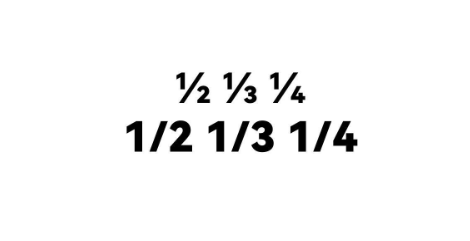
字体特征绘制专注于在文本渲染过程中对字体特性(如粗体、斜体、字体变种等)的处理,允许字体在不同的排版场景下表现出不同的效果,可用于增强文本的表现力,使其更符合设计和阅读需求。
常见的FontFeature包含有liga、frac、case等,需要对应的ttf文件支持才能正常使能。
| 接口定义 | 描述 |
|---|---|
| void OH_Drawing_TextStyleAddFontFeature(OH_Drawing_TextStyle* style, const char* tag, int value) | 设置文本样式中指定字体特征是否启用。 |
示例及示意效果如下所示:
// 创建一个 TypographyStyle,创建 TypographyCreate 时需要使用
OH_Drawing_TypographyStyle *typoStyle = OH_Drawing_CreateTypographyStyle();
// 设置文本对齐方式为居中
OH_Drawing_SetTypographyTextAlign(typoStyle, TEXT_ALIGN_CENTER);
// 设置文本内容
const char *text = "1/2 1/3 1/4\n";

// 设置文字颜色、大小、字重,不设置TextStyle无法绘制出文本
OH_Drawing_TextStyle *txtStyleWithFeature = OH_Drawing_CreateTextStyle();
OH_Drawing_SetTextStyleColor(txtStyleWithFeature, OH_Drawing_ColorSetArgb(0xFF, 0x00, 0x00, 0x00));
OH_Drawing_SetTextStyleFontSize(txtStyleWithFeature, DIV_TEN(width_));
OH_Drawing_SetTextStyleFontWeight(txtStyleWithFeature, FONT_WEIGHT_900);
// 设置启用frac font feature,此功能将斜线分隔的数字替换为普通(对角线)分数。
OH_Drawing_TextStyleAddFontFeature(txtStyleWithFeature, "frac", 1);

// 创建一个不带字体特征的 TextStyle 用于对比
OH_Drawing_TextStyle *txtStyleNoFeature = OH_Drawing_CreateTextStyle();
// 设置文字颜色、大小、字重。不设置 TextStyle 无法绘制出文本
OH_Drawing_SetTextStyleColor(txtStyleNoFeature, OH_Drawing_ColorSetArgb(0xFF, 0x00, 0x00, 0x00));
OH_Drawing_SetTextStyleFontSize(txtStyleNoFeature, DIV_TEN(width_));
OH_Drawing_SetTextStyleFontWeight(txtStyleNoFeature, FONT_WEIGHT_900);

// 创建 FontCollection,FontCollection 用于管理字体匹配逻辑
OH_Drawing_FontCollection *fc = OH_Drawing_CreateSharedFontCollection();
// 使用 FontCollection 和 之前创建的 TypographyStyle 创建 TypographyCreate。TypographyCreate 用于创建 Typography
OH_Drawing_TypographyCreate *handler = OH_Drawing_CreateTypographyHandler(typoStyle, fc);

// 加入带有字体特征的文本样式
OH_Drawing_TypographyHandlerPushTextStyle(handler, txtStyleWithFeature);
// 将文本添加到 handler 中
OH_Drawing_TypographyHandlerAddText(handler, text);
// 销毁之前创建的 TextStyle
OH_Drawing_TypographyHandlerPopTextStyle(handler);

// 后续加入的不带字体特征的文本样式
OH_Drawing_TypographyHandlerPushTextStyle(handler, txtStyleNoFeature);
// 将文本添加到 handler 中
OH_Drawing_TypographyHandlerAddText(handler, text);
// 销毁之前创建的 TextStyle
OH_Drawing_TypographyHandlerPopTextStyle(handler);

OH_Drawing_Typography *typography = OH_Drawing_CreateTypography(handler);
// 设置页面最大宽度
double maxWidth = width_;
OH_Drawing_TypographyLayout(typography, maxWidth);
// 将文本绘制到画布上
OH_Drawing_TypographyPaint(typography, cCanvas_, 0, DIV_TEN(width_));

// 释放内存
OH_Drawing_DestroyTypographyStyle(typoStyle);
OH_Drawing_DestroyTextStyle(txtStyleWithFeature);
OH_Drawing_DestroyTextStyle(txtStyleNoFeature);
OH_Drawing_DestroyFontCollection(fc);
OH_Drawing_DestroyTypographyHandler(handler);
OH_Drawing_DestroyTypography(typography);
可变字体
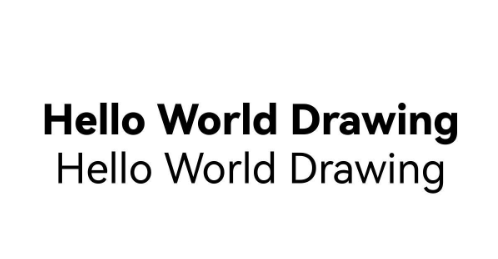
可变字体是一种在一个字体文件中包含多个字形变体的字体格式,允许在一个字体文件内灵活地调整字体的各种属性(如字重、字宽、斜体等)。
与传统字体文件(每种变体需要一个独立的文件)不同,可变字体在一个字体文件中包含多个变体轴,可通过使用可变字体实现文本渲染绘制时的平滑过渡。
| 接口定义 | 描述 |
|---|---|
| void OH_Drawing_TextStyleAddFontVariation(OH_Drawing_TextStyle* style, const char* axis, const float value) | 添加可变字体属性。对应的字体文件(.ttf文件)需要支持可变调节,此接口才能生效。当对应的字体不支持可变调节时,此接口调用不生效。 |
示例及示意效果如下所示:
// 创建一个 TypographyStyle 创建 Typography 时需要使用
OH_Drawing_TypographyStyle *typoStyle = OH_Drawing_CreateTypographyStyle();
// 设置文本对齐方式为居中
OH_Drawing_SetTypographyTextAlign(typoStyle, TEXT_ALIGN_CENTER);
// 设置文字内容
const char *text = "Hello World Drawing\n";

OH_Drawing_TextStyle *txtStyleWithVar = OH_Drawing_CreateTextStyle();
// 设置可变字体的字重为800,在字体文件支持的情况下,还可以设置"slnt", "wdth"
OH_Drawing_TextStyleAddFontVariation(txtStyleWithVar, "wght", 800);
// 设置文字颜色、大小、字重,不设置 TextStyle 会使用 TypographyStyle 中的默认 TextStyle
OH_Drawing_SetTextStyleColor(txtStyleWithVar, OH_Drawing_ColorSetArgb(0xFF, 0x00, 0x00, 0x00));
OH_Drawing_SetTextStyleFontSize(txtStyleWithVar, DIV_TEN(width_));
// 此处设置字重不生效,将被可变字体的字重覆盖
OH_Drawing_SetTextStyleFontWeight(txtStyleWithVar, FONT_WEIGHT_400);

// 创建一个不带可变字体的 TextStyle 用于对比
OH_Drawing_TextStyle *txtStyleNoVar = OH_Drawing_CreateTextStyle();
// 设置文字颜色、大小、字重,不设置 TextStyle 会使用 TypographyStyle 中的默认 TextStyle
OH_Drawing_SetTextStyleColor(txtStyleNoVar, OH_Drawing_ColorSetArgb(0xFF, 0x00, 0x00, 0x00));
OH_Drawing_SetTextStyleFontSize(txtStyleNoVar, DIV_TEN(width_));
OH_Drawing_SetTextStyleFontWeight(txtStyleNoVar, FONT_WEIGHT_400);

// 创建 FontCollection,FontCollection 用于管理字体匹配逻辑
OH_Drawing_FontCollection *fc = OH_Drawing_CreateSharedFontCollection();
// 使用 FontCollection 和 之前创建的 TypographyStyle 创建 TypographyCreate。TypographyCreate 用于创建 Typography
OH_Drawing_TypographyCreate *handler = OH_Drawing_CreateTypographyHandler(typoStyle, fc);

// 加入带有可变字体的文本样式
OH_Drawing_TypographyHandlerPushTextStyle(handler, txtStyleWithVar);
// 将文本添加到 handler 中
OH_Drawing_TypographyHandlerAddText(handler, text);
// 弹出之前创建的 TextStyle
OH_Drawing_TypographyHandlerPopTextStyle(handler);

// 后续加入的不带可变字体的文本样式
OH_Drawing_TypographyHandlerPushTextStyle(handler, txtStyleNoVar);
// 将文本添加到 handler 中
OH_Drawing_TypographyHandlerAddText(handler, text);
// 弹出之前创建的 TextStyle
OH_Drawing_TypographyHandlerPopTextStyle(handler);

OH_Drawing_Typography *typography = OH_Drawing_CreateTypography(handler);
// 设置页面最大宽度
double maxWidth = width_;
OH_Drawing_TypographyLayout(typography, maxWidth);
// 将文本绘制到画布上
OH_Drawing_TypographyPaint(typography, cCanvas_, 0, DIV_TEN(width_));

// 释放内存
OH_Drawing_DestroyTypographyStyle(typoStyle);
OH_Drawing_DestroyTextStyle(txtStyleWithVar);
OH_Drawing_DestroyTextStyle(txtStyleNoVar);
OH_Drawing_DestroyFontCollection(fc);
OH_Drawing_DestroyTypographyHandler(handler);
OH_Drawing_DestroyTypography(typography);
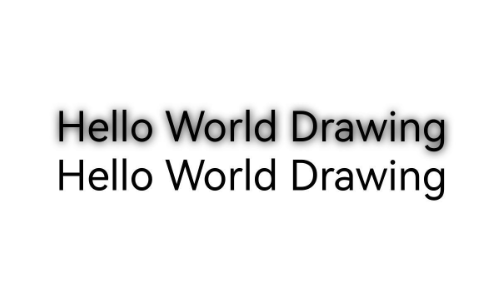
文本阴影
文本阴影为文本提供了深度感,使得文本在背景上更具立体感。通常用于提升文本的视觉吸引力或增强可读性,尤其是在色彩对比度较低的场景下。
其中,TextShadow有三个属性,分别为阴影颜色color、阴影基于当前文本的偏移位置point、阴影半径blurRadius。
使用阴影效果需要在文本样式中设置对应的阴影效果数组,从而在文本绘制时生效。
| 接口定义 | 描述 |
|---|---|
| OH_Drawing_Point* OH_Drawing_PointCreate(float x, float y) | 用于创建一个坐标点对象。 |
| OH_Drawing_TextShadow* OH_Drawing_CreateTextShadow(void) | 创建指向字体阴影对象的指针。 |
| void OH_Drawing_SetTextShadow(OH_Drawing_TextShadow* shadow, uint32_t color, OH_Drawing_Point* offset, double blurRadius) | 设置字体阴影对象的参数。 |
| void OH_Drawing_TextStyleAddShadow(OH_Drawing_TextStyle* style, const OH_Drawing_TextShadow* shadow) | 字体阴影容器中添加字体阴影元素。 |
| void OH_Drawing_DestroyTextShadow(OH_Drawing_TextShadow* shadow) | 释放被字体阴影对象占据的内存。 |
示例及示意效果如下所示:
// 创建一个 TypographyStyle 创建 Typography 时需要使用
OH_Drawing_TypographyStyle *typoStyle = OH_Drawing_CreateTypographyStyle();
// 设置文本对齐方式为居中
OH_Drawing_SetTypographyTextAlign(typoStyle, TEXT_ALIGN_CENTER);
// 设置文本内容
const char *text = "Hello World Drawing\n";

// 设置文字颜色、大小、字重,不设置 TextStyle 会使用 TypographyStyle 中的默认 TextStyle
OH_Drawing_TextStyle *txtStyleWithShadow = OH_Drawing_CreateTextStyle();
OH_Drawing_SetTextStyleColor(txtStyleWithShadow, OH_Drawing_ColorSetArgb(0xFF, 0x00, 0x00, 0x00));
OH_Drawing_SetTextStyleFontSize(txtStyleWithShadow, DIV_TEN(width_));
OH_Drawing_SetTextStyleFontWeight(txtStyleWithShadow, FONT_WEIGHT_400);
// 设置阴影偏移量
OH_Drawing_Point *offset = OH_Drawing_PointCreate(1, 1);
OH_Drawing_TextShadow *shadow = OH_Drawing_CreateTextShadow();
double radius = 10.0;
// 为 TextShadow 设置样式
OH_Drawing_SetTextShadow(shadow, OH_Drawing_ColorSetArgb(0xFF, 0x00, 0x00, 0x00), offset, radius);
// 将 TextShadow 加入 TextStyle
OH_Drawing_TextStyleAddShadow(txtStyleWithShadow, shadow);

// 创建一个不带阴影的 TextStyle 用于对比
OH_Drawing_TextStyle *txtStyleNoShadow = OH_Drawing_CreateTextStyle();
// 设置文字颜色、大小、字重,不设置 TextStyle 会使用 TypographyStyle 中的默认 TextStyle
OH_Drawing_SetTextStyleColor(txtStyleNoShadow, OH_Drawing_ColorSetArgb(0xFF, 0x00, 0x00, 0x00));
OH_Drawing_SetTextStyleFontSize(txtStyleNoShadow, DIV_TEN(width_));
OH_Drawing_SetTextStyleFontWeight(txtStyleNoShadow, FONT_WEIGHT_400);

// 创建 FontCollection,FontCollection 用于管理字体匹配逻辑
OH_Drawing_FontCollection *fc = OH_Drawing_CreateSharedFontCollection();
// 使用 FontCollection 和 之前创建的 TypographyStyle 创建 TypographyCreate。TypographyCreate 用于创建 Typography
OH_Drawing_TypographyCreate *handler = OH_Drawing_CreateTypographyHandler(typoStyle, fc);

// 加入带有阴影的文本样式
OH_Drawing_TypographyHandlerPushTextStyle(handler, txtStyleWithShadow);
// 将文本添加到 handler 中
OH_Drawing_TypographyHandlerAddText(handler, text);

// 后续加入的不带阴影的文本样式
OH_Drawing_TypographyHandlerPushTextStyle(handler, txtStyleNoShadow);
// 将文本添加到 handler 中
OH_Drawing_TypographyHandlerAddText(handler, text);

OH_Drawing_Typography *typography = OH_Drawing_CreateTypography(handler);
// 设置页面最大宽度
double maxWidth = width_;
OH_Drawing_TypographyLayout(typography, maxWidth);
// 将文本绘制到画布上
OH_Drawing_TypographyPaint(typography, cCanvas_, 0, DIV_TEN(width_));

// 释放内存
OH_Drawing_DestroyTypographyStyle(typoStyle);
OH_Drawing_DestroyTextStyle(txtStyleWithShadow);
OH_Drawing_PointDestroy(offset);
OH_Drawing_DestroyTextShadow(shadow);
OH_Drawing_DestroyTextStyle(txtStyleNoShadow);
OH_Drawing_DestroyFontCollection(fc);
OH_Drawing_DestroyTypographyHandler(handler);
OH_Drawing_DestroyTypography(typography);
占位符
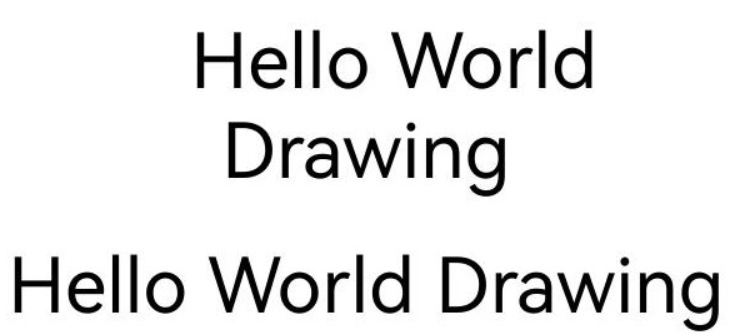
占位符绘制用于处理文本中占位符符号的渲染。
占位符也是用来实现图文混排的关键,是指在实际图像或内容注册之前,用来预先提供或替代某个位置的视觉元素。
| 接口定义 | 描述 |
|---|---|
| void OH_Drawing_TypographyHandlerAddPlaceholder(OH_Drawing_TypographyCreate* handler, OH_Drawing_PlaceholderSpan* span) | 设置占位符。 |
示例及示意效果如下所示:
// 设置页面最大宽度
double maxWidth = width_;
// 创建 FontCollection,FontCollection 用于管理字体匹配逻辑
OH_Drawing_FontCollection *fc = OH_Drawing_CreateSharedFontCollection();

// 设置文字颜色、大小、字重,不设置 TextStyle 会使用 TypographyStyle 中的默认 TextStyle
OH_Drawing_TextStyle *txtStyle = OH_Drawing_CreateTextStyle();
OH_Drawing_SetTextStyleColor(txtStyle, OH_Drawing_ColorSetArgb(0xFF, 0x00, 0x00, 0x00));
OH_Drawing_SetTextStyleFontSize(txtStyle, DIV_TEN(width_));
OH_Drawing_SetTextStyleFontWeight(txtStyle, FONT_WEIGHT_400);

// 设置文本内容
const char *text = "Hello World Drawing\n";

// 创建一个 TypographyStyle 创建 Typography 时需要使用
OH_Drawing_TypographyStyle *typoStyle = OH_Drawing_CreateTypographyStyle();
// 设置文本对齐方式为居中
OH_Drawing_SetTypographyTextAlign(typoStyle, TEXT_ALIGN_CENTER);

// 使用 FontCollection 和 之前创建的 TypographyStyle 创建 TypographyCreate。TypographyCreate 用于创建 Typography
OH_Drawing_TypographyCreate *handlerWithPlaceholder = OH_Drawing_CreateTypographyHandler(typoStyle, fc);
// 创建一个 placeholder,并且初始化其成员变量
OH_Drawing_PlaceholderSpan placeholder;
placeholder.width = DIV_TEN(width_);
placeholder.height = DIV_FIVE(width_);
placeholder.alignment = ALIGNMENT_ABOVE_BASELINE; // 基线对齐策略
placeholder.baseline = TEXT_BASELINE_ALPHABETIC;  // 使用的文本基线类型
placeholder.baselineOffset = 0.0; // 相比基线的偏移量。只有对齐策略是 OFFSET_AT_BASELINE 时生效

// 将 placeholder 放在开头
OH_Drawing_TypographyHandlerAddPlaceholder(handlerWithPlaceholder, &placeholder);

// 将之前创建的 TextStyle 加入 handler
OH_Drawing_TypographyHandlerPushTextStyle(handlerWithPlaceholder, txtStyle);
// 将文本添加到 handler 中
OH_Drawing_TypographyHandlerAddText(handlerWithPlaceholder, text);

OH_Drawing_Typography *typographyWithPlaceholder = OH_Drawing_CreateTypography(handlerWithPlaceholder);
OH_Drawing_TypographyLayout(typographyWithPlaceholder, maxWidth);
// 将文本绘制到画布上
OH_Drawing_TypographyPaint(typographyWithPlaceholder, cCanvas_, 0, DIV_TEN(width_));

// 创建 OH_Drawing_TypographyCreate
OH_Drawing_TypographyCreate *handlerNoPlaceholder = OH_Drawing_CreateTypographyHandler(typoStyle, fc);
// 将之前创建的 TextStyle 加入 handler
OH_Drawing_TypographyHandlerPushTextStyle(handlerNoPlaceholder, txtStyle);
// 将文本添加到 handler 中
OH_Drawing_TypographyHandlerAddText(handlerNoPlaceholder, text);

OH_Drawing_Typography *typographyNoPlaceholder = OH_Drawing_CreateTypography(handlerNoPlaceholder);

OH_Drawing_TypographyLayout(typographyNoPlaceholder, maxWidth);
// 将文本绘制到画布上
OH_Drawing_TypographyPaint(typographyNoPlaceholder, cCanvas_, 0, DIV_TWO(width_));

// 释放内存
OH_Drawing_DestroyFontCollection(fc);
OH_Drawing_DestroyTextStyle(txtStyle);
OH_Drawing_DestroyTypographyStyle(typoStyle);
OH_Drawing_DestroyTypographyHandler(handlerWithPlaceholder);
OH_Drawing_DestroyTypographyHandler(handlerNoPlaceholder);
OH_Drawing_DestroyTypography(typographyWithPlaceholder);
OH_Drawing_DestroyTypography(typographyNoPlaceholder);
自动间距
使能自动间距,则会在文本排版时自动调整CJK(中文字符、日文字符、韩文字符)与西文(拉丁字母、西里尔字母、希腊字母)、CJK与数字、CJK与版权符号、版权符号与数字、版权符号与西文之间的间距。例如,在中英文混排场景中,使能自动间距即可在中英文切换的地方自动添加额外间距,提升阅读体验。
| 接口定义 | 描述 |
|---|---|
| void OH_Drawing_SetTypographyTextAutoSpace(OH_Drawing_TypographyStyle *style, bool enableAutoSpace) | 设置文本排版时是否使能自动间距。默认不使能自动间距,一旦使能则会自动调整CJK(中文字符、日文字符、韩文字符)与西文(拉丁字母、西里尔字母、希腊字母)、CJK与数字、CJK与版权符号、版权符号与数字、版权符号与西文之间的间距。 |
示例及示意效果如下所示:
// 创建一个TypographyStyle创建Typography时需要使用
OH_Drawing_TypographyStyle *typoStyle = OH_Drawing_CreateTypographyStyle();
// 设置使能自动间距,默认为false
OH_Drawing_SetTypographyTextAutoSpace(typoStyle, true);
// 设置文字内容
const char *text = "test测试©test©测。";

OH_Drawing_TextStyle *txtStyle = OH_Drawing_CreateTextStyle();
// 设置文字颜色、大小、字重,不设置TextStyle会使用TypographyStyle中的默认TextStyle
OH_Drawing_SetTextStyleColor(txtStyle, OH_Drawing_ColorSetArgb(0xFF, 0x00, 0x00, 0x00));
OH_Drawing_SetTextStyleFontSize(txtStyle, DIV_TEN(width_));

// 创建FontCollection,FontCollection用于管理字体匹配逻辑
OH_Drawing_FontCollection *fc = OH_Drawing_CreateSharedFontCollection();
// 使用FontCollection和之前创建的TypographyStyle创建TypographyCreate。TypographyCreate用于创建Typography
OH_Drawing_TypographyCreate *handler = OH_Drawing_CreateTypographyHandler(typoStyle, fc);

// 将文本样式添加到handler中
OH_Drawing_TypographyHandlerPushTextStyle(handler, txtStyle);
// 将文本添加到handler中
OH_Drawing_TypographyHandlerAddText(handler, text);
// 创建段落
OH_Drawing_Typography *typography = OH_Drawing_CreateTypography(handler);
// 设置页面最大宽度
double maxWidth = width_;
// 将段落按照排版宽度进行排版
OH_Drawing_TypographyLayout(typography, maxWidth);
// 将文本绘制到画布上
OH_Drawing_TypographyPaint(typography, cCanvas_, 0, DIV_TEN(width_));

// 设置使能自动间距,用于对比
OH_Drawing_SetTypographyTextAutoSpace(typoStyle, false);

// 使用FontCollection和之前创建的TypographyStyle创建TypographyCreate。TypographyCreate用于创建Typography
OH_Drawing_TypographyCreate *handlerWithoutAutoSpace = OH_Drawing_CreateTypographyHandler(typoStyle, fc);

// 将文本样式添加到handlerWithoutAutoSpace中
OH_Drawing_TypographyHandlerPushTextStyle(handlerWithoutAutoSpace, txtStyle);
// 将文本添加到handlerWithoutAutoSpace中
OH_Drawing_TypographyHandlerAddText(handlerWithoutAutoSpace, text);
// 创建段落
OH_Drawing_Typography *typographyWithoutAutoSpace = OH_Drawing_CreateTypography(handlerWithoutAutoSpace);
// 将段落按照排版宽度进行排版
OH_Drawing_TypographyLayout(typographyWithoutAutoSpace, maxWidth);
// 将文本绘制到画布上
OH_Drawing_TypographyPaint(typographyWithoutAutoSpace, cCanvas_, 0, DIV_FOUR(width_));

// 释放内存
OH_Drawing_DestroyTypographyStyle(typoStyle);
OH_Drawing_DestroyTextStyle(txtStyle);
OH_Drawing_DestroyFontCollection(fc);
OH_Drawing_DestroyTypographyHandler(handler);
OH_Drawing_DestroyTypographyHandler(handlerWithoutAutoSpace);
OH_Drawing_DestroyTypography(typography);
OH_Drawing_DestroyTypography(typographyWithoutAutoSpace);
| 段落样式设置(自动间距) | 示意效果 |
|---|---|
| 不使能自动间距 | |
| 使能自动间距 |
渐变色
渐变色是一种在文字设计中广泛应用的视觉效果,通过在文字的不同部分应用不同的颜色,从而创造出从一种颜色平滑过渡到另一种颜色的效果。可以通过着色器实现文字渐变的效果,着色器的更多介绍请参考着色器效果。
| 接口定义 | 描述 |
|---|---|
| void OH_Drawing_SetTextStyleForegroundBrush(OH_Drawing_TextStyle* style, OH_Drawing_Brush* foregroundBrush) | 添加前景画刷,渐变着色器属性依附于前景画刷中。 |
示例及效果如下所示:
OH_Drawing_TypographyStyle *typoStyle = OH_Drawing_CreateTypographyStyle();
OH_Drawing_TextStyle *txtStyle = OH_Drawing_CreateTextStyle();
// 设置文字大小
OH_Drawing_SetTextStyleFontSize(txtStyle, DIV_TEN(width_));
// 创建着色器对象,并设置颜色、变化起始点与结束点
OH_Drawing_Point *startPt = OH_Drawing_PointCreate(0, 0);
// 结束点位于(900, 900)
OH_Drawing_Point *endPt = OH_Drawing_PointCreate(900, 900);
uint32_t colors[] = {0xFFFFFF00, 0xFFFF0000, 0xFF0000FF};
float pos[] = {0.0f, 0.5f, 1.0f};
// pos数组长度为3
OH_Drawing_ShaderEffect *colorShaderEffect =
    OH_Drawing_ShaderEffectCreateLinearGradient(startPt, endPt, colors, pos, 3, OH_Drawing_TileMode::CLAMP);
// 创建画刷对象,并将着色器添加到画刷
OH_Drawing_Brush *brush = OH_Drawing_BrushCreate();
OH_Drawing_BrushSetShaderEffect(brush, colorShaderEffect);
// 将画刷添加到文本样式中
OH_Drawing_SetTextStyleForegroundBrush(txtStyle, brush);
// 创建排版对象,并绘制
OH_Drawing_FontCollection *fc = OH_Drawing_CreateSharedFontCollection();
OH_Drawing_TypographyCreate *handler = OH_Drawing_CreateTypographyHandler(typoStyle, fc);
OH_Drawing_TypographyHandlerPushTextStyle(handler, txtStyle);
const char *text = "Hello World";
OH_Drawing_TypographyHandlerAddText(handler, text);
OH_Drawing_Typography *typography = OH_Drawing_CreateTypography(handler);
// 设置页面最大宽度
double maxWidth = width_;
// 将段落按照排版宽度进行排版
OH_Drawing_TypographyLayout(typography, maxWidth);
OH_Drawing_TypographyPaint(typography, cCanvas_, 0, DIV_TEN(width_));

// 释放对象
OH_Drawing_DestroyFontCollection(fc);
OH_Drawing_ShaderEffectDestroy(colorShaderEffect);
OH_Drawing_BrushDestroy(brush);
OH_Drawing_DestroyTextStyle(txtStyle);
OH_Drawing_DestroyTypographyStyle(typoStyle);
OH_Drawing_DestroyTypographyHandler(handler);
OH_Drawing_DestroyTypography(typography);

垂直对齐
垂直对齐用于调整文本在一行中垂直方向的排版位置。开启行高缩放或行内存在不同字号文本混排时使能垂直对齐,可以让文本实现顶部对齐、居中对齐、底部对齐或基线对齐(默认)。
| 接口定义 | 描述 |
|---|---|
| void OH_Drawing_SetTypographyVerticalAlignment(OH_Drawing_TypographyStyle* style, OH_Drawing_TextVerticalAlignment align) | 设置文本垂直方向排版方式。 |
示例及效果如下所示:
OH_Drawing_TypographyStyle *typoStyle = OH_Drawing_CreateTypographyStyle();
OH_Drawing_TextStyle *txtStyle = OH_Drawing_CreateTextStyle();
// 设置垂直对齐方式
OH_Drawing_SetTypographyVerticalAlignment(typoStyle,
                                          OH_Drawing_TextVerticalAlignment::TEXT_VERTICAL_ALIGNMENT_CENTER);
// 设置文字大小
OH_Drawing_SetTextStyleFontSize(txtStyle, DIV_TEN(width_));
// 设置文字颜色
OH_Drawing_SetTextStyleColor(txtStyle, OH_Drawing_ColorSetArgb(0xFF, 0x00, 0x00, 0x00));
// 创建排版对象,并绘制
OH_Drawing_FontCollection *fc = OH_Drawing_CreateSharedFontCollection();
OH_Drawing_TypographyCreate *handler = OH_Drawing_CreateTypographyHandler(typoStyle, fc);
OH_Drawing_TypographyHandlerPushTextStyle(handler, txtStyle);
const char *text = "VerticalAlignment-center";
OH_Drawing_TypographyHandlerAddText(handler, text);
OH_Drawing_Typography *typography = OH_Drawing_CreateTypography(handler);
// 设置页面最大宽度
double maxWidth = width_;
// 将段落按照排版宽度进行排版
OH_Drawing_TypographyLayout(typography, maxWidth);
OH_Drawing_TypographyPaint(typography, cCanvas_, 0, DIV_TEN(width_));

// 释放对象
OH_Drawing_DestroyFontCollection(fc);
OH_Drawing_DestroyTextStyle(txtStyle);
OH_Drawing_DestroyTypographyStyle(typoStyle);
OH_Drawing_DestroyTypographyHandler(handler);
OH_Drawing_DestroyTypography(typography);
效果如下(黑框仅为展示文本绘制区域,实际不绘制):

上下标
上下标能将文本作为上标或下标参与排版。一般用于数学公式、化学式等场景。
| 接口定义 | 描述 |
|---|---|
| void OH_Drawing_SetTextStyleBadgeType(OH_Drawing_TextStyle* style, OH_Drawing_TextBadgeType textBadgeType) | 使能上下标样式。 |
示例及效果如下所示:
OH_Drawing_TypographyStyle *typoStyle = OH_Drawing_CreateTypographyStyle();
OH_Drawing_TextStyle *txtStyle = OH_Drawing_CreateTextStyle();
OH_Drawing_TextStyle *badgeTxtStyle = OH_Drawing_CreateTextStyle();
// 设置文字大小
OH_Drawing_SetTextStyleFontSize(txtStyle, DIV_TWENTY(width_));
OH_Drawing_SetTextStyleFontSize(badgeTxtStyle, DIV_TWENTY(width_));
// 设置文字颜色
OH_Drawing_SetTextStyleColor(txtStyle, OH_Drawing_ColorSetArgb(0xFF, 0x00, 0x00, 0x00));
OH_Drawing_SetTextStyleColor(badgeTxtStyle, OH_Drawing_ColorSetArgb(0xFF, 0x00, 0x00, 0x00));
// 使能文本上标
OH_Drawing_SetTextStyleBadgeType(badgeTxtStyle, OH_Drawing_TextBadgeType::TEXT_SUPERSCRIPT);
// 创建排版对象,并绘制
OH_Drawing_FontCollection *fc = OH_Drawing_CreateSharedFontCollection();
OH_Drawing_TypographyCreate *handler = OH_Drawing_CreateTypographyHandler(typoStyle, fc);
OH_Drawing_TypographyHandlerPushTextStyle(handler, txtStyle);
const char *text = "Mass-energy equivalence: E=mc";
OH_Drawing_TypographyHandlerAddText(handler, text);
OH_Drawing_TypographyHandlerPushTextStyle(handler, badgeTxtStyle);
const char *badgeText = "2";
OH_Drawing_TypographyHandlerAddText(handler, badgeText);
OH_Drawing_Typography *typography = OH_Drawing_CreateTypography(handler);
// 设置页面最大宽度
double maxWidth = width_;
// 将段落按照排版宽度进行排版
OH_Drawing_TypographyLayout(typography, maxWidth);
OH_Drawing_TypographyPaint(typography, cCanvas_, 0, DIV_TEN(width_));

// 释放对象
OH_Drawing_DestroyFontCollection(fc);
OH_Drawing_DestroyTextStyle(txtStyle);
OH_Drawing_DestroyTextStyle(badgeTxtStyle);
OH_Drawing_DestroyTypographyStyle(typoStyle);
OH_Drawing_DestroyTypographyHandler(handler);
OH_Drawing_DestroyTypography(typography);

高对比度
高对比度可将深色文字变黑、浅色文字变白。开发者可选择开启或关闭应用的高对比度文字渲染,或遵循系统设置中的高对比度文字配置。
| 接口定义 | 描述 |
|---|---|
| void OH_Drawing_SetTextHighContrast(OH_Drawing_TextHighContrast action) | 设置文字渲染高对比度模式。模式具体可参考OH_Drawing_TextHighContrast。 |
示例及示意效果如下所示:
// 开启APP的文字渲染高对比模式,该模式的优先级要高于系统设置中的高对比度文字配置
OH_Drawing_SetTextHighContrast(TEXT_APP_ENABLE_HIGH_CONTRAST);
// 创建一个 TypographyStyle,创建 Typography 时需要使用
OH_Drawing_TypographyStyle *typoStyle = OH_Drawing_CreateTypographyStyle();

// 设置文字颜色、大小,不设置 TextStyle 会使用 TypographyStyle 中的默认 TextStyle
OH_Drawing_TextStyle *txtStyle = OH_Drawing_CreateTextStyle();
OH_Drawing_SetTextStyleColor(txtStyle, OH_Drawing_ColorSetArgb(0xFF, 0x6F, 0xFF, 0xFF));
OH_Drawing_SetTextStyleFontSize(txtStyle, DIV_TEN(width_));

// 创建 FontCollection,FontCollection 用于管理字体匹配逻辑
OH_Drawing_FontCollection *fc = OH_Drawing_CreateSharedFontCollection();
// 使用 FontCollection 和 之前创建的 TypographyStyle 创建 TypographyCreate
OH_Drawing_TypographyCreate *handler = OH_Drawing_CreateTypographyHandler(typoStyle, fc);

// 将之前创建的 TextStyle 加入 handler 中
OH_Drawing_TypographyHandlerPushTextStyle(handler, txtStyle);
// 设置文本内容,并将文本添加到 handler 中
const char *text = "Hello World Drawing\n";
OH_Drawing_TypographyHandlerAddText(handler, text);

OH_Drawing_Typography *typography = OH_Drawing_CreateTypography(handler);
// 设置页面最大宽度
double maxWidth = width_;
// 将段落按照排版宽度进行排版
OH_Drawing_TypographyLayout(typography, maxWidth);
// 将文本绘制到画布上
OH_Drawing_TypographyPaint(typography, cCanvas_, 0, DIV_TEN(width_));

// 释放内存
OH_Drawing_DestroyTypographyStyle(typoStyle);
OH_Drawing_DestroyTextStyle(txtStyle);
OH_Drawing_DestroyFontCollection(fc);
OH_Drawing_DestroyTypographyHandler(handler);
OH_Drawing_DestroyTypography(typography);
| 高对比度设置 | 示意效果 |
|---|---|
| 不开启高对比度 | |
| 开启高对比度 |
行高调整
调整行高可以改变文本行的垂直间距,行间距将变得更松散或更紧凑,可以显著改善文本垂直方向截断问题,使文本更易读。
当前行高调整方式包括两种:设置行高上限/下限和使用行高缩放系数。
行高调整(方式一)
从API version 21开始,支持为文本行设置行高上限与下限。
| 接口定义 | 描述 |
|---|---|
| OH_Drawing_ErrorCode OH_Drawing_SetTextStyleAttributeDouble(OH_Drawing_TextStyle* style, OH_Drawing_TextStyleAttributeId id, double value) | 传入id为OH_Drawing_TextStyleAttributeId::TEXT_STYLE_ATTR_D_LINE_HEIGHT_MAXIMUM,设置行高上限。 |
| OH_Drawing_ErrorCode OH_Drawing_SetTextStyleAttributeDouble(OH_Drawing_TextStyle* style, OH_Drawing_TextStyleAttributeId id, double value) | 传入id为OH_Drawing_TextStyleAttributeId::TEXT_STYLE_ATTR_D_LINE_HEIGHT_MINIMUM,设置行高下限。 |
示例及效果如下所示:
OH_Drawing_TypographyStyle *typoStyle = OH_Drawing_CreateTypographyStyle();
OH_Drawing_TextStyle *txtStyle = OH_Drawing_CreateTextStyle();
// 设置文字大小为50
OH_Drawing_SetTextStyleFontSize(txtStyle, 50);
// 设置文字颜色
OH_Drawing_SetTextStyleColor(txtStyle, OH_Drawing_ColorSetArgb(0xFF, 0x00, 0x00, 0x00));
OH_Drawing_SetTextStyleAttributeDouble(txtStyle,
    OH_Drawing_TextStyleAttributeId::TEXT_STYLE_ATTR_D_LINE_HEIGHT_MAXIMUM, 65); // 设置行高上限为65
OH_Drawing_SetTextStyleAttributeDouble(txtStyle,
    OH_Drawing_TextStyleAttributeId::TEXT_STYLE_ATTR_D_LINE_HEIGHT_MINIMUM, 65); // 设置行高下限为65
// 创建排版对象,并绘制
OH_Drawing_FontCollection *fc = OH_Drawing_CreateSharedFontCollection();
OH_Drawing_TypographyCreate *handler = OH_Drawing_CreateTypographyHandler(typoStyle, fc);
OH_Drawing_TypographyHandlerPushTextStyle(handler, txtStyle);
const char *text = "Hello World!";
OH_Drawing_TypographyHandlerAddText(handler, text);
OH_Drawing_Typography *typography = OH_Drawing_CreateTypography(handler);
// 排版宽度为1000
OH_Drawing_TypographyLayout(typography, 1000);
OH_Drawing_TypographyPaint(typography, cCanvas_, 0, 0);

// 释放对象
OH_Drawing_DestroyFontCollection(fc);
OH_Drawing_DestroyTextStyle(txtStyle);
OH_Drawing_DestroyTypographyStyle(typoStyle);
OH_Drawing_DestroyTypographyHandler(handler);
OH_Drawing_DestroyTypography(typography);
具体效果如下所示:
| 行高上限值 | 行高下限值 | 示意效果(黑框仅为展示文本绘制区域,实际不绘制) |
|---|---|---|
| 65 | 65 | |
| 200 | 200 |
行高调整(方式二)
设置行高缩放系数。
| 接口定义 | 描述 |
|---|---|
| void OH_Drawing_SetTextStyleFontHeight(OH_Drawing_TextStyle* style, double fontHeight) | 使能行高缩放。 |
| OH_Drawing_ErrorCode OH_Drawing_SetTextStyleAttributeInt(OH_Drawing_TextStyle* style, OH_Drawing_TextStyleAttributeId id) | 传入id为OH_Drawing_TextStyleAttributeId::TEXT_STYLE_ATTR_I_LINE_HEIGHT_STYLE,使能行高缩放样式。 |
示例及效果如下所示:
OH_Drawing_TypographyStyle *typoStyle = OH_Drawing_CreateTypographyStyle();
OH_Drawing_TextStyle *txtStyle = OH_Drawing_CreateTextStyle();
// 设置文字大小为50
OH_Drawing_SetTextStyleFontSize(txtStyle, 50);
// 设置文字颜色
OH_Drawing_SetTextStyleColor(txtStyle, OH_Drawing_ColorSetArgb(0xFF, 0x00, 0x00, 0x00));
// 设置行高缩放系数为1.5
OH_Drawing_SetTextStyleFontHeight(txtStyle, 1.5);
// 设置行高缩放样式(1代表行高缩放以字形高度作为缩放基数)
OH_Drawing_SetTextStyleAttributeInt(txtStyle,
    OH_Drawing_TextStyleAttributeId::TEXT_STYLE_ATTR_I_LINE_HEIGHT_STYLE, 1);
// 创建排版对象,并绘制
OH_Drawing_FontCollection *fc = OH_Drawing_CreateSharedFontCollection();
OH_Drawing_TypographyCreate *handler = OH_Drawing_CreateTypographyHandler(typoStyle, fc);
OH_Drawing_TypographyHandlerPushTextStyle(handler, txtStyle);
const char *text = "Hello World!";
OH_Drawing_TypographyHandlerAddText(handler, text);
OH_Drawing_Typography *typography = OH_Drawing_CreateTypography(handler);
// 排版宽度为1000
OH_Drawing_TypographyLayout(typography, 1000);
OH_Drawing_TypographyPaint(typography, cCanvas_, 0, 0);

// 释放对象
OH_Drawing_DestroyFontCollection(fc);
OH_Drawing_DestroyTextStyle(txtStyle);
OH_Drawing_DestroyTypographyStyle(typoStyle);
OH_Drawing_DestroyTypographyHandler(handler);
OH_Drawing_DestroyTypography(typography);
具体效果如下所示:
| 行高缩放样式 | 示意效果(黑框仅为展示文本绘制区域,实际不绘制) |
|---|---|
| TEXT_LINE_HEIGHT_BY_FONT_SIZE | |
| TEXT_LINE_HEIGHT_BY_FONT_HEIGHT |
行间距调整
从API version 21开始,支持设置行间距可以改善文本行之间的距离,提高阅读体验。
| 接口定义 | 描述 |
|---|---|
| OH_Drawing_ErrorCode OH_Drawing_SetTypographyStyleAttributeDouble(OH_Drawing_TypographyStyle* style, OH_Drawing_TypographyStyleAttributeId id, double value) | 传入id为OH_Drawing_TypographyStyleAttributeId::TYPOGRAPHY_STYLE_ATTR_D_LINE_SPACING,设置行间距。 |
示例及效果如下所示:
OH_Drawing_TypographyStyle *typoStyle = OH_Drawing_CreateTypographyStyle();
OH_Drawing_SetTypographyStyleAttributeDouble(typoStyle,
    OH_Drawing_TypographyStyleAttributeId::TYPOGRAPHY_STYLE_ATTR_D_LINE_SPACING, 100); // 设置行间距为100
OH_Drawing_TextStyle *txtStyle = OH_Drawing_CreateTextStyle();
// 设置文字大小为50
OH_Drawing_SetTextStyleFontSize(txtStyle, 50);
// 设置文字颜色
OH_Drawing_SetTextStyleColor(txtStyle, OH_Drawing_ColorSetArgb(0xFF, 0x00, 0x00, 0x00));
// 创建排版对象,并绘制
OH_Drawing_FontCollection *fc = OH_Drawing_CreateSharedFontCollection();
OH_Drawing_TypographyCreate *handler = OH_Drawing_CreateTypographyHandler(typoStyle, fc);
OH_Drawing_TypographyHandlerPushTextStyle(handler, txtStyle);
const char *text = "Hello World!";
OH_Drawing_TypographyHandlerAddText(handler, text);
OH_Drawing_Typography *typography = OH_Drawing_CreateTypography(handler);
// 排版宽度为200
OH_Drawing_TypographyLayout(typography, 200);
OH_Drawing_TypographyPaint(typography, cCanvas_, 0, 0);

// 释放对象
OH_Drawing_DestroyFontCollection(fc);
OH_Drawing_DestroyTextStyle(txtStyle);
OH_Drawing_DestroyTypographyStyle(typoStyle);
OH_Drawing_DestroyTypographyHandler(handler);
OH_Drawing_DestroyTypography(typography);
具体效果如下所示:
| 上升部下降部开关 | 示意效果(黑框仅为展示文本绘制区域,实际不绘制) |
|---|---|
| TEXT_HEIGHT_DISABLE_ALL | |
| TEXT_HEIGHT_ALL |
样式的拷贝、绘制与显示
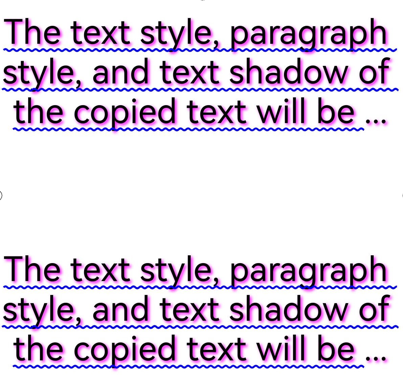
支持拷贝文本样式、段落样式、阴影样式,以便快速复制相关样式作用到不同文字上。
| 接口定义 | 描述 |
|---|---|
| OH_Drawing_TypographyStyle* OH_Drawing_CopyTypographyStyle(OH_Drawing_TypographyStyle* style) | 创建一个段落样式的对象副本,用于拷贝一个已有的段落样式对象。 |
| OH_Drawing_TextStyle* OH_Drawing_CopyTextStyle(OH_Drawing_TextStyle* style) | 创建一个文本样式的对象副本,用于拷贝一个已有的文本样式对象。 |
| OH_Drawing_TextShadow* OH_Drawing_CopyTextShadow(OH_Drawing_TextShadow* shadow) | 创建一个文本阴影的对象副本,用于拷贝一个已有的文本阴影对象。 |
示例及示意效果如下所示:
// 创建一个TypographyStyle,其中创建Typography时需要使用
OH_Drawing_TypographyStyle *typoStyle = OH_Drawing_CreateTypographyStyle();
// 配置段落样式包括:使能自动间距、最大行数、省略号样式、省略号文本、对齐方式
// 使能自动间距
OH_Drawing_SetTypographyTextAutoSpace(typoStyle, true);
// 设置段落最大行数为3行
OH_Drawing_SetTypographyTextMaxLines(typoStyle, 3);
// 设置省略号模式为尾部省略号
OH_Drawing_SetTypographyTextEllipsisModal(typoStyle, ELLIPSIS_MODAL_TAIL);
// 设置省略号文本
OH_Drawing_SetTypographyTextEllipsis(typoStyle, "...");
// 设置对齐方式为居中对齐
OH_Drawing_SetTypographyTextAlign(typoStyle, TEXT_ALIGN_CENTER);

OH_Drawing_TextStyle *txtStyle = OH_Drawing_CreateTextStyle();
// 设置文字颜色、大小、字重,不设置TextStyle会使用TypographyStyle中的默认TextStyle
OH_Drawing_SetTextStyleColor(txtStyle, OH_Drawing_ColorSetArgb(0xFF, 0x00, 0x00, 0x00));
OH_Drawing_SetTextStyleFontSize(txtStyle, DIV_TEN(width_));
// 设置文本的装饰线
// 添加下划线
OH_Drawing_SetTextStyleDecoration(txtStyle, TEXT_DECORATION_UNDERLINE);
// 设置装饰线样式为波浪线样式
OH_Drawing_SetTextStyleDecorationStyle(txtStyle, TEXT_DECORATION_STYLE_WAVY);
// 设置下划线粗细
OH_Drawing_SetTextStyleDecorationThicknessScale(txtStyle, 1);
// 设置下划线颜色为蓝色
OH_Drawing_SetTextStyleDecorationColor(txtStyle, OH_Drawing_ColorSetArgb(0xFF, 0x00, 0x00, 0xFF));

// 设置阴影的颜色、偏移量、模糊半径
// 创建阴影对象
OH_Drawing_TextShadow *shadow = OH_Drawing_CreateTextShadow();
// 设置阴影偏移量为(5, 5)
OH_Drawing_Point *offset = OH_Drawing_PointCreate(5, 5);
// 定义阴影模糊半径为4
double blurRadius = 4;
OH_Drawing_SetTextShadow(shadow, OH_Drawing_ColorSetArgb(0xFF, 0xFF, 0x00, 0xFF), offset, blurRadius);

// 拷贝阴影对象
OH_Drawing_TextShadow *shadowCopy = OH_Drawing_CopyTextShadow(shadow);
// 将拷贝出的阴影添加到文本样式中
OH_Drawing_TextStyleAddShadow(txtStyle, shadowCopy);

// 创建FontCollection,FontCollection用于管理字体匹配逻辑
OH_Drawing_FontCollection *fc = OH_Drawing_CreateSharedFontCollection();

// 使用FontCollection和之前创建的TypographyStyle创建TypographyCreate。TypographyCreate用于创建Typography
OH_Drawing_TypographyCreate *handler = OH_Drawing_CreateTypographyHandler(typoStyle, fc);
// 将段落一文本样式添加到handler中
OH_Drawing_TypographyHandlerPushTextStyle(handler, txtStyle);
// 将段落一文本添加到handler中
const char *text = "The text style, paragraph style, and text shadow of the copied text will be exactly the same "
                   "as those of the original text.";
OH_Drawing_TypographyHandlerAddText(handler, text);
// 创建段落一,并将段落一按照排版宽度进行排版
OH_Drawing_Typography *typography = OH_Drawing_CreateTypography(handler);
double maxWidth = width_;
OH_Drawing_TypographyLayout(typography, maxWidth);
OH_Drawing_TypographyPaint(typography, cCanvas_, 0, DIV_TEN(width_));

// 生成第二段文本,其中,文本样式和段落样式均由第一段文本拷贝而来
// 复制文本样式
OH_Drawing_TextStyle *textStyleCopy = OH_Drawing_CopyTextStyle(txtStyle);
// 复制段落样式
OH_Drawing_TypographyStyle *typographyStyleCopy = OH_Drawing_CopyTypographyStyle(typoStyle);

// 使用复制的样式创建段落二,后续可以观察段落一和段落二是否绘制效果一致
OH_Drawing_TypographyCreate *handlerCopy = OH_Drawing_CreateTypographyHandler(typographyStyleCopy, fc);
OH_Drawing_TypographyHandlerPushTextStyle(handlerCopy, textStyleCopy);
OH_Drawing_TypographyHandlerAddText(handlerCopy, text);
OH_Drawing_Typography *typographyCopy = OH_Drawing_CreateTypography(handlerCopy);
OH_Drawing_TypographyLayout(typographyCopy, maxWidth);
OH_Drawing_TypographyPaint(typographyCopy, cCanvas_, 0, DIV_TWO(width_));

// 释放内存
OH_Drawing_DestroyFontCollection(fc);
OH_Drawing_DestroyTypographyStyle(typoStyle);
OH_Drawing_DestroyTextStyle(txtStyle);
OH_Drawing_DestroyTypographyHandler(handler);
OH_Drawing_DestroyTypography(typography);
// 拷贝的段落样式也需要释放内存
OH_Drawing_DestroyTypographyStyle(typographyStyleCopy);
// 拷贝的文本样式也需要释放内存
OH_Drawing_DestroyTextStyle(textStyleCopy);
OH_Drawing_DestroyTypographyHandler(handlerCopy);
OH_Drawing_DestroyTypography(typographyCopy);