激励广告
场景介绍
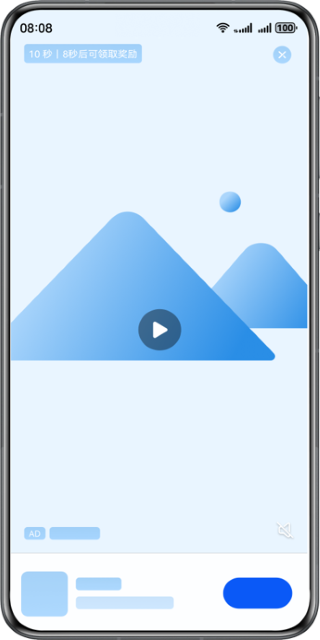
激励广告是一种全屏幕的视频广告,用户可以选择点击观看,以换取相应奖励。
约束与限制
支持Phone、Tablet、PC/2in1设备。
使用PC/2in1设备时,需要确保设备上智慧营销服务或广告服务的版本在8.4.80.300及以上,版本号可通过选择“设置> 应用和元服务 > 更多应用”查看。
接口说明
| 接口名 | 描述 |
|---|---|
| loadAd(adParam: AdRequestParams, adOptions: AdOptions, listener: AdLoadListener): void | 请求单广告位广告,通过AdRequestParams、AdOptions进行广告请求参数设置,通过AdLoadListener监听广告请求回调。 |
| showAd(ad: Advertisement, options: AdDisplayOptions, context?: common.UIAbilityContext): void | 展示广告,通过AdDisplayOptions进行广告展示参数设置。 说明:为了保证广告能正确展示,该接口必须和请求广告接口配套使用。 |
开发步骤
请求广告
-
导入相关模块。
import { abilityAccessCtrl, common, PermissionRequestResult } from '@kit.AbilityKit';import { advertising, identifier } from '@kit.AdsKit';import { hilog } from '@kit.PerformanceAnalysisKit'; -
获取OAID。
若需提升广告推送精准度,可以在请求参数AdRequestParams中添加oaid属性。
如何获取OAID参见获取OAID信息。

使用以下示例中提供的测试广告位时,必须先获取OAID信息。
-
请求单广告位广告。
需要先创建一个AdLoader对象,通过AdLoader的loadAd方法请求广告,最后通过AdLoadListener,来监听广告的加载状态。
请求广告关键参数如下所示:
请求广告参数名 类型 必填 说明 adType number 是 请求广告类型,激励广告类型为7。 adId string 是 广告位ID。 - 如果仅调测广告,可使用测试广告位ID:j14rx3xtac。 - 如果要接入正式广告,则需要申请正式的广告位ID。可在应用发布前进入流量变现官网,点击“开始变现”,登录鲸鸿动能媒体服务平台进行申请,具体操作详情请参见展示位创建。 oaid string 否 开放匿名设备标识符,用于精准推送广告。不填无法获取到个性化广告。 示例代码如下所示:
@Entry@Componentstruct Index {private context: common.UIAbilityContext = this.getUIContext().getHostContext() as common.UIAbilityContext;build() {Column() {Button('LoadAd').onClick(async () => {await this.loadAd();})}.width('100%').height('100%').justifyContent(FlexAlign.Center)}private async loadAd(): Promise<void> {// 广告请求回调监听const adLoadListener: advertising.AdLoadListener = {// 广告请求失败回调onAdLoadFailure: (errorCode: number, errorMsg: string) => {hilog.error(0x0000, 'testTag', `Failed to load ad. Code is ${errorCode}, message is ${errorMsg}`);},// 广告请求成功回调onAdLoadSuccess: (ads: Array<advertising.Advertisement>) => {hilog.info(0x0000, 'testTag', 'Succeeded in loading ad');// ...}};// 广告请求参数const adRequestParams: advertising.AdRequestParams = {// 'j14rx3xtac'为测试专用的广告位ID,App正式发布时需要改为正式的广告位IDadId: 'j14rx3xtac',// 激励广告类型adType: 7,// 开放匿名设备标识符oaid: await requestOAID(this.context)};// 广告配置参数,开发者可根据项目实际情况设置const adOptions: advertising.AdOptions = {};// 创建AdLoader广告对象const adLoader: advertising.AdLoader = new advertising.AdLoader(this.context);try {// 调用广告请求接口adLoader.loadAd(adRequestParams, adOptions, adLoadListener);} catch (e) {hilog.error(0x0000, 'testTag', `Failed to load ad. Code is ${e.code}, message is ${e.message}`);}}}async function requestOAID(context: Context): Promise<string | undefined> {// 向用户请求授权广告跨应用关联访问权限let isPermissionGranted: boolean = false;try {const atManager: abilityAccessCtrl.AtManager = abilityAccessCtrl.createAtManager();const result: PermissionRequestResult =await atManager.requestPermissionsFromUser(context, ['ohos.permission.APP_TRACKING_CONSENT']);isPermissionGranted = result.authResults[0] === abilityAccessCtrl.GrantStatus.PERMISSION_GRANTED;} catch (err) {hilog.error(0x0000, 'testTag', `Failed to request permission. Code is ${err.code}, message is ${err.message}`);}if (isPermissionGranted) {hilog.info(0x0000, 'testTag', 'Succeeded in requesting permission');try {const oaid = await identifier.getOAID();hilog.info(0x0000, 'testTag', 'Succeeded in getting OAID');return oaid;} catch (err) {hilog.error(0x0000, 'testTag', `Failed to get OAID. Code is ${err.code}, message is ${err.message}`);}} else {hilog.error(0x0000, 'testTag', 'Failed to request permission. User rejected');}return undefined;}
事件订阅
-
导入相关模块。
import { BusinessError, commonEventManager } from '@kit.BasicServicesKit';import { hilog } from '@kit.PerformanceAnalysisKit'; -
事件订阅。
开发者需要在应用中订阅com.huawei.hms.pps.action.PPS_REWARD_STATUS_CHANGED事件来监听激励广告页面变化并接收奖励信息。
在订阅到公共事件后,可以从CommonEventData的parameters参数中获取激励广告页面变化状态和奖励信息。
-
使用reward_ad_status作为key值获取激励广告页面变化状态,涉及的页面变化状态如下所示:
页面变化状态 说明 onAdOpen 打开广告。 onAdClick 点击广告。 onAdClose 关闭广告。 onAdReward 广告获得奖励。 onVideoPlayBegin 广告视频开始播放。 onVideoPlayEnd 广告视频播放结束。 -
使用reward_ad_data作为key值获取奖励信息,其中:
- 属性rewardType用来获取奖励物品的名称。
- 属性rewardAmount用来获取奖励物品的数量。
示例代码如下所示:
const KEY_REWARD_DATA = 'reward_ad_data';const KEY_REWARD_STATUS = 'reward_ad_status';export class RewardAdStatusHandler {// 用于保存创建成功的订阅者对象,后续使用其完成订阅及退订的动作private subscriber: commonEventManager.CommonEventSubscriber | null = null;// 订阅方法,需要在每次展示广告前调用public registerPPSReceiver(): void {if (this.subscriber) {this.unRegisterPPSReceiver();}// 订阅者信息const subscribeInfo: commonEventManager.CommonEventSubscribeInfo = {events: ['com.huawei.hms.pps.action.PPS_REWARD_STATUS_CHANGED'],// publisherBundleName被设置为"com.huawei.hms.adsservice",表示只有来自该包名的事件才会被订阅者接收和处理。// 如果没有明确声明publisherBundleName,那么订阅者可能会收到来自其它包名的伪造事件,从而导致安全性问题或误导。publisherBundleName: 'com.huawei.hms.adsservice'};// 创建订阅者回调commonEventManager.createSubscriber(subscribeInfo, (err: BusinessError, commonEventSubscriber:commonEventManager.CommonEventSubscriber) => {if (err) {hilog.error(0x0000, 'testTag', `Failed to create subscriber. Code is ${err.code}, message is ${err.message}`);return;}hilog.info(0x0000, 'testTag', 'Succeeded in creating subscriber');this.subscriber = commonEventSubscriber;// 订阅公共事件回调commonEventManager.subscribe(this.subscriber, (err: BusinessError, commonEventSubscriber:commonEventManager.CommonEventData) => {if (err) {hilog.error(0x0000, 'testTag', `Failed to subscribe. Code is ${err.code}, message is ${err.message}`);} else {hilog.info(0x0000, 'testTag', 'Succeeded in subscribing data');const status: string = commonEventSubscriber?.parameters?.[KEY_REWARD_STATUS];switch (status) {case 'onAdOpen':hilog.info(0x0000, 'testTag', 'Status is onAdOpen');break;case 'onAdClick':hilog.info(0x0000, 'testTag', 'Status is onAdClick');break;case 'onAdClose':hilog.info(0x0000, 'testTag', 'Status is onAdClose');this.unRegisterPPSReceiver();break;case 'onAdReward':const rewardData: Record<string, string | number> = commonEventSubscriber?.parameters?.[KEY_REWARD_DATA];const rewardType: string = rewardData?.rewardType as string;const rewardAmount: number = rewardData?.rewardAmount as number;hilog.info(0x0000, 'testTag', `Status is onAdReward. Type is ${rewardType}, Amount is ${rewardAmount}`);break;case 'onVideoPlayBegin':hilog.info(0x0000, 'testTag', 'Status is onVideoPlayBegin');break;case 'onVideoPlayEnd':hilog.info(0x0000, 'testTag', 'Status is onVideoPlayEnd');break;default:break;}}});});}// 取消订阅public unRegisterPPSReceiver(): void {commonEventManager.unsubscribe(this.subscriber, (err: BusinessError) => {if (err) {hilog.error(0x0000, 'testTag', `Failed to unsubscribe. Code is ${err.code}, message is ${err.message}`);} else {hilog.info(0x0000, 'testTag', 'Succeeded in unsubscribing');this.subscriber = null;}});}} -
展示广告
-
导入相关模块。
import { common } from '@kit.AbilityKit';import { advertising } from '@kit.AdsKit';import { hilog } from '@kit.PerformanceAnalysisKit';// 事件订阅步骤中创建的文件import { RewardAdStatusHandler } from './RewardAdStatusHandler'; -
展示广告。
开发者需要调用showAd方法来展示广告,ads为请求广告返回的广告信息,在每次展示广告前需要注册事件订阅中定义的监听器。
示例代码如下所示:
@Entry@Componentstruct Index {private context: common.UIAbilityContext = this.getUIContext().getHostContext() as common.UIAbilityContext;build() {// ...}private async loadAd(): Promise<void> {// 广告请求回调监听const adLoadListener: advertising.AdLoadListener = {// 广告请求失败回调onAdLoadFailure: (errorCode: number, errorMsg: string) => {hilog.error(0x0000, 'testTag', `Failed to load ad. Code is ${errorCode}, message is ${errorMsg}`);},// 广告请求成功回调onAdLoadSuccess: (ads: Array<advertising.Advertisement>) => {hilog.info(0x0000, 'testTag', 'Succeeded in loading ad');try {// 注册激励广告状态监听器new RewardAdStatusHandler().registerPPSReceiver();// 广告展示参数,开发者可根据项目实际情况设置const adDisplayOptions: advertising.AdDisplayOptions = {// 是否静音mute: true,// ...};// 此处ads[0]表示请求到的第一个广告,开发者可根据项目实际情况选择advertising.showAd(ads[0], adDisplayOptions, this.context);} catch (e) {hilog.error(0x0000, 'testTag', `Failed to show ad. Code is ${e.code}, message is ${e.message}`);}}};// ...}}
校验激励广告服务端验证回调
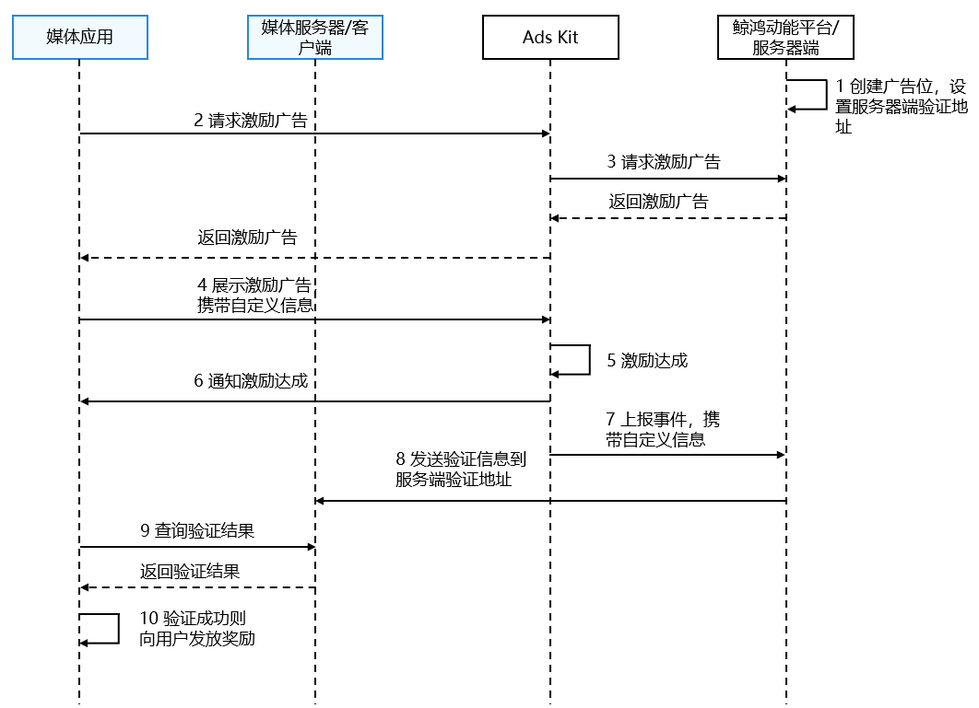
服务端验证回调是指鲸鸿动能平台发送给媒体服务器的网址请求,其中带有特定的查询参数,用来通知媒体服务器某位用户因为与激励视频广告互动而应予以奖励,从而规避欺骗的行为。
奖励用户
- 在给用户发奖励时,要把握好用户体验和奖励验证之间的平衡。由于服务器端回调会存在延迟的情况,因此我们建议客户端立即奖励用户,同时在收到服务器端回调时对所有奖励进行验证。这种做法可确保奖励符合发放条件,同时提供良好的用户体验。
- 对于某些应用而言,奖励是否达到发放条件非常重要,用户可适当接受延迟。这时,推荐做法是等待服务器端回调完成验证,再向用户发放奖励。
校验服务端验证回调
App上架至华为应用市场(AppGallery)时间超过12小时才可以收到回调。
-
设置激励广告的奖励配置。
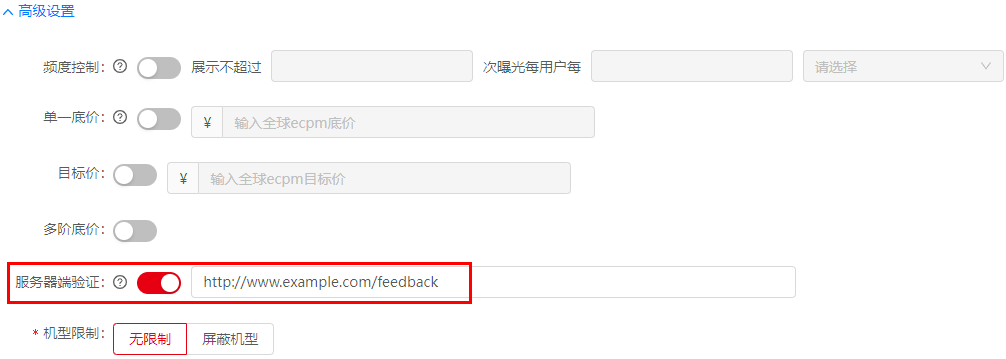
您在鲸鸿动能媒体服务平台上申请激励视频广告位时选择“媒体管理(点击媒体名)> 新增展示位 > 选择激励视频(点击下一步,进入编辑页面)”,设置奖励类型和奖励数量,并点击“高级设置”,设置服务器端验证的URL。如下图:
-
(可选)设置自定义数据customData和userId。
您在展示广告第2点之前可以设置自定义数据customData和userId。示例代码如下所示:
import { advertising } from '@kit.AdsKit';// 广告展示参数,开发者可根据项目实际情况设置const adDisplayOptions: advertising.AdDisplayOptions = {// 是否静音mute: true,// 设置自定义数据customData: 'CUSTOM_DATA',// 设置自定义用户iduserId: '1234567'};如果没有设置customData和userId,不影响发放奖励事件上报但是服务端验证的参数中没有这两个字段。如果设置customData和userId,必须在展示广告之前设置并且URLEncode之后,长度不超过1024个字符,否则影响服务端验证。
-
获取要验证的内容。
用户观看完激励广告时,鲸鸿动能平台服务端会把需要验证的参数以及keyId和sign传给媒体提供的URL:
https://www.example.com/feedback([即第1点中配置的验证URL](ads-publisher-service-reward.md#校验服务端验证回调))。请求体样例:{"adId" : "tj14rx3xtac","data" : "CUSTOM_DATA","keyId" : "12345678","rewardAmount" : "10","rewardName" : "金币","newSign" : "OA33u6mypnhE4hbmF32N/ibYi1uXt72nDDyYMwjDI6JXVVFKePZYo4F7Fuk2MaG......","uniqueId" : "3361626337333932313435313430373438383561376265636130393939313166","userId" : "1234567"}服务器端验证回调查询参数说明:
参数名称 类型 是否必选 描述 adId String 是 激励视频广告位ID data String 否 自定义数据字符串 keyId String 是 验证回调的密钥 rewardAmount String 否 奖励数量 rewardName String 否 奖励奖品 sign String 是 回调的签名 newSign String 是 新版本回调签名 uniqueId String 是 获奖事件生成的十六进制的标识符 userId String 否 用户ID eventType String 否 事件类型 -
组装验证参数
验证内容(除sign、keyId)格式顺序如下:
adId={adId}&data={data}&rewardAmount={rewardAmount}&rewardName={rewardName}&uniqueId={uniqueId}&userId={userId}
其中‘{}’里面表示参数的值,且参数顺序不能变。如果参数为null或者空字符串,则URL中不拼接该参数。然后用SHA256计算散列值,得到paramContentData。示例代码如下所示:
String adId = request.getParameter("adId");String data = request.getParameter("data");// ...String userId = request.getParameter("userId");String param = "adId=" + adId + "&data=" + data + "&rewardAmount=" + rewardAmount + "&rewardName=" + rewardName + "&uniqueId=" + uniqueId + "&userId=" + userId;// sha256Value为全小写数据String sha256Value = Sha256Util.digest(param);byte[] paramContentData = sha256Value.getBytes(Charset.forName("UTF-8"));可参考以下工具类计算散列值:
import { advertising } from '@kit.AdsKit';public static String digest(String message) {if (TextUtils.isEmpty(message)) {return "";}byte[] content = message.getBytes(StandardCharsets.UTF_8);return bytesToHexString(digest(content));}public static byte[] digest(byte[] data) {try {MessageDigest md = MessageDigest.getInstance("SHA-256");return md.digest(data);} catch (NoSuchAlgorithmException e) {LOGGER.error("sha256 NoSuchAlgorithmException");}return new byte[]{};}public static String bytesToHexString(byte[] bytes) {if (null == bytes) {return "";}StringBuilder sb = new StringBuilder();for (int i = 0; i < bytes.length; i++) {String hex = Integer.toHexString(0xFF & bytes[i]);if (hex.length() == 1) {sb.append('0');}sb.append(hex);}return sb.toString();} -
获取公钥列表。
a. 在鲸鸿动能媒体服务平台上查看对应的账户信息时选择“账户”。
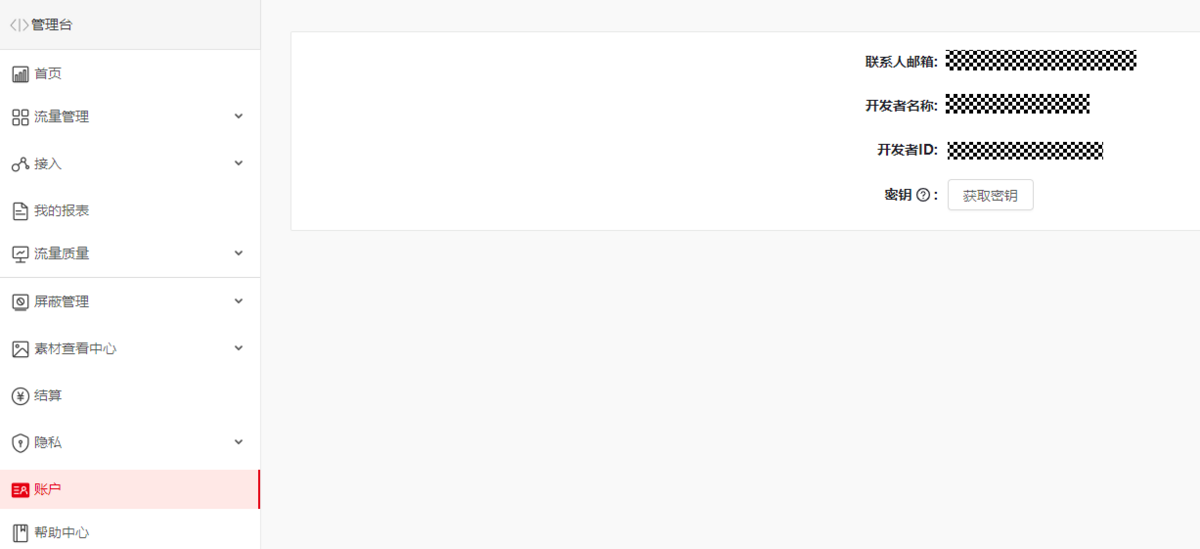
通过点击上图所示的“获取密钥”按钮弹出如下所示的弹框,获取“开发者ID”和“密钥”。

b. 您根据应用分发区域不同,需要使用对应站点的接口URL去获取公钥列表,不同站点对应的接口URL如下所示:
- 中国境内(香港特别行政区、澳门特别行政区、中国台湾除外):<
https://ppscrowd-drcn.op.hicloud.com/action-lib-track/publickeys>
将body通过密钥进行HMAC-SHA256加密得到签名,替换到Authorization中,并设置“开发者ID”和Authorization到Header中。示例代码如下所示:
String data = "";String url = "https://ppscrowd-dre.op.dbankcloud.com/action-lib-track/publickeys";String authorization = "Digest validTime=\"{0}\", response=\"{1}\"";// 开发者IDString userId = "YOUR_PUBLISHER_ID";// 密钥String key = "YOUR_KEY";HttpClient httpclient = HttpClients.createDefault();HttpGet request = new HttpGet();try {// 将body通过密钥进行HMAC-SHA256加密得到签名,替换到Authorization中String validTime = String.valueOf(System.currentTimeMillis());String body = validTime + ":/publickeys";byte[] keyBytes = Base64.decodeBase64(key);byte[] bodyBytes = body.getBytes(Charsets.UTF_8);Mac mac = Mac.getInstance("HmacSHA256");SecretKey secretKey = new SecretKeySpec(keyBytes, "HmacSHA256");mac.init(secretKey);byte[] signatureBytes = mac.doFinal(bodyBytes);String signature = (signatureBytes == null) ? null : Hex.encodeHexString(signatureBytes);authorization = MessageFormat.format(authorization, validTime, signature);// 设置开发者ID和Authorization到Header中request.setURI(new URI(url));request.setHeader("userId", userId);request.setHeader("Authorization", authorization);HttpResponse response = httpclient.execute(request);data = EntityUtils.toString(response.getEntity());} catch (Exception e) {System.out.println(e.getMessage());}返回data消息体(publicKey已匿名化):
{"keys": [{"keyId":"12345678","publicKey":"LS0tLS1*******************************************************"},{"keyId": "22345678","publicKey":"LS0tLS1*******************************************************"}]}返回消息结构体:
参数名称 类型 是否必选 描述 keys List<key> 是 返回公钥列表 - key结构体:
参数名称 类型 是否必选 描述 keyId String 是 密钥ID publicKey String 是 公钥 - 中国境内(香港特别行政区、澳门特别行政区、中国台湾除外):<
-
执行验证。
a. 根据keyId从公钥列表中找到对应的base64编码后的publicKey。
b. 将paramContentData、publicKey、newSign和SHA256withRSA/PSS数字签名算法的入参,执行验证。
示例代码如下所示:
public static boolean verify(byte[] data, String publicKey, String newSign, String signatureAlgorithm) {try {byte[] keyBytes = base64Decode(publicKey);X509EncodedKeySpec keySpec = new X509EncodedKeySpec(keyBytes);KeyFactory keyFactory = KeyFactory.getInstance("RSA");PublicKey publicK = keyFactory.generatePublic(keySpec);Signature signature = Signature.getInstance(signatureAlgorithm);signature.initVerify(publicK);signature.update(data);return signature.verify(base64Decode(newSign));} catch (InvalidKeyException | SignatureException | UnsupportedEncodingException | InvalidKeySpecException | NoSuchAlgorithmException e) {return false;}}private static byte[] base64Decode(String encoded) throws UnsupportedEncodingException {return Base64.decodeBase64(encoded.getBytes("UTF-8"));}
测试激励广告
激励广告测试广告位ID,仅可用于调测激励广告功能,不可用于广告变现,在应用正式发布前需替换为正式的激励广告位ID。您应在应用发布前先进入流量变现官网,点击“开始变现”,登录鲸鸿动能媒体服务平台,申请正式的广告位ID并替换测试广告位ID,具体操作详情请参见展示位创建。
激励广告测试广告位ID列表如下:
| 广告位类型 | 测试广告位ID | 展示形式 | 比例 | 推广类型 |
|---|---|---|---|---|
| 激励 | j14rx3xtac | 图片 | 16:9 | 应用下载 |
| 激励 | j2mh81xmqs | 视频 | 9:16 | 网页推广 |