华为账号一键登录(获取手机号和UnionID/OpenID)
概述
华为账号一键登录是基于OAuth 2.0协议标准和OpenID Connect协议标准构建的OAuth 2.0授权登录系统,应用可以通过华为账号一键登录能力快捷地获取华为账号用户的身份标识和手机号,快速建立应用内的用户体系。
优势:
- 利用系统账号的安全性和便利性,用户无需输入账号名和密码,无需复杂的安全验证,简化登录步骤,提高用户转化率。
- 提供系统验证过的手机号,关联应用已有用户。
- 实现Phone、Tablet、PC/2in1、TV设备一致的登录体验。
场景介绍
若应用需同时获取手机号和UnionID完成用户登录,Account Kit提供了同时获取手机号和UnionID的华为账号一键登录按钮。应用可以将华为账号一键登录按钮嵌入自有的登录页,使用登录按钮获取手机号和UnionID,实现用户登录。设备登录华为账号(该账号已绑定手机号)后,一键登录获取手机号可不依赖设备插SIM卡。

-
儿童账号一键登录场景:
用户使用儿童账号进行登录,点击一键登录会触发Account Kit默认提供的家长验密流程(Account Kit提供的验证页,暂不可自定义),家长验密完成后可获取用户的身份标识和手机号。并且TV设备暂不支持儿童账号。
-
手机号验证机制说明:
Account Kit调用系统能力获取华为账号登录设备上的SIM卡手机号码,与华为账号绑定的手机号进行校验(有网络即可,无需使用SIM卡移动数据)。用户点击一键登录按钮后,结合华为账号使用过程中账号所绑定的手机号短信验证记录,90天内有验证通过的记录,则返回该华为账号绑定的手机号;若90天内没有验证通过的记录,则触发Account Kit默认提供的短信验证流程(Account Kit提供的验证页,暂不可自定义),确保返回的手机号经过验证。
约束与限制
- 应用满足《常见类型移动互联网应用程序必要个人信息范围规定》中使用手机号的必要业务场景。
- 使用华为账号一键登录功能用户必须同意《华为账号用户认证协议》,当用户点击《华为账号用户认证协议》,系统浅色模式下应用需跳转到如下链接<
https://privacy.consumer.huawei.com/legal/id/authentication-terms.htm?code=CN&language=zh-CN>,系统深色模式下跳转到<https://privacy.consumer.huawei.com/legal/id/authentication-terms.htm?code=CN&language=zh-CN&bgmode=black>。 - 应用在用户同意后获取到手机号,需要根据自身业务场景判断使用的方式,必要时增加其他安全验证手段,比如对二次放号的判断。
- 华为账号一键登录服务当前仅限中国境内(香港特别行政区、澳门特别行政区、中国台湾除外)用户可用。
- 应用服务端获取华为账号绑定号码时,该服务器必须部署在中国境内(香港特别行政区、澳门特别行政区、中国台湾除外)。
- 华为账号一键登录支持Phone、Tablet、PC/2in1设备。并且从5.1.1(19)版本开始,新增支持TV设备。
- 仅支持企业开发者使用一键登录,个人开发者请使用华为账号登录或静默登录实现登录。
用户体验设计
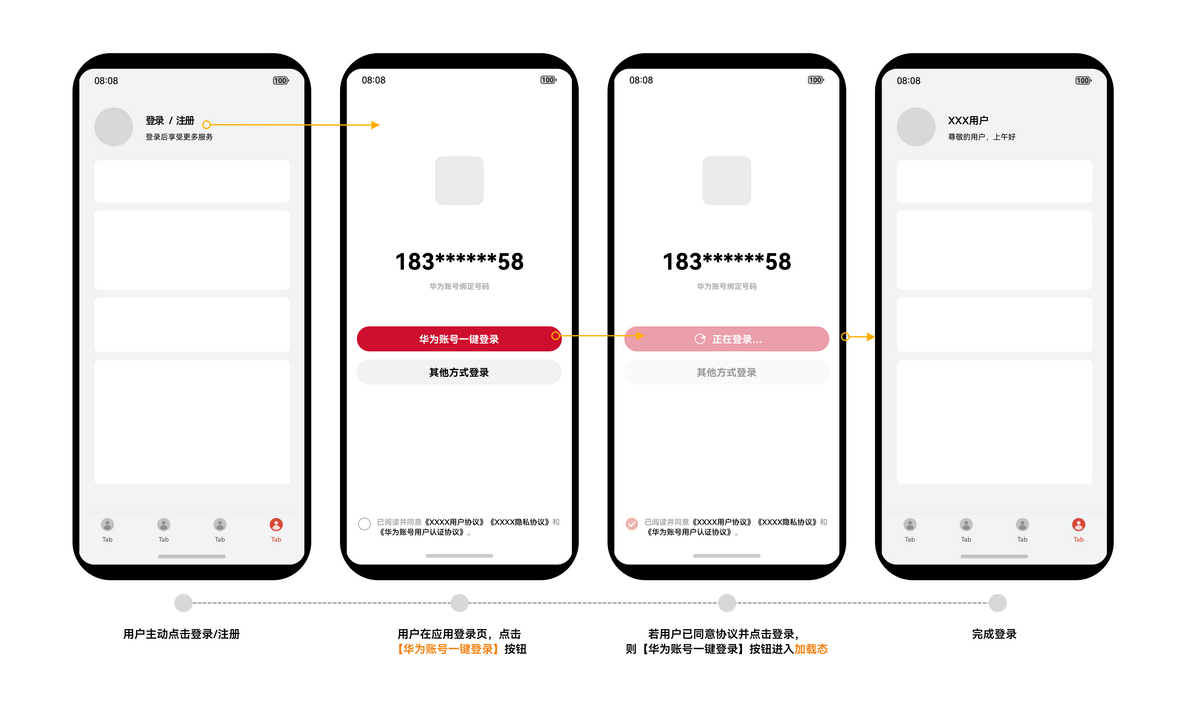
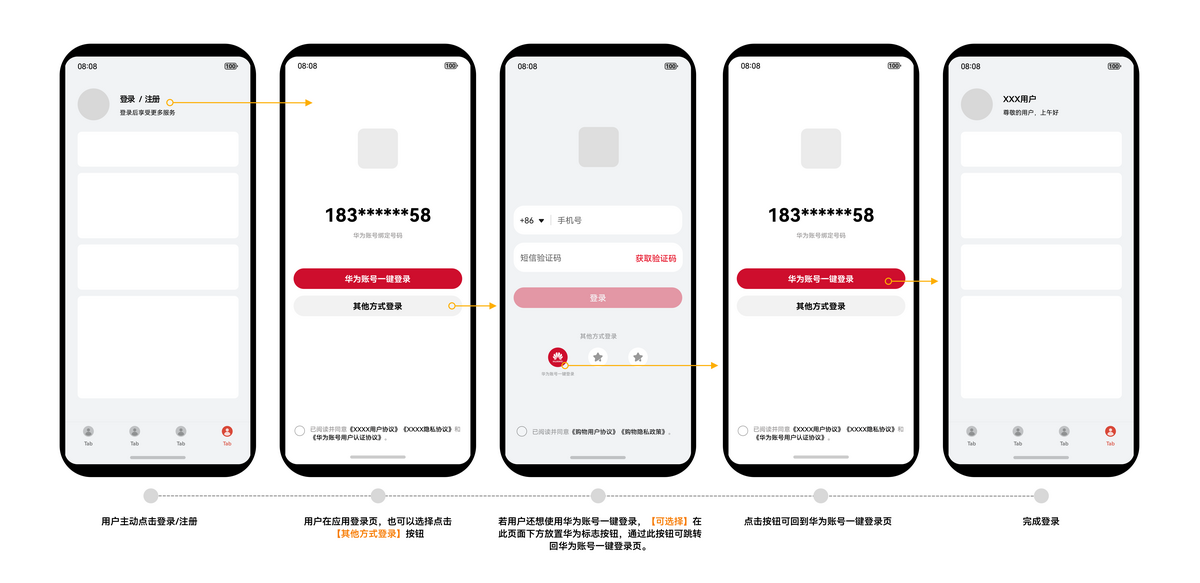
登录页面UX设计规范
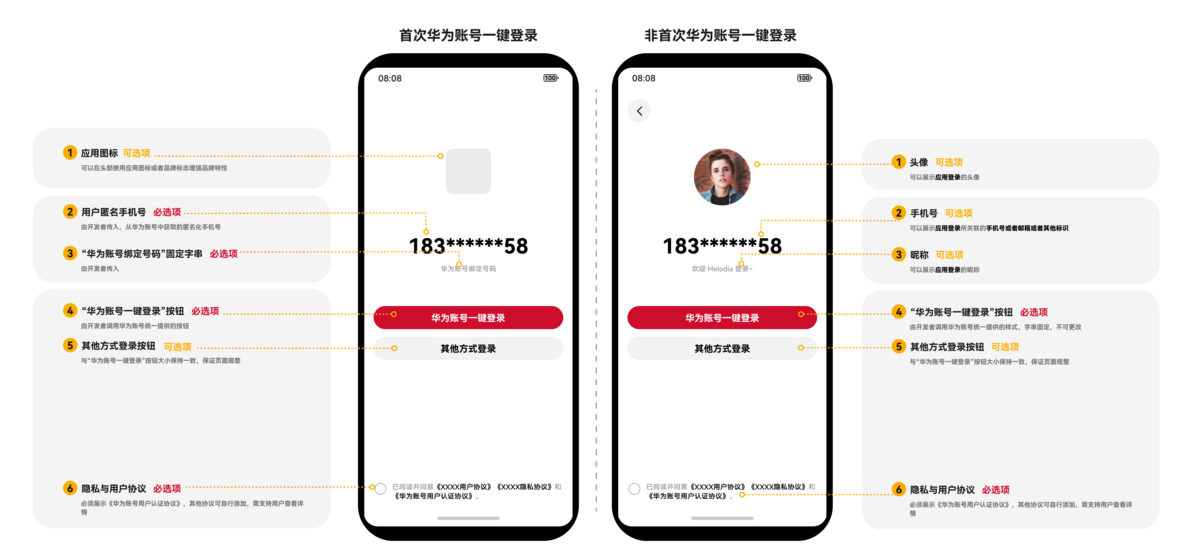
一键登录按钮的用户体验和UX设计需符合【华为账号一键登录】按钮规范,用户体验设计图2中的华为标志按钮可参考华为账号登录视觉规范中的样式三。不符合规范的UX设计可能会对应用上架和用户体验带来影响。一键登录按钮的样式设计具体可以参考华为账号登录按钮类型。
用户场景设计
用户使用华为账号一键登录能力,注册/登录应用时,可能存在多种场景,应用可参照以下流程,根据自身业务场景进行设计。
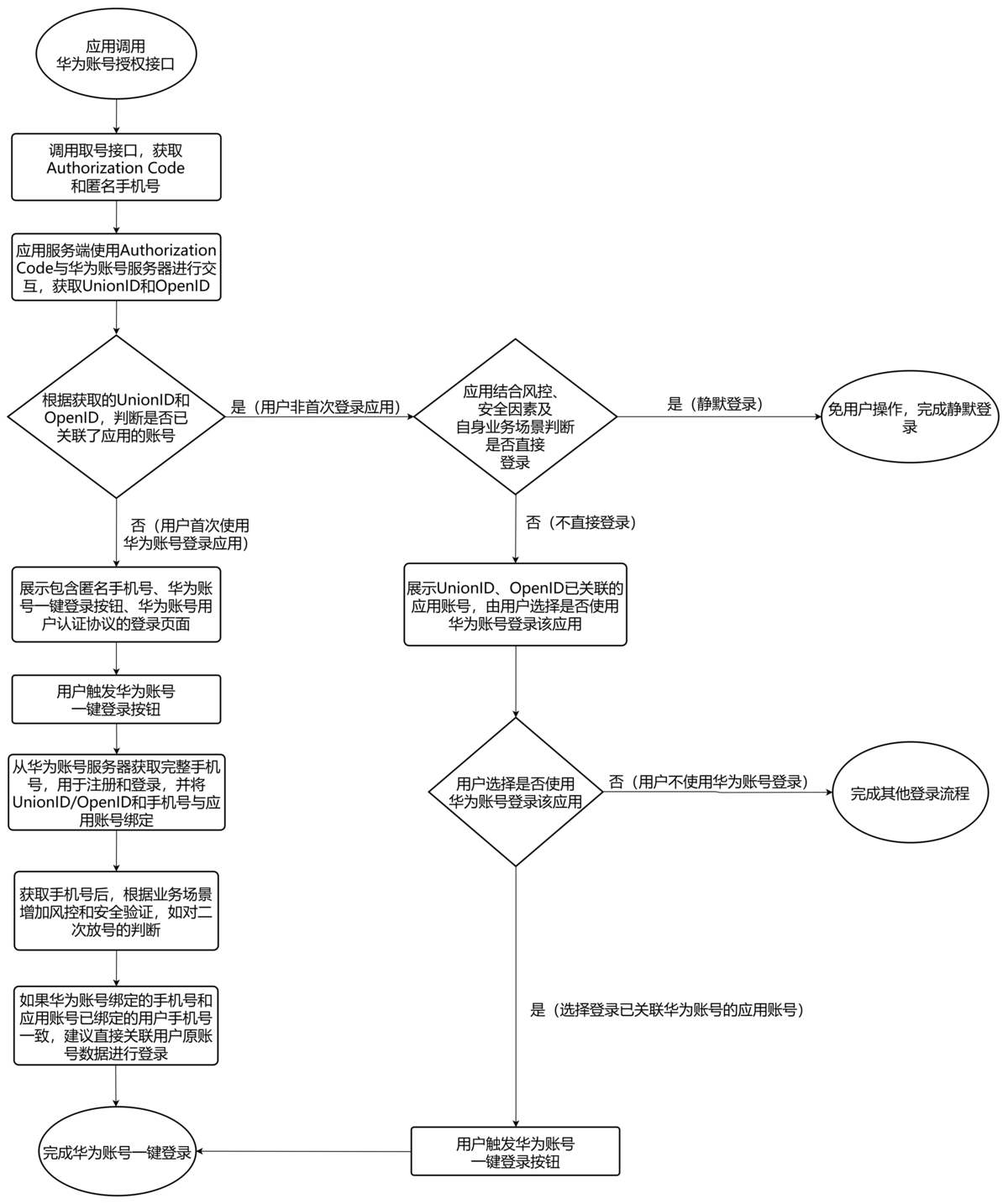
将UnionID/OpenID和手机号同时与应用账号建立关联,可以为用户带来更多便利的功能。如:实现静默登录、获取华为账号用户信息、获取华为账号风险等级等。实现免用户操作登录,获得安全快捷的应用登录体验。
业务流程
用户首次登录应用
若应用未接入过华为账号登录,不存在使用华为账号登录过的应用账号,请参照以下流程接入华为账号一键登录。
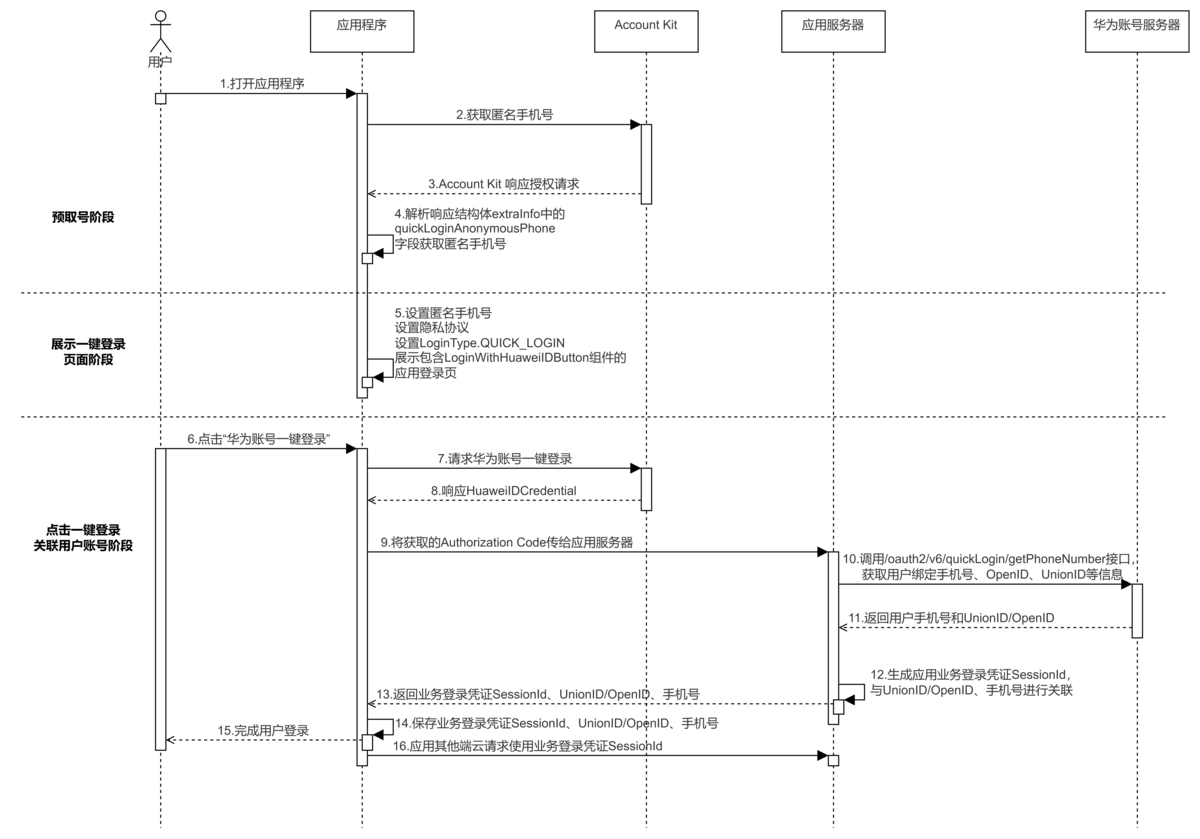
图1 华为账号一键登录(用户首次登录应用)流程图
流程说明:
-
预取号阶段(序号1-4):
-
用户打开应用后,应用scope传quickLoginAnonymousPhone调用AuthorizationWithHuaweiIDRequest授权请求获取匿名手机号。如果获取到匿名手机号为空,应用需要展示其他登录方式。
获取匿名手机号需要进行超时处理,应用可根据实际场景设置超时时间,推荐设置5秒保证用户体验。
-
若华为账号未登录,调用AuthorizationWithHuaweiIDRequest授权请求会返回1001502001 用户未登录华为账号错误码,此时应用需要展示其他登录方式进行应用登录。
-
-
展示一键登录页面阶段(序号5):
- 获取到的匿名手机号需要展示在页面上并设置好隐私协议,设置登录按钮类型为LoginType.QUICK_LOGIN,展示包含LoginWithHuaweiIDButton组件的一键登录页面。应用可结合实际登录风控场景,通过组件参数传入风险等级标识获取华为账号风险等级,通过华为账号一键登录获取用户风险等级,对恶意账号进行风控,提升应用的安全等级。
-
点击一键登录关联用户账号阶段(序号6-16):
- 用户同意协议后,点击华为账号一键登录按钮,应用可以通过HuaweiIDCredential获取到Authorization Code等数据。
- 将获取的Authorization Code数据传给应用服务端,应用服务端通过Authorization Code调用/oauth2/v6/quickLogin/getPhoneNumber接口获取用户完整手机号和UnionID、OpenID。
- 应用通过关联用户手机号和UnionID、OpenID完成用户登录。
用户非首次登录应用(可选)
应用接入过华为账号登录,存在使用华为账号登录过的用户账号,即根据UnionID/OpenID判断用户已关联过应用系统数据库,则需要参照以下流程开发。
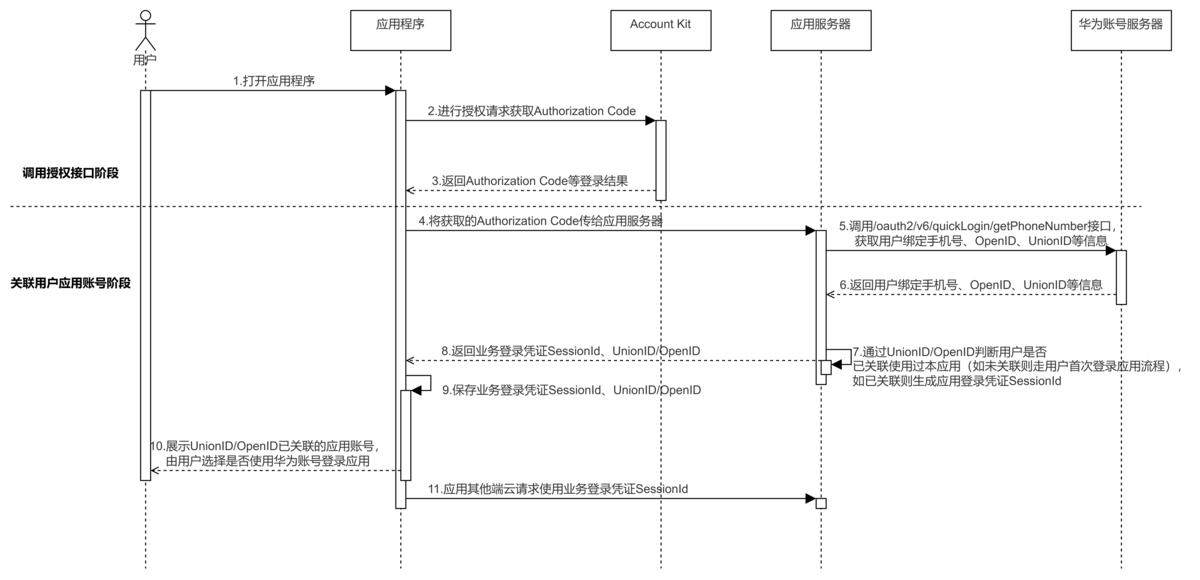
图2 华为账号一键登录(用户非首次登录应用)流程图
流程说明:
- 应用调用AuthorizationWithHuaweiIDRequest授权请求获取AuthorizationWithHuaweiIDResponse响应结果中的Authorization Code。
- 应用服务端通过Authorization Code调用/oauth2/v6/quickLogin/getPhoneNumber接口获取用户相关信息。通过Authorization Code凭证获取用户信息可以有效避免黑客通过数据遍历、身份伪造、重放攻击等手段导致的安全风险。
- 应用对用户身份标识UnionID/OpenID、业务登录凭证SessionId信息进行认证后,通过UnionID/OpenID判断用户是否已关联应用系统数据库,如已关联,结合风控、安全因素及自身业务场景判断,可展示已关联的账号,由用户选择是否使用华为账号登录应用,或免用户操作,静默登录应用。
接口说明
华为账号一键登录按钮关键接口如下表所示:
| 接口名 | 描述 |
|---|---|
| createAuthorizationWithHuaweiIDRequest(): AuthorizationWithHuaweiIDRequest | 获取授权接口,通过AuthorizationWithHuaweiIDRequest传入一键登录的scope:quickLoginAnonymousPhone,即可在授权结果中获取到用户的匿名手机号和Authorization Code。 |
| constructor(context?: common.Context) | 创建授权请求Controller。 |
| executeRequest(request: AuthenticationRequest): Promise<AuthenticationResponse> | 通过Promise方式执行授权操作。 |
| LoginWithHuaweiIDButton | 华为账号Button登录组件。 该组件仅纯文本样式支持华为账号一键登录功能。开发者可以通过调整按钮的大小、圆角等参数以适配HarmonyOS应用登录界面。如果仍然不能满足开发者的诉求,可以使用Style的BUTTON_CUSTOM值定义按钮的文字颜色和背景色。 |
| onClickLoginWithHuaweiIDButton(callback: AsyncCallback<HuaweiIDCredential>): LoginWithHuaweiIDButtonController | 注册华为账号一键登录按钮的结果回调。 |
| setAgreementStatus(agreementStatus: AgreementStatus): LoginWithHuaweiIDButtonController | 设置协议状态方法。用户未同意协议前设置协议状态为NOT_ACCEPTED,用户同意协议后设置协议状态为ACCEPTED,才可以完成华为账号登录。 |
| onClickEvent(callback: AsyncCallback<ClickEvent>): LoginWithHuaweiIDButtonController | 注册华为账号一键登录按钮的点击事件回调。 |
| continueLogin(callback: AsyncCallback<void>): LoginWithHuaweiIDButtonController | 用户点击协议弹框的同意并登录按钮结果回调。 |

上述接口需在页面或自定义组件生命周期内调用。
开发前提
-
在进行代码开发前,请先确认已完成开发准备工作。
若未配置签名和指纹,将报错1001500001 应用指纹证书校验失败。
若未申请“华为账号一键登录”权限,将报错1001502014 应用未申请scopes或permissions权限。
-
若应用开启了代码混淆,应用工程代码中获取到的quickLoginAnonymousPhone(匿名手机号)属性需要配置混淆白名单防止编译release包时被混淆,否则无法获取到匿名手机号。在调用获取匿名手机号方法工程模块的混淆文件obfuscation-rules.txt中添加:
# 开发者开启属性混淆需要配置quickLoginAnonymousPhone属性白名单防止其被混淆-enable-property-obfuscation-keep-property-namequickLoginAnonymousPhone
客户端开发
开发者可参考下述内容自行开发,也可使用Account Kit为常见的三方开发框架(Flutter、H5、React-Native、uni-app)提供的SampleCode示例工程,用于接入华为账号一键登录能力,具体可参考三方开发框架接入华为账号一键登录进行开发。
用户首次登录应用
-
导入模块。
导入Account Kit的authentication模块及相关公共模块。
import { authentication } from '@kit.AccountKit';import { util } from '@kit.ArkTS';import { hilog } from '@kit.PerformanceAnalysisKit';import { BusinessError } from '@kit.BasicServicesKit'; -
获取匿名手机号。
调用authentication模块的AuthorizationWithHuaweiIDRequest请求获取华为账号用户的匿名手机号。匿名手机号用于登录页面展示。
该场景下forceAuthorization参数需设置为false。
根据获取的响应结果判断,可能存在以下场景:
1)返回ArkTS错误码,开发者可参考下表针对不同错误码进行处理:
表1 获取匿名手机号错误码处理
错误码 错误描述 处理建议 1001502001 用户未登录华为账号 应用展示其他登录方式 1001502005 网络异常 提示用户检查当前网络状态后重试 1001502009 内部错误 应用展示其他登录方式 1001502014 应用未申请scopes或permissions权限 请参考1001502014 应用未申请scopes或permissions权限的可能原因和解决方法解决该报错 1001500001 应用指纹证书校验失败 请参考1001500001 应用指纹证书校验失败的可能原因和解决办法解决该报错 1001500002 重复请求 重复请求,应用无需处理 1001500003 不支持该scopes或permissions 1、华为账号用户注册地可能为中国境外、香港特别行政区、澳门特别行政区或中国台湾,应用展示其他登录方式 2、仅在5.1.1(19)支持TV设备,其他版本应用可以通过华为账号登录进行登录 12300001 系统服务异常 应用展示其他登录方式 2)获取到的匿名手机号为空,说明华为账号没有绑定手机号、权限未申请或未生效,上述异常场景应用需要展示其他登录方式。
3)若开发者开启了代码混淆,需将quickLoginAnonymousPhone(匿名手机号)属性加入混淆白名单,防止其被混淆。
getQuickLoginAnonymousPhone() {// 创建授权请求,并设置参数const authRequest = new authentication.HuaweiIDProvider().createAuthorizationWithHuaweiIDRequest();// 获取匿名手机号需传quickLoginAnonymousPhone这个scope,传参之前需要先申请“华为账号一键登录”权限,否则会返回1001502014错误码authRequest.scopes = ['quickLoginAnonymousPhone'];// 用于防跨站点请求伪造authRequest.state = util.generateRandomUUID();// 一键登录场景该参数必须设置为falseauthRequest.forceAuthorization = false;const controller = new authentication.AuthenticationController();try {controller.executeRequest(authRequest).then((response: authentication.AuthorizationWithHuaweiIDResponse) => {// 获取到匿名手机号const anonymousPhone = response.data?.extraInfo?.quickLoginAnonymousPhone as string;if (anonymousPhone) {hilog.info(0x0000, 'testTag', 'Succeeded in authentication.');const quickLoginAnonymousPhone: string = anonymousPhone;return;}hilog.info(0x0000, 'testTag', 'Succeeded in authentication. AnonymousPhone is empty.');// 未获取到匿名手机号,应用需要跳转到其他方式登录页面}).catch((error: BusinessError) => {this.dealAllError(error);})} catch (error) {this.dealAllError(error);}}// 错误处理dealAllError(error: BusinessError): void {hilog.error(0x0000, 'testTag',`Failed to get quickLoginAnonymousPhone, errorCode is ${error.code}, errorMessage is ${error.message}`);// 在应用登录涉及UI交互场景下,建议按照如下错误码指导提示用户if (error.code === ErrorCode.ERROR_CODE_LOGIN_OUT) {// 华为账号未登录,应用需要展示其他登录方式} else if (error.code === ErrorCode.ERROR_CODE_NETWORK_ERROR) {// 网络异常,请检查当前网络状态并重试或展示其他登录方式} else if (error.code === ErrorCode.ERROR_CODE_INTERNAL_ERROR) {// 登录失败,应用需要展示其他登录方式} else if (error.code === ErrorCode.ERROR_CODE_SYSTEM_SERVICE) {// 系统服务异常,应用需要展示其他登录方式} else if (error.code === ErrorCode.ERROR_CODE_REQUEST_REFUSE) {// 重复请求,应用无需处理} else {// 应用登录失败,应用需要展示其他登录方式}}export enum ErrorCode {// 账号未登录ERROR_CODE_LOGIN_OUT = 1001502001,// 网络错误ERROR_CODE_NETWORK_ERROR = 1001502005,// 内部错误ERROR_CODE_INTERNAL_ERROR = 1001502009,// 系统服务异常ERROR_CODE_SYSTEM_SERVICE = 12300001,// 重复请求ERROR_CODE_REQUEST_REFUSE = 1001500002} -
展示一键登录页面并获取Authorization Code
将获取到的匿名手机号设置给下面QuickLoginButtonComponent组件示例代码中的quickLoginAnonymousPhone变量,调用LoginWithHuaweiIDButton组件,实现应用自己的登录页面,并展示华为账号一键登录按钮和华为账号用户认证协议(Account Kit提供跳转链接,应用需实现协议跳转,参见约束与限制第2点),用户同意协议并点击一键登录按钮后,可获取到Authorization Code,将该值传给应用服务端用于获取用户信息(完整手机号、UnionID、OpenID)。通过code凭证获取用户信息可以有效避免因数据遍历、身份伪造、重放攻击导致的安全风险。
import { loginComponentManager, LoginWithHuaweiIDButton } from '@kit.AccountKit';import { hilog } from '@kit.PerformanceAnalysisKit';import { BusinessError } from '@kit.BasicServicesKit';import { connection } from '@kit.NetworkKit';@Componentstruct QuickLoginComponent {// 第二步获取的匿名手机号传到此处@State quickLoginAnonymousPhone: string = '';build() {if (this.quickLoginAnonymousPhone) {QuickLoginButtonComponent({quickLoginAnonymousPhone: this.quickLoginAnonymousPhone})} else {// 授权获取匿名手机号为空时,请应用自行实现其他方式登录页面}}}@Componentstruct QuickLoginButtonComponent {logTag: string = 'QuickLoginButtonComponent';domainId: number = 0x0000;@State quickLoginAnonymousPhone: string = '';// 是否勾选协议@State isSelected: boolean = false;// 华为账号用户认证协议链接,此处仅为示例,实际开发过程中,出于可维护性、安全性等方面考虑,域名不建议硬编码在本地private static USER_AUTHENTICATION_PROTOCOL: string ='https://privacy.consumer.huawei.com/legal/id/authentication-terms.htm?code=CN&language=zh-CN';private static USER_SERVICE_TAG = '用户服务协议';private static PRIVACY_TAG = '隐私协议';private static USER_AUTHENTICATION_TAG = '华为账号用户认证协议';// 定义LoginWithHuaweiIDButton展示的隐私文本,展示应用的用户服务协议、隐私协议和华为账号用户认证协议privacyText: loginComponentManager.PrivacyText[] = [{text: '已阅读并同意',type: loginComponentManager.TextType.PLAIN_TEXT}, {text: '《用户服务协议》',tag: QuickLoginButtonComponent.USER_SERVICE_TAG,type: loginComponentManager.TextType.RICH_TEXT}, {text: '《隐私协议》',tag: QuickLoginButtonComponent.PRIVACY_TAG,type: loginComponentManager.TextType.RICH_TEXT}, {text: '和',type: loginComponentManager.TextType.PLAIN_TEXT}, {text: '《华为账号用户认证协议》',tag: QuickLoginButtonComponent.USER_AUTHENTICATION_TAG,type: loginComponentManager.TextType.RICH_TEXT}, {text: '。',type: loginComponentManager.TextType.PLAIN_TEXT}];// 构造LoginWithHuaweiIDButton组件的控制器controller: loginComponentManager.LoginWithHuaweiIDButtonController =new loginComponentManager.LoginWithHuaweiIDButtonController()/*** 当应用使用自定义的登录页时,如果用户未同意协议,需要设置协议状态为NOT_ACCEPTED,当用户同意协议后再设置* 协议状态为ACCEPTED,才可以使用华为账号一键登录功能*/.setAgreementStatus(loginComponentManager.AgreementStatus.NOT_ACCEPTED).onClickLoginWithHuaweiIDButton((error: BusinessError | undefined,response: loginComponentManager.HuaweiIDCredential) => {this.handleLoginWithHuaweiIDButton(error, response);}).onClickEvent((error: BusinessError, clickEvent: loginComponentManager.ClickEvent) => {if (error) {hilog.error(this.domainId, this.logTag,`onClickEvent error. errCode is ${error?.code}, errMessage is ${error?.message}`);return;}hilog.info(this.domainId, this.logTag, `onClickEvent clickEvent: ${clickEvent}`);// 设置按钮为不可点击态,待业务逻辑处理完成后,再设置为可点击态this.controller.setEnabled(false);});agreementDialog: CustomDialogController = new CustomDialogController({builder: AgreementDialog({privacyText: this.privacyText,cancel: () => {this.agreementDialog.close();this.controller.setAgreementStatus(loginComponentManager.AgreementStatus.NOT_ACCEPTED);},confirm: () => {this.agreementDialog.close();this.isSelected = true;this.controller.setAgreementStatus(loginComponentManager.AgreementStatus.ACCEPTED);// 调用此方法,同意协议与登录一并完成,无需再次点击登录按钮this.controller.continueLogin((error: BusinessError) => {if (error) {hilog.error(this.domainId, this.logTag,`Failed to login with agreementDialog. errCode is ${error.code}, errMessage is ${error.message}`);} else {hilog.info(this.domainId, this.logTag,'Succeeded in clicking agreementDialog continueLogin.');}});},clickHyperlinkText: () => {this.agreementDialog.close();this.jumpToPrivacyWebView();}}),autoCancel: false,alignment: DialogAlignment.Center,});// 传递页面渲染所需的数据,如匿名手机号等aboutToAppear(): void {}// Toast提示showToast(resource: string) {try {this.getUIContext().getPromptAction().showToast({message: resource,duration: 2000});} catch (error) {const message = (error as BusinessError).messageconst code = (error as BusinessError).codehilog.error(this.domainId, this.logTag, `showToast args errCode is ${code}, errMessage is ${message}`);}}// 跳转华为账号用户认证协议页,该页面需在工程main_pages.json文件配置jumpToPrivacyWebView() {try {// 需在module.json5中配置“ohos.permission.GET_NETWORK_INFO”权限const checkNetConn = connection.hasDefaultNetSync();if (!checkNetConn) {this.showToast('服务或网络异常,请稍后重试');return;}} catch (error) {const message = error.message as string;const code = error.code as string;hilog.error(0x0000, 'testTag', `Failed to hasDefaultNetSync, errCode is ${code}, errMessage is ${message}`);}this.getUIContext().getRouter().pushUrl({// 需在module.json5配置“ohos.permission.INTERNET”网络权限url: 'pages/WebPage',params: {isFromDialog: true,url: QuickLoginButtonComponent.USER_AUTHENTICATION_PROTOCOL,}}, (err) => {if (err) {hilog.error(this.domainId, this.logTag,`Failed to jumpToPrivacyWebView, errCode is ${err.code}, errMessage is ${err.message}`);}});}handleLoginWithHuaweiIDButton(error: BusinessError | undefined,response: loginComponentManager.HuaweiIDCredential) {if (error) {hilog.error(this.domainId, this.logTag,`Failed to login with LoginWithHuaweiIDButton. errCode is ${error.code}, errMessage is ${error.message}`);if (error.code === ErrorCode.ERROR_CODE_NETWORK_ERROR) {this.getUIContext().showAlertDialog({message: "网络未连接,请检查网络设置。",offset: { dx: 0, dy: -12 },alignment: DialogAlignment.Bottom,autoCancel: false,confirm: {value: "知道了",action: () => {}}});} else if (error.code === ErrorCode.ERROR_CODE_AGREEMENT_STATUS_NOT_ACCEPTED) {// 未同意协议,弹出协议弹框,推荐使用该回调方式this.agreementDialog.open();} else if (error.code === ErrorCode.ERROR_CODE_LOGIN_OUT) {// 华为账号未登录提示this.showToast("华为账号未登录,请重试");} else if (error.code === ErrorCode.ERROR_CODE_NOT_SUPPORTED) {// 不支持该scopes或permissions提示this.showToast("该scopes或permissions不支持");} else if (error.code === ErrorCode.ERROR_CODE_PARAMETER_ERROR) {// 参数错误提示this.showToast("参数错误");} else if (error.code === ErrorCode.ERROR_CODE_USER_CANCEL) {// 用户取消,无需特别处理} else {// 其他提示系统或服务异常this.showToast('服务或网络异常,请稍后重试');}this.controller.setEnabled(true);return;}try {if (this.isSelected) {if (response) {hilog.info(this.domainId, this.logTag, 'Succeeded in clicking LoginWithHuaweiIDButton.');// 开发者根据实际业务情况使用以下信息const authCode = response.authorizationCode;}} else {this.agreementDialog.open();}} catch (err) {hilog.error(this.domainId, this.logTag,`Failed to login with LoginWithHuaweiIDButton, errCode: ${err.code}, errMessage: ${err.message}`);this.getUIContext().showAlertDialog({message: '服务或网络异常,请稍后重试',offset: { dx: 0, dy: -12 },alignment: DialogAlignment.Bottom,autoCancel: false,confirm: {value: '知道了',action: () => {}}});} finally {this.controller.setEnabled(true);}}build() {Scroll() {Column() {Column() {Column() {// 此处为示例资源,开发者可使用应用图标进行替换,以保证正常编译运行Image($r('app.media.app_icon')).width(48).height(48).draggable(false).copyOption(CopyOptions.None).onComplete(() => {hilog.info(this.domainId, this.logTag, 'appIcon loading success.');}).onError(() => {hilog.error(this.domainId, this.logTag, 'appIcon loading fail.');})Text($r('app.string.app_name')).fontFamily($r('sys.string.ohos_id_text_font_family_medium')).fontWeight(FontWeight.Medium).fontWeight(FontWeight.Bold).maxFontSize($r('sys.float.ohos_id_text_size_headline8')).minFontSize($r('sys.float.ohos_id_text_size_body1')).maxLines(1).fontColor($r('sys.color.ohos_id_color_text_primary')).constraintSize({ maxWidth: '100%' }).margin({top: 12,})Text('应用描述').fontSize($r('sys.float.ohos_id_text_size_body2')).fontColor($r('sys.color.ohos_id_color_text_secondary')).fontFamily($r('sys.string.ohos_id_text_font_family_regular')).fontWeight(FontWeight.Regular).constraintSize({ maxWidth: '100%' }).margin({top: 8,})}.margin({top: 100})Column() {Text(this.quickLoginAnonymousPhone).fontSize(36).fontColor($r('sys.color.ohos_id_color_text_primary')).fontFamily($r('sys.string.ohos_id_text_font_family_medium')).fontWeight(FontWeight.Bold).lineHeight(48).textAlign(TextAlign.Center).maxLines(1).constraintSize({ maxWidth: '100%', minHeight: 48 })Text('华为账号绑定号码').fontSize($r('sys.float.ohos_id_text_size_body2')).fontColor($r('sys.color.ohos_id_color_text_secondary')).fontFamily($r('sys.string.ohos_id_text_font_family_regular')).fontWeight(FontWeight.Regular).lineHeight(19).textAlign(TextAlign.Center).maxLines(1).constraintSize({ maxWidth: '100%' }).margin({top: 8})}.margin({top: 64})Column() {LoginWithHuaweiIDButton({params: {// LoginWithHuaweiIDButton支持的样式style: loginComponentManager.Style.BUTTON_RED,// 账号登录按钮在登录过程中展示加载态extraStyle: {buttonStyle: new loginComponentManager.ButtonStyle().loadingStyle({show: true})},// LoginWithHuaweiIDButton的边框圆角半径borderRadius: 24,// LoginWithHuaweiIDButton支持的登录类型loginType: loginComponentManager.LoginType.QUICK_LOGIN,// LoginWithHuaweiIDButton支持按钮的样式跟随系统深浅色模式切换supportDarkMode: true},controller: this.controller})}.height(40).margin({top: 56})Column() {Button({type: ButtonType.Capsule,stateEffect: true}) {Text('其他方式登录').fontColor($r('sys.color.ohos_id_color_text_primary_activated')).fontFamily($r('sys.string.ohos_id_text_font_family_medium')).fontWeight(FontWeight.Medium).fontSize($r('sys.float.ohos_id_text_size_button1')).focusable(true).focusOnTouch(true).textOverflow({ overflow: TextOverflow.Ellipsis }).maxLines(1).padding({ left: 8, right: 8 })}.fontColor($r('sys.color.ohos_id_color_text_primary_activated')).fontFamily($r('sys.string.ohos_id_text_font_family_medium')).fontWeight(FontWeight.Medium).backgroundColor($r('sys.color.ohos_id_color_button_normal')).focusable(true).focusOnTouch(true).constraintSize({ minHeight: 40 }).width('100%').onClick(() => {hilog.info(this.domainId, this.logTag, 'click optionalLoginButton.');})}.margin({ top: 16 })}.width('100%')Row() {Row() {Checkbox({ name: 'privacyCheckbox', group: 'privacyCheckboxGroup' }).width(24).height(24).focusable(true).focusOnTouch(true).margin({ top: 0 }).select(this.isSelected).onChange((value: boolean) => {if (value) {this.isSelected = true;this.controller.setAgreementStatus(loginComponentManager.AgreementStatus.ACCEPTED);} else {this.isSelected = false;this.controller.setAgreementStatus(loginComponentManager.AgreementStatus.NOT_ACCEPTED);}hilog.info(this.domainId, this.logTag, `agreementChecked: ${value}`);})}Row() {Text() {ForEach(this.privacyText, (item: loginComponentManager.PrivacyText) => {if (item?.type === loginComponentManager.TextType.PLAIN_TEXT && item?.text) {Span(item?.text).fontColor($r('sys.color.ohos_id_color_text_secondary')).fontFamily($r('sys.string.ohos_id_text_font_family_regular')).fontWeight(FontWeight.Regular).fontSize($r('sys.float.ohos_id_text_size_body3'))} else if (item?.type === loginComponentManager.TextType.RICH_TEXT && item?.text) {Span(item?.text).fontColor($r('sys.color.ohos_id_color_text_primary_activated')).fontFamily($r('sys.string.ohos_id_text_font_family_medium')).fontWeight(FontWeight.Medium).fontSize($r('sys.float.ohos_id_text_size_body3')).onClick(() => {// 应用需要根据item.tag实现协议页面的跳转逻辑hilog.info(this.domainId, this.logTag, `click privacy text tag: ${item.tag}`);// 华为账号用户认证协议if (item.tag === QuickLoginButtonComponent.USER_AUTHENTICATION_TAG) {this.jumpToPrivacyWebView();}})}}, (item: loginComponentManager.PrivacyText) => item.text.toString())}.width('100%')}.margin({ left: 12 }).layoutWeight(1).constraintSize({ minHeight: 24 })}.alignItems(VerticalAlign.Top).margin({top: 16,bottom: 16})}.justifyContent(FlexAlign.SpaceBetween).constraintSize({ minHeight: '100%' }).margin({left: 16,right: 16})}.width('100%').height('100%')}}@CustomDialogexport struct AgreementDialog {logTag: string = 'AgreementDialog';domainId: number = 0x0000;dialogController?: CustomDialogController;cancel: () => void = () => {};confirm: () => void = () => {};clickHyperlinkText: () => void = () => {};privacyText: loginComponentManager.PrivacyText[] = [];private static USER_AUTHENTICATION_TAG = '华为账号用户认证协议';build() {Column() {Row() {Text('用户协议与隐私条款').id('loginPanel_agreement_dialog_privacy_title').maxFontSize($r('sys.float.ohos_id_text_size_headline8')).minFontSize($r('sys.float.ohos_id_text_size_body1')).fontColor($r('sys.color.ohos_id_color_text_primary')).fontFamily($r('sys.string.ohos_id_text_font_family_medium')).fontWeight(FontWeight.Bold).textAlign(TextAlign.Center).textOverflow({ overflow: TextOverflow.Ellipsis }).maxLines(2)}.alignItems(VerticalAlign.Center).constraintSize({ minHeight: 56, maxWidth: 400 }).margin({left: $r('sys.float.ohos_id_max_padding_start'),right: $r('sys.float.ohos_id_max_padding_start')})Row() {Text() {ForEach(this.privacyText, (item: loginComponentManager.PrivacyText) => {if (item?.type === loginComponentManager.TextType.PLAIN_TEXT && item?.text) {Span(item?.text).fontSize($r('sys.float.ohos_id_text_size_body1')).fontColor($r('sys.color.ohos_id_color_text_primary')).fontFamily($r('sys.string.ohos_id_text_font_family_regular')).fontWeight(FontWeight.Regular)} else if (item?.type === loginComponentManager.TextType.RICH_TEXT && item?.text) {Span(item?.text).fontSize($r('sys.float.ohos_id_text_size_body1')).fontColor('#CE0E2D').fontFamily($r('sys.string.ohos_id_text_font_family_medium')).fontWeight(FontWeight.Medium).onClick(() => {// 应用需要根据item.tag实现协议页面的跳转逻辑hilog.info(this.domainId, this.logTag, `click privacy text tag: ${item.tag}`);// 华为账号用户认证协议if (item.tag === AgreementDialog.USER_AUTHENTICATION_TAG) {hilog.info(this.domainId, this.logTag, 'AgreementDialog click.');this.clickHyperlinkText();}})}}, (item: loginComponentManager.PrivacyText) => item.text.toString())}.width('100%').textOverflow({ overflow: TextOverflow.Ellipsis }).maxLines(10).textAlign(TextAlign.Start).focusable(true).focusOnTouch(true).padding({ left: 24, right: 24 })}.width('100%')Flex({direction: FlexDirection.Row}) {Button('取消',{ type: ButtonType.Capsule, stateEffect: true }).id('loginPanel_agreement_cancel_btn').fontColor($r('sys.color.ohos_id_color_text_primary')).fontSize($r('sys.float.ohos_id_text_size_button1')).fontFamily($r('sys.string.ohos_id_text_font_family_medium')).backgroundColor(Color.Transparent).fontWeight(FontWeight.Medium).focusable(true).focusOnTouch(true).constraintSize({ minHeight: 40, maxWidth: 400 }).width('50%').onClick(() => {hilog.info(this.domainId, this.logTag, 'AgreementDialog cancel.');this.cancel();})Button('同意并登录',{ type: ButtonType.Capsule, stateEffect: true }).id('loginPanel_agreement_dialog_huawei_id_login_btn').fontColor(Color.White).backgroundColor('#CE0E2D').fontSize($r('sys.float.ohos_id_text_size_button1')).fontFamily($r('sys.string.ohos_id_text_font_family_medium')).fontWeight(FontWeight.Medium).focusable(true).focusOnTouch(true).constraintSize({ minHeight: 40, maxWidth: 400 }).width('50%').onClick(() => {hilog.info(this.domainId, this.logTag, 'AgreementDialog confirm.');this.confirm();})}.margin({top: 8,left: $r('sys.float.ohos_id_elements_margin_horizontal_l'),right: $r('sys.float.ohos_id_elements_margin_horizontal_l'),bottom: 16})}.backgroundColor($r('sys.color.ohos_id_color_dialog_default_bg')).padding({left: 16,right: 16})}}export enum ErrorCode {// 账号未登录ERROR_CODE_LOGIN_OUT = 1001502001,// 该账号不支持一键登录,如海外账号ERROR_CODE_NOT_SUPPORTED = 1001500003,// 网络错误ERROR_CODE_NETWORK_ERROR = 1001502005,// 内部错误ERROR_CODE_INTERNAL_ERROR = 1001502009,// 用户取消授权ERROR_CODE_USER_CANCEL = 1001502012,// 系统服务异常ERROR_CODE_SYSTEM_SERVICE = 12300001,// 用户未同意用户协议ERROR_CODE_AGREEMENT_STATUS_NOT_ACCEPTED = 1005300001,// 参数错误ERROR_CODE_PARAMETER_ERROR = 401,// 重复请求ERROR_CODE_REQUEST_REFUSE = 1001500002}以下是华为账号用户认证协议展示页示例代码:
import { webview } from '@kit.ArkWeb';import { hilog } from '@kit.PerformanceAnalysisKit';import { BusinessError } from '@kit.BasicServicesKit';// 华为账号用户认证协议展示页@Entry@Componentstruct WebPage {@State webUrl?: string = '';@State progress: number = 0;logTag: string = 'WebPage';domainId: number = 0x0000;controller: webview.WebviewController = new webview.WebviewController();build() {Column() {Column() {Button({ type: ButtonType.Normal }) {Image($r('sys.media.ohos_ic_compnent_titlebar_back')).backgroundColor(Color.Transparent).borderRadius(20).width(24).height(24).draggable(false).autoResize(false).focusable(true).fillColor($r('sys.color.ohos_id_color_titlebar_icon')).matchTextDirection(true)}.alignSelf(ItemAlign.Start).backgroundColor($r('sys.color.ohos_id_color_button_normal')).borderRadius(20).width(40).height(40).onClick(() => {this.getUIContext().getRouter().back();})}.height(56).width('100%').justifyContent(FlexAlign.Center).margin({top: 36,left: 16})Progress({ value: this.progress, type: ProgressType.Linear }).width('100%').visibility(this.progress <= 99 ? Visibility.Visible : Visibility.None)Web({ src: this.webUrl ?? '', controller: this.controller }).backgroundColor(Color.Transparent).margin({ bottom: 60 }).onProgressChange((event) => {hilog.info(this.domainId, this.logTag,'onProgressChange: ', (event ? event.newProgress : -1));this.progress = event ? event.newProgress : 0;}).darkMode(WebDarkMode.Auto).forceDarkAccess(true).onLoadIntercept((event) => {hilog.info(this.domainId, this.logTag, 'onLoadIntercept');return false;}).onErrorReceive((event) => {if (event) {hilog.error(this.domainId, this.logTag, `onErrorReceive,errorInfo: ${event?.error?.getErrorInfo()}`);}})}.alignItems(HorizontalAlign.Start).padding({ left: 12, right: 12, bottom: 60 }).width('100%').height('100%')}aboutToAppear(): void {hilog.info(0x0000, 'testTag', 'aboutToAppear');const params = this.getUIContext().getRouter().getParams() as Record<string, string>;this.webUrl = params.url ?? '';hilog.info(0x0000, 'testTag', `webUrl: ${this.webUrl}`);}aboutToDisappear(): void {hilog.info(0x0000, 'testTag', 'aboutToDisappear');if (this.webUrl) {try {this.controller.stop();} catch (error) {hilog.error(0x0000, 'testTag',`ErrorCode: ${(error as BusinessError).code}, Message: ${(error as BusinessError).message}`);}}}}
用户非首次登录应用(可选)
用户非首次登录应用流程请参考首次登录应用开发流程中的导入模块及获取匿名手机号,获取AuthorizationWithHuaweiIDResponse响应结果中的Authorization Code。可能存在的异常场景及处理方法,可参考表1 获取匿名手机号错误码处理。
正确获取到Authorization Code,开发者可将Authorization Code传给应用服务端用于获取用户身份标识(UnionID、OpenID),即可查询该用户是否已关联。
1)如已关联,结合风控、安全因素及自身业务场景判断,可展示已关联的账号,由用户选择是否使用华为账号登录应用,或免用户操作,静默登录应用,客户端开发结束。
2)如未关联,则参考首次登录应用开发流程中的展示一键登录页面并获取Authorization Code继续开发。
借助DevEco Studio辅助开发(可选)
-
打开需要提供一键登录功能的页面,在页面的build()中创建一个容器(如Column)。
-
在DevEco Studio菜单栏点击View > Tool Windows > Kit Assistant,或使用快捷键Alt + K,进入Kit Assistant页面。
-
在左侧目录中点击选中AccountKit > QuickLoginButton,并拖拽至新创建的容器中。即可在当前位置插入相应的代码片段。
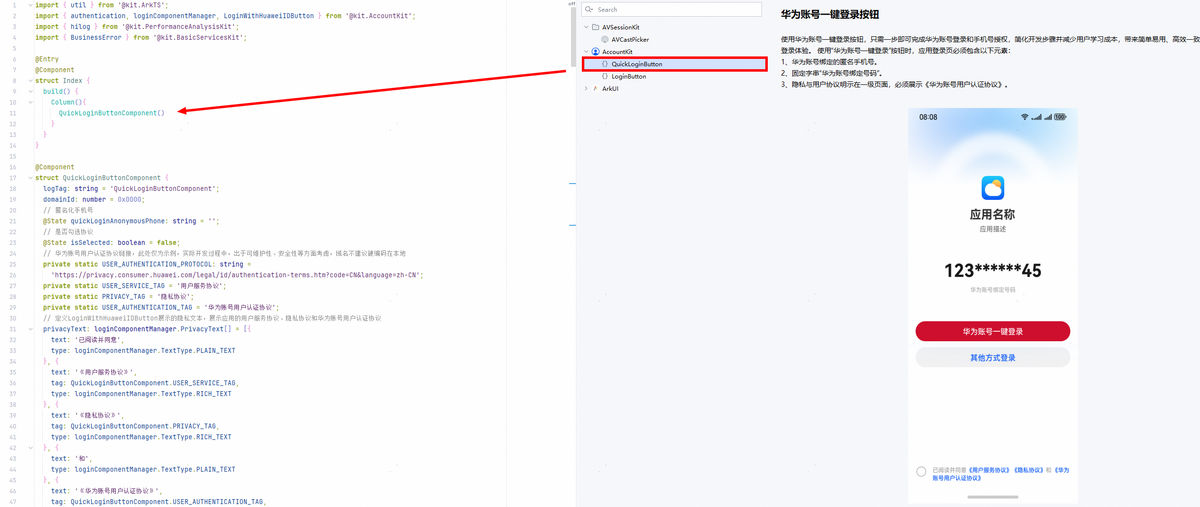
若代码片段插入失败,可查询快速插入场景化代码片段的说明排查原因。
-
在自动生成的代码段的getQuickLoginAnonymousPhone函数中,执行executeRequest函数可获取响应结果。
根据获取的响应结果判断,可能存在以下场景:
-
已正确获取到用户匿名手机号及Authorization Code,开发者可将Authorization Code传给应用服务端用于获取用户身份标识(UnionID、OpenID),即可查询该用户是否已关联。
1)如已关联,结合风控、安全因素及自身业务场景判断,可展示已关联的账号,由用户选择是否使用华为账号登录应用,或免用户操作,静默登录应用,客户端开发结束。
2)如未关联,再判断是否存在下面的异常场景,如无,则参考下面步骤5继续开发。
-
存在如下异常场景:
1)返回1001502001 用户未登录华为账号错误码,说明华为账号未登录。
2)返回1001500003 不支持该scopes或permissions错误码,说明华为账号用户注册地为中国境外、香港特别行政区、澳门特别行政区或中国台湾。
3)获取到的匿名手机号为空,说明华为账号没有绑定手机号、权限未申请或未生效。
上述异常场景应用需要展示其他登录方式。
-
-
根据上述代码实现应用的登录页面,并展示华为账号一键登录按钮和华为账号用户认证协议(Account Kit提供跳转链接,应用需实现协议跳转,参见约束与限制第2点),用户同意协议并点击一键登录按钮后,可获取到Authorization Code,将该值传给应用服务端用于获取用户信息(完整手机号、UnionID、OpenID)。
服务端开发
- 应用服务端使用Client ID、Client Secret、Authorization Code调用/oauth2/v6/quickLogin/getPhoneNumber接口获取完整手机号和华为账号用户标识UnionID。
- 应用通过获取到的完整手机号或UnionID查询该用户是否已关联应用系统数据库。如已关联,则绑定获取的UnionID与手机号到已有用户上(如已绑定,则可忽略),完成用户登录;如未关联,则创建新用户并绑定手机号与UnionID到该用户上。
客户端与服务端交互开发
应用客户端到应用服务端的开发
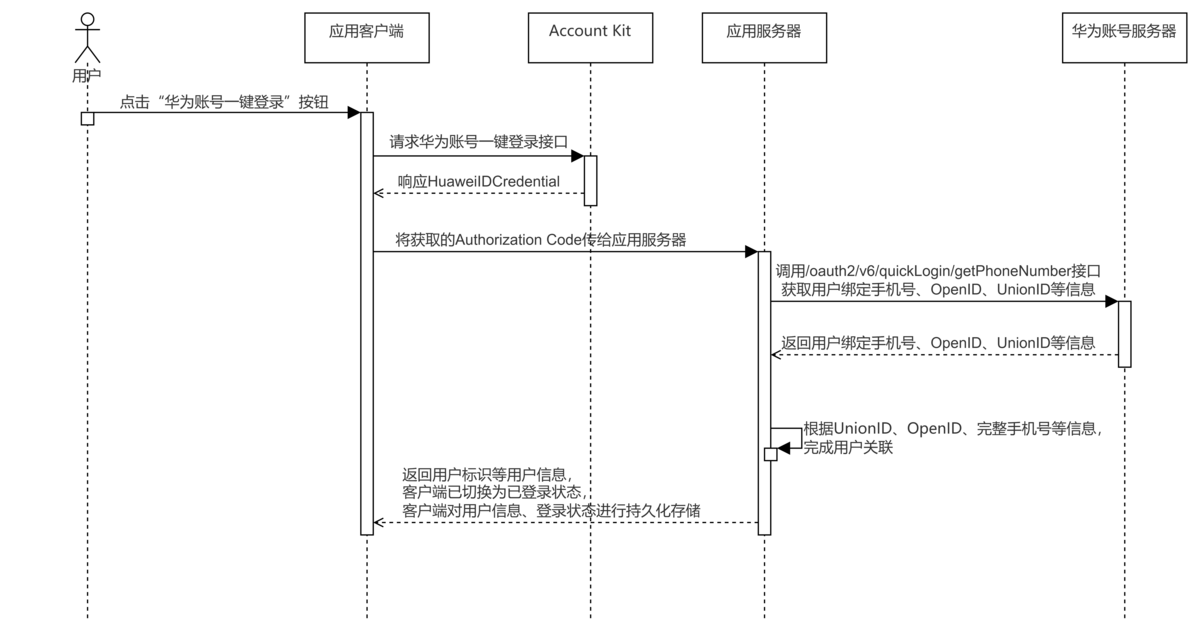
业务流程:
- 准备:
-
请先完成应用客户端一键登录的相关开发,相关开发指导参考客户端开发;
-
参考使用fetch发送网络请求完成客户端到服务端的接口请求,开发步骤如下;
-
在应用客户端调用应用服务端提供的接口,将Authorization Code传输给应用的服务端;
应用客户端与应用服务端的交互安全需要应用自行保证。
import { rcp } from '@kit.RemoteCommunicationKit';import { hilog } from '@kit.PerformanceAnalysisKit';import { util } from '@kit.ArkTS';import { BusinessError } from '@kit.BasicServicesKit';// 客户端请求接口示例代码export function rcpRequest(authCode: string) {// 定义请求头const headers: rcp.RequestHeaders = {'accept': 'application/json'};// 定义要传递的参数const postMessage: Record<string, string> = {'authorizationCode': authCode};const securityConfig: rcp.SecurityConfiguration = {tlsOptions: {tlsVersion: 'TlsV1.3'}};// 假设"http://localhost:8080"为应用服务端地址const baseUrl = 'http://localhost:8080/login';// 定义请求对象const req = new rcp.Request(baseUrl, 'POST', headers, postMessage);try {// 创建通信会话对象const session = rcp.createSession({ requestConfiguration: { security: securityConfig } });// 发起请求session.fetch(req).then((response) => {hilog.info(0x0000, 'getRcpResult', 'Succeeded in getting result from server.');if (response.body) {const decoder = util.TextDecoder.create('utf-8');const result = JSON.parse(decoder.decodeToString(new Uint8Array(response.body))) as Record<string, Object>;// 此为代码示例,具体实现请以业务服务端实际返回数据结构为准const phoneNumber: string = JSON.stringify(result['phone'] ?? '');if (phoneNumber) {// 应用处理相关逻辑}} else {hilog.error(0x0000, 'getRcpResult', 'Failed to get response body.');}}).catch((err: BusinessError) => {hilog.error(0x0000, 'getRcpResult', `err: err code is ${err.code}, err message is ${JSON.stringify(err)}`);});} catch (err) {hilog.error(0x0000, 'getRcpResult', `err: err code is ${err.code}, err message is ${JSON.stringify(err)}`);}} -
应用服务端提供接口用于接收应用客户端获取到的Authorization Code;
java示例代码:
import com.huawei.account.common.Response;import com.huawei.account.entity.PhoneNumberResp;import com.huawei.account.entity.LoginReq;import com.huawei.account.service.impl.LoginService;import lombok.RequiredArgsConstructor;import org.springframework.web.bind.annotation.RestController;import org.springframework.web.bind.annotation.PostMapping;import org.springframework.web.bind.annotation.RequestBody;@RestController@RequiredArgsConstructorpublic class QuickLoginController {private final LoginService loginService;@PostMapping("/login")public Response login(@RequestBody LoginReq requestBody) {PhoneNumberResp accountInfo = loginService.loginWithHuawei(requestBody.getAuthorizationCode());return new Response(200, "login success!", accountInfo);}}python示例代码:
from flask import Flask, request, jsonifyfrom service.loginService import login_with_huaweiapp = Flask(__name__)@app.route('/login', methods=['POST'])def login():# 验证请求参数request_data = request.get_json()if not request_data or 'authorizationCode' not in request_data:return jsonify({'code': 400,'message': 'invalid authorizationCode','data': None})authorization_code = request_data['authorizationCode']# 调用服务层user_info = login_with_huawei(authorization_code)if not user_info:return jsonify({'code': 401,'message': 'Failed to authenticate with Huawei','data': None})# 成功响应return jsonify({'code': 200,'message': 'Login successful','data': user_info})if __name__ == '__main__':app.run(debug=True, port=8080)go示例代码:
package mainimport (loginService "./service""encoding/json""errors""fmt"_ "fmt""io/ioutil""log""net/http"_ "strconv")type LoginRequest struct {AuthorizationCode string `json:"authorizationCode"`}type Response struct {UserInfo UserInfo `json:"data"`Code int `json:"code"`Message string `json:"message"`}type UserInfo struct {OpenID string `json:"openId"`UnionID string `json:"unionId"`LoginMobileNumber string `json:"phoneNumber"`LoginMobileValid int `json:"phoneNumberValid"`PurePhoneNumber string `json:"purePhoneNumber"`PhoneCountryCode string `json:"phoneCountryCode"`}type PhoneNumberErrRsp struct {ResultCode int `json:"resultCode"`ResultDesc string `json:"resultDesc"`}func loginHandler(w http.ResponseWriter, r *http.Request) {// 设置通用JSON响应头w.Header().Set("Content-Type", "application/json")// 1. 请求体解析var loginRequest LoginRequestif err := parseLoginRequest(r, &loginRequest); err != nil {sendErrorResponse(w, http.StatusBadRequest, "Invalid request format")return}// 2. 服务调用resp, err := loginService.LoginWithHuawei(loginRequest.AuthorizationCode)if err != nil {log.Printf("Login service error: %v", err)sendErrorResponse(w, http.StatusInternalServerError, "Authentication failed")return}defer resp.Body.Close()// 3. 响应处理userInfo, err := processUserInfoResponse(resp)if err != nil {log.Printf("User info processing error: %v", err)sendErrorResponse(w, http.StatusInternalServerError, "Failed to process user data")return}// 4. 成功响应sendSuccessResponse(w, userInfo)}func parseLoginRequest(r *http.Request, dest *LoginRequest) error {body, err := ioutil.ReadAll(r.Body)if err != nil {return fmt.Errorf("failed to read request body: %v", err)}defer r.Body.Close()if err := json.Unmarshal(body, dest); err != nil {return fmt.Errorf("invalid JSON format: %v", err)}if dest.AuthorizationCode == "" {return errors.New("missing authorization code")}return nil}func processUserInfoResponse(resp *http.Response) (*UserInfo, error) {if resp.StatusCode != http.StatusOK {return nil, fmt.Errorf("unexpected status code: %d", resp.StatusCode)}respBody, err := ioutil.ReadAll(resp.Body)var phoneNumberErrRsp PhoneNumberErrRsperr = json.Unmarshal(respBody, &phoneNumberErrRsp)if err != nil {return nil, fmt.Errorf("failed to unmarshal response body: %v", err)}if phoneNumberErrRsp.ResultCode != 0 {return nil, fmt.Errorf("api error %d: %s", phoneNumberErrRsp.ResultCode, phoneNumberErrRsp.ResultDesc)}var userInfo UserInfoerr = json.Unmarshal(respBody, &userInfo)if err != nil {return nil, fmt.Errorf("failed to unmarshal response body: %v", err)}/*根据业务设计流程,在数据库中查询用户信息,比如:1、使用UnionID查询用户,匹配到了则返回用户信息;2、未匹配到则使用手机号查询用户,查到了则将华为账号UnionID关联到该用户,返回用户信息;3、UnionID和手机号均没有匹配到,则进入注册流程*/return &userInfo, nil}func sendErrorResponse(w http.ResponseWriter, statusCode int, message string) {w.WriteHeader(statusCode)response := Response{Code: statusCode,Message: message,}if err := json.NewEncoder(w).Encode(response); err != nil {log.Printf("Failed to encode error response: %v", err)}}func sendSuccessResponse(w http.ResponseWriter, userInfo *UserInfo) {response := Response{Code: http.StatusOK,Message: "Login successful",UserInfo: *userInfo,}if err := json.NewEncoder(w).Encode(response); err != nil {log.Printf("Failed to encode success response: %v", err)w.WriteHeader(http.StatusInternalServerError)}}func main() {http.HandleFunc("/login", loginHandler)log.Println("Server starting on :8080...")if err := http.ListenAndServe(":8080", nil); err != nil {log.Fatalf("Server failed: %v", err)}}php示例代码:
<?phprequire __DIR__ . '/../service/LoginService.php';// 初始化路由$router = new Router();$router->addRoute('POST', '/login', function($request) {// 获取POST数据$requestBody = json_decode(file_get_contents('php://input'), true);if (isset($requestBody['authorizationCode'])) {// 调用服务层进行登录验证$userInfo = LoginService::loginWithHuawei($requestBody['authorizationCode']);if (!isset($userInfo)) {echo json_encode(['code' => 500,'message' => 'login failed!']);return;}// 返回响应echo json_encode(['data' => $userInfo,'code' => 200,'message' => 'login success!']);} else {echo json_encode(['code' => 400, 'message' => 'Missing authorization code']);}});// 处理请求$router->dispatch($_SERVER['REQUEST_METHOD'], parse_url($_SERVER['REQUEST_URI'], PHP_URL_PATH));class Router {private $routes = [];public function addRoute($method, $path, $handler) {$this->routes[strtoupper($method)][$path] = $handler;}public function dispatch($method, $uri) {header('Content-Type: application/json');$method = strtoupper($method);// 精确匹配路由if (isset($this->routes[$method][$uri])) {$handler = $this->routes[$method][$uri];$handler($_REQUEST);return;}// 未找到路由echo json_encode(['message' => 'Not Found','code' => 404]);}} -
应用服务端获取到Authorization Code之后,对接华为账号服务器,参考服务端开发,调用/oauth2/v6/quickLogin/getPhoneNumber接口获取完整手机号、UnionID、OpenID;
-
根据获取的UnionID、OpenID、完整手机号,判断登录用户是否为新用户、是否已关联等等(根据实际业务开发);
-
保存或更新用户信息到应用服务端,完成处理后,返回登录用户的信息至应用客户端;
java示例代码:
import com.alibaba.fastjson2.JSONObject;import com.huawei.account.config.AGCProperties;import com.huawei.account.config.Constants;import com.huawei.account.entity.PhoneNumberReq;import com.huawei.account.entity.PhoneNumberResp;import com.huawei.account.util.HttpUtil;import lombok.RequiredArgsConstructor;import lombok.extern.slf4j.Slf4j;import org.springframework.stereotype.Service;@Slf4j@Service@RequiredArgsConstructorpublic class LoginService {private final HttpUtil httpService;private final AGCProperties agcProperties;public PhoneNumberResp loginWithHuawei(String authorizationCode) {PhoneNumberReq phoneNumberReq = new PhoneNumberReq();phoneNumberReq.setClientId(agcProperties.getClientId()); // 读取配置项中Client IDphoneNumberReq.setClientSecret(agcProperties.getClientSecret()); // 读取配置项中Client SecretphoneNumberReq.setCode(authorizationCode);PhoneNumberResp phoneNumberResp = httpService.callHttpPost(Constants.QUICK_LOGIN_PHONE_NUMBER_URL, phoneNumberReq, PhoneNumberResp.class).getBody();log.info("/oauth2/v6/quickLogin/getPhoneNumber response body is: {}", JSONObject.toJSONString(phoneNumberResp));// 数据库相关:// 使用UnionID查询用户,匹配到了则返回用户信息;// 未匹配到则使用手机号查询用户,查到了则关联华为账号UnionID,返回用户信息;// UnionID和手机号均没有匹配到,则进入注册流程return phoneNumberResp;}}python示例代码:
import requestsimport jsonimport osparent_dir = os.path.dirname(os.path.dirname(os.path.abspath(__file__)))target_file = os.path.join(parent_dir, "config", "agc.json")with open(target_file) as f:agc_config = json.load(f)def login_with_huawei(authorization_code):# 配置信息client_id = agc_config["clientId"] # 读取配置项中Client IDclient_secret = agc_config["clientSecret"] # 读取配置项中Client Secretphone_number_url = "https://account-api.cloud.huawei.com/oauth2/v6/quickLogin/getPhoneNumber"# 构建请求体token_request_body = {"clientId": client_id,"clientSecret": client_secret,"code": authorization_code}# 发送请求获取一键登录用户手机号等信息user_info_response = {}try:user_info_response = requests.post(phone_number_url, headers={'Content-Type': 'application/json'}, json=token_request_body)user_info_response.raise_for_status() # 如果请求失败,抛出HTTPError异常user_info = json.loads(user_info_response.content.decode('utf-8'))except requests.RequestException as e:user_info = json.loads(user_info_response.content.decode('utf-8'))print(f"Error retrieving /oauth2/v6/quickLogin/getPhoneNumber: {e}")print(f"Error retrieving /oauth2/v6/quickLogin/getPhoneNumber: {user_info}")return Noneif "resultCode" in user_info:assert user_info["resultCode"] == 0# 根据业务设计流程,在数据库中查询用户信息,比如:# 1、使用UnionID查询用户,匹配到了则返回用户信息;# 2、未匹配到则使用手机号查询用户,查到了则将华为账号UnionID关联到该用户,返回用户信息;# 3、UnionID和手机号均没有匹配到,则进入注册流程return user_infogo示例代码:
package serviceimport ("bytes""encoding/json""fmt""io/ioutil""net""net/http""path/filepath""sync""time")type Response struct {Data interface{} `json:"data"`Code int `json:"code"`Message string `json:"message"`}type PhoneNumberReq struct {ClientId string `json:"clientId"`ClientSecret string `json:"clientSecret"`Code string `json:"code"`}var httpClient = &http.Client{Transport: &http.Transport{DialContext: (&net.Dialer{Timeout: 5 * time.Second,}).DialContext,TLSHandshakeTimeout: 5 * time.Second,ResponseHeaderTimeout: 10 * time.Second,},Timeout: 30 * time.Second,}var (config *ConfigconfigOnce sync.OnceconfigErr error)type Config struct {ClientID string `json:"clientId"`ClientSecret string `json:"clientSecret"`}func LoadConfig() (*Config, error) {configOnce.Do(func() {data, err := ioutil.ReadFile(filepath.Join("src", "config", "agc.json"))if err != nil {configErr = errreturn}var cfg Configif err := json.Unmarshal(data, &cfg); err != nil {configErr = errreturn}config = &cfg})return config, configErr}func LoginWithHuawei(authorizationCode string) (*http.Response, error) {config, err := LoadConfig()if err != nil {return nil, err}// 1. 构造请求体reqBody := PhoneNumberReq{ClientId: config.ClientID,ClientSecret: config.ClientSecret,Code: authorizationCode,}// 2. 序列化为JSONjsonData, err := json.Marshal(reqBody)resp, err := httpClient.Post("https://account-api.cloud.huawei.com/oauth2/v6/quickLogin/getPhoneNumber", "application/json", bytes.NewBuffer(jsonData))if err != nil {fmt.Errorf("failed to make POST request: %v, %v", config.ClientID, config.ClientSecret)return nil, fmt.Errorf("failed to make POST request: %v", err)}return resp, nil}php示例代码:
<?phpclass LoginService {public static function loginWithHuawei($authorizationCode) {$agcConfig = require __DIR__ . '/../config/agc.php';$requestBody = ['clientId' => $agcConfig['clientId'],'clientSecret' => $agcConfig['clientSecret'],'code' => $authorizationCode];$ch = curl_init();curl_setopt_array($ch,[CURLOPT_RETURNTRANSFER => true,CURLOPT_POST => true,CURLOPT_HTTPHEADER => ['Content-Type: application/json','Accept: application/json'],CURLOPT_SSL_VERIFYPEER => false,CURLOPT_SSL_VERIFYHOST => false,CURLOPT_URL => 'https://account-api.cloud.huawei.com/oauth2/v6/quickLogin/getPhoneNumber',CURLOPT_POSTFIELDS => json_encode($requestBody)]);$response = curl_exec($ch);if ($response === false) {error_log('cURL Error: ' . curl_error($ch));curl_close($ch);return null;}$userInfo = json_decode($response, true);curl_close($ch);if (!isset($data['resultCode']) && $userInfo['resultCode'] != 0) {error_log('cURL Error: ' . curl_error($ch));curl_close($ch);}/*** 根据业务设计流程,在数据库中查询用户信息,比如:* 1、使用UnionID查询用户,匹配到了则返回用户信息;* 2、未匹配到则使用手机号查询用户,查到了则将华为账号UnionID关联到该用户,返回用户信息;* 3、UnionID和手机号均没有匹配到,则进入注册流程*/return $userInfo;}}
-
客户端与服务端联调
前提:根据应用登录方案设计及实现,完成客户端和服务端开发,开发指导参见客户端开发、服务端开发和应用客户端到应用服务端的开发。
-
在客户端获取到Authorization Code之后,传送给服务端接口;在服务端使用Authorization Code获取华为账号绑定的手机号、UnionID、OpenID。

-
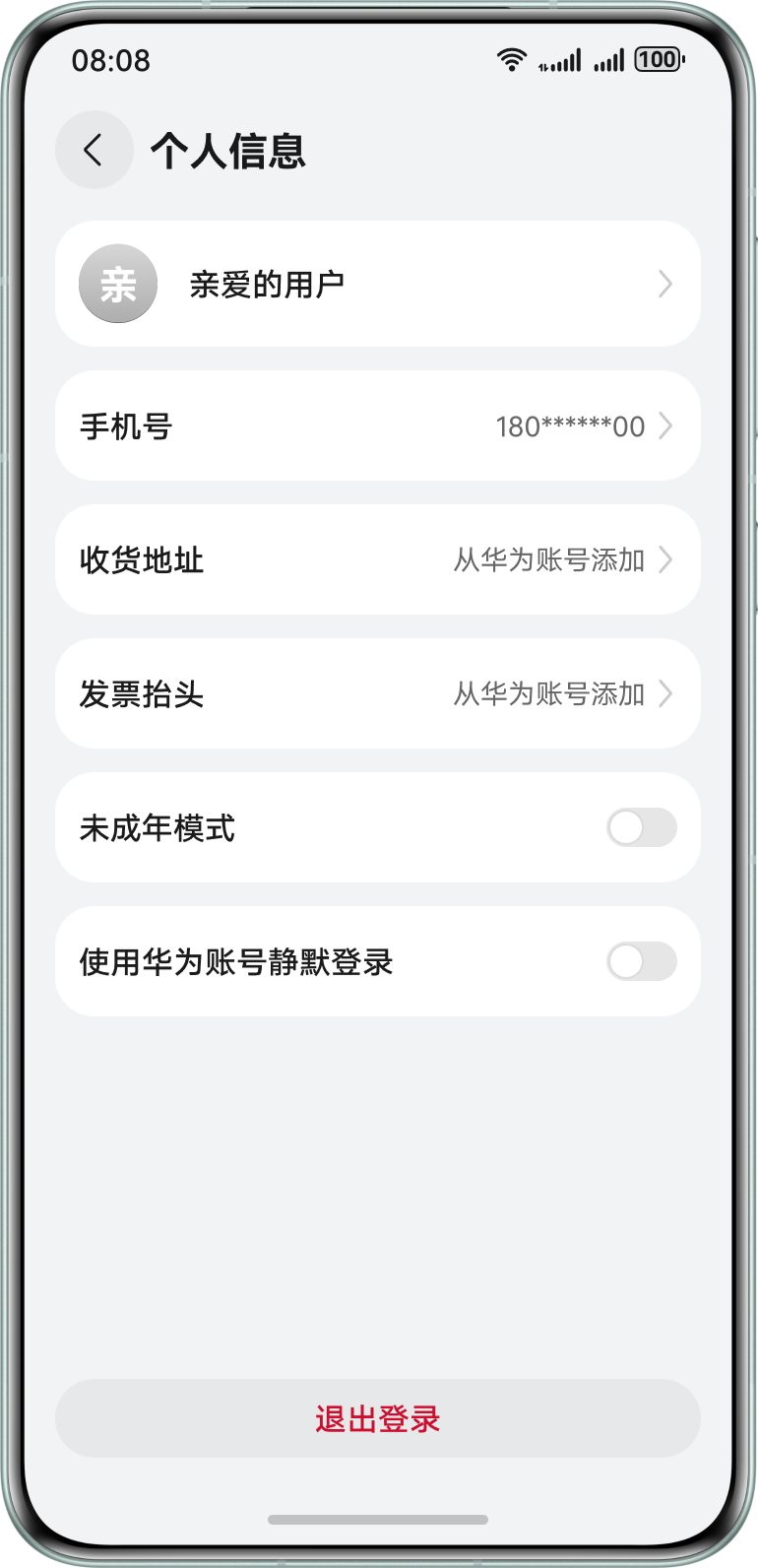
根据应用登录方案使用华为账号绑定的手机号、UnionID、OpenID登录成功后,应用服务端返回用户信息给应用客户端,应用客户端可根据需要进行本地持久化存储,例如:登录状态、用户账号名、手机号、用户身份标识等。
-
在应用客户端首页或个人信息页等位置,对当前登录用户信息进行展示,举例如下图:
开发后验证
集成华为账号一键登录能力应用用户体验质量建议
应用完成开发后,可参照以下标准检查集成华为账号一键登录后的用户体验是否符合预期:
| 标准编号 | 标准项名称 | 类型 | 标准详细描述 |
|---|---|---|---|
| 1 | 满足华为账号提供登录设计规范 | 规则 | 需满足华为账号开放登录中 【华为账号一键登录】按钮 规范,保障HarmonyOS应用拥有简单易用、高效一致、快速安全的登录体验; |
| 2 | 用户交互体验原则 | 建议 | (1)登录页面的用户协议与隐私协议、华为账号用户认证协议可展示、可点击; (2)当用户点击协议后,回退页面,须回到点击前的页面; (3)只有用户勾选并同意所有协议后,才可继续进行登录操作,若用户未勾选协议时直接点击华为账号登录按钮,须有明确的同意协议提醒; (4)点击登录按钮须直接完成登录流程,可出现头像、昵称授权页,但取消场景须不影响登录流程;若出现处理异常,须及时终止页面,不应出现应用卡死无法操作; |
| 3 | 登录页面内容用户体验原则 | 建议 | (1)若未提供其他登录方式,不应显示“其他登录方式”的入口; (2)若使用华为账号一键登录,页面匿名手机号须展示从华为账号侧获取的匿名手机号,不应展示其他来源的手机号; (3)用户协议中,必须包含《华为账号用户认证协议》,且协议必须可点击、可加载,加载后支持回退页面,且回到点击前的页面; |
| 4 | 异常处理用户体验原则 | 建议 | 登录页面需进行异常处理保证: (1)若登录异常(如网络异常、海外账号不支持等情况),勿将错误码等原始信息直接透传给用户; (2)若登录时触发了华为侧的短信验证码校验,则在校验成功之后,应用不应再展示额外的验证码验证页面; |
| 5 | 应用生命周期变化的华为账号用户体验原则 | 建议 | 应用更新后,其登录状态须与更新前一致; |