通过Call调用实现多端协同
Call调用是UIAbility能力的扩展,它为UIAbility提供一种能够被外部调用并与外部进行通信的能力。Call调用支持前台与后台两种启动方式,使UIAbility既能被拉起到前台展示UI,也可以在后台被创建并运行。通过建立跨进程通信(IPC)链路,它在调用方与被调用方间构建起数据通道。当在分布式场景下使用时,Call调用可以跨设备发起,使得一个设备上的应用能够将任务迁移至另一个设备上的UIAbility继续执行,从而完成跨端迁移。
Call调用的核心接口是startAbilityByCall()方法,与startAbility()接口的不同之处在于:
- startAbilityByCall支持前台与后台两种启动方式,而startAbility()仅支持前台启动。
- 调用方可使用startAbilityByCall()所返回的Caller对象与被调用方进行通信,而startAbility()不具备通信能力。
基本概念
表1 Call调用相关名词解释
| 名词 | 描述 |
|---|---|
| CallerAbility | 进行Call调用的UIAbility(调用方)。 |
| CalleeAbility | 被Call调用的UIAbility(被调用方)。 |
| Caller | 实际对象,由startAbilityByCall接口返回,CallerAbility可使用Caller与CalleeAbility进行通信。 |
| Callee | 实际对象,被CalleeAbility持有,可与Caller进行通信。 |
约束限制
- CalleeAbility的启动模式不支持指定实例模式。
- 当前仅分布式迁移场景对第三方应用开放Call调用权限,其余所有Call调用场景均限定为系统内部调用。
运行机制
Call调用示意图如下所示。
图1 Call调用示意图
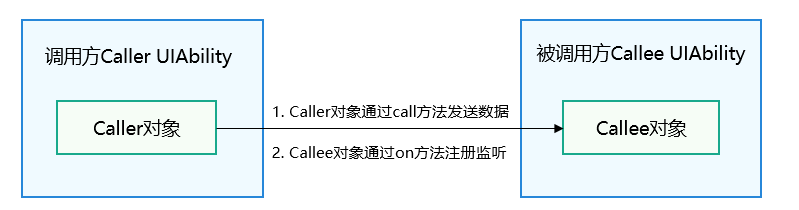
- CallerAbility调用startAbilityByCall()接口获取Caller,并使用Caller对象的call方法向CalleeAbility发送数据。
- CalleeAbility持有一个Callee对象,通过Callee的on方法注册回调函数,当接收到Caller发送的数据时将会调用对应的回调函数。
接口说明
Call功能主要接口如下表所示。具体的API详见Caller接口说明。
表2 Call功能主要接口
| 接口名 | 描述 |
|---|---|
| startAbilityByCall(want: Want): Promise<Caller> | 启动指定UIAbility并获取其Caller通信接口,默认为后台启动,通过配置want可实现前台启动,详见startAbilityByCall接口说明。AbilityContext与ServiceExtensionContext均支持该接口。 |
| on(method: string, callback: CalleeCallBack): void | 通用组件Callee注册method对应的callback方法。 |
| off(method: string): void | 通用组件Callee解注册method的callback方法。 |
| call(method: string, data: rpc.Parcelable): Promise<void> | 向通用组件Callee发送约定序列化数据。 |
| callWithResult(method: string, data: rpc.Parcelable): Promise<rpc.MessageSequence> | 向通用组件Callee发送约定序列化数据,并将Callee返回的约定序列化数据带回。 |
| release(): void | 释放通用组件的Caller通信接口。 |
| on(type: "release", callback: OnReleaseCallback): void | 注册通用组件通信断开监听通知。 |
开发步骤
创建Callee被调用端
在Callee被调用端,需要实现指定方法的数据接收回调函数、数据的序列化及反序列化方法。在需要接收数据期间,通过on接口注册监听,无需接收数据时通过off接口解除监听。
-
需要申请ohos.permission.DISTRIBUTED_DATASYNC权限,配置方式请参见声明权限。
-
同时需要在应用首次启动时弹窗向用户申请授权,使用方式请参见向用户申请授权。
-
配置UIAbility的启动模式。
例如将CalleeAbility配置为单实例模式singleton,配置方式请参见UIAbility组件启动模式。
-
定义约定的序列化数据。
调用端及被调用端发送接收的数据格式需协商一致,如下示例约定数据由number和string组成。
import { rpc } from '@kit.IPCKit';class MyParcelable {num: number = 0;str: string = '';constructor(num: number, string: string) {this.num = num;this.str = string;}mySequenceable(num: number, string: string): void {this.num = num;this.str = string;}marshalling(messageSequence: rpc.MessageSequence): boolean {messageSequence.writeInt(this.num);messageSequence.writeString(this.str);return true;}unmarshalling(messageSequence: rpc.MessageSequence): boolean {this.num = messageSequence.readInt();this.str = messageSequence.readString();return true;}} -
实现Callee.on监听及Callee.off解除监听。
被调用端Callee的监听函数注册时机,取决于应用开发者。注册监听之前的数据不会被处理,取消监听之后的数据不会被处理。如下示例在UIAbility的onCreate注册'MSG_SEND_METHOD'监听,在onDestroy取消监听,收到序列化数据后作相应处理并返回,应用开发者根据实际需要做相应处理。具体示例代码如下:
import { AbilityConstant, UIAbility, Want, Caller } from '@kit.AbilityKit';import { hilog } from '@kit.PerformanceAnalysisKit';import { rpc } from '@kit.IPCKit';const TAG: string = '[CalleeAbility]';const MSG_SEND_METHOD: string = 'CallSendMsg';const DOMAIN_NUMBER: number = 0xFF00;class MyParcelable {num: number = 0;str: string = '';constructor(num: number, string: string) {this.num = num;this.str = string;}mySequenceable(num: number, string: string): void {this.num = num;this.str = string;}marshalling(messageSequence: rpc.MessageSequence): boolean {messageSequence.writeInt(this.num);messageSequence.writeString(this.str);return true;}unmarshalling(messageSequence: rpc.MessageSequence): boolean {this.num = messageSequence.readInt();this.str = messageSequence.readString();return true;}}function sendMsgCallback(data: rpc.MessageSequence): rpc.Parcelable {hilog.info(DOMAIN_NUMBER, TAG, '%{public}s', 'CalleeSortFunc called');// 获取Caller发送的序列化数据let receivedData: MyParcelable = new MyParcelable(0, '');data.readParcelable(receivedData);hilog.info(DOMAIN_NUMBER, TAG, '%{public}s', `receiveData[${receivedData.num}, ${receivedData.str}]`);let num: number = receivedData.num;// 作相应处理// 返回序列化数据result给Callerreturn new MyParcelable(num + 1, `send ${receivedData.str} succeed`) as rpc.Parcelable;}export default class CalleeAbility extends UIAbility {caller: Caller | undefined;onCreate(want: Want, launchParam: AbilityConstant.LaunchParam): void {try {this.callee.on(MSG_SEND_METHOD, sendMsgCallback);} catch (error) {hilog.error(DOMAIN_NUMBER, TAG, '%{public}s', `Failed to register. Error is ${error}`);}}// ...releaseCall(): void {try {if (this.caller) {this.caller.release();this.caller = undefined;}hilog.info(DOMAIN_NUMBER, TAG, 'caller release succeed');} catch (error) {hilog.error(DOMAIN_NUMBER, TAG, `caller release failed with ${error}`);}}// ...onDestroy(): void {try {this.callee.off(MSG_SEND_METHOD);hilog.info(DOMAIN_NUMBER, TAG, '%{public}s', 'Callee OnDestroy');this.releaseCall();} catch (error) {hilog.error(DOMAIN_NUMBER, TAG, '%{public}s', `Failed to register. Error is ${error}`);}}}
访问被调用端UIAbility
-
导入UIAbility模块。
import { UIAbility } from '@kit.AbilityKit'; -
获取Caller通信接口。
Ability的context属性实现了startAbilityByCall方法,用于获取指定通用组Caller通信接口。如下示例通过this.context获取Ability实例的context属性,使用startAbilityByCall拉起Callee被调用端并获取Caller通信接口,注册Caller的onRelease和onRemoteStateChange监听。应用开发者根据实际业务需要做相应处理。
import { BusinessError } from '@kit.BasicServicesKit';import { Caller, common } from '@kit.AbilityKit';import { hilog } from '@kit.PerformanceAnalysisKit';import { distributedDeviceManager } from '@kit.DistributedServiceKit';import { promptAction } from '@kit.ArkUI';const TAG: string = '[Page_CollaborateAbility]';const DOMAIN_NUMBER: number = 0xFF00;let caller: Caller | undefined;let dmClass: distributedDeviceManager.DeviceManager;function getRemoteDeviceId(): string | undefined {if (typeof dmClass === 'object' && dmClass !== null) {let list = dmClass.getAvailableDeviceListSync();hilog.info(DOMAIN_NUMBER, TAG, JSON.stringify(dmClass), JSON.stringify(list));if (typeof (list) === 'undefined' || typeof (list.length) === 'undefined') {hilog.error(DOMAIN_NUMBER, TAG, 'getRemoteDeviceId err: list is null');return;}if (list.length === 0) {hilog.error(DOMAIN_NUMBER, TAG, `getRemoteDeviceId err: list is empty`);return;}return list[0].networkId;} else {hilog.error(DOMAIN_NUMBER, TAG, 'getRemoteDeviceId err: dmClass is null');return;}}@Entry@Componentstruct Page_CollaborateAbility {private context = this.getUIContext().getHostContext() as common.UIAbilityContext;build() {Row() {Column() {// ...List({ initialIndex: 0 }) {// ...ListItem() {Button('test').onClick(() => {let caller: Caller | undefined;let context = this.context;context.startAbilityByCall({deviceId: getRemoteDeviceId(),bundleName: 'com.samples.stagemodelabilityinteraction',abilityName: 'CalleeAbility'}).then((data) => {if (data !== null) {caller = data;hilog.info(DOMAIN_NUMBER, TAG, 'get remote caller success');// 注册caller的release监听caller.onRelease((msg) => {hilog.info(DOMAIN_NUMBER, TAG, `remote caller onRelease is called ${msg}`);});hilog.info(DOMAIN_NUMBER, TAG, 'remote caller register OnRelease succeed');promptAction.openToast({message: 'CallerSuccess'});// 注册caller的协同场景下跨设备组件状态变化监听通知try {caller.onRemoteStateChange((str) => {hilog.info(DOMAIN_NUMBER, TAG, 'Remote state changed ' + str);});} catch (error) {hilog.error(DOMAIN_NUMBER, TAG, `Caller.onRemoteStateChange catch error, error.code: ${JSON.stringify(error.code)}, error.message: ${JSON.stringify(error.message)}`);}}}).catch((error: BusinessError) => {hilog.error(DOMAIN_NUMBER, TAG, `get remote caller failed with ${error}`);});})}// ...}// ...}// ...}}}
向被调用端UIAbility发送约定序列化数据
-
向被调用端发送Parcelable数据有两种方式,一种是不带返回值,一种是获取被调用端返回的数据,method以及序列化数据需要与被调用端协商一致。如下示例调用Call接口,向Callee被调用端发送数据。
import { UIAbility, Caller } from '@kit.AbilityKit';import { rpc } from '@kit.IPCKit';import { hilog } from '@kit.PerformanceAnalysisKit';const TAG: string = '[CalleeAbility]';const DOMAIN_NUMBER: number = 0xFF00;const MSG_SEND_METHOD: string = 'CallSendMsg';class MyParcelable {num: number = 0;str: string = '';constructor(num: number, string: string) {this.num = num;this.str = string;}mySequenceable(num: number, string: string): void {this.num = num;this.str = string;}marshalling(messageSequence: rpc.MessageSequence): boolean {messageSequence.writeInt(this.num);messageSequence.writeString(this.str);return true;}unmarshalling(messageSequence: rpc.MessageSequence): boolean {this.num = messageSequence.readInt();this.str = messageSequence.readString();return true;}}export default class EntryAbility extends UIAbility {// ...caller: Caller | undefined;async onButtonCall(): Promise<void> {try {let msg: MyParcelable = new MyParcelable(1, 'origin_Msg');if (this.caller) {await this.caller.call(MSG_SEND_METHOD, msg);}} catch (error) {hilog.error(DOMAIN_NUMBER, TAG, `caller call failed with ${error}`);}}// ...} -
如下示例调用callWithResult接口,向Callee被调用端发送待处理的数据originMsg,并将CallSendMsg方法处理完毕的数据赋值给backMsg。
import { UIAbility, Caller } from '@kit.AbilityKit';import { rpc } from '@kit.IPCKit';import { hilog } from '@kit.PerformanceAnalysisKit';const TAG: string = '[CalleeAbility]';const DOMAIN_NUMBER: number = 0xFF00;const MSG_SEND_METHOD: string = 'CallSendMsg';let originMsg: string = '';let backMsg: string = '';class MyParcelable {num: number = 0;str: string = '';constructor(num: number, string: string) {this.num = num;this.str = string;}mySequenceable(num: number, string: string): void {this.num = num;this.str = string;}marshalling(messageSequence: rpc.MessageSequence): boolean {messageSequence.writeInt(this.num);messageSequence.writeString(this.str);return true;}unmarshalling(messageSequence: rpc.MessageSequence): boolean {this.num = messageSequence.readInt();this.str = messageSequence.readString();return true;}}export default class EntryAbility extends UIAbility {// ...caller: Caller | undefined;async onButtonCallWithResult(originMsg: string, backMsg: string): Promise<void> {try {let msg: MyParcelable = new MyParcelable(1, originMsg);if (this.caller) {const data = await this.caller.callWithResult(MSG_SEND_METHOD, msg);hilog.info(DOMAIN_NUMBER, TAG, 'caller callWithResult succeed');let result: MyParcelable = new MyParcelable(0, '');data.readParcelable(result);backMsg = result.str;hilog.info(DOMAIN_NUMBER, TAG, `caller result is [${result.num}, ${result.str}]`);}} catch (error) {hilog.error(DOMAIN_NUMBER, TAG, `caller callWithResult failed with ${error}`);}}// ...}
释放Caller通信接口
Caller不再使用后,应用开发者可以通过release接口释放Caller。
import { UIAbility, Caller } from '@kit.AbilityKit';
import { hilog } from '@kit.PerformanceAnalysisKit';

const TAG: string = '[CalleeAbility]';
const DOMAIN_NUMBER: number = 0xFF00;

export default class EntryAbility extends UIAbility {
  caller: Caller | undefined
  releaseCall(): void {
    try {
      if (this.caller) {
        this.caller.release();
        this.caller = undefined;
      }
      hilog.info(DOMAIN_NUMBER, TAG, 'caller release succeed');
    } catch (error) {
      hilog.error(DOMAIN_NUMBER, TAG, `caller release failed with ${error}`);
    }
  }
}